1. Prodott Aktarview
The GUOANVISION S100 is an advanced outdoor PTZ (Pan-Tilt-Zoom) security camera featuring a unique dual-lens system. It combines a fixed wide-angle lens with a rotatable tracking lens to provide comprehensive surveillance without blind spots. Equipped with 6MP resolution, AI human detection, automatic tracking, two-way audio, and IP66 waterproofing, this camera is designed for robust outdoor monitoring.

Figure 1: GUOANVISION S100 Dual Lens Outdoor PTZ Security Camera
2. Kontenut tal-Pakkett
Before proceeding with installation, please verify that all components are present in your package:
- GUOANVISION S100 Outdoor PTZ Camera
- Bracket tal-Immuntar
- Adapter tal-Enerġija (Elettriku bil-Fili)
- Viti tal-Immuntar u Plugs tal-Ħajt
- Waterproof Caps for Connectors
- Manwal għall-Utent
Video 1: Unboxing and Package Contents of the GUOANVISION S100 Camera.
3. Gwida ta' Setup
3.1 Installazzjoni Fiżika
The GUOANVISION S100 camera supports both wall and ceiling mounting. Choose a location that provides optimal coverage and a stable Wi-Fi signal.
- Waħħal il-parentesi tal-immuntar: Secure the mounting bracket to the camera using the provided screws.
- Immarka l-Punti tat-Tħaffir: Hold the camera with the attached bracket against the desired installation surface. Mark the drilling points.
- Drill toqob: Agħmel toqob fil-pożizzjonijiet immarkati u daħħal it-tappijiet tal-ħajt.
- Mount Camera: Align the bracket with the drilled holes and secure the camera using the mounting screws.
- Qabbad l-Enerġija: Connect the power adapter to the camera and plug it into a power outlet. Ensure the connection is secure and protected from weather using the waterproof caps.

Figure 2: Illustration of wall and ceiling mounting options.
3.2 Installazzjoni u Tqabbil tal-App
To control and monitor your camera, download the iCSee app from your smartphone's app store (available for Android and iOS).
- Niżżel l-App: Scan the QR code in the included user manual or search for 'iCSee' in your app store.
- Irreġistra Kont: Open the iCSee app and follow the on-screen instructions to register a new account or log in if you already have one.
- Ippermetti l-Bluetooth u l-Wi-Fi: Ensure your smartphone's Bluetooth and 2.4GHz Wi-Fi are enabled.
- Żid Apparat: In the app, tap the '+' icon to add a new device. The app should automatically detect the camera via Bluetooth. Confirm the device.
- Qabbad mal-Wi-Fi: Select your 2.4GHz Wi-Fi network and enter the password. The camera will connect to your network.
- Daħħal il-Kard tal-MicroSD (Mhux obbligatorju): For local recording, insert a MicroSD card (up to 128GB) into the designated slot on the camera.

Figure 3: Visual guide for iCSee app installation and device pairing.
Video 2: Detailed steps for connecting the camera to the iCSee app.
4. Istruzzjonijiet Operattivi
4.1 Ħaj View and Dual Screen Monitoring
Access the live feed from your camera through the iCSee app. The S100 features a dual-screen display, allowing you to view both the fixed wide-angle lens and the rotatable PTZ lens simultaneously.

Figure 4: Simultaneous display of both camera lenses in the iCSee app.
4.2 Kontroll PTZ
The lower lens of the camera can be controlled remotely via the app, offering a horizontal pan of 350° and a vertical tilt of 90°.
- Pan/Mejjel: Use the directional controls in the app to adjust the camera's viewangolu tal-ing.
- Pożizzjonijiet issettjati minn qabel: Save frequently monitored areas as preset positions for quick navigation.

Figure 5: Diagram illustrating the 350° pan and 90° tilt functionality.
4.3 AI Human Detection & Auto-Tracking
The camera utilizes AI to accurately detect human movement and automatically track the subject within its field of view. This minimizes false alarms from animals or environmental factors.
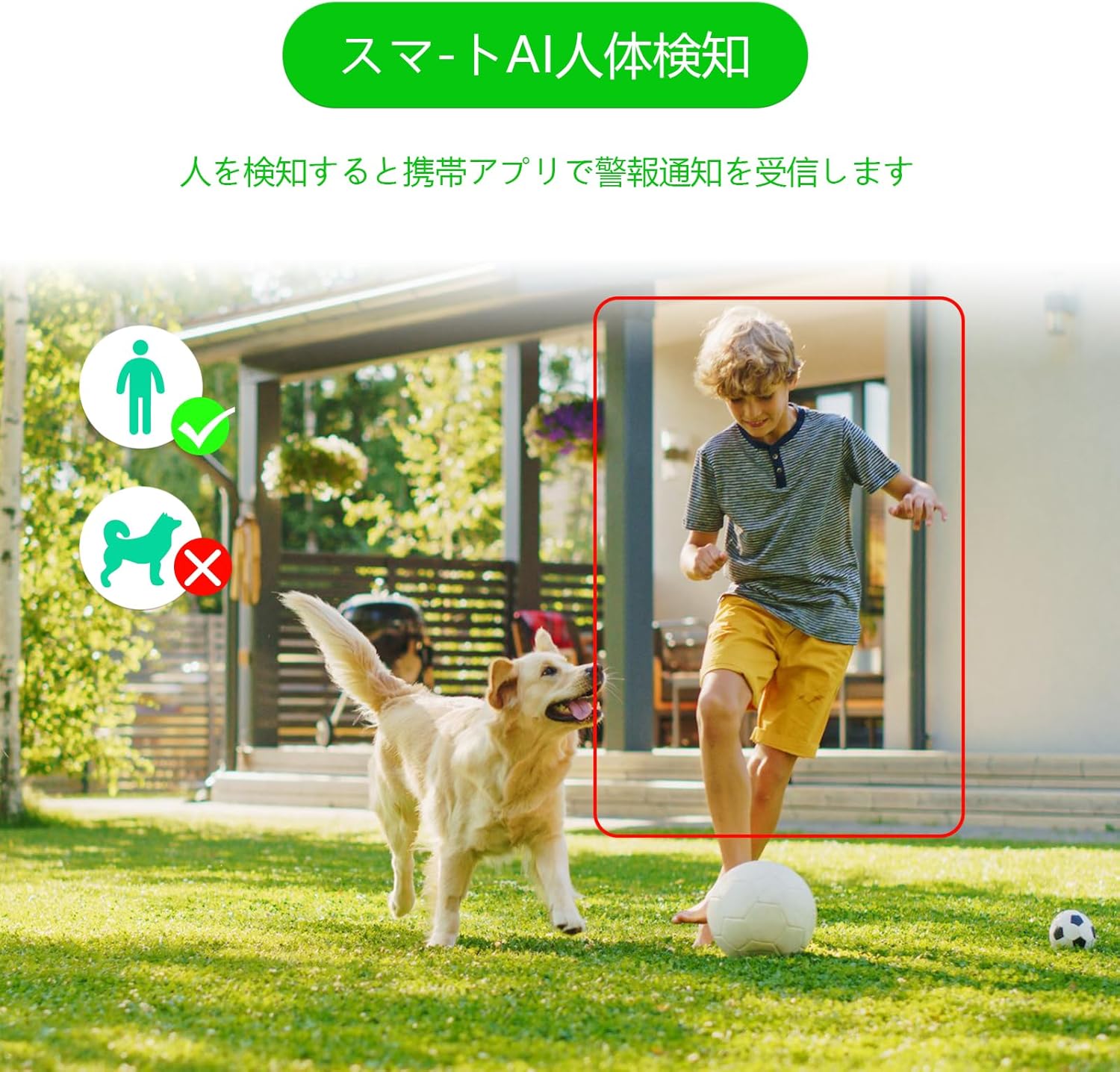
Figure 6: AI human detection feature, focusing on human figures.
Video 3: Demonstration of the camera's automatic motion tracking feature.
4.4 Modi ta' Viżjoni bil-Lejl
The S100 offers multiple night vision modes to suit different lighting conditions:
- Modalità infra-aħmar: Standard black and white night vision.
- Modalità b'Kulur Sħiħ: Utilizes built-in lights to provide color images even in low light.
- Modalità Smart: Automatically switches between infrared and color night vision based on detected motion.

Figure 7: Comparison of infrared, smart, and full-color night vision modes.
Video 4: Demonstration of the camera's night vision capabilities in various settings.
4.5 Two-Way Audio & Alarm Functions
Communicate with visitors or deter intruders using the built-in microphone and speaker. The camera also features a light and sound alarm that can be triggered upon detection of suspicious activity.
- Taħdita f'żewġ direzzjonijiet: Use the app to speak through the camera's speaker and listen through its microphone.
- Light & Sound Alarm: Configure the camera to activate flashing blue/red lights and an audible siren when human motion is detected at night.

Figure 8: Illustrates the two-way audio feature for remote communication.
5. Manutenzjoni
Regular maintenance ensures optimal performance and longevity of your GUOANVISION S100 camera.
- Tindif: Imsaħ il-lenti u l-korp tal-kamera perjodikament b'ċarruta ratba u damp drapp biex tneħħi t-trab u l-ħmieġ. Evita prodotti tat-tindif li joborxu.
- Aġġornamenti tal-Firmware: Check the iCSee app regularly for available firmware updates. Keeping the firmware updated ensures you have the latest features and security enhancements.
- Kontroll tal-Konnessjoni: Periodically verify the power and network connections to ensure they are secure and free from damage.
- Ġestjoni tal-Karta SD: If using a MicroSD card, ensure it is functioning correctly and has sufficient storage space. Format the card through the app if necessary.
6 Issolvi l-problemi
Jekk tiltaqa' ma' problemi bil-kamera tiegħek, irreferi għall-problemi u s-soluzzjonijiet komuni li ġejjin:
- Kamera Offline:
- Check power supply: Ensure the camera is properly connected to power.
- Check Wi-Fi connection: Verify your Wi-Fi network is active and the camera is within range. Re-pair the camera if necessary.
- Router settings: Ensure your router is broadcasting a 2.4GHz Wi-Fi signal.
- No Recording/SD Card Not Detected:
- Ensure MicroSD card is correctly inserted.
- Check if the MicroSD card is damaged or full. Format it via the app or replace it.
- Verify recording settings in the iCSee app.
- Kwalità Fqira tal-Immaġni:
- Naddaf il-lenti tal-kamera.
- Ensure adequate lighting, especially for color night vision.
- Check network stability; a weak Wi-Fi signal can affect streaming quality.
- Allarmi Foloz:
- Adjust AI human detection sensitivity in the app.
- Ensure the camera is positioned to minimize detection of non-human movement (e.g., swaying branches).
7. Speċifikazzjonijiet
| Karatteristika | Dettall |
|---|---|
| Brand | GUOANVISION |
| Isem tal-Mudell | S100 |
| Użu Rakkomandat | Baby Monitor, Pet Monitor, Indoor Security, Outdoor Security |
| Konnettività | Wired, Wi-Fi (2.4GHz) |
| Karatteristiċi | HD Resolution, Dual Lens, PTZ, AI Human Detection, Auto-Tracking, Two-Way Audio, Light/Sound Alarm |
| Użu fuq ġewwa/barra | Ġewwa, Barra |
| Apparati Kompatibbli | Smartphone (iOS, Android) |
| Sors tal-Enerġija | Corded Elettriku |
| Protokoll tal-Konnessjoni | ONVIF |
| Tip ta 'Immuntar | Wall Mount, Ceiling Mount (Screw-in) |
| Product Exterior Material | Plastik |
| Klassifikazzjoni li ma jgħaddix ilma minnha | IP66 |
| Tip ta 'allarm | Audio & Motion (Light & Sound) |
| Riżoluzzjoni Għadha Effettiva | 6 MP (2x 3MP lenses) |
| Metodu ta' Ġestjoni | App (iCSee) |
| Batteriji Meħtieġa | Nru |
| Format tal-Kodifikazzjoni tal-Vidjo | MPEG-4 |
| Format tal-Qbid tal-Vidjo | MP4 |
| Medda tal-Viżjoni Lejl | 15-il metru |
| Viżjoni bil-lejl | Color Night Vision, Infrared, Smart Mode |
| LED IR | 8 |
| Daqs tal-Prodott | 22.9 x 12.7 x 22.9 ċm |
| Max Flash Memory Support | 128 GB (MicroSD) |
8. Garanzija u Appoġġ
GUOANVISION is committed to providing high-quality products and excellent customer service. If you have any questions, concerns, or encounter product defects during the warranty period, please do not hesitate to contact us.
8.1 Informazzjoni ta 'Kuntatt
- Appoġġ bl-Email: support@guoanvision.net (Rispons fi żmien 24 siegħa)
- Servizz tal-Klijent Amazon: Navigate to 'Customer Service' > 'Your Orders' > 'Sold by' > 'Ask a question' for assistance with your purchase.
We will respond promptly to provide warranty service and support.


