1. Introduzzjoni
This manual provides essential information for the proper use and care of your SUAAT S3 10-inch Android 14 Tablet. Please read this manual thoroughly before operating the device to ensure optimal performance and longevity. Keep this manual for future reference.
2. Kontenut tal-Pakkett
Iċċekkja li l-oġġetti kollha elenkati hawn taħt huma inklużi fil-pakkett tiegħek. Jekk xi oġġetti huma neqsin jew bil-ħsara, jekk jogħġbok ikkuntattja l-appoġġ għall-klijenti.
- Pillola SUAAT S3
- Kawża tal-Pillola
- Film protettur tal-iskrin
- Tastiera
- Ġurdien
- Type-C to USB Adapter (OTG)
- Kejbil tat-Tip Ċ
- European Standard Charger
- Pin Ejector SIM
- Manwal għall-Utent

Stampa 2.1: All items included in the SUAAT S3 Tablet package.
3. Prodott Aktarview
The SUAAT S3 tablet features a sleek design with a 10-inch display and a robust set of accessories to enhance your user experience.

Stampa 3.1: SUAAT S3 Tablet and its accessories.
Karatteristiċi ewlenin:
- Sistema Operattiva: Android 14
- Proċessur: Octa-core 1.8 GHz (A523)
- RAM: 20GB (6GB fiżiku + 14GB espansjoni)
- ROM: 128GB
- Wiri: IPS ta' 10.1 pulzieri, 1280 x 800 pixel
- Konnettività: WiFi b'żewġ frekwenzi (2.4G/5G), Bluetooth 5.0
- Batterija: 6000 mAh
- Ċertifikazzjoni: GMS Certified, Widevine L1
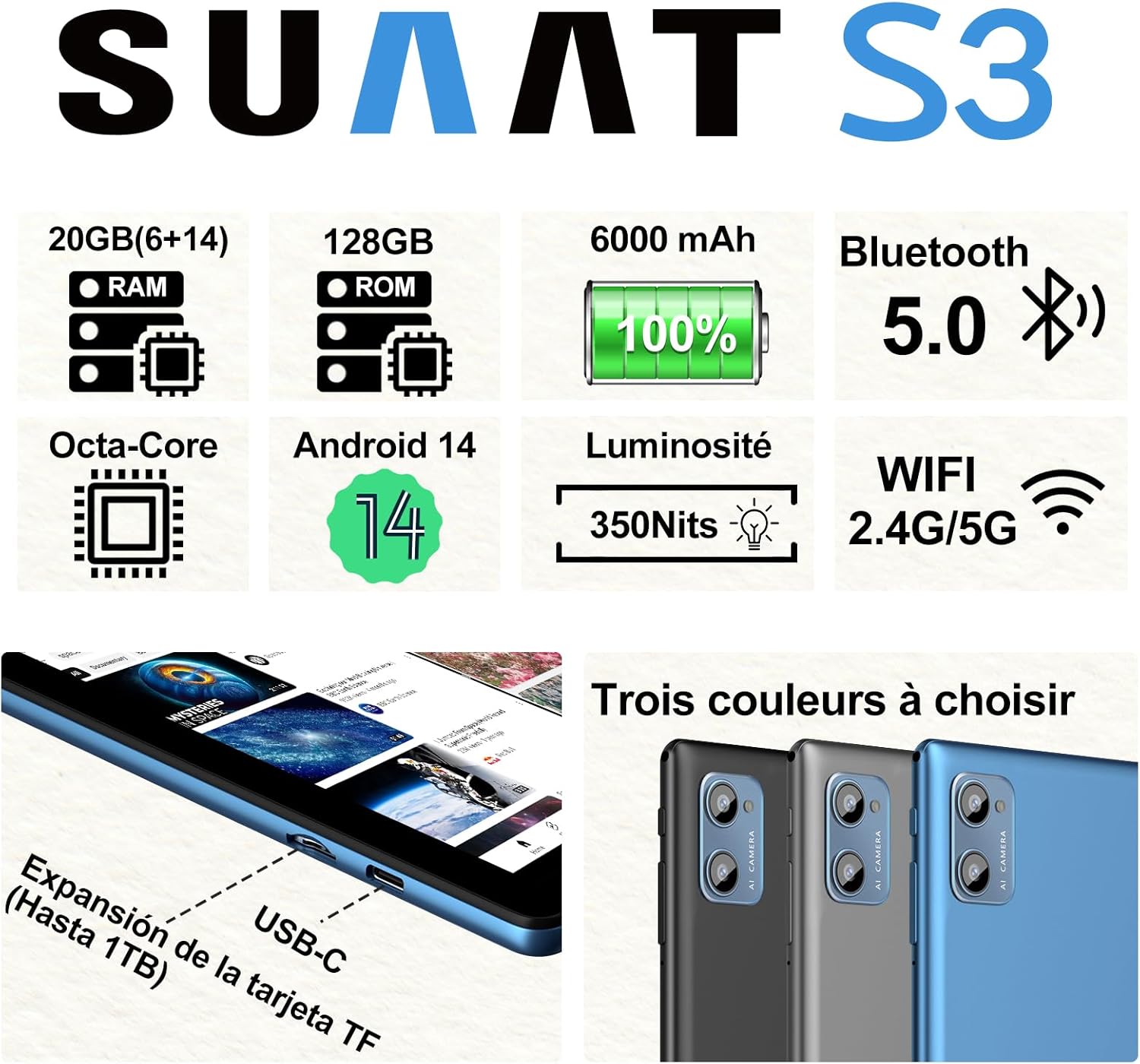
Stampa 3.2: SUAAT S3 Tablet key specifications.
4. Setup Inizjali
4.1 Iċċarġjar tat-Tablet
Before first use, fully charge the tablet using the provided Type-C cable and European standard charger. The charging port is located on the side of the tablet.

Stampa 4.1: Tablet charging via USB-C.
4.2 Tixgħel/Jitfi
- Biex Tixgħel: Agħfas u żomm il-buttuna Power sakemm l-iskrin jixgħel.
- Biex Tifi: Agħfas u żomm il-buttuna tal-Power, imbagħad agħżel 'Power off' mill-għażliet fuq l-iskrin.
- Biex terġa' tibda: Agħfas u żomm il-buttuna tal-Power, imbagħad agħżel 'Restart' mill-għażliet.
4.3 Konfigurazzjoni Inizjali
Upon first power-on, follow the on-screen prompts to set up your tablet. This includes selecting your language, connecting to a Wi-Fi network, setting up your Google account, and configuring security options.
5. Istruzzjonijiet Operattivi
5.1 Karatteristiċi ta' Android 14
Your SUAAT S3 tablet runs on Android 14, offering enhanced privacy, customization, and productivity features:
- Kontrolli tal-Ġenituri: Manage screen time, app access, and content filters for children.
- Multi-Account Mode: Oħloq utent separat profiles for different users, each with their own apps, settings, and data.
- Modalità Skrin maqsum: Use two applications simultaneously by dividing the screen.
- Custom Themes: Personalize your tablet's appearance with various themes and wallpapers.
- widgets: Add calendar, weather, and other widgets to your home screen for quick information access.

Stampa 5.1: Tablet in split-screen mode.
5.2 Navigazzjoni Bażika
- Skrin tad-dar: Skrolla lejn ix-xellug jew il-lemin biex tinnaviga bejn l-iskrins tad-dar.
- App Drawer: Skrolla 'l fuq mill-qiegħ tal-iskrin biex taċċessa l-applikazzjonijiet installati kollha.
- Notifiki u Settings Mgħaġġla: Swipe 'l isfel minn fuq tal-iskrin għal view notifiki u aċċess għal settings veloċi.
- Apps riċenti: Tap the square navigation button (or swipe up and hold from the bottom if using gesture navigation) to see recently opened applications.
6. Konnettività
6.1 Konnessjoni Wi-Fi
The tablet supports dual-band Wi-Fi (2.4G and 5G) for faster and more stable internet connectivity.
- Mur fuq Settings > Netwerk u internet > Wi-Fi.
- Ixgħel il-Wi-Fi On.
- Agħżel in-netwerk mixtieq tiegħek mil-lista u daħħal il-password jekk meħtieġ.
6.2 Apparati Bluetooth
Connect Bluetooth accessories like the included keyboard and mouse, or headphones, using Bluetooth 5.0.
- Mur fuq Settings > Apparati konnessi > Bluetooth.
- Toggle Bluetooth On.
- Kun żgur li l-apparat Bluetooth tiegħek jinsab fil-modalità ta' tqabbil.
- Select the device from the 'Available devices' list to pair.
6.3 Jack tal-headphones
A 3.5mm headphone jack is provided for wired audio connections.
7. Display and Multimedia
7.1 10.1-inch IPS Display
The tablet features a 10.1-inch IPS display with a resolution of 1280 x 800 pixels, offering clear and vibrant visuals with wide viewangoli.

Stampa 7.1: 10.1-inch IPS Display.
7.2 Appoġġ Widevine L1
With Widevine L1 support, the tablet can stream high-definition content from popular streaming services, providing a clear and immersive viewing esperjenza.
7.3 GMS Certification
The tablet is GMS (Google Mobile Services) certified, ensuring full access to the Google Play Store and all Google applications, along with robust security and privacy features.
8. Ħażna u Prestazzjoni
8.1 RAM and ROM
The SUAAT S3 comes with 20GB of RAM (6GB physical + 14GB virtual expansion) and 128GB of internal storage (ROM). This ample memory allows for smooth multitasking and storage of numerous applications, videos, images, and files.

Stampa 8.1: Tablet showcasing large memory for apps and media.
8.2 Octa-Core Processor
Equipped with an Octa-core 1.8 GHz A523 processor, the tablet delivers stable and responsive performance for everyday tasks, gaming, and multimedia consumption.
8.3 Ħażna Espansibbli
The tablet supports expandable storage via a TF (microSD) card, allowing you to increase storage capacity up to 1TB for even more files u l-midja.
9. Ġestjoni tal-batterija
9.1 Kapaċità tal-batterija
The SUAAT S3 is powered by a 6000 mAh battery, providing extended usage time. Actual battery life may vary based on usage patterns and settings.
9.2 Linji Gwida għall-Iċċarġjar
- Uża biss il-ċarġer u l-kejbil oriġinali pprovduti mat-tablet.
- Avoid exposing the tablet to extreme temperatures during charging.
- Do not leave the tablet charging for excessively long periods after it has reached 100% to prolong battery health.
10. Manutenzjoni
10.1 Tindif tat-Tablet
- Uża drapp artab u mingħajr suf biex tnaddaf l-iskrin u l-korp tat-tablet.
- Għal tbajja' iebsa, ftit dampNaddaf id-drapp bl-ilma jew b'prodott tat-tindif tal-iskrin. Evita kimiċi ħarxa.
- Ensure the tablet is powered off and unplugged before cleaning.
10.2 Ħażna
When not in use for extended periods, store the tablet in a cool, dry place. Avoid direct sunlight and extreme temperatures.
10.3 Aġġornamenti tas-Software
Iċċekkja u installa aġġornamenti tas-softwer regolarment biex tiżgura li t-tablet tiegħek ikollu l-aħħar karatteristiċi, irqajja tas-sigurtà, u titjib fil-prestazzjoni. Mur fuq Settings > Sistema > Aġġornament tas-sistema.
11 Issolvi l-problemi
If you encounter issues with your SUAAT S3 tablet, refer to the following common solutions:
| Problema | Soluzzjoni Possibbli |
|---|---|
| It-tablet ma jixgħelx | Kun żgur li l-batterija hija ċċarġjata. Qabbad il-ċarġer u stenna ftit minuti qabel ma tipprova tixgħelha mill-ġdid. |
| L-iskrin ma jirrispondix | Erġa' ibda t-tablet. Jekk il-problema tippersisti, wettaq reset tal-fabbrika (id-dejta tintilef). |
| Ma tistax tikkonnettja mal-Wi-Fi | Check if Wi-Fi is enabled in settings. Restart your router. Ensure you are entering the correct password. |
| Apparat Bluetooth mhux pairing | Ensure Bluetooth is enabled on both devices and the accessory is in pairing mode. Try restarting both devices. |
| L-apps qed jiġġarraf jew qed jaħdmu bil-mod | Close background apps. Clear app cache (Settings > Apps > [App Name] > Storage > Clear cache). Ensure sufficient storage space. |
| Il-batterija tiskula malajr | Reduce screen brightness. Disable unused features like Wi-Fi or Bluetooth. Close background apps. Check for power-intensive apps. |
If these solutions do not resolve the issue, please contact SUAAT customer support.
12. Speċifikazzjonijiet
| Karatteristika | Dettall |
|---|---|
| Brand | SUAT |
| Numru tal-Mudell | S3 |
| Sistema Operattiva | Android 14 |
| Proċessur | A523 Octa-core 1.8 GHz |
| RAM | 20 GB (6GB installed) |
| Ħażna (ROM) | 128 GB |
| Ħażna espansibbli | Sa 1 TB permezz ta' karta TF |
| Daqs tal-Iskrin | 10.1 Pulzier |
| Riżoluzzjoni tal-Iskrin | 1280 x 800 pixel |
| Konnettività bla fili | Wi-Fi (802.11n, 2.4G/5G Dual-band) |
| Bluetooth | Bluetooth 5.0 |
| Tip ta' Konnettur | USB-C |
| Jack tal-headphone | 3.5mm |
| Kapaċità tal-batterija | 6000 mAh |
| Dimensjonijiet (L x W x H) | 17 x 12 x 0.8 ċm |
| Piż | 1.28 kilogrammi |
| Aċċessorji Inklużi | Keyboard, Mouse, Protective Case, Screen Protector |
13. Garanzija u Appoġġ
SUAAT provides professional technical support and customer service for your S3 tablet. If you require assistance, have questions, or encounter any issues not covered in this manual, please contact our customer support team. Refer to your purchase documentation for specific warranty terms and contact information.


