1. Introduzzjoni
Welcome to the user manual for your Spedal CL872 6.25-inch Motorcycle CarPlay & Android Auto Screen. This device is designed to enhance your riding experience by providing seamless access to navigation, music, communication, and smart assistant features directly on your motorcycle. Please read this manual thoroughly to ensure proper installation, operation, and maintenance of your device.
2. Prodott Aktarview
Karatteristiċi Ewlenin
- Seamless Motorcycle CarPlay & Android Auto Experience: 6.25-inch display for easy access to navigation, music, and calls.
- Disinn reżistenti għat-temp: IP65 waterproof body and upgraded waterproof touchscreen for reliable use in all weather conditions.
- Direct Bluetooth Connection & Wired Control: Connect helmet or Bluetooth headset directly to your phone for reduced sound loss. Use the wired remote for hands-free control.
- User-Friendly Installation & Rugged Build: Durable aluminum alloy mount for stability and easy installation. Includes a tool pouch for accessories.
- Personalized Service & U.S.-Based Customer Support: Assistance with installation, usage, and after-sales inquiries.
- Includes an Extra USB Cable: Provides flexible power connection options for various vehicle models or indoor testing. Supports optional tire pressure monitor (sold separately).
Kontenut tal-Pakkett
- Spedal CL872 Main Unit
- Bracket tal-Immuntar tal-Liga tal-Aluminju
- Kejbil tal-Enerġija (għal konnessjoni diretta mal-batterija)
- Kejbil tal-Enerġija USB
- Installation Screws and Tools
- Manwal għall-Utent

Figure 2.1: Spedal CL872 device, showing the screen, USB cable, and mounting bracket.
3. Gwida għall-Installazzjoni
Immuntar tal-Apparat
The CL872 comes with a robust aluminum alloy mounting bracket designed for secure attachment to your motorcycle's handlebars. Ensure the mounting location does not obstruct your view jew jinterferixxu mal-kontrolli tal-vettura.

Figure 3.1: The durable aluminum alloy mount provides superior stability compared to plastic alternatives.
Alternative Mounting Options
Depending on your motorcycle's design, various mounting accessories are available (sold separately) to suit different preferences, including rearview mirror holders, fuel pump mounts, fuel cap mounts, and fork stem mounts.

Figura 3.2: Eżample of a rearview mirror holder mount.

Figura 3.3: Eżample of a motorcycle fuel pump mount.

Figura 3.4: Eżample of a fuel cap mount bracket.

Figura 3.5: Eżample of a fork stem mount.
Konnessjoni tal-Enerġija
The CL872 offers two primary power connection methods:
- Direct Battery Connection (1-Power Cable): Connect the black wire to the negative pole (GND) and the yellow wire to the positive pole (B+). The red wire connects to the ACC power, which is active when the motorcycle's ignition is ON (11-14.4V) and OFF (0V).
- USB Plug (2-USB Plug to 3 pin): Connect to the motorcycle's USB interface, which provides a 5V output. This is convenient for indoor testing or use with E-bikes.
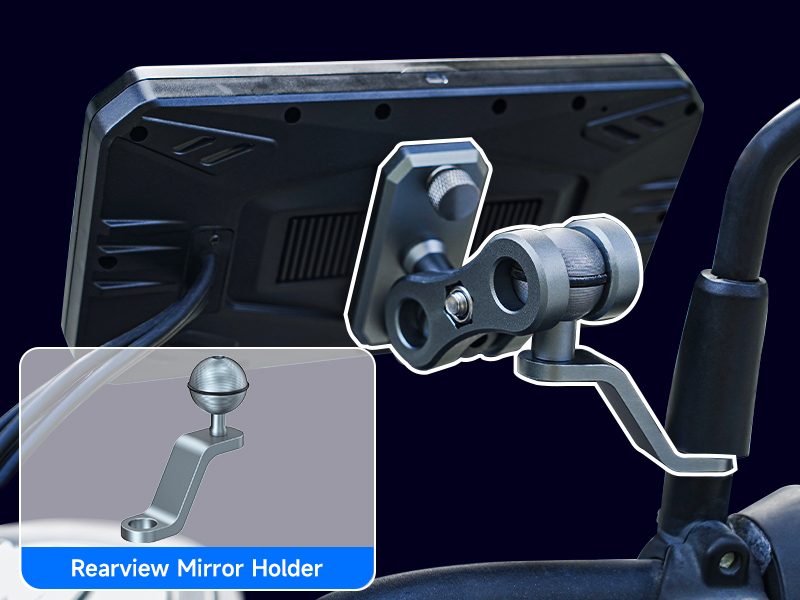
Figure 3.6: Wiring diagram illustrating both direct battery and USB power connection methods.

Figure 3.7: The included USB cable offers an additional power option.
4. Gwida tal-Operazzjoni
Connecting to CarPlay / Android Auto
The CL872 supports wireless Apple CarPlay and Android Auto. Follow these steps to connect your smartphone:
Konnessjoni Apple CarPlay
- Tap the CarPlay icon on the CL872 screen.
- On your iPhone, search for "Spedal-****" in Bluetooth settings and pair.
- Select "Use CarPlay" in the pop-up on your iPhone.
- CarPlay will now be connected.

Figure 4.1: Visual guide for connecting Apple CarPlay.
Konnessjoni Auto Android
- Tap the Auto icon on the CL872 screen.
- Enable Bluetooth & Wi-Fi on your Android phone, then tap "Connect Device".
- Pair your new device with "Spedal-****" in your phone's Bluetooth settings.
- Android Auto will now be connected.

Figure 4.2: Visual guide for connecting Android Auto.
Bl-użu tal-Kontroll tal-Vuċi
Utilize voice recognition functions like Siri or Google Assistant for hands-free control of navigation, music, and calls. This enhances safety by allowing you to keep your hands on the handlebars.
- Fittex għal destinazzjonijiet.
- Daqq mużika.
- Make hands-free calls.
- Send messages.

Figure 4.3: Hands-free voice control for maps, music, and phone calls.
Enhanced Bluetooth Connection
Connect your helmet or Bluetooth headset directly to your phone, rather than routing through the CL872. This setup minimizes sound loss and provides a more stable audio experience for calls and music, especially in challenging riding environments.

Figure 4.4: Direct Bluetooth connection from your phone to your headset for optimal audio quality.
Karatteristiċi tal-iskrin
Landscape and Portrait Rotation
The screen rotation feature can be enabled through a firmware update. In navigation mode, portrait orientation may be easier for viewing the road ahead than landscape. If needed, contact Spedal after-sales support for assistance.
- To rotate the screen, find the screen rotation function in the settings and activate it. The device will automatically shut down and restart for a few seconds (approximately 5-8 seconds).
- If the device includes a camera and the display orientation is reversed, loosen the screws, rotate the camera to the correct direction, and then retighten the screws.

Figure 4.5: The CL872 supports both landscape and portrait screen orientations.
Automatic Light Sensing
The CL872 features an automatic light sensing function that adjusts screen brightness according to ambient light conditions. This ensures clear visibility in both bright daylight and dark environments, enhancing usability and safety.

Figure 4.6: Automatic light sensing ensures optimal screen visibility in varying light conditions.
Reżistenza għat-temp
The CL872 is designed to withstand various riding environments. Its IP65 waterproof rating and anti-glare screen ensure functionality in rain, sun, and snow. The touchscreen is compatible with gloves, allowing for easy operation.

Figure 4.7: The CL872 is built to perform reliably in all weather conditions.
5. Manutenzjoni u Kura
Disinn li ma jgħaddix ilma minnu
The CL872 features an IP65 waterproof body, providing protection against dust and water jets. This ensures reliable operation even in heavy rain. Always ensure all ports and connections are securely sealed when exposed to wet conditions.
Reżistenza għat-temperatura
The device is designed to operate within a wide temperature range, from -4°F to 158°F (-20°C to 70°C), making it suitable for diverse climates.

Figure 5.1: The CL872's robust construction provides top-level protection against harsh environments.
6 Issolvi l-problemi
If you encounter issues with your Spedal CL872, please refer to the following common solutions:
- Ebda Qawwa: Ensure all power cables are securely connected. If using the direct battery connection, verify the ACC wire is correctly wired to an ignition-switched power source. If using USB, confirm the USB port is active and providing 5V.
- Connectivity Issues (CarPlay/Android Auto):
- Kun żgur li l-Bluetooth u l-Wi-Fi huma attivati fuq l-ismartphone tiegħek.
- Insieh l-apparat fis-settings tal-Bluetooth tat-telefon tiegħek u pprova erġa' waħħalh.
- Restart both your smartphone and the CL872 device.
- L-Iskrin Ma Jirrispondix: Ensure the screen is clean and free of debris. If wearing gloves, confirm they are compatible with capacitive touchscreens.
- Problemi tal-awdjo: Verify your helmet or Bluetooth headset is properly paired directly to your phone. Check volume settings on both your phone and the headset.
- Screen Rotation Not Working: Check the device settings for the screen rotation option. If it requires a firmware update, contact customer support.
For persistent issues, please contact Spedal customer support.
7. Speċifikazzjonijiet tal-Prodott
Dettalji Tekniċi
| Brand | Spedal |
| Numru tal-Mudell | CL872 |
| Daqs tal-Iskrin | 6.25 inches (Note: Product title states 6.25", specifications list 7") |
| Sistema Operattiva | Android |
| Teknoloġiji tal-Konnettività | Bluetooth, Mingħajr Fili |
| Karatteristiċi Speċjali | Android Auto, Apple CarPlay, Touchscreen, Waterproof |
| Input tal-Interface tal-Bniedem | Touchscreen |
| Tip ta 'Servizz tal-Vettura | Mutur |
| Piż tal-oġġett | 2.11 liri |
| Dimensjonijiet tal-Pakkett | 8.5 x 6.38 x 4.72 pulzieri |
| Manifattur | SHENZHEN HUIJINLINGHANG TECHNOLOGY CO.LTD. |
| Data L-Ewwel Disponibbli | 23 ta’ Awwissu, 2024 |
8. Garanzija u Appoġġ għall-Klijent
Informazzjoni dwar Garanzija
The Spedal CL872 comes with a 12-month product warranty. A 30-day return policy is also available.

Figura 8.1: Aktarview of warranty and service terms.
Ikkuntattja l-Appoġġ
For technical support, installation assistance, usage inquiries, after-sales service, or personalized customization of your startup image, please contact our U.S.-based support team.
Kuntatt Email: support@spedaltech.com

Figure 8.2: Customer support details for Spedal products.


