1. Introduzzjoni
This manual provides essential information for the safe and efficient operation of your Phomemo M834 Portable Thermal Printer. Please read it thoroughly before using the device and retain it for future reference. The Phomemo M834 is an inkless thermal printer designed for portable use, offering high-resolution printing for various documents and notes.

Image: The Phomemo M834 printer highlights its key advantages such as Bluetooth wireless connectivity, inkless printing, portability, ease of setup, lightweight design, and multi-size thermal paper support, contrasting with common limitations of other printers like wired connections, ink requirements, and bulkiness.
2. Informazzjoni dwar is-Sigurtà
Observe the following safety precautions to prevent damage to the printer or personal injury:
- Tiżżarmax, issewwiex, jew timmodifikax il-printer int stess.
- Żomm il-printer 'il bogħod mill-ilma, l-umdità, u d-dawl tax-xemx dirett.
- Use only Phomemo-approved thermal paper. Using other paper types may damage the print head.
- Ensure the printer is placed on a stable surface during operation.
- Żomm fejn ma jintlaħaqx mit-tfal.
- Do not touch the print head immediately after printing, as it may be hot.
- Use the provided USB-C cable for charging.
3. Kontenut tal-Pakkett
Ivverifika li l-oġġetti kollha huma preżenti fil-pakkett tiegħek:
- Phomemo M834 Portable Printer
- Printer Carry Case
- USB-C Cable
- Adapter USB-C għal USB
- Gwida għall-Utent
- Thermal Paper Roll (8.5" width)
- Additional Thermal Paper Rolls (4.33", 3.14", 2.08" widths)

Image: The package contents include the Phomemo M834 portable printer, a printer case, a USB-C cable, a USB-C to USB adapter, a user guide, and multiple rolls of thermal paper in various widths (8.5", 4.33", 3.14", 2.08").
4. Prodott Aktarview
The Phomemo M834 is a compact and versatile thermal printer. It features a 300 dpi print resolution for clear output and supports various thermal paper sizes and types. Its inkless technology eliminates the need for cartridges, reducing operational costs.
Karatteristiċi ewlenin:
- Ċarezza Għolja tal-Istampar: 300 dpi resolution for sharp text and images.
- Appoġġ Versatili għall-Karta: Compatible with US Letter, A4, 4.33'', 3.14'', 2.08'' paper sizes, and roll, fold, or ordinary thermal paper types.
- Ħajja Estiża tal-Batterija: 2600mAh rechargeable battery supports over 160 pages of continuous printing.
- Kompatibilità Wiesgħa tal-Apparat: Connects via Bluetooth to smartphones (Android, iOS) and USB to PCs (Windows 10/11, Linux, ChromeOS, macOS).
- Teknoloġija bla linka: Uses thermal printing, requiring no ink, toner, or ribbons.

Image: The Phomemo M834 portable thermal printer is shown with its carrying case, various sizes of thermal paper rolls, and a smartphone displaying the Phomemo app, illustrating its wireless connectivity and portability.

Image: A visual comparison demonstrates the superior clarity of 300 DPI printouts from the Phomemo M834 compared to standard 203 DPI prints, highlighting the enhanced detail and readability.

Image: This graphic illustrates the Phomemo M834's 2600mAh large capacity battery, emphasizing its USB-C fast charging capability and the ability to print over 160 sheets on a full charge.
5. Istruzzjonijiet ta' Setup
5.1 Iċċarġjar tal-Printer
- Qabbad il-kejbil USB-C provdut mal-port tal-iċċarġjar tal-istampatur.
- Plug the other end into a USB power adapter (not included) or a computer's USB port.
- The indicator light will show charging status. A full charge typically takes a few hours.
5.2 Tagħbija ta' Karta Termali
- Iftaħ l-għatu tal-karta tal-istampatur.
- Insert the thermal paper roll or folded paper, ensuring the printable side faces the print head.
- Adjust the paper guides to fit the paper width snugly.
- Agħlaq il-qoxra tal-karta sew.

Image: The Phomemo M834 printer is depicted with its paper compartment open, showcasing support for five paper sizes (US Letter, A4, 4.33'', 3.14'', 2.08'') and four types: single sheet, continuous folding, inner roll, and stickers.
6. Istruzzjonijiet Operattivi
6.1 Power On/Off
Press and hold the power button for 3 seconds to turn the printer on or off.
6.2 Konnessjoni ma' Apparat
6.2.1 Bluetooth Connection (Smartphones/Tablets)
- Download the Phomemo app from your device's app store.
- Kun żgur li l-Bluetooth huwa attivat fuq l-ismartphone jew it-tablet tiegħek.
- Open the Phomemo app and follow the on-screen instructions to search for and connect to your M834 printer.
6.2.2 USB Connection (PC/Laptop)
- Connect the printer to your computer using the provided USB-C cable.
- Install the appropriate printer driver from the official Phomemo websit.
- Once the driver is installed, the printer will be recognized by your operating system.
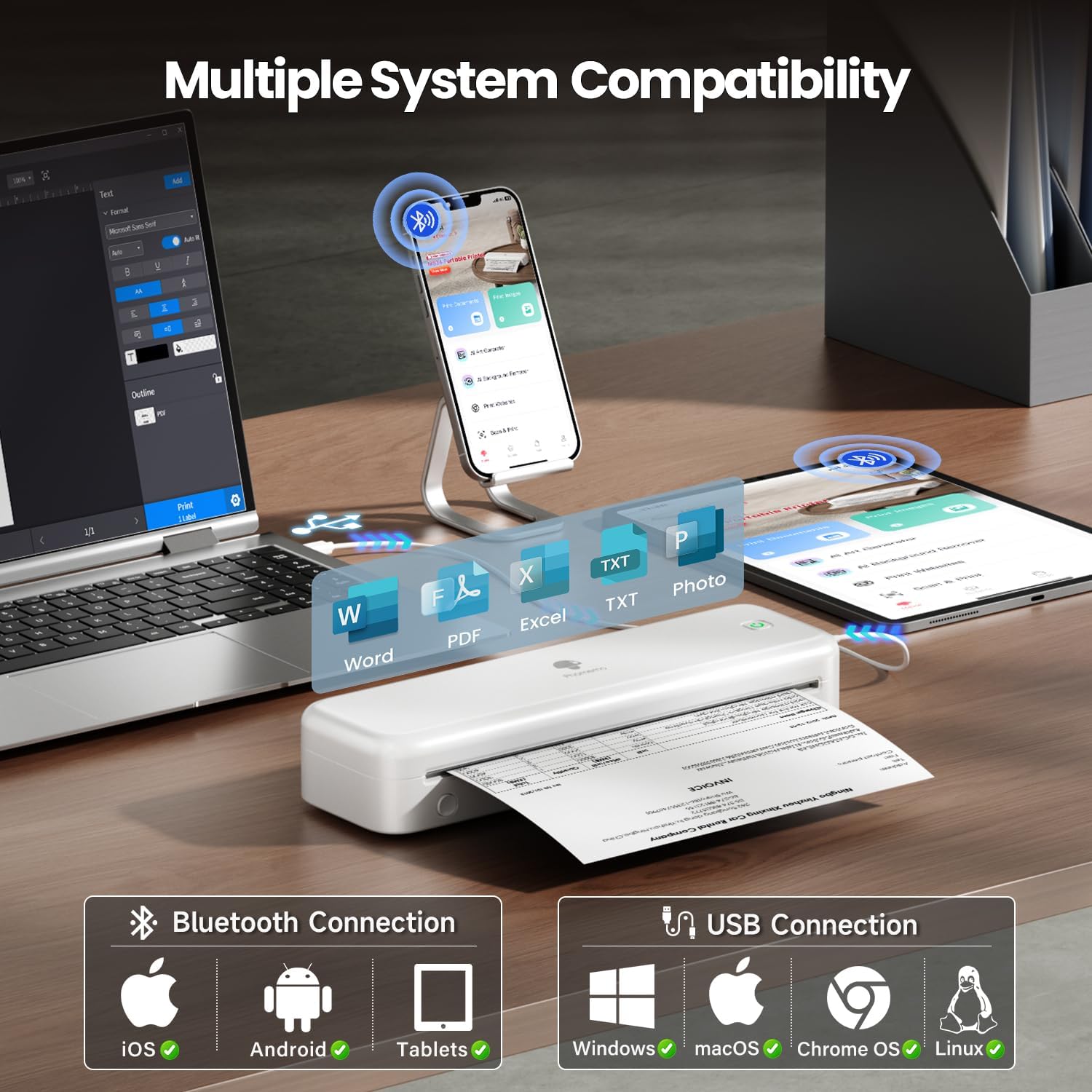
Image: The Phomemo M834 printer demonstrates its broad compatibility, connecting via Bluetooth to iOS, Android, and Tablets, and via USB to Windows, macOS, Chrome OS, and Linux systems, supporting various document formats like Word, PDF, Excel, and text files.
6.3 Stampar
- Open the document or image you wish to print on your connected device.
- Agħżel l-għażla tal-istampar fl-applikazzjoni.
- Choose the Phomemo M834 as your printer.
- Adjust print settings (e.g., paper size, density) as needed.
- Ibda x-xogħol tal-istampar.
7. Manutenzjoni
7.1 Tindif tar-Ras tal-Istampar
Tindif regolari tar-ras tal-istampar jiżgura kwalità ottimali tal-istampar.
- Turn off the printer and disconnect it from power.
- Iftaħ il-qoxra tal-karta.
- Imsaħ ir-ras tal-istampar bil-mod b'tajjara tal-qoton ħafifa.ampened b'alkoħol isopropiliku.
- Ħalli r-ras tal-istampar tinxef kompletament qabel ma tagħlaq l-għatu u tixgħel il-printer.
7.2 Ħażna
Store the printer in a cool, dry place away from direct sunlight and extreme temperatures. If storing for an extended period, ensure the battery is partially charged (around 50%) to prolong its lifespan.
8 Issolvi l-problemi
| Problema | Kawża Possibbli | Soluzzjoni |
|---|---|---|
| L-istampatur ma jixgħelx | Batterija baxxa; Il-buttuna tal-qawwa mhux ippressata sew | Charge the printer; Press and hold the power button for 3 seconds |
| Kwalità fqira tal-istampar | Print head dirty; Incorrect paper type; Low battery | Clean the print head; Use Phomemo thermal paper; Charge the printer |
| Ma tistax tikkonnettja permezz tal-Bluetooth | Bluetooth mitfi; Il-printer mhux skopert; Problema bl-app | Ensure Bluetooth is on; Restart printer and app; Re-pair device |
| Ġamm tal-karta | Karta mgħobbija ħażin; Karta bil-ħsara | Open cover, remove jammed paper, reload correctly; Use undamaged paper |
| Il-printer mhux rikonoxxut mill-PC | Driver not installed; Loose USB connection | Install latest driver from Phomemo website; Check USB cable connection |
9. Speċifikazzjonijiet
| Karatteristika | Dettall |
|---|---|
| Mudell | M834 |
| Teknoloġija tal-Istampar | Termali |
| Riżoluzzjoni tal-Istampar | 300 x 300 DPI |
| Konnettività | Bluetooth, USB |
| Sistemi Operattivi Kompatibbli | Android, iOS, Windows 10/11, Linux, ChromeOS, macOS |
| Kapaċità tal-batterija | Polimer tal-Litju 2600mAh |
| Kapaċità Massima tal-Folja tal-Input | 160 pages (continuous printing) |
| Max Monochrome Printing Speed | 6 ppm |
| Daqsijiet tal-Karta Sostnuti | US Letter, A4, 4.33'', 3.14'', 2.08'' |
| Dimensjonijiet tal-Prodott | 29 x 11.2 x 9.8 ċm |
| Piż tal-oġġett | 1.23 kg |
10. Garanzija u Appoġġ
For warranty information and customer support, please refer to the official Phomemo webis-sit jew ikkuntattja lis-servizz tal-konsumatur tagħhom direttament. Żomm l-irċevuta tax-xiri tiegħek bħala prova tax-xiri għal talbiet ta' garanzija.
Phomemo Official Websit: www.phomemo.com


