Prodott Overview
The APPECK Smart Landscape Lights are designed to enhance your outdoor space with vibrant, customizable lighting. Featuring RGBW color-changing capabilities, these low-voltage spotlights offer versatile control options via a dedicated app, remote, or voice commands. Built for durability, they are IP65 waterproof and resistant to extreme temperatures, ensuring reliable performance in various outdoor conditions.

Image: The APPECK Smart Landscape Lights 6-pack, showcasing the lights, remote control, and smartphone app interface.
X'hemm fil-Kaxxa
- 6 Pack of lights
- Kontroll mill-bogħod
- Kaxxa tal-Kontroll
- Mounting Hardware (ground stakes and screws)
- Transformer or Power Supply
Setup u Installazzjoni
The APPECK Smart Landscape Lights are designed for easy installation with two primary mounting options: ground staking or wall mounting. Ensure you have a suitable low-voltage power source nearby.
Għażliet ta 'Immuntar:
- Ground Staking: Simply attach the provided ground stakes to the spotlights and firmly insert them into the ground in your desired location.
- Immuntar tal-ħajt: Use the included screws and mounting hardware to secure the spotlights to walls or other solid surfaces. The lights can be rotated to any angle for optimal illumination.

Image: Illustration showing two installation methods: staking into the ground and mounting on a wall, with lights adjustable to various angles.
Wiring and Power:
Connect the lights in series using the provided cables. The sufficient cable length between each light allows for flexible placement. Plug the transformer into a suitable outdoor power outlet.

Image: A diagram illustrating the cable lengths between the lights and the power supply, indicating flexibility in arrangement.
Konnessjoni tal-App:
Download the "Smart Life" app. Ensure your Wi-Fi network is 2.4 GHz, as 5 GHz Wi-Fi is not supported. Follow the in-app instructions to pair your lights. This typically involves pressing and holding the on/off button on the control box until the lights blink red, then adding the device in the app.
Video: An official product video demonstrating the setup and features of the APPECK Outdoor Landscape Spotlights, including app control and various lighting effects.
Istruzzjonijiet Operattivi
The APPECK Smart Landscape Lights offer multiple ways to control your lighting experience.
Metodi ta' Kontroll:
- App Smart Life: Provides comprehensive control over individual lights, color selection (16 million RGB colors), brightness (1%-100% adjustable), and access to 111+ customized scene modes. You can also program, save, favorite, and cycle through scenes.
- Kontroll mill-bogħod: Use the included remote for basic functions like turning lights on/off, changing colors, and adjusting brightness.
- Kaxxa tal-Kontroll: A physical control box on the wiring allows for basic on/off and mode changes.
- Kontroll tal-Vuċi: Integrate with Amazon Alexa or Google Assistant for convenient hands-free commands. (e.g., "Alexa, turn on the spotlights.")

Image: The RGBW color-changing capability of the lights, displaying a spectrum of colors.

Image: An outdoor garden illuminated with various colors from the APPECK spotlights, demonstrating customization.
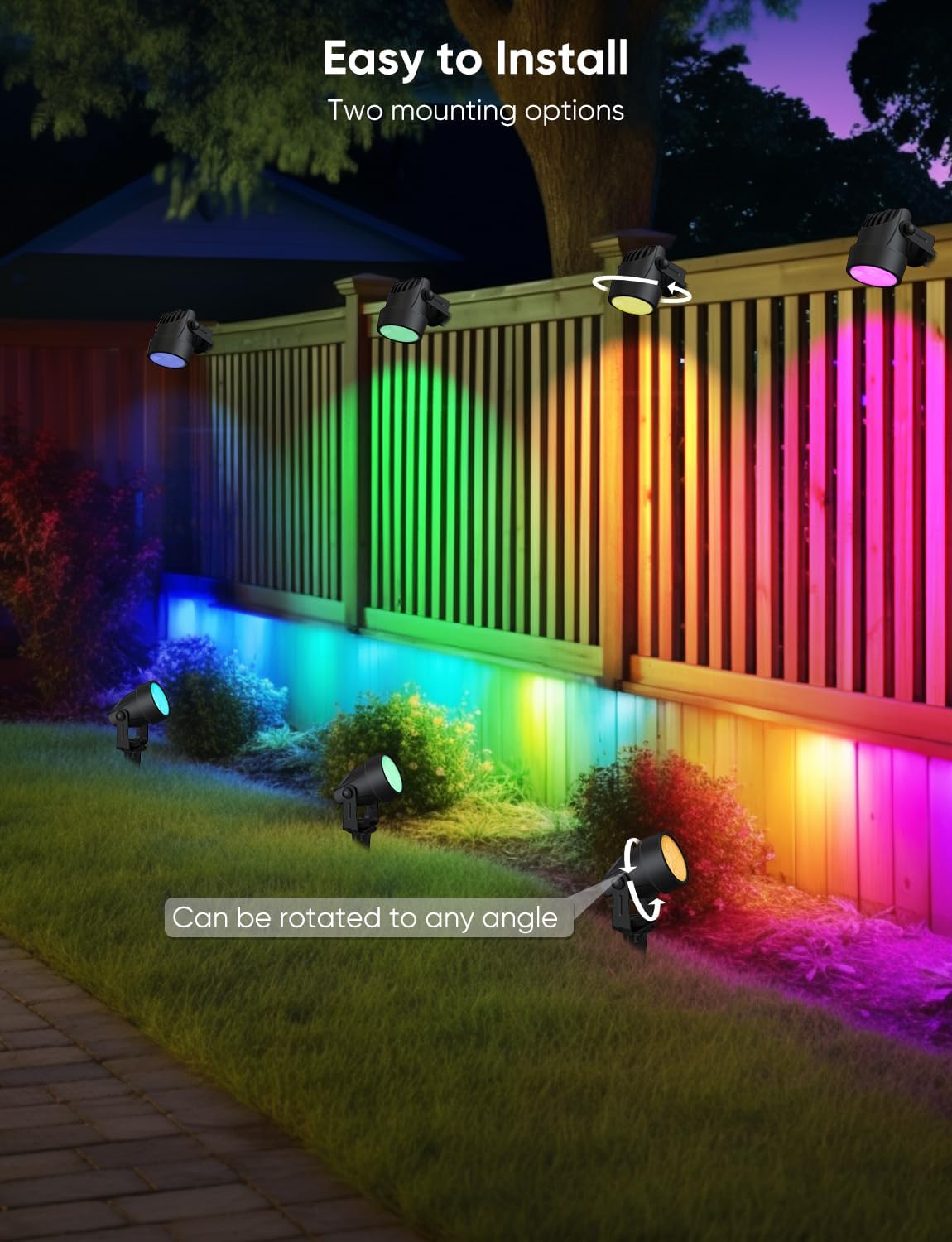
Image: A patio scene with APPECK lights, showing integration with Amazon Alexa and Google Assistant for voice commands.

Image: A screenshot of the Smart Life app interface demonstrating color selection and control for the lights.

Image: A visual representation of the timer and scheduling feature, showing lights turning on at dusk and off in the morning.

Image: A scene showing outdoor lights changing colors in sync with music, controlled via the app.

Image: The app interface demonstrating the ability to control each individual spotlight's color and settings.
Manutenzjoni
The APPECK Smart Landscape Lights are built for durability and require minimal maintenance.
- Reżistenza għat-temp: These lights feature an IP65 waterproof rating, ensuring they function effectively in heavy rain, snow, and extreme temperatures ranging from -4°F to 140°F.
- Tindif: Periodically wipe down the light fixtures with a soft, damp drapp biex tneħħi l-ħmieġ u d-debris. Evita li tuża kimiċi ħarxa jew materjali li joborxu.
- Spezzjoni: Regularly check the wiring and connections for any signs of wear or damage. Ensure all connections remain secure to maintain optimal performance.
Image: A close-up of an APPECK spotlight in a garden setting, demonstrating its IP65 waterproof rating during rainfall.
Issolvi l-problemi
If you encounter any issues with your APPECK Smart Landscape Lights, refer to the following common solutions:
| Problema | Kawża / Soluzzjoni Possibbli |
|---|---|
| Id-dwal mhux jixegħlu. |
|
| Problemi bil-konnessjoni tal-app. |
|
| Lights not responding to remote/app. |
|
| Il-funzjoni tal-ħin mhix qed taħdem sew. |
|
Speċifikazzjonijiet
| Karatteristika | Dettall |
|---|---|
| Brand | APPECK |
| Isem tal-Mudell | C6612-D |
| Kulur | Iswed |
| Materjal | Plastik |
| Formola ta' Tagħmir tad-Dawl | Spotlight |
| Dimensjonijiet tal-Prodott | 22"T x 20"W x 12"Għ |
| Użi Speċifiċi Għall-Prodott | Użu fuq barra biss |
| Użu fuq ġewwa/barra | Barra |
| Sors tal-Enerġija | DC |
| Tip ta' Installazzjoni | Immonta fil-wiċċ |
| Metodu ta' Kontroll | App |
| Tip ta' Sors tad-Dawl | LED |
| Numru ta' Sorsi tad-Dawl | 6 |
| Voltage | 24 Volts (DC) |
| Kulur Dawl | Multicolor |
| Wattage | 15 watt |
| Luminożità | 1200 lumen |
| Livell ta 'Reżistenza għall-Ilma | Reżistenti għall-Ilma (IP65) |
| Temperatura operattiva | -4°F sa 140°F |
Garanzija u Appoġġ
For product support, troubleshooting assistance, or warranty inquiries, please visit the official APPECK Store on Amazon or contact their customer service directly.
Protection plans are available for purchase separately through Amazon, offering extended coverage for your product.


