Introduzzjoni
The Logitech Zone Wireless 2 is a premium noise-canceling headset designed for professional use, offering advanced audio clarity and comfort. This manual provides instructions for setting up, operating, maintaining, and troubleshooting your headset to ensure optimal performance.
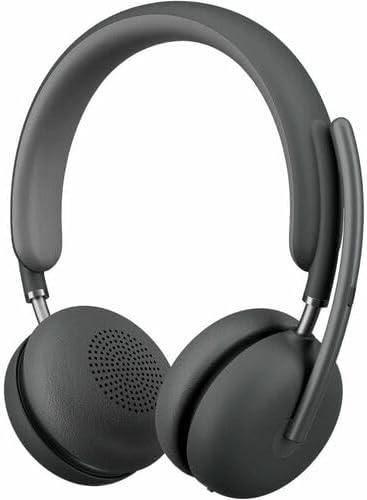
Image: The Logitech Zone Wireless 2 headset, shown in graphite color.
Karatteristiċi ewlenin:
- Microsoft Teams Certified: Optimized for Microsoft Teams over native Bluetooth, freeing up a USB port.
- Ċarezza Avvanzata tas-Sejħiet: Logi Tune app feature suppresses far-end ambient noise for clearer communication.
- Four Noise-Canceling Microphones: Elevate your voice and suppress background sounds.
- Kanċellazzjoni Attiva Ibrida tal-Ħoss (ANC): Offers ANC high, ANC low, transparency on, and ANC/transparency off modes for focused work.
- Awdjo Personalizzat: Custom listening experience via Personal EQ in the Logi Tune mobile app with 40mm drivers.
- Disinn Sostenibbli: Features interchangeable earpads, a replaceable battery, 20% post-consumer recycled plastic, and low-carbon aluminum.
- Libertà mingħajr fili: Connects simultaneously to laptop and mobile phone via Bluetooth with a range of up to 170 ft (50 meters).
- Ħajja Estiża tal-Batterija: Up to 15 hours talk time and 22 hours listening time (with ANC on).
Setup
1. X'hemm fil-Kaxxa
- Logitech Zone Wireless 2 Headset
- Kawża Protettiva
- Cable tal-Iċċarġjar tal-USB-C
- Adapter USB-C għal USB-A
- Manwal għall-Utent (dan id-dokument)
- Ear Cushions (pre-installed, with additional set for replacement)

Image: The Logitech Zone Wireless 2 headset, protective case, USB-C cable, and USB-C to USB-A adapter.
2. Iċċarġjar tal-Headset
- Connect the USB-C charging cable to the USB-C port on the headset.
- Qabbad it-tarf l-ieħor tal-kejbil ma' sors ta' enerġija USB (eż., port USB tal-kompjuter, adapter tal-ħajt).
- The LED indicator on the headset will show charging status. A full charge takes approximately 2 hours.
3. Konnessjoni ma' Apparati
The Zone Wireless 2 headset supports Bluetooth 5.2 for wireless connectivity.
Tqabbil Bluetooth:
- Power on the headset by sliding the power switch.
- Press and hold the Bluetooth pairing button on the headset until the LED indicator flashes blue rapidly.
- On your device (laptop, smartphone), go to Bluetooth settings and select "Logitech Zone Wireless 2" from the list of available devices.
- Ladarba konness, l-indikatur LED se jdur blu solidu.

Image: Diagram illustrating the headset's ability to connect simultaneously to a smartphone and a laptop via Bluetooth.
Microsoft Teams Certification:
The headset is certified for Microsoft Teams over native Bluetooth. This allows for a full Teams meeting experience without requiring a separate USB dongle, preserving your device's USB ports.
4. Logi Tune App Installation
For full functionality, including Personal EQ, Advanced Call Clarity, and firmware updates, download and install the Logi Tune application on your computer or mobile device. The app provides a personalized experience and device management.

Image: A laptop screen displaying the Logi Tune application interface, showing device management and settings.
It-tħaddim tal-Headset
1. Kontrolli tal-Headset
The headset features intuitive controls for managing calls, media, and noise cancellation.

Image: A close-up of the right earcup, showing the power switch, ANC button, and other controls.
- Swiċċ tal-Enerġija: Żerżaq biex tixgħel jew titfi l-headset.
- Buttuni tal-Volum: Aġġusta l-volum tal-awdjo.
- Buttuna b'ħafna funzjonijiet: Play/pause media, answer/end calls.
- Buttuna ANC: Cycle through Active Noise Cancellation modes.
- Mute tal-mikrofonu: Flip the microphone boom up to mute, down to unmute.
2. Kanċellazzjoni Attiva tal-Istorbju (ANC)
The Hybrid ANC feature allows you to control your listening environment. Press the ANC button to switch between modes:
- ANC High: Maximum noise cancellation for noisy environments.
- ANC Low: Reduced noise cancellation for less intrusive background sounds.
- Trasparenza Fuq: Allows ambient sounds to pass through, keeping you aware of your surroundings.
- ANC and Transparency Off: No active noise cancellation or transparency mode.
3. Użu tal-mikrofonu
The headset features four noise-canceling microphones designed to isolate your voice and suppress background noise during calls. Simply lower the microphone boom to activate the microphone for calls. Raise it to mute.

Image: A man wearing the headset, illustrating the clear audio experience with sound wave graphics around his head.
4. Audio Customization with Logi Tune
Use the Logi Tune app to personalize your audio experience:
- Personal EQ: Adjust audio frequencies to optimize sound for your hearing range.
- Ċarezza Avvanzata tas-Sejħiet: Further refine noise suppression for incoming audio.
- Aġġornamenti tal-Firmware: Ensure your headset has the latest features and performance improvements.
Manutenzjoni
1. Tindif
- Imsaħ il-headset b'ċarruta ratba, damp drapp.
- Evita li tuża tindif jew solventi li joborxu.
- Ensure all ports are dry before charging or connecting.
2. Earpad and Battery Replacement
The Zone Wireless 2 is designed for longevity with user-replaceable components:
- Earpads: Interchangeable earpads can be replaced to maintain hygiene and comfort. Refer to the Logi Tune app or Logitech support website for instructions on how to replace them.
- Batterija: The battery is designed to be replaceable, extending the product's lifespan. Contact Logitech support for information on obtaining and replacing the battery.

Image: The headset disassembled, showing the removable earpads, internal components, and a replaceable battery, highlighting its modular design.
3. Ħażna
When not in use, store the headset in its protective case to prevent damage and keep it clean.
Issolvi l-problemi
- Ebda Qawwa: Ensure the headset is charged. Connect it to a power source using the USB-C cable.
- Ma nistax nikkonnettja permezz tal-Bluetooth:
- Ensure the headset is in pairing mode (LED flashing blue).
- Check your device's Bluetooth settings and ensure Bluetooth is enabled.
- Ipprova erġa' ibda kemm il-headset kif ukoll l-apparat tiegħek.
- If previously paired, remove the headset from your device's Bluetooth list and re-pair.
- Kwalità tal-Awdjo Fqira:
- Ensure the headset is within the Bluetooth range (up to 170 ft / 50 meters).
- Iċċekkja għal interferenza minn apparat ieħor mingħajr fili.
- Adjust Personal EQ settings in the Logi Tune app.
- Ensure the microphone boom is properly positioned for clear voice pickup.
- L-ANC Mhux Taħdem b'Mod Effettiv:
- Ensure ANC mode is activated (not in Transparency or Off mode).
- Check that the earpads are properly seated and forming a good seal around your ears.
- Logi Tune App Issues: Ensure the app is updated to the latest version. Restart the app and your headset.
Għal aktar assistenza, irreferi għall-appoġġ ta' Logitech website or the Logi Tune application.
Speċifikazzjonijiet
| Karatteristika | Dettall |
|---|---|
| Isem tal-Mudell | Zone Wireless 2 |
| Numru tal-Mudell tal-Oġġett | 981-001435 |
| Teknoloġija tal-Konnettività | Mingħajr fili (Bluetooth 5.2) |
| Medda Bluetooth | Sa 50 metri (170 pied) |
| Headphones Jack | USB Type C (for charging) |
| Tip ta' Sewwieq Awdjo | Dynamic Driver (40 mm) |
| Medda ta' Frekwenzi | 20 - 20000 Hz |
| Kontroll tal-Ħoss | Kanċellazzjoni Ibrida tal-Ħoss Attiva |
| Mikrofonu | Four noise-canceling mics |
| Ħajja tal-Batterija (Smigħ) | Sa 22 sigħat (bl-ANC mixgħul) |
| Ħajja tal-Batterija (Ħin tat-Taħdit) | Sa 15 sigħat (bl-ANC mixgħul) |
| Ħin tal-Iċċarġjar | Appross. 2 sigħat |
| Piż tal-oġġett | 230 Gram (8.1 uqija) |
| Dimensjonijiet tal-Prodott | 9 x 8.75 x 2.5 pulzieri |
| Materjal | Plastic (20% post-consumer recycled) |
| Apparati Kompatibbli | Desktops, Laptops (PC, Mac), Smartphones |
| Metodu ta' Kontroll | App (Logi Tune), Media Control Buttons |
| UPC | 097855196316 |
Garanzija u Appoġġ
Informazzjoni dwar Garanzija
Logitech products are typically covered by a limited hardware warranty. Please refer to the warranty card included with your product or visit the official Logitech website for specific warranty terms and conditions applicable to your region and product model.
Appoġġ għall-Klijent
For technical assistance, troubleshooting guides, FAQs, and driver downloads, please visit the official Logitech support websit:
You can also utilize the Logi Tune application for device management, personalized settings, and access to support resources directly from the app.


