1. Introduzzjoni
The APC Smart-UPS SMT750C is an Uninterruptible Power Supply (UPS) designed to provide reliable power and surge protection for critical electronic equipment. This unit offers 750VA/500W of line-interactive pure sine wave power, making it suitable for servers, storage systems, network closets, business VoIP setups, desktop computers, and retail POS systems. It features Automatic VoltagRegolament e (AVR) biex jikkoreġi l-volumtage fluctuations and a SmartConnect Ethernet Port for cloud-based remote monitoring. This manual provides essential information for the safe and efficient installation, operation, and maintenance of your SMT750C UPS.
2. Informazzjoni dwar is-Sigurtà
WARNING: Risk of electric shock. Refer to bottom of unit for warnings.
- Aqra l-istruzzjonijiet kollha bir-reqqa qabel l-installazzjoni u t-tħaddim.
- Dan l-UPS fih batteriji interni u jista' jippreżenta periklu ta' xokk anke meta jkun skonnettjat mis-sors tal-enerġija AC.
- Do not open or disassemble the UPS. There are no user-serviceable parts inside except for the battery.
- Qabbad l-UPS ma' żbokk ertjat biss.
- Do not use the UPS in direct sunlight, near heat sources, or in areas with excessive humidity.
- Ensure proper ventilation around the UPS. Do not block any ventilation openings.
3. Kontenut tal-Pakkett
Iċċekkja li l-oġġetti kollha huma preżenti meta tiftaħ il-pakkett:
- APC Smart-UPS SMT750C Unit
- 16GB USB 3.0 Drive
- Manwal għall-Utent (dan id-dokument)
- Cable tal-Komunikazzjoni USB
- Korda tal-Enerġija

Image: Included 16GB USB 3.0 Drive. This USB drive provides additional storage or file kapaċitajiet ta' trasferiment.
4. Prodott Aktarview
Front Panel
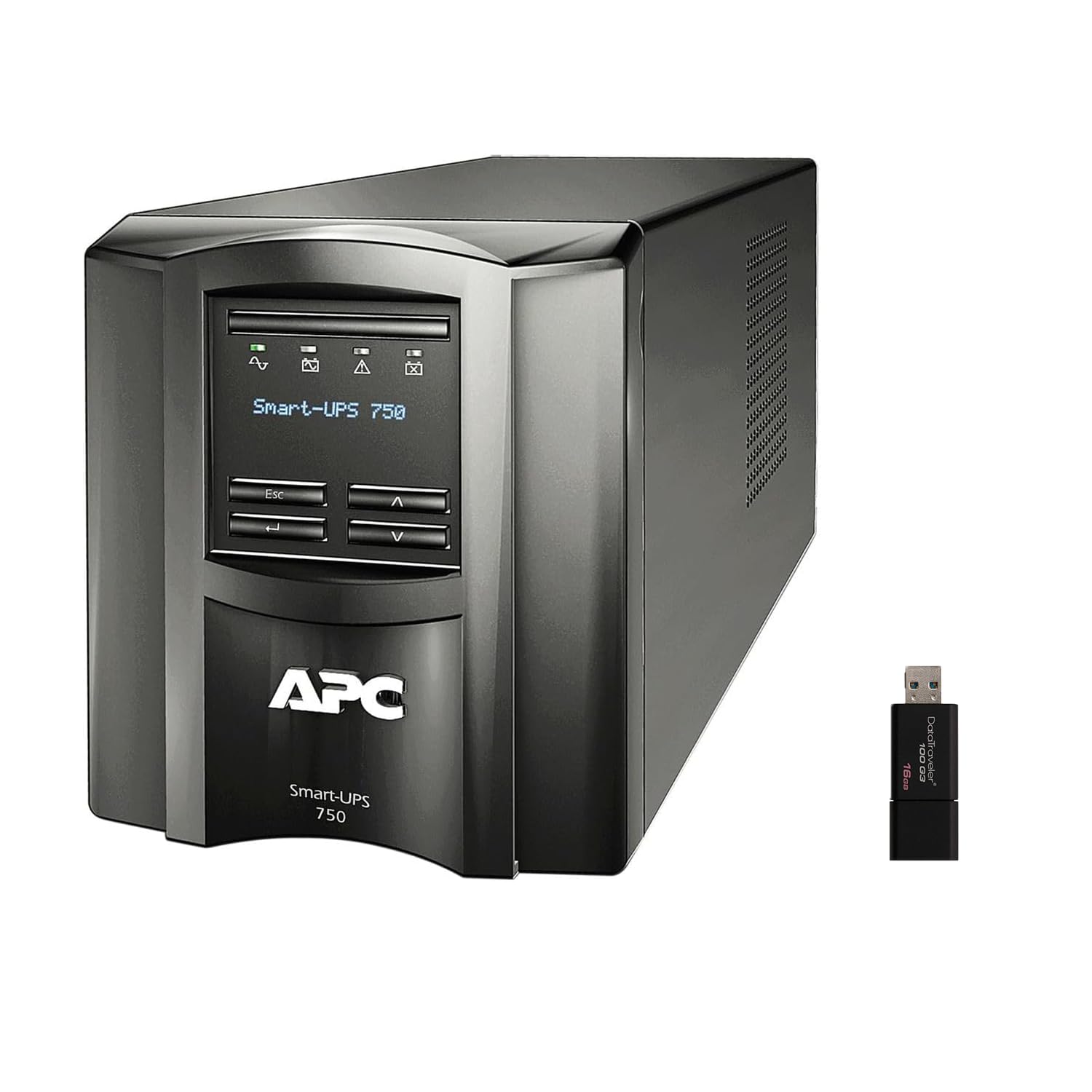
Immaġni: Minn quddiem u mill-ġenb view of the APC Smart-UPS SMT750C. This image displays the compact tower design of the UPS unit.
- Buttuna tal-Qawwa: Controls the main power to the UPS.
- Display LCD: Provides real-time status information, load levels, battery charge, and estimated runtime.
- Buttuni tan-Navigazzjoni: Used to scroll through display menus and adjust settings.
Panel ta' wara
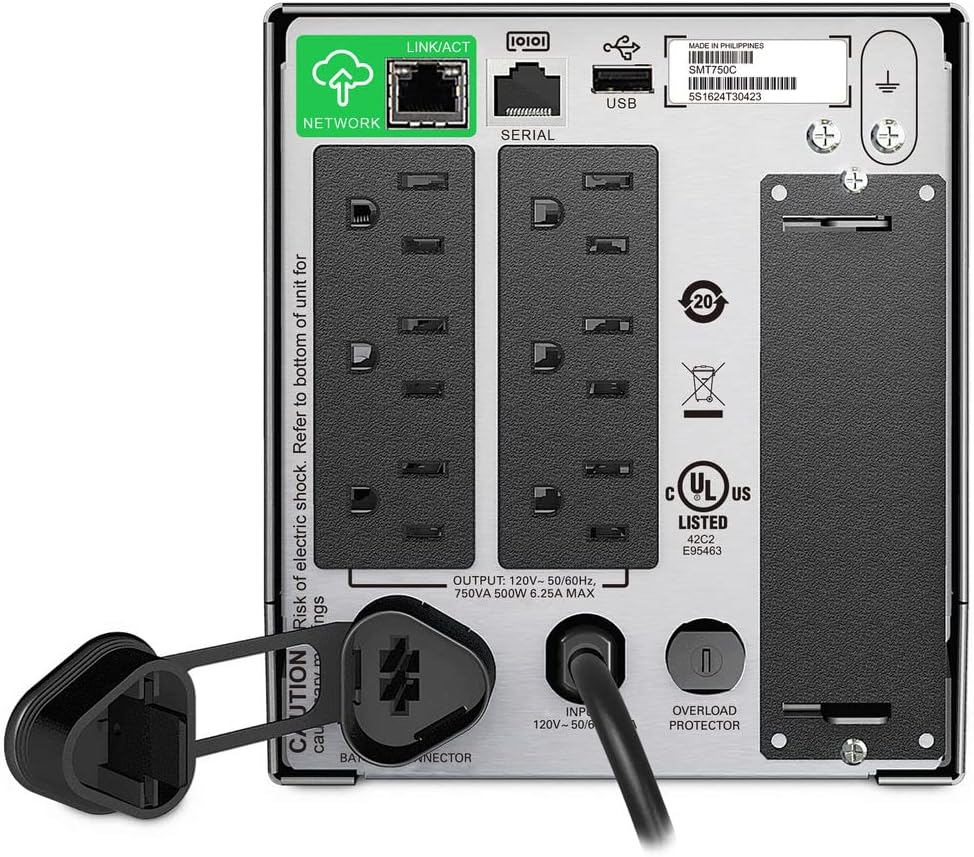
Image: Rear panel of the APC Smart-UPS SMT750C. This view highlights the various input/output ports, including NEMA 5-15R outlets, SmartConnect port, USB, and serial ports.
- NEMA 5-15R Outlets: Six outlets for connecting protected equipment.
- SmartConnect Ethernet Port: For cloud-based remote monitoring and management.
- Port USB: For communication with a computer for graceful shutdown via PowerChute Serial Shutdown software.
- Port tas-Serje: Alternative communication port for graceful shutdown.
- Slott Intelliġenti: For optional Network Management Card (sold separately).
- Korda tal-Enerġija tad-Dħul: Connects the UPS to the utility power.
- Protettur ta' tagħbija żejda: Interruttur taċ-ċirkwit li jista' jiġi rrisettjat.
5. Setup
5.1 Konnessjoni Inizjali tal-Batterija
Before initial use, the internal battery must be connected. The unit is shipped with the battery disconnected for safety during transit.
- Poġġi l-UPS fuq wiċċ stabbli.
- Locate the battery compartment cover, typically on the bottom or rear of the unit.
- Remove the cover to access the battery.
- Connect the red battery cable to the positive (+) terminal and the black battery cable to the negative (-) terminal. Ensure a secure connection.
- Ibdel l-għatu tal-kompartiment tal-batterija.
5.2 Konnessjoni mal-Enerġija tal-Utilità
- Plug the UPS power cord into a grounded 3-prong AC outlet.
- Ħalli l-UPS jiċċarġja għal mill-inqas 24 siegħa qabel ma tqabbad tagħmir kritiku biex tiżgura l-kapaċità sħiħa tal-batterija.
5.3 Tagħmir ta' Konnessjoni
- Connect your critical equipment (e.g., computer, monitor, network devices) to the NEMA 5-15R outlets on the rear panel.
- For graceful shutdown capabilities, connect the provided USB cable from the UPS to your computer and install the PowerChute Serial Shutdown software (available for download from APC's websit).
- For remote monitoring, connect an Ethernet cable to the SmartConnect port and follow the instructions for cloud-based setup.
6. Operazzjoni
6.1 Tixgħel/Jitfi
- To power on the UPS, press and hold the power button on the front panel until the unit beeps and the display illuminates.
- To power off the UPS, press and hold the power button until the unit beeps and the display turns off.
6.2 Vol. AwtomatikutagRegolament (AVR)
The SMT750C features AVR, which automatically corrects minor voltage fluctuations (sags and surges) without switching to battery power. This protects connected equipment from voltage irregularities and extends battery life.
6.3 Operazzjoni ta' Backup tal-Batterija
Waqt qawwa outage, the UPS will automatically switch to battery power, providing continuous power to connected equipment. The LCD display will show the estimated remaining runtime. When utility power returns, the UPS will automatically switch back to utility power and recharge its battery.
6.4 Remote Monitoring (SmartConnect)
The SmartConnect port allows for cloud-based remote monitoring of your UPS. This feature enables IT professionals and network administrators to:
- Monitor UPS status and performance.
- Agħmel aġġornamenti tal-firmware.
- Wettaq dijanjostika mill-bogħod.
- Irċievi notifiki proattivi bl-email b'azzjonijiet rakkomandati.
7. Manutenzjoni
7.1 Sostituzzjoni tal-batterija
The internal battery is a user-replaceable component. When the battery reaches the end of its service life, the UPS will indicate a battery fault. To replace the battery:
- Ensure the UPS is powered off and disconnected from utility power.
- Neħħi l-għatu tal-kompartiment tal-batterija.
- Disconnect the battery cables (red and black).
- Carefully slide out the old battery.
- Insert a genuine APC replacement battery (model RBC154, sold separately).
- Connect the battery cables, ensuring correct polarity (red to positive, black to negative).
- Ibdel l-għatu tal-kompartiment tal-batterija.
- Recycle the old battery responsibly.
7.2 Tindif
Naddaf il-barra tal-UPS perjodikament b'ċarruta ratba u niexfa. Tużax prodotti tat-tindif likwidi jew aerosol. Kun żgur li l-fetħiet tal-ventilazzjoni huma ħielsa mit-trab u l-fdalijiet.
8 Issolvi l-problemi
| Problema | Kawża Possibbli | Soluzzjoni |
|---|---|---|
| L-UPS ma jixgħelx | Batterija mhux imqabbda jew ċarġ baxx | Ensure battery cables are connected. Plug UPS into AC outlet and allow to charge. |
| Il-UPS jagħmel ħoss kontinwu | Overload or on battery power | Reduce connected load. Check utility power. |
| Battery symbol blinking | Battery needs to be flipped (initial setup) or is failing | For new units, ensure battery is correctly oriented and connected. For older units, consider battery replacement. |
| Ebda enerġija għall-ħwienet | UPS is off, circuit breaker tripped, or utility power lost | Turn on UPS. Reset circuit breaker. Check utility power. |
9. Speċifikazzjonijiet
- Mudell: SMT750C
- Kapaċità tal-Qawwa tal-Ħruġ: 500 Watts / 750 VA
- Konnessjonijiet tal-Ħruġ: 6 x NEMA 5-15R
- Konnessjonijiet tad-dħul: NEMA 5-15P
- Vol Input Nominalitage: 120V
- Vol Output Nominalitage: 120V
- Tip ta 'batterija: Aċidu taċ-Ċomb
- Fattur tal-Formola: Torri
- Dimensjonijiet (H x W x D): 6.34 pulzieri (16.1 ċm) x 5.43 pulzieri (13.8 ċm) x 14.53 pulzieri (36.9 ċm)
- Piż Nett: 27.56 lb (12.5 kg)
- Kulur: Iswed
- Materjal: Metall
- Aċċessorji inklużi: 16GB USB 3.0 Drive
10. Garanzija u Appoġġ
L-APC tipprovdi garanzija standard għal dan il-prodott. Għat-termini u l-kundizzjonijiet speċifiċi tal-garanzija, jekk jogħġbok irreferi għall-karta tal-garanzija inkluża mal-prodott tiegħek jew żur is-sit uffiċjali tal-APC. website. For technical support, product registration, or to purchase replacement parts, please visit www.apc.com jew ikkuntattja lis-servizz tal-klijenti tal-APC.
Protection plans are available for extended coverage. For example, a 3-Year Protection Plan is available.


