1. Introduzzjoni
This manual provides essential information for the proper setup, operation, and maintenance of your SENECESLI Translator Pen Scanner. Please read this manual thoroughly before using the device to ensure optimal performance and longevity.
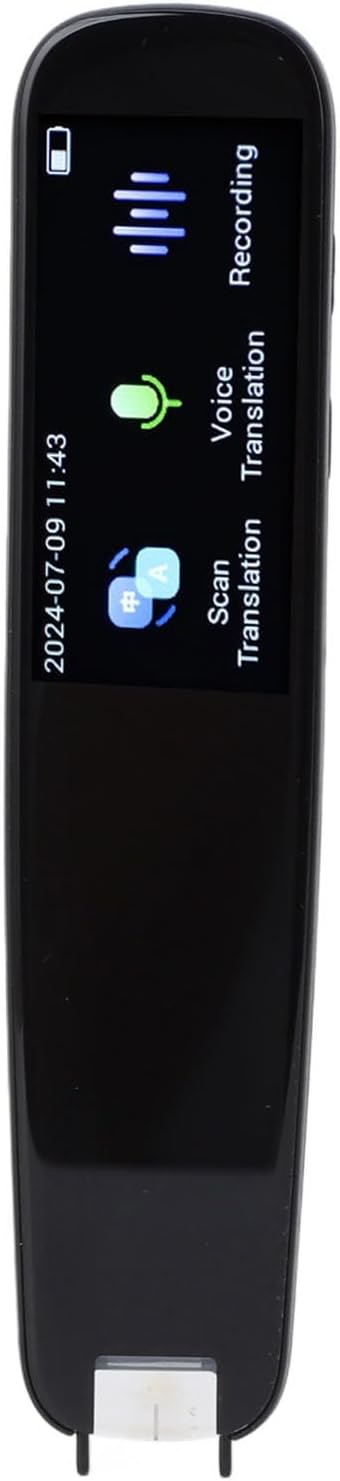
Image 1.1: The SENECESLI Translator Pen Scanner.
2. Kontenut tal-Pakkett
Ivverifika li l-oġġetti kollha huma preżenti fil-pakkett:
- 1 x SENECESLI Translator Pen Scanner
- 1 x Cable tal-Iċċarġjar tal-USB (Tip-Ċ)
- 1 x Manwal tal-Istruzzjonijiet (dan id-dokument)

Image 2.1: Translator Pen Scanner and included USB cable.
3. Setup
3.1 Iċċarġjar inizjali
Before first use, fully charge the device. Connect the provided USB Type-C cable to the charging port on the pen and plug the other end into a compatible USB power adapter (not included) or a computer's USB port. The battery indicator on the screen will show charging status.

Image 3.1: The device features a 1050 mAh battery for extended use.
3.2 Tixgħel/Jitfi
To power on, press and hold the power button until the screen illuminates. To power off, press and hold the power button until the shutdown prompt appears, then confirm.
3.3 Network Connection (Optional for Online Features)
For online translation and updates, connect the device to a Wi-Fi network or a mobile hotspot. Navigate to the settings menu on the device to configure network access.
4. Istruzzjonijiet Operattivi
The SENECESLI Translator Pen Scanner offers multiple functionalities accessible via its touch screen and physical buttons.
4.1 Scan Translation
This function allows you to scan text from various printed materials and receive an instant translation. The device supports scanning of long sentences, various fonts, and different materials such as newspapers, picture books, e-books, and textbooks.
- Select the "Scan Translation" option from the main menu.
- Position the pen's scanning tip over the text you wish to translate.
- Gently glide the pen across the text. Ensure consistent contact and speed for accurate results.
- The scanned text and its translation will appear on the screen.

Image 4.1: Scanning text from a book for offline translation.

Image 4.2: The device can scan long sentences and various printed materials and fonts.
The device boasts a scanning recognition accuracy of 99% and can scan up to 18 characters per second, providing translations in approximately 0.3 seconds.

Image 4.3: High speed and accuracy features of the translator pen.
4.2 Voice Translation
The pen supports 112 types of online voice translation and features dual microphone noise reduction for clear audio input.
- Select the "Voice Translation" option.
- Press and hold the voice input button and speak clearly into the microphone.
- Release the button. The device will process and speak the translation.

Image 4.4: Dual microphone noise reduction for clear voice input.
4.3 Offline Use
The device supports offline translation for 13 languages, allowing use without an internet connection. This feature is convenient for travel or areas with limited connectivity.
4.4 Karatteristiċi Addizzjonali
The device includes various functions to enhance learning and communication:
- Estratt mit-Test: Save scanned text for later review.
- Text Upload: Transfer scanned or saved text to other devices.
- E-dictionary: Access definitions and explanations directly.
- Multimedia Speaker: For audio output of translations and pronunciations.
- HD Large Screen: Provides clear display of text and menus.
- Għodod ta' Tagħlim: The pen can listen, read, explain, and evaluate text, functioning as an effective reading tool.

Immaġni 4.5: Fuqview of the device's main features.

Image 4.6: The pen's capabilities extend to listening, reading, explaining, and evaluating text.
5. Manutenzjoni
5.1 Tindif
To clean the device, gently wipe the exterior with a soft, dry, lint-free cloth. Do not use liquid cleaners, aerosols, or harsh chemicals, as these may damage the device. Keep the scanning tip free of dust and debris for optimal performance.
5.2 Ħażna
Store the translator pen in a cool, dry place away from direct sunlight and extreme temperatures. When not in use for extended periods, ensure the device is fully charged before storage and recharge it periodically to maintain battery health.
6 Issolvi l-problemi
If you encounter issues with your SENECESLI Translator Pen Scanner, refer to the following common solutions:
- Apparat mhux mixgħul: Kun żgur li l-batterija hija ċċarġjata. Qabbad l-apparat ma' sors ta' enerġija u erġa' pprova.
- Inaccurate scanning: Ensure the scanning tip is clean. Glide the pen smoothly and consistently over the text. Check lighting conditions.
- L-ebda ħoss mill-kelliem: Check the volume settings. Ensure the speaker is not obstructed.
- Ma tistax tikkonnettja mal-Wi-Fi: Verify Wi-Fi password and network availability. Try restarting the device and your router.
- L-apparat ma jirrispondix: Perform a soft reset by pressing and holding the power button for approximately 10-15 seconds until the device restarts.
Jekk il-problemi jippersistu, ikkuntattja l-appoġġ tal-klijent għal aktar assistenza.
7. Speċifikazzjonijiet
| Karatteristika | Speċifikazzjoni |
|---|---|
| Brand | SENECESLI |
| Numru tal-Mudell | SENECESLIktm43bovf6 |
| Tip ta 'batterija | Batterija tal-litju |
| Kapaċità tal-batterija | 1050 mAh |
| Sistema Operattiva | Android 4.4 |
| Interface tal-iċċarġjar | TIP Ċ |
| Mod ta' Operazzjoni | Button u Touch |
| Storage (RAM) | 1GB |
| Storage (Built-in) | 8GB (Read-only) |
| Memorja espansibbli | Supports memory card (not included) |
| Modalità tan-Netwerk | Wireless Fidelity (Wi-Fi), Mobile Hotspot |
8. Garanzija u Appoġġ
For warranty information and customer support, please refer to the documentation provided at the time of purchase or visit the official SENECESLI websit. Żomm il-prova tax-xiri tiegħek għal talbiet ta' garanzija.