1. Introduzzjoni
This manual provides detailed instructions for the setup, operation, maintenance, and troubleshooting of your ProtoArc EKM01 Plus Ergonomic Wireless Keyboard and Mouse Combo. Please read this manual thoroughly before use to ensure optimal performance and longevity of your device.

Stampa 1.1: The ProtoArc EKM01 Plus Ergonomic Wireless Keyboard and Mouse Combo. This image displays the full keyboard with its split, curved design and integrated wrist rest, alongside the ergonomic mouse.
2. Kontenut tal-Pakkett
Ivverifika li l-oġġetti kollha huma preżenti fil-pakkett:
- Tastiera Wireless Ergonomika ProtoArc EKM01 Plus
- Maws bla fili ergonomiku ProtoArc
- USB Receiver (stored in the keyboard or mouse)
- Cable tal-Iċċarġjar tal-USB-C
- Manwal għall-Utent (dan id-dokument)
3. Istruzzjonijiet ta' Setup
3.1 Iċċarġjar tal-Apparati
Both the keyboard and mouse are equipped with built-in 500mAh lithium batteries. Before initial use, it is recommended to fully charge both devices using the provided USB-C cable.
- Connect the USB-C end of the charging cable to the charging port on the keyboard and mouse.
- Qabbad it-tarf USB-A tal-kejbil tal-iċċarġjar ma' port USB li jkun imħaddem (eż., kompjuter, adapter tal-ħajt).
- The charging indicator light will illuminate. Once fully charged, the light will change or turn off (refer to device-specific indicators).
The devices can be used while charging.
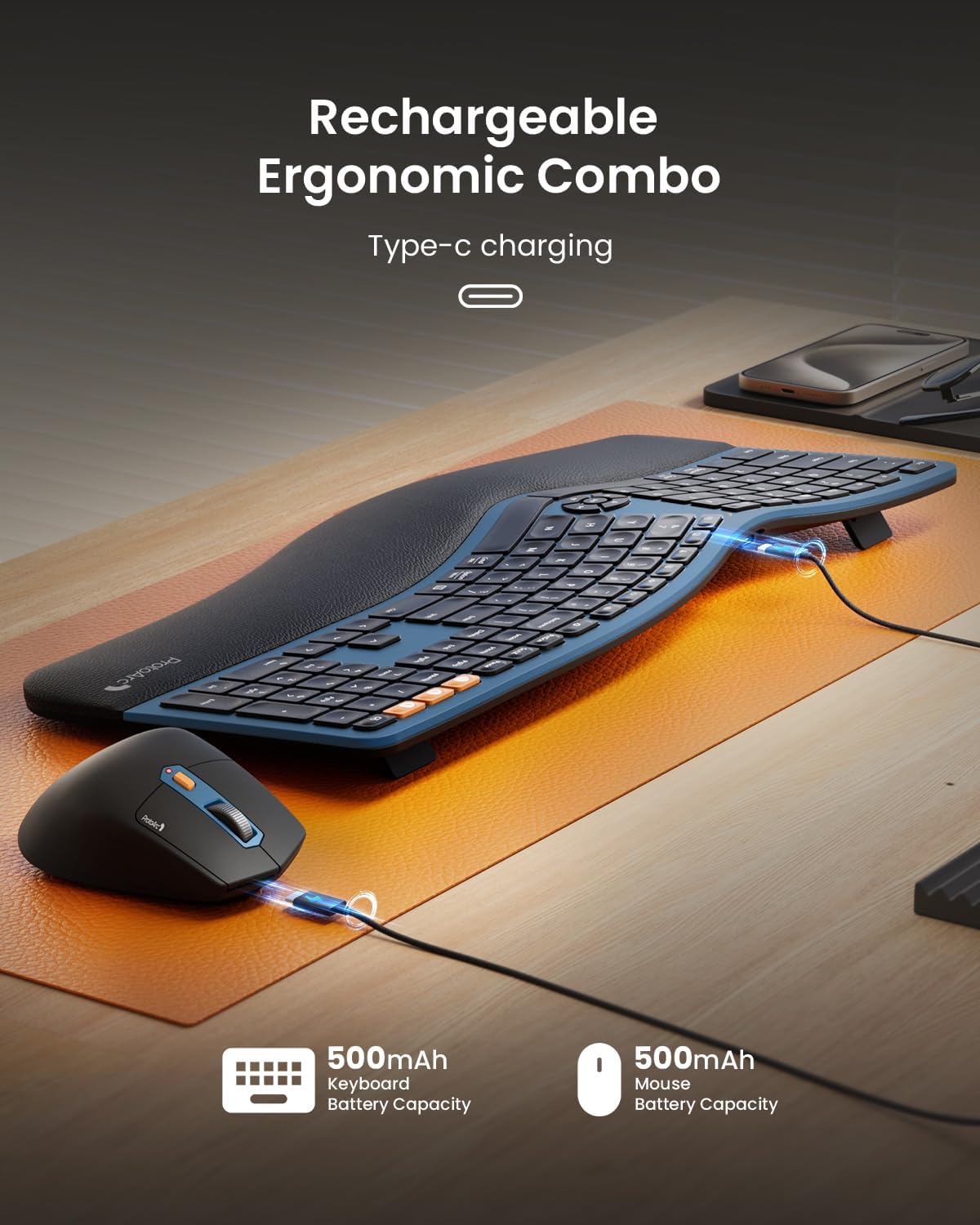
Stampa 3.1: The keyboard and mouse connected via USB-C cables for charging. This image illustrates the Type-C charging ports and the charging process for both devices.
3.2 Konnessjoni mat-Tagħmir Tiegħek
The combo supports connection via a 2.4GHz USB receiver or Bluetooth, allowing connection to up to three devices simultaneously.
3.2.1 2.4GHz USB Receiver Connection
- Locate the USB receiver. It is typically stored in a magnetic compartment underneath the keyboard or in a cavity under the mouse's logo sticker.
- Ipplaggja r-riċevitur USB f'port USB disponibbli fuq il-kompjuter tiegħek.
- Ixgħel it-tastiera u l-maws billi tuża s-swiċċijiet tal-enerġija rispettivi tagħhom.
- The devices should automatically connect. If not, press the 2.4G mode switch button on the keyboard/mouse to activate the 2.4G connection.
3.2.2 Konnessjoni Bluetooth (Sa 2 Apparati)
- Ixgħel it-tastiera u l-maws.
- Fuq it-tastiera, agħfas u żomm jew il- BT1 or BT2 button for 3-5 seconds until the indicator light flashes, indicating pairing mode.
- On the mouse, press the mode switch button until the white LED flashes for BT1 or BT2, then press and hold for 3-5 seconds to enter pairing mode.
- On your computer or mobile device, open Bluetooth settings and search for new devices.
- Select "ProtoArc EKM01 Plus Keyboard" and "ProtoArc EKM01 Plus Mouse" from the list to pair.
- Repeat for a second Bluetooth device using the other BT button.
3.3 Aġġustamenti Ergonomiċi
The keyboard features adjustable tilt legs and an integrated wrist rest for enhanced comfort.
- Saqajn Aġġustabbli għall-Inklinazzjoni: Flip out the legs located on the underside of the keyboard to adjust the typing angle. This helps maintain a natural wrist posture whether seated or standing.
- Mistrieħ tal-polz ikkuttunat: The integrated curved wrist rest with a soft memory foam layer provides support and reduces wrist bending.

Stampa 3.2: The ProtoArc EKM01 Plus keyboard with its adjustable tilt legs extended, showing the elevated typing angle. This feature allows users to customize the keyboard's incline for ergonomic comfort.
4. Istruzzjonijiet Operattivi
4.1 Użu tat-Tastiera
The EKM01 Plus keyboard features a full-size, curved, and split keyframe design to promote a natural, relaxed posture for your wrists and forearms. Scooped keys are designed to match fingertip contours for comfortable typing.
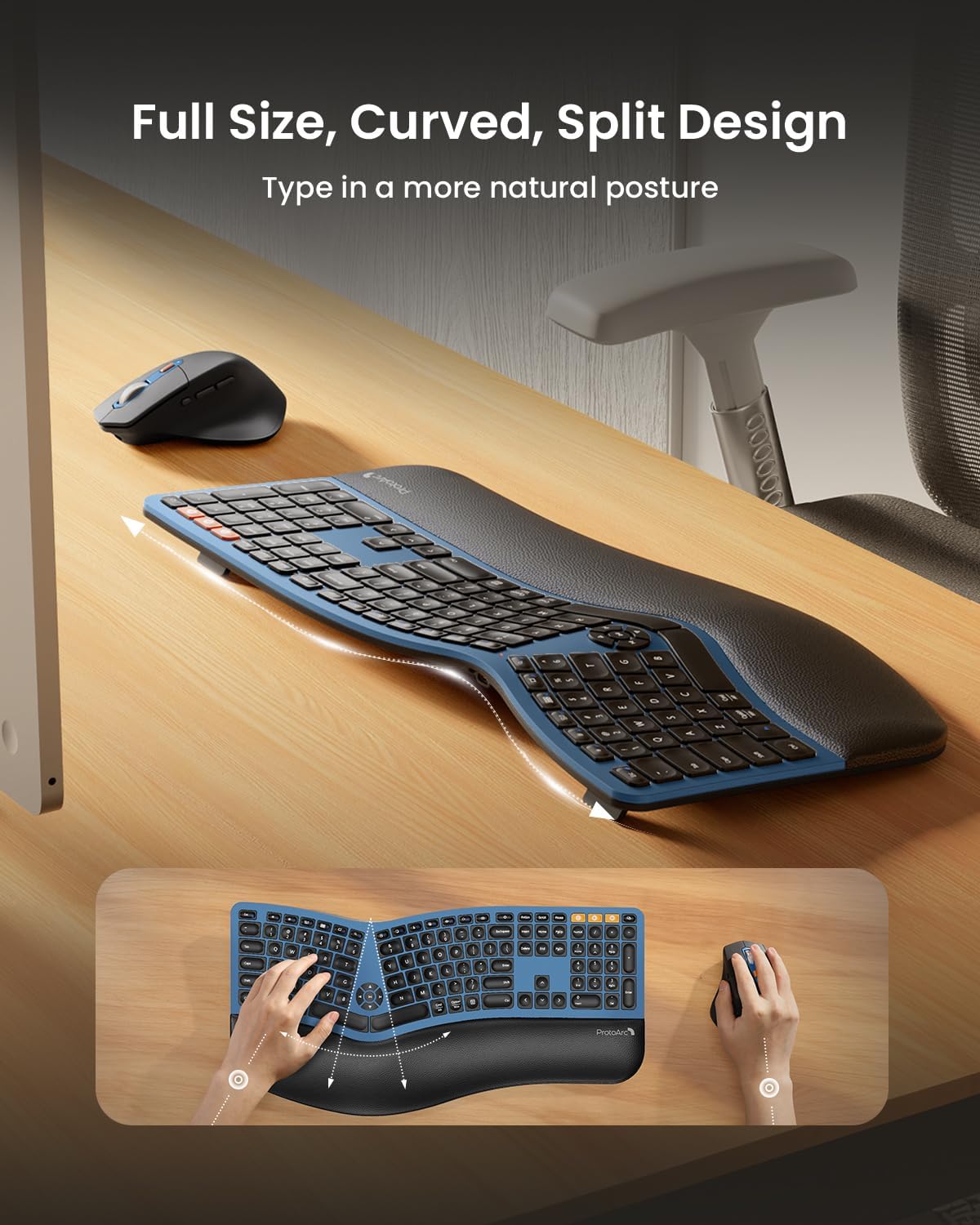
Stampa 4.1: An overhead view of the ProtoArc EKM01 Plus keyboard, highlighting its full-size, curved, and split design. This layout is engineered to encourage a more natural hand and wrist position during typing.
4.1.1 Media and Function Keys
The keyboard includes dedicated media control keys and function keys. Refer to the keycap legends for specific functions such as volume control, play/pause, and other shortcuts.
4.2 Użu tal-Maws
The ergonomic mouse is designed with a contoured shape, including a palm and thumb rest, to provide better wrist support and maintain a natural hand position, reducing strain.
- Aġġustament DPI: The mouse features adjustable DPI settings (800/1300/2000 DPI) for precise control. Press the DPI button to cycle through the settings. The indicator light will flash once for 800 DPI, twice for 1300 DPI, and three times for 2000 DPI.
- Buttuni tan-Navigazzjoni: Forward and backward buttons are conveniently located for web page browsing and other navigation tasks.

Stampa 4.2: A close-up of the ProtoArc EKM01 Plus ergonomic mouse, showcasing its contoured shape designed for comfortable hand placement. The image highlights the thumb rest and the overall ergonomic form factor.
4.3 Swiċċjar ta' Apparati Multipli
Effortlessly switch between up to three connected devices (one 2.4GHz USB receiver, two Bluetooth) by pressing the corresponding mode switch buttons on the keyboard (2.4G, BT1, BT2) and mouse.

Stampa 4.3: The ProtoArc EKM01 Plus keyboard and mouse in a multi-device setup, connected to a laptop, monitor, and tablet. This image demonstrates the ability to switch between up to three devices for a seamless workflow.
5. Manutenzjoni
5.1 Ġestjoni tal-batterija
The keyboard and mouse feature rechargeable batteries. To prolong battery life:
- Recharge when the low battery indicator appears.
- Evita li tiċċarġja l-batterija kompletament ta' spiss.
- The devices enter an auto-sleep mode after 30 minutes of inactivity to conserve power. Press any key or move the mouse to wake them up.
5.2 Tindif
Biex tnaddaf it-tastiera u l-maws tiegħek:
- Disconnect the devices from power and your computer.
- Uża drapp ratba u mingħajr ħelu ftit dampimdaħħla bl-ilma jew soluzzjoni ħafifa għat-tindif.
- Avoid harsh chemicals, abrasives, or excessive moisture.
- Għal debris bejn iċ-ċwievet, uża arja kkompressata.
6 Issolvi l-problemi
If you encounter issues with your ProtoArc EKM01 Plus combo, refer to the following common solutions:
| Problema | Kawża Possibbli | Soluzzjoni |
|---|---|---|
| It-tastiera/maws ma jirrispondix | Low battery; Not powered on; Connection issue; USB receiver not detected. |
|
| Konnessjoni dewmien jew intermittenti | Interference; Distance from receiver/device; Low battery. |
|
| Keys not typing correctly (e.g., 'W' key) | Software issue; Physical obstruction; Defective key. |
|
| Mouse cursor erratic | Dirty sensor; Uneven surface; Low battery. |
|
7. Speċifikazzjonijiet
| Karatteristika | Dettall |
|---|---|
| Numru tal-Mudell | EKM01 Plus |
| Teknoloġija tal-Konnettività | Bluetooth, USB ta' 2.4GHz |
| Layout tat-Tastiera | Full-size, Ergonomic Split Design |
| Karatteristiċi Speċjali | Ergonomic Split Design, Full-size, Wrist Rest, Multi-Device Support, Rechargeable |
| Apparati Kompatibbli | Laptop, Personal Computer (Windows 7/8/10, Mac OS X 10.12+, Android 4.3+) |
| Kapaċità tal-Batterija tat-Tastiera | Batterija tal-litju 500mAh |
| Kapaċità tal-batterija tal-ġurdien | Batterija tal-litju 500mAh |
| DPI tal-ġurdien | 800/1300/2000 DPI |
| Piż tal-oġġett | 4.04 liri (madwar 1.83 kg) |
| Dimensjonijiet tal-Pakkett | 21.6 x 13 x 2.9 pulzieri (madwar 54.9 x 33 x 7.4 ċm) |
8. Garanzija u Appoġġ
For warranty information and customer support, please refer to the documentation included with your product or visit the official ProtoArc websit. Żomm l-irċevuta tax-xiri tiegħek għal pretensjonijiet ta' garanzija.


