1. Introduzzjoni
This manual provides essential information for setting up, operating, maintaining, and troubleshooting your Lenovo ThinkPad X1 Carbon Gen 12 Laptop. The ThinkPad X1 Carbon Gen 12 is a business notebook designed for performance and durability, featuring an Intel Core Ultra 7 155U Processor, a 14-inch WUXGA 100% sRGB touchscreen, 32GB of 6400MHz RAM, and a 1TB Gen4 Performance SSD, running Windows 11 Pro.

Figura 1.1: Laptop Lenovo ThinkPad X1 Carbon Gen 12
2. X'hemm fil-Kaxxa
Upon unboxing your Lenovo ThinkPad X1 Carbon Gen 12, ensure all the following items are present:
- ThinkPad X1 Carbon Gen 12 Laptop PC
- Batterija Interna (installata minn qabel)
- USB-C Power Adaptor
3. Prodott Aktarview
3.1 Portijiet u Konnetturi
The ThinkPad X1 Carbon Gen 12 features a variety of ports for connectivity. Familiarize yourself with their locations and functions:
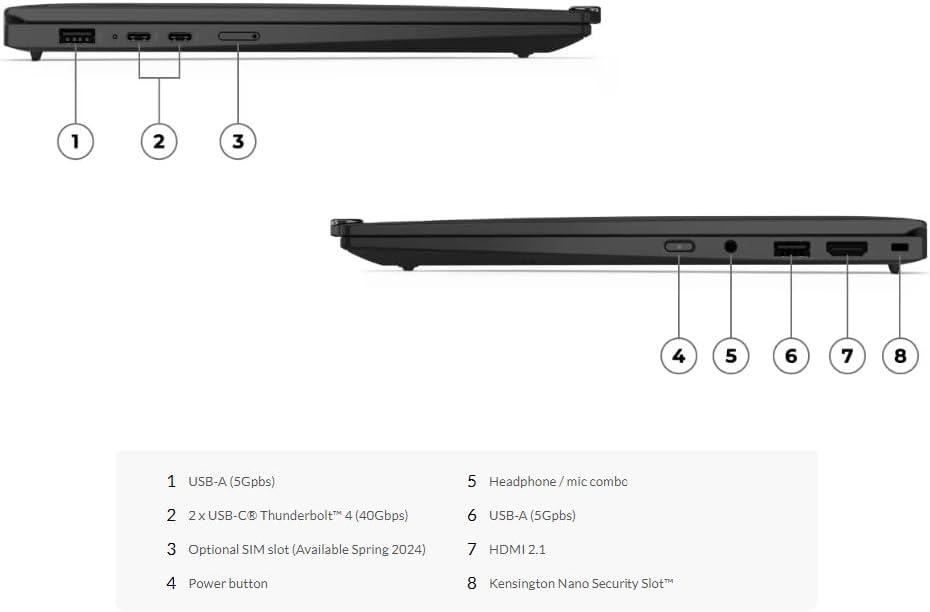
Figure 3.1: Port Layout
- USB-A (5Gbps): Standard USB port for connecting peripherals.
- 2 x USB-C Thunderbolt 4 (40Gbps): High-speed ports for data transfer, video output, and charging.
- Optional SIM slot (Available Spring 2024): For mobile broadband connectivity.
- Buttuna tal-qawwa: To turn the laptop on or off.
- Combo tal-headphone / mic: Single jack for audio input and output.
- USB-A (5Gbps): Another standard USB port.
- HDMI 2.1: For connecting to external displays.
- Kensington Nano Slot tas-Sigurtà: For physical security locking.
3.2 Tastiera u Touchpad
The ThinkPad X1 Carbon Gen 12 features a redesigned keyboard and a larger glass touchpad. The keyboard includes tactile markings on certain keys to assist touch typists. The 120mm glass touchpad is larger than previous models and retains the traditional ThinkPad buttons at the top. The TrackPoint pointing stick, located in the middle of the keyboard, offers an alternative navigation method.

Figure 3.2: Keyboard and Touchpad
3.3 Wiri u Kamera
The laptop is equipped with a 14-inch WUXGA (1920 x 1200) IPS touchscreen display with anti-glare properties, 100% sRGB color gamut, and 400 nits brightness. It features a 1080P FHD IR+RGB camera with a privacy shutter, positioned within the Communications Bar at the top of the display.
4. Setup
4.1 Qawwa Inizjali
- Unpack the laptop and power adapter.
- Connect the USB-C power adapter to one of the Thunderbolt 4 ports on the laptop and plug it into a power outlet.
- Open the laptop lid. The power button is located on the side. Press the power button to turn on the device.
- Follow the on-screen instructions to complete the initial Windows 11 Pro setup, including language selection, network connection, and user account creation.
4.2 Konnessjoni tal-Periferali
Use the available USB-A and USB-C ports to connect external devices such as mice, keyboards, external drives, or monitors. The HDMI 2.1 port allows for connection to external displays.
5. Istruzzjonijiet Operattivi
5.1 Operazzjoni Bażika
- Qawwa mixgħul/mitfi: Press the power button to turn on. To shut down, click Start > Power > Shut down in Windows.
- Modalità Sleep: Close the lid or click Start > Power > Sleep to enter sleep mode.
- Ibda mill-ġdid: Click Start > Power > Restart.
5.2 Using the TrackPoint and Touchpad
- TrackPoint: Use the red TrackPoint pointing stick to move the cursor. The three buttons below the spacebar function as left-click, scroll, and right-click for the TrackPoint.
- Quick Menu: Double-tapping the TrackPoint pointing stick activates a Quick Menu for microphone settings, output device selection, and voice-to-text functionality.
- Touchpad: Use the glass touchpad for multi-touch gestures. The integrated buttons at the bottom of the touchpad function as left and right clicks.
5.3 Camera and Microphone Usage
The integrated FHD IR+RGB camera and dual-microphone array are optimized for video conferencing. Ensure the privacy shutter is open when using the camera. The ThinkPad X1 Carbon Gen 12 is Zoom-certified and includes Dolby Voice and Dolby Atmos for enhanced audio experiences.

Figure 5.1: Laptop in use for video conferencing
5.4 Konnettività
- Wi-Fi: Connect to wireless networks using the integrated Wi-Fi 6E AX211 2x2 AX.
- Bluetooth: Pair Bluetooth devices such as headphones or mice using Bluetooth 5.3.
- Intel Unison: Sync your laptop with iOS or Android smartphones for calls, texts, and file trasferimenti.
5.5 Blue Light Protection
The display is Eyesafe Certified, providing always-on blue light protection to reduce eye strain during extended use.
5.6 Karatteristiċi tas-Sigurtà
The ThinkPad X1 Carbon Gen 12 includes a fingerprint reader and facial recognition for secure login. ThinkShield provides a comprehensive suite of security solutions, including a discrete Trusted Platform Module (dTPM) for data encryption. Intel vPro offers hardware-based security and remote management capabilities.

Figure 5.2: Laptop in a typical work setting
6. Manutenzjoni
6.1 Tindif tal-Laptop Tiegħek
- Uża ċarruta ratba u mingħajr ħelu dampNaddaf bl-ilma jew b'prodott tat-tindif tal-iskrin biex tnaddaf id-displej.
- Għat-tastiera u x-chassis, uża drapp artab. Evita kimiċi ħarxa jew materjali li joborxu.
- Kun żgur li l-laptop ikun mitfi u skonnettjat qabel ma tnaddaf.
6.2 Kura tal-Batterija
- Biex ittawwal il-ħajja tal-batterija, evita temperaturi estremi.
- Aħżen u erġa' ċċarġja l-batterija perjodikament.
- Għal ħażna fit-tul, iċċarġja l-batterija sa madwar 50-60% u aħżen il-laptop f'post frisk u niexef.
6.3 Aġġornamenti tas-Software
Regularly update your Windows operating system and Lenovo drivers to ensure optimal performance and security. Use Windows Update and the Lenovo Vantage application for this purpose.
7 Issolvi l-problemi
Din it-taqsima tindirizza kwistjonijiet komuni li tista' tiltaqa' magħhom. Għal problemi aktar kumplessi, irreferi għar-riżorsi ta' appoġġ uffiċjali ta' Lenovo.
7.1 Kwistjonijiet tal-Enerġija
- Laptop does not turn on: Ensure the power adapter is securely connected and the outlet is functional. Try holding the power button for 10-15 seconds to perform a hard reset.
- Il-batterija mhix qed tiċċarġja: Verify the power adapter is working. Check for any damage to the cable or port.
7.2 Problemi tal-Wiri
- L-ebda wiri fuq l-iskrin: Connect an external monitor to check if the issue is with the laptop's display. Ensure the display brightness is not set to minimum.
- Skrin li jteptep: Update your graphics drivers.
7.3 Problemi ta' Konnettività
- Wi-Fi mhux konnessjoni: Check if Wi-Fi is enabled in Windows settings. Restart your router and the laptop.
- Apparat Bluetooth mhux pairing: Ensure the Bluetooth device is in pairing mode and within range. Check Bluetooth settings on your laptop.
7.4 It-Tastiera/Touchpad Ma Jirrispondix
- Ibda mill-ġdid il-laptop.
- Iċċekkja għal xi ostruzzjonijiet fiżiċi jew debris.
- Ensure drivers are up to date via Lenovo Vantage or Device Manager.
8. Speċifikazzjonijiet
Below are the detailed technical specifications for the Lenovo ThinkPad X1 Carbon Gen 12 Laptop (Model: Ultra 7 155U, WUXGA Touch):

Figure 8.1: Intel Core Ultra 7 Processor and Intel Evo Edition
| Karatteristika | Dettall |
|---|---|
| Proċessur | Intel Core Ultra 7 155U (E-cores up to 3.80 GHz, P-cores up to 4.80 GHz), 12 Core (2 P-core + 8 E-core + 2 LPE-core), 14 threads, 12MB Cache, Intel AI Boost |
| RAM | 32 GB LPDDR5X-6400MHz (Issalljat) |
| Ħażna | SSD ta' 1 TB M.2 2280 PCIe Gen4 Performance TLC Opal |
| Wiri | 14" Touch WUXGA (1920 x 1200), IPS, Anti-Glare, 100% sRGB, 400 nits, 60Hz, Low Power, 1000:1 Contrast Ratio, 16:10 Aspect Ratio |
| Grafika | Grafika Intel integrata |
| Kamera | 1080P FHD IR+RGB b'Xatter tal-Privatezza |
| Batterija | Li-Polimeru Integrat 57Wh |
| Konnettività | Wi-Fi 6E AX211 2x2 AX, Bluetooth 5.3 |
| Portijiet | 2x USB-A (5Gbps), 2x USB-C Thunderbolt 4 (40Gbps), HDMI 2.1, Kombinazzjoni ta' headphones/mikrofonu |
| Sistema Operattiva | Windows 11 Pro |
| Dimensjonijiet (LxWxH) | 12.31 x 8.45 x 0.59 pulzieri |
| Piż | Madwar 2.4 lbs |
| Kulur | Iswed |
9. Garanzija u Appoġġ
9.1 Informazzjoni dwar Garanzija
The Lenovo ThinkPad X1 Carbon Gen 12 comes with a One Year Onsite Lenovo Warranty. Users have the option to extend their coverage by adding up to 5 years of Lenovo Premier Support upon registering their computer with Lenovo.
9.2 Appoġġ għall-Klijent
For technical assistance, warranty claims, or further information, please visit the official Lenovo support website or contact their customer service. Ensure you have your product's serial number available when seeking support.
Appoġġ Lenovo Websit: support.lenovo.com


