1. Introduzzjoni
The Daakro ZK-1001B is a 100W mono channel Bluetooth amplifier board designed for DIY audio projects, including wireless speakers. It features TWS (True Wireless Stereo) pairing, multiple audio input options (Bluetooth, AUX, USB), and intuitive knob controls for volume, treble, and bass. This manual provides detailed instructions for setting up, operating, and maintaining your ampbord aktar ħaj.
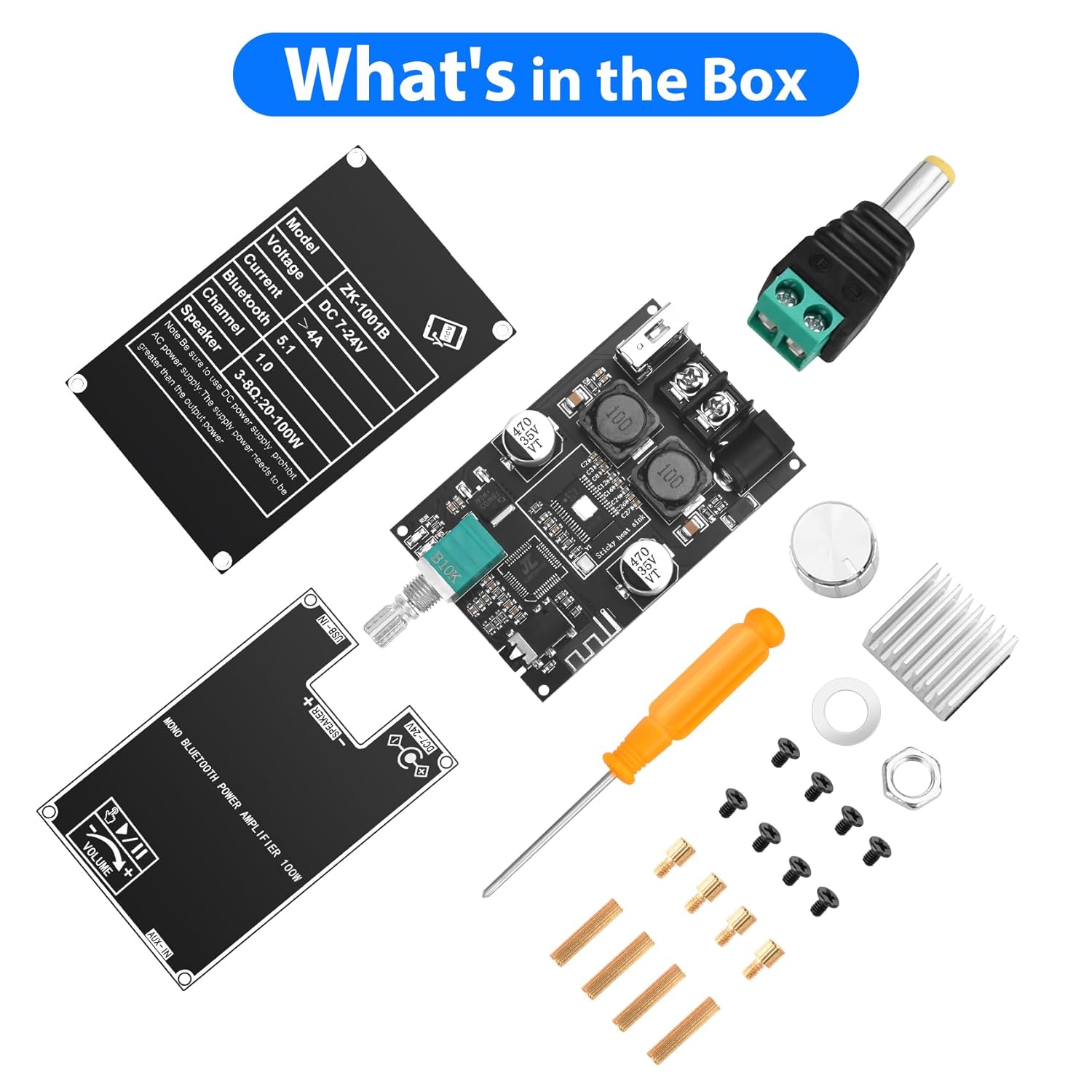
2. X'hemm fil-Kaxxa
Malli tiftaħ il-pakkett, għandek issib il-komponenti li ġejjin:
- AmpBord aktar ħaj
- Knob caps (for volume, treble, bass)
- Tornavit
- Kejbil tad-dħul tal-enerġija
- Mounting hardware (spacers, screws)
- Protective plates
3. Prodott Aktarview
The ZK-1001B amplifier board integrates a TPA3116D2 HiFi chip and Bluetooth 5.1 for high-fidelity audio. It includes controls for treble, bass, and volume, along with multiple input ports.
Kontrolli
- Buttuna tal-Volum: Adjusts overall sound level. Also functions as a multi-function button (single click for play/pause, double click for next track, triple click for TWS mode, long press for power ON/OFF).
- Pum tal-bass: Adjusts low-frequency audio.
- Pum tat-Triple: Adjusts high-frequency audio.

Inputs u Outputs
- Dħul tal-Enerġija DC 7-24V: Għall-konnessjoni tal-provvista tal-enerġija.
- Riżultat tal-Kelliem: Connects to a single speaker (mono channel).
- USB-IN: For USB flash drive audio playback or as a USB sound card.
- AUX-IN: 3.5mm audio jack for wired audio input.
Indikaturi
- Indikatur tax-XOGĦOL: Juri l-istatus operattiv.
- Indikatur TWS: Shows TWS pairing status.

4. Istruzzjonijiet ta' Setup
- Ħoll il-Komponenti: Neħħi bir-reqqa l-oġġetti kollha mill-imballaġġ.
- Attach Heat Sink: If not pre-attached, remove the backing adhesive from the heat sink and firmly press it onto the TPA3116D2 chip on the ampbord aktar ħaj.
- Installa l-Pumi: Place the silver knob caps onto the volume, bass, and treble shafts.
- Mount Protective Plates: Use the provided spacers and screws to attach the top and bottom protective plates to the amplifier board. Ensure all ports and controls are accessible.
- Connect Speaker: Connect your speaker (3-8Ω, 20-100W) to the "SPEAKER +" and "SPEAKER -" terminals.
- Qabbad l-Enerġija: Connect a DC 7-24V power supply to the DC power input jack. Ensure correct polarity. A 12V or 24V adapter is suitable. For portable use, a 12V battery can be used.

5. Istruzzjonijiet Operattivi
- Qawwa Mixgħul: Long press the volume knob to power on the amplifier board. The WORK indicator light will illuminate.
- Agħżel il-Modalità tad-Dħul:
- Modalità Bluetooth: The board will automatically enter Bluetooth pairing mode. Fittex għal "ZK-1001B" on your device and connect.
- Modalità AUX: Connect an audio source (e.g., TV, computer, phone) to the 3.5mm AUX-IN jack. The board will automatically switch to AUX input.
- Modalità USB: Daħħal USB flash drive bl-awdjo files into the USB-IN port. The board will play audio from the USB drive. It can also function as a USB sound card when connected to a computer.
- Aġġusta l-Awdjo:
- Volum: Rotate the volume knob to increase or decrease the sound level.
- Play/Pawsa: Single click the volume knob to play or pause audio.
- Track li jmiss: Double click the volume knob to skip to the next track (in Bluetooth or USB mode).
- Treble / Bass: Rotate the respective knobs to adjust high and low frequencies.
- Itfi: Long press the volume knob to power off the ampbord aktar ħaj.

6. TWS Pairing Function (True Wireless Stereo)
The ZK-1001B supports TWS pairing, allowing two ZK-1001B boards to function as left and right stereo channels for a wider soundstage.
- Prepare Two Boards: Ensure both ZK-1001B amplifier boards are powered on and not connected to any Bluetooth device.
- Daħħal il-Modalità TWS: On one of the boards, triple click the volume knob. The TWS indicator light will flash, indicating it's searching for another board.
- Tqabbil: The two boards will automatically pair. Once paired, one board will act as the left channel and the other as the right channel. The TWS indicator lights on both boards will show a steady state (e.g., solid light or a different flashing pattern).
- Qabbad il-Bluetooth: Connect your Bluetooth device to the primary amplifier board (the one you initiated TWS pairing on).
- Ħruġ mill-Modalità TWS: Triple click the volume knob again on either board to exit TWS mode.

7. Audio Input Modes
The Daakro ZK-1001B offers versatile audio input options:
- Bluetooth 5.1: Wireless connection for smartphones, tablets, and other Bluetooth-enabled devices. Provides a stable connection up to 16.4 feet (5 meters).
- Input AUX 3.5mm: For wired connection to devices like TVs, computers, MP3 players, or other audio sources.
- USB Flash Drive: Directly play audio files minn USB flash drive.
- Karta tal-Ħoss USB: Connect the board to a computer via USB to use it as an external sound card, enhancing audio output quality.

8. Speċifikazzjonijiet
| Karatteristika | Dettall |
|---|---|
| Numru tal-Mudell | ZK-1001B |
| Brand | Daakro |
| Tip ta 'Immuntar | Board/Module |
| Input Voltage | DC 7-24 Volt |
| Numru ta 'Kanali | 1 (Mono) |
| Qawwa tal-Ħruġ | Up to 100W (depending on input voltage and speaker impedance) |
| Impedenza tal-Ispeaker | 3-8Ω (recommended 4Ω) |
| Verżjoni Bluetooth | 5.1 |
| Medda Bluetooth | Sa 16.4 pied (5 metri) |
| Inputs tal-awdjo | Bluetooth, AUX (3.5mm), USB Flash Drive, USB Sound Card |
| Dimensjonijiet tal-Pakkett | 4.41 x 2.64 x 2.05 pulzieri |
| Piż tal-oġġett | 3.53 uqija |
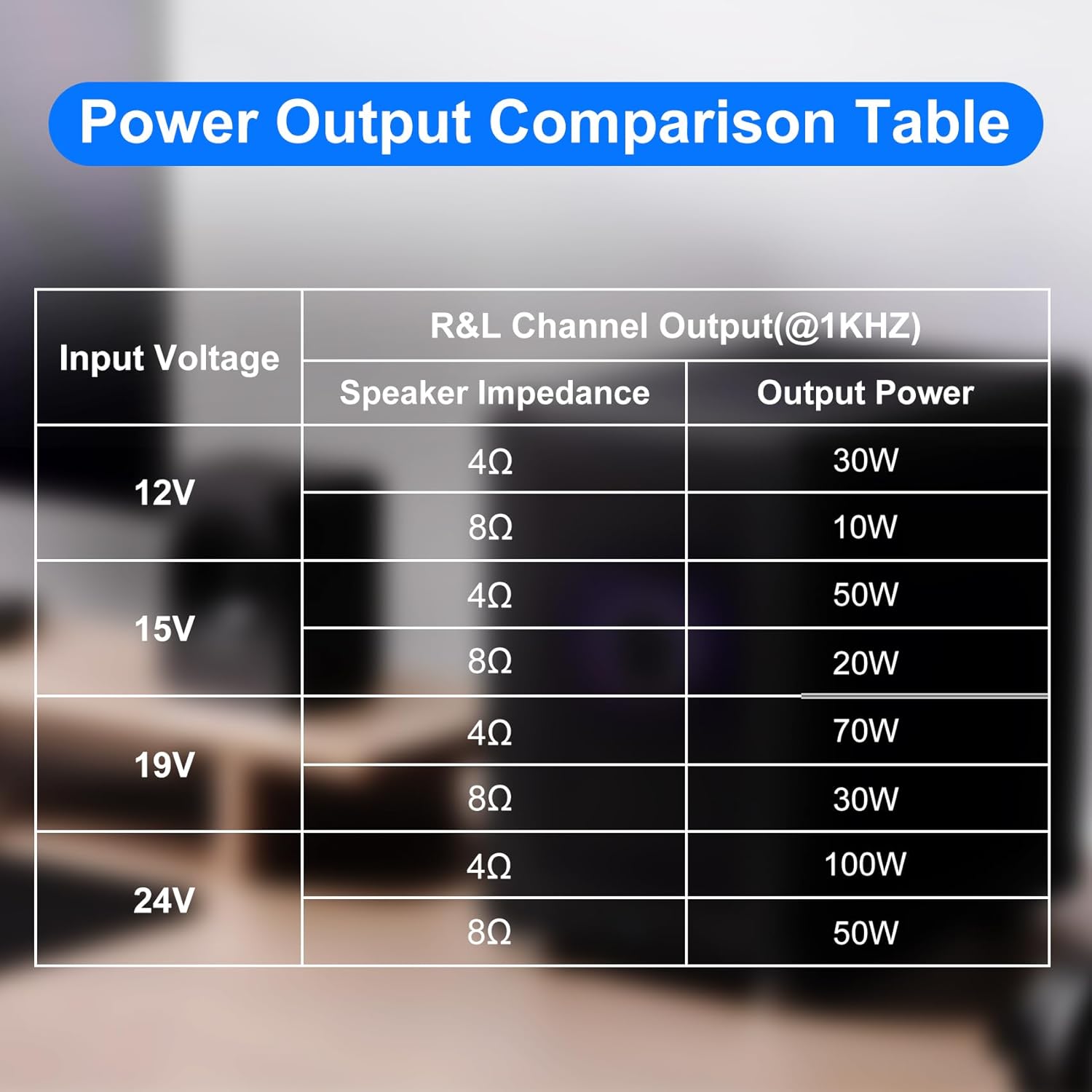
Power Output Comparison Table
| Input Voltage | Impedenza tal-Ispeaker | Qawwa tal-Ħruġ |
|---|---|---|
| 12V | 4Ω | 30W |
| 8Ω | 10W | |
| 15V | 4Ω | 50W |
| 8Ω | 20W | |
| 19V | 4Ω | 70W |
| 8Ω | 30W | |
| 24V | 4Ω | 100W |
| 8Ω | 50W |
Nota: Żgura biżżejjed voltage and current input for optimal power output. Higher voltage and current generally result in higher power. For the same conditions, a smaller speaker impedance yields greater power.
9. Manutenzjoni
- Żomm il- amplifier board clean and free from dust. Use a soft, dry cloth for cleaning.
- Avoid exposing the board to moisture, extreme temperatures, or direct sunlight.
- Ensure proper ventilation to prevent overheating, especially during prolonged use at high volumes.
- Do not attempt to modify the circuit board, as this may void the warranty and cause damage.
10 Issolvi l-problemi
Ebda Qawwa
- Check if the power supply is correctly connected and providing the specified DC 7-24V.
- Ensure the power adapter is functional.
- Verify the volume knob is long-pressed to turn on the device.
Ebda Ħoss
- Iċċekkja l-konnessjonijiet tal-ispiker għal polarità korretta u twaħħil sikur.
- Ensure the volume is turned up on both the amplifier board and the audio source.
- Verify the correct audio input mode is selected (Bluetooth, AUX, USB).
- Jekk qed tuża l-Bluetooth, kun żgur li l-apparat huwa mqabbad u konness sew.
- If using AUX, check the audio cable for damage and ensure it's fully inserted.
- If using USB, ensure the USB drive is formatted correctly and contains compatible audio files.
Ħoss Mgħawġ
- Naqqas il-volum fuq iż-żewġ amplifier board and the audio source.
- Check speaker impedance compatibility (3-8Ω).
- Ensure the power supply provides adequate current for the desired output power.
- Inspect speaker wires for shorts or damage.
Skonnettjar Bluetooth
- Ensure the Bluetooth device is within the 16.4 feet (5 meters) range.
- Iċċekkja għal interferenza minn apparat ieħor mingħajr fili.
- Ipprova erġa' qabbad l-apparat Bluetooth.
TWS Pairing Issues
- Ensure both ZK-1001B boards are the same model and are not already connected to another Bluetooth device.
- Follow the triple-click procedure carefully on one board to initiate pairing.
- Ensure both boards are within close proximity during pairing.
11. Garanzija u Appoġġ
Daakro is committed to providing high-quality audio equipment.
- Garanzija: The product typically comes with a 30-day warranty. Please refer to your purchase documentation for specific terms.
- Servizz tal-Klijent: Online customer service is available for support.
- Kuntatt: For any issues or inquiries, please contact Daakro customer support through the platform of purchase or visit the official Daakro store for more information.


