1. Introduzzjoni
Grazzi tax-xiriasing the AFK Portable Bluetooth Wireless Speaker. This manual provides detailed instructions on how to set up, operate, and maintain your speaker to ensure optimal performance and longevity. Please read this manual thoroughly before using the product.

Image: The AFK Portable Bluetooth Wireless Speaker, showcasing its sleek black cylindrical design and top-mounted control panel.
2. Prodott Aktarview
2.1 Kontenut tal-Pakkett
Jekk jogħġbok iċċekkja l-kontenut tal-pakkett meta tiftaħ il-kaxxa:
- AFK Portable Bluetooth Wireless Speaker (Model: BT528) with built-in microphone
- Cable tal-Iċċarġjar tal-USB-C
- Manwal għall-Utent (dan id-dokument)
2.2 Karatteristiċi ewlenin
- Awdjo b'saħħtu: Dual speaker drivers and a powerful amplifier module deliver up to 15W room-filling sound with punchy bass, strong midranges, and crisp highs.
- Konnettività Bluetooth 5.3: Offers fast and stable wireless connections up to 100 feet (30 meters).
- Dawl Dinamika: Features 5 colorful light colors and 6 light modes, including mixed color flashes that sync with the beat, creating an immersive audio-visual experience.
- Ħin tal-logħob estiż: Enjoy up to 18 hours of non-stop playback at 50% volume, or up to 4 hours at 100% volume. Lights can be turned off to conserve battery.
- Għażliet multipli ta' daqq: Supports wireless playback via Bluetooth, TF card, or USB.
- Mikrofonu inkorporat: Allows for clear hands-free calls within the Bluetooth range.
- Disinn portabbli: Lightweight and easy to carry for indoor and outdoor use.
- Iċċarġjar USB-C: Convenient and modern USB-C port for charging.
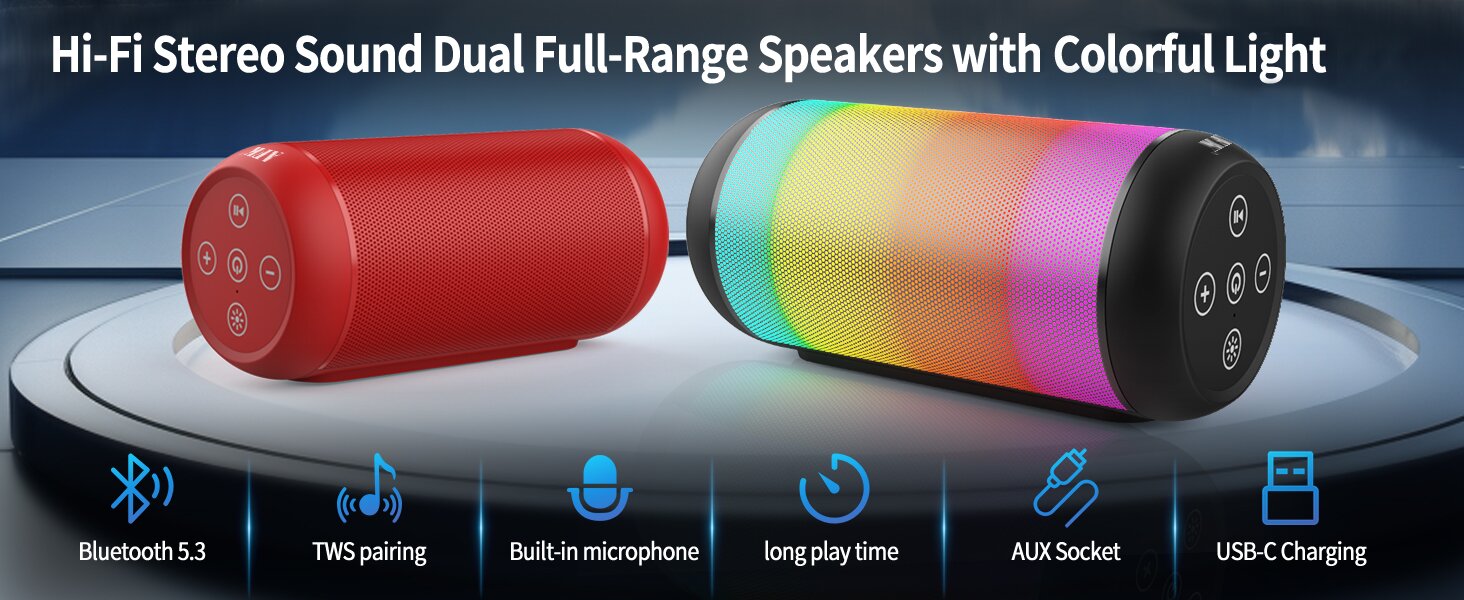
Image: An illustration highlighting key features such as Bluetooth 5.3, TWS pairing, built-in microphone, long playtime, AUX socket, and USB-C charging.

Immaġni: Maqtugħ view illustrating the dual speaker drivers responsible for deep bass stereo sound.

Image: The speaker positioned on a table, demonstrating its 360-degree stereo surround sound capability.
3. Setup
3.1 Iċċarġjar tal-Ispeaker
Before first use, fully charge the speaker. Connect the provided USB-C charging cable to the speaker's USB-C port and the other end to a compatible USB power adapter (not included) or a computer's USB port. The charging indicator light will show the charging status and turn off when fully charged.
3.2 Tixgħel/Jitfi
- Biex tixgħel: Agħfas u żomm il-buttuna tal-Enerġija (⏻) for a few seconds until you hear an audible prompt and the indicator lights turn on.
- Biex titfi: Agħfas u żomm il-buttuna tal-Enerġija (⏻) again for a few seconds until you hear an audible prompt and the indicator lights turn off.
4. Istruzzjonijiet Operattivi
4.1 Tqabbil tal-Bluetooth
Biex tqabbad l-ispiker tiegħek ma' apparat li jaħdem bil-Bluetooth:
- Ensure the speaker is powered on and in Bluetooth pairing mode (indicated by a flashing blue light, or similar).
- Fuq l-apparat tiegħek (smartphone, tablet, kompjuter), attiva l-Bluetooth u fittex apparati disponibbli.
- Select "AFK Speaker" (or similar name) from the list of found devices.
- Once paired, the speaker will indicate a successful connection (e.g., a solid blue light or an audible prompt).
L-ispiker jipprova awtomatikament jerġa' jikkonnettja mal-aħħar apparat imqabbad meta jixgħel, jekk l-apparat ikun fil-firxa u l-Bluetooth ikun attivat.

Image: The speaker in an outdoor setting, demonstrating its stable Bluetooth connection range of up to 100 feet.
4.2 Daqq tal-Mużika
- Modalità Bluetooth: Once paired, play music from your connected device. Use the speaker's control buttons or your device to control playback (play/pause, next/previous track, volume).
- Modalità Karta TF/USB: Insert a TF card or USB drive containing audio files into the respective port on the speaker. The speaker will automatically switch to the corresponding mode and begin playback. Use the speaker's control buttons for navigation.
4.3 Controlling Lights
The speaker features dynamic lighting modes. Press the Light button (💡) to cycle through the available light modes:
- Tarry Sky Light
- Nifs
- Jiċċirkola
- Aqbeż malajr
- Rhythm Jump
- Dawl Mitfi

Immaġni: Aktar minnview of the six dynamic light modes available on the speaker, including options to turn the lights off.
4.4 Immaniġġjar tas-Sejħiet
With the built-in microphone, you can manage calls when connected via Bluetooth:
- Tweġiba/Tmiem Sejħa: Agħfas il-buttuna Play / Pause (⏸) darba.
- Irrifjuta Sejħa: Agħfas u żomm il-buttuna Play/Pause (⏸) għal 2 sekondi.

Image: The speaker being used for a hands-free call, demonstrating the functionality of its built-in microphone.
5. Manutenzjoni
5.1 Tindif
To clean your speaker, use a soft, dry, lint-free cloth. Do not use abrasive cleaners, alcohol, or chemical solvents, as these may damage the surface or internal components. Avoid getting moisture into any openings.
5.2 Ħażna
Store the speaker in a cool, dry place away from direct sunlight, extreme temperatures, and humidity. If storing for an extended period, charge the battery periodically (e.g., every 3 months) to maintain battery health.
6 Issolvi l-problemi
If you encounter issues with your AFK Portable Bluetooth Wireless Speaker, please refer to the following common problems and solutions:
| Problema | Kawża Possibbli | Soluzzjoni |
|---|---|---|
| L-ispiker ma jixgħelx. | Batterija baxxa; Il-buttuna tal-qawwa mhux ippressata sew. | Iċċarġja l-ispiker kompletament. Agħfas u żomm il-buttuna tal-Power għal ftit sekondi. |
| L-ebda ħoss. | Volume too low; Device not connected; Incorrect input mode. | Increase speaker and device volume. Ensure Bluetooth is connected or TF/USB is inserted correctly. |
| Ma tistax tqabbad permezz tal-Bluetooth. | Speaker not in pairing mode; Device Bluetooth off; Too far from speaker; Interference. | Ensure speaker is in pairing mode. Turn device Bluetooth off/on. Move device closer to speaker. Avoid strong electromagnetic interference. |
| Ħajja qasira tal-batterija. | High volume usage; Lights constantly on; Battery degradation. | Reduce volume. Turn off lights when not needed. Battery life naturally decreases over time. |
7. Speċifikazzjonijiet
| Karatteristika | Dettall |
|---|---|
| Isem tal-Mudell | BT528-BLK-US |
| Tip ta' Kelliem | Kelliem Doppju |
| Teknoloġija tal-Konnettività | Bluetooth 5.3 |
| Teknoloġija tal-Komunikazzjoni mingħajr Fili | Bluetooth |
| Medda Massimu | 30 Metru (100 pied) |
| Qawwa tal-Ħruġ Massimu tal-Ispeaker | 11 Watts (RMS) / 15 Watts (Peak) |
| Rispons ta' Frekwenza | 20 KHz (Nota: Dan x'aktarx huwa l-limitu massimu, il-medda tipika hija 20Hz-20kHz) |
| Modalità tal-Ħruġ tal-Awdjo | Stereo |
| Surround Sound Channel Konfigurazzjoni | 2.0 |
| Karatteristika Speċjali | Built-in Microphone, Dynamic LED Lights |
| Użi Rakkomandati | Indoor/Outdoor, Sport, Outdoor Events, Parties, Camping, Mixi |
| Apparati Kompatibbli | Desktop, Smartphone, Tablet, Television |
| Sors tal-Enerġija | Li jaħdem bil-batterija (batterija tal-jone tal-litju inkluża) |
| Metodu ta' Kontroll | Touch Buttuni |
| Kulur | Iswed |
| Dimensjonijiet tal-Prodott | 2.6"D x 6.1"W x 2.6"Għ (6.6cm D x 15.5cm W x 6.6cmGħ) |
| Piż tal-oġġett | 1.26 libbra (0.57 Kilogrammi) |
| Huwa Waterproof | FALZ |
8. Garanzija u Appoġġ
8.1 Garanzija Limitata
This AFK Portable Bluetooth Wireless Speaker comes with a limited warranty. Please refer to the warranty card included in your package or contact AFK customer support for specific terms and conditions. The warranty typically covers manufacturing defects and malfunctions under normal use.
8.2 Appoġġ għall-Klijent
For further assistance, technical support, or warranty claims, please contact AFK customer service. Contact information can usually be found on the product packaging, the official AFK webis-sit, jew permezz tal-kanali ta' appoġġ tal-bejjiegħ bl-imnut tiegħek.


