Introduzzjoni
The Caliber RMD035DAB-FBA is a versatile 1DIN car radio designed to enhance your in-car audio experience. It features an integrated DAB+/FM tuner for crystal clear radio reception, Bluetooth for hands-free calling and audio streaming, and multiple media playback options including USB and Micro SD cards. This manual provides detailed instructions for installation, operation, and maintenance to ensure optimal performance and longevity of your device.

Figure 1: Caliber RMD035DAB-FBA Car Radio Front View
Karatteristiċi Ewlenin
- Sintonizzatur DAB+: Enjoy crystal clear and interference-free digital radio reception.
- FM Tuner with RDS-EON: Standard FM radio reception with enhanced data services.
- Konnettività Bluetooth: Għal sejħiet hands-free u streaming awdjo mingħajr fili.
- USB & Micro SD Playback: Supports music playback from USB drives and Micro SD cards up to 32GB.
- Iċċarġjar tal-USB ta' 2.1A: Conveniently charge your smartphone or other devices.
- Aux-in: Qabbad apparati awdjo esterni permezz ta' jack ta' 3.5mm.
- Output RCA: Għall-konnessjoni esterna ampliifikaturi.
- Appoġġ għall-Format tal-Awdjo: Compatible with MP3, WMA, APE, FLAC, and AAC audio formats.
- Standard 1 DIN Size: Easy installation in most vehicles.

Figura 2: Aktarview of Product Features and Connectivity Options
Setup u Installazzjoni
This unit is designed for standard 1 DIN installation. Professional installation is recommended to ensure proper wiring and functionality.
1. Kontroll ta' Qabel l-Installazzjoni
- Ensure your vehicle has a standard 1 DIN opening.
- Verify that your vehicle's wiring harness is compatible with the ISO connection provided.
- Disconnect the vehicle's negative battery terminal before starting installation to prevent electrical shorts.
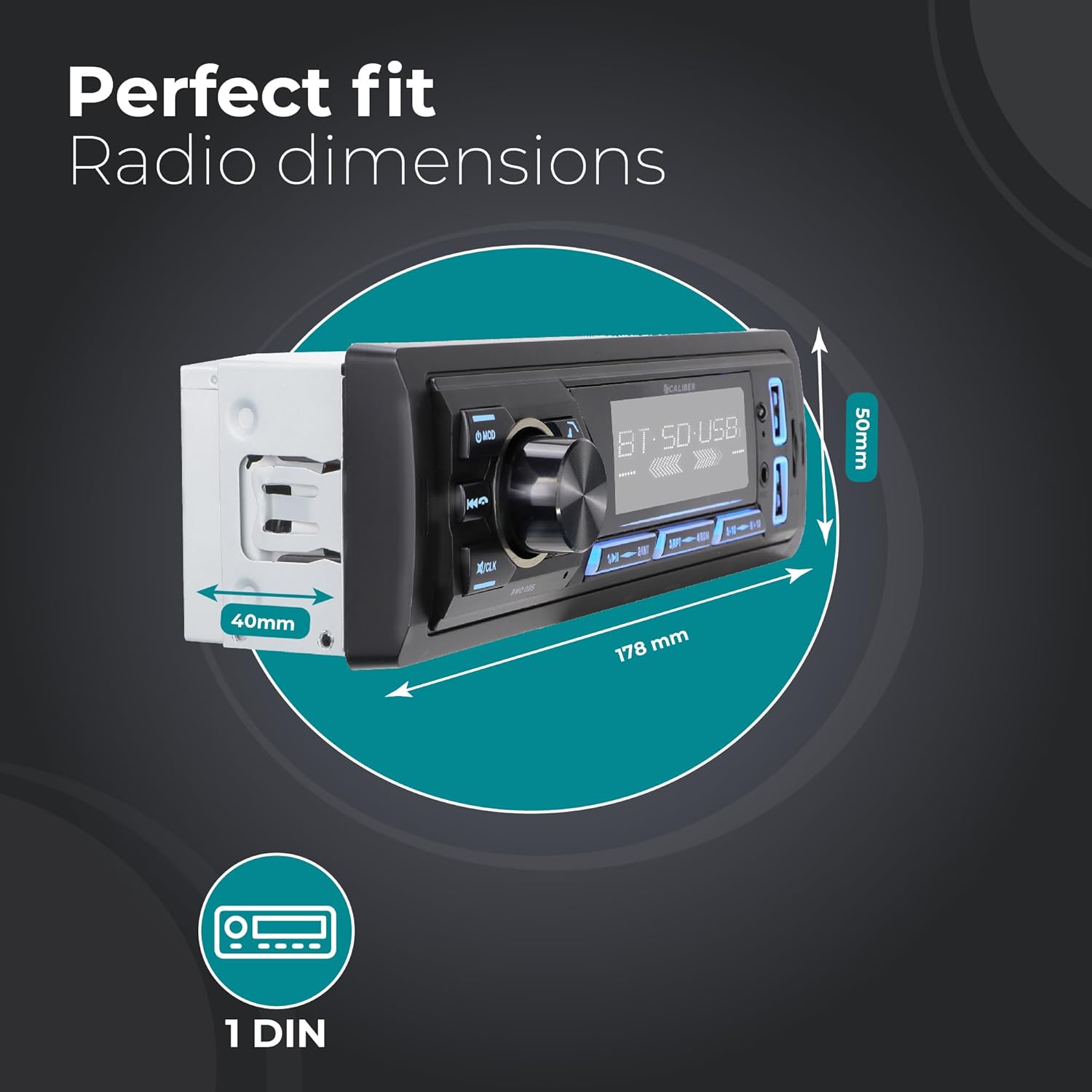
Figure 3: Car Radio Dimensions for Installation
2. Konnessjonijiet tal-Wiring
Connect the following wires according to the ISO standard and your vehicle's wiring diagram:
- Yellow (Constant Power): Connect to a constant 12V supply.
- Red (Accessory Power): Connect to a switched 12V supply (ignition).
- Iswed (Art): Connect to a good chassis ground point.
- Blue (Antenna/Amplifier Remote): Connect to power antenna or external ampTixgħel mill-bogħod tal-lifier.
- Wajers tal-Ispeaker: Connect to your vehicle's speakers (e.g., White/White-Black for Front Left, Grey/Grey-Black for Front Right, Green/Green-Black for Rear Left, Purple/Purple-Black for Rear Right).
- DAB+ Antenna: Connect the included DAB+ antenna to the dedicated DAB antenna input on the rear of the unit. Position the antenna for optimal reception.
- Outputs RCA: Jekk tuża esterna amplifier, connect RCA cables from the unit's RCA outputs to the ampinputs tal-lifier.
3. Immuntar tal-Unità
- Slide the metal mounting sleeve into the vehicle's dashboard opening until it locks into place.
- Carefully slide the car radio unit into the mounting sleeve until it clicks securely.
- Erġa' qabbad it-terminal negattiv tal-batterija tal-vettura.
Istruzzjonijiet Operattivi
1. Kontrolli Bażiċi
- Power On/Off: Agħfas il- MOD Agħfas il-buttuna fil-qosor biex tixgħel l-unità. Agħfas u żomm biex titfi.
- Kontroll tal-Volum: Dawwar il-pum ċentrali l-kbir biex taġġusta l-volum.
- Għażla tal-Modalità: Agħfas il- MOD button repeatedly to cycle through available modes (DAB+, FM, Bluetooth, USB, SD, AUX).
- Siekta: Briefly press the volume knob to mute/unmute audio.
- Issettjar tal-Arloġġ: Agħfas u żomm il- /CLK Agħfas il-buttuna biex tidħol fil-modalità tas-settings tal-arloġġ. Uża l-pum tal-volum biex taġġusta s-sigħat/minuti u agħfas il-pum biex tikkonferma.
2. Tħaddim tar-Radju (DAB+/FM)
- L-Għażla tal-Banda: Fil-modalità tar-radju, agħfas il-buttuna BND button to switch between FM1, FM2, FM3, DAB1, DAB2, DAB3.
- Skennjar Awtomatiku: Agħfas u żomm il- BND button to perform an automatic scan and store strong stations.
- Irfinar Manwali: Uża l- ◀◀ (track preċedenti) u ▶▶ (next track) buttons for manual tuning.
- Stazzjonijiet issettjati minn qabel: Agħfas il-buttuni 1 biex 6 to select a stored preset station. To store a station, tune to the desired frequency, then press and hold one of the preset buttons (1-6) until you hear a beep.

Figure 4: DAB+ Digital Radio Experience
3. Operazzjoni Bluetooth
- Tqabbil:
- Agħżel il-modalità Bluetooth billi tuża l- MOD button. The display will show "BT".
- Fuq it-tagħmir mobbli tiegħek, ippermetti l-Bluetooth u fittex tagħmir disponibbli.
- Select "Caliber RMD035DAB" (or similar name) from the list. If prompted for a PIN, enter "0000".
- Ladarba jkun imqabbad, id-displej se juri "CONNECTED".
- Sejħat mingħajr idejn:
- Irrispondi Sejħa: Agħfas il- ☎ (phone) button.
- Tmiem Sejħa: Agħfas il- ☎ (phone) button again.
- Irrifjuta Sejħa: Agħfas u żomm il- ☎ (phone) button.
- Ċempil mill-ġdid: Fil-modalità Bluetooth, agħfas il- ☎ (phone) button twice to redial the last number.
- Streaming tal-Awdjo Bluetooth (A2DP):
- Once paired, audio from your device will stream to the car radio.
- Uża l- ◀◀ u ▶▶ buttuni biex taqbeż il-binarji.
- Use the volume knob to adjust playback volume.

Figure 5: Bluetooth Audio Streaming Interface
4. USB and Micro SD Playback
- Insert a USB drive into the USB port or a Micro SD card into the SD card slot. The unit will automatically switch to USB/SD mode and begin playback.
- Uża l- ◀◀ u ▶▶ buttuni biex taqbeż il-binarji.
- Agħfas il- 1/▶▶ buttuna biex tilgħab/pawża.
- The unit supports MP3, WMA, APE, FLAC, and AAC audio formats.
5. AUX-in Operation
- Connect an external audio device (e.g., MP3 player) to the AUX-in port on the front panel using a 3.5mm audio cable.
- Agħżel il-modalità AUX billi tuża l- MOD buttuna.
- Ikkontrolla d-daqq u l-volum mill-apparat estern konness.
6. Funzjoni tal-Iċċarġjar tal-USB
- The dedicated USB charging port (2.1A) allows you to charge your smartphone or other USB-powered devices.
- Simply connect your device's USB charging cable to the charging port.

Figure 6: USB Charging Port Location
Manutenzjoni
- Tindif: Use a soft, dry cloth to clean the unit's front panel. For stubborn dirt, dampen the cloth slightly with water. Do not use abrasive cleaners or solvents.
- Temperatura: Evita li tesponi l-unità għal temperaturi estremi, dawl tax-xemx dirett għal perjodi twal, jew umdità għolja.
- Ventilazzjoni: Ensure the unit has adequate ventilation to prevent overheating. Do not block ventilation openings.
- Sostituzzjoni tal-fjus: If the unit does not power on, check the fuse located on the rear of the unit. Replace with a fuse of the same rating (typically 10A).
Issolvi l-problemi
| Problema | Kawża Possibbli | Soluzzjoni |
|---|---|---|
| Ebda qawwa | Wajers mhux korretti; Fjus maħruq; Batterija tal-vettura baxxa. | Iċċekkja l-konnessjonijiet tal-enerġija u tal-art. Ibdel il-fjus jekk ikun inħaraq. Iċċekkja l-batterija tal-vettura. |
| L-ebda ħoss | Volum baxx wisq; Mute attivat; Wajers tal-ispiker skonnettjati/xortjati. | Żid il-volum. Iddiżattiva l-mute. Iċċekkja l-wajers tal-ispiker. |
| Riċeviment ħażin tar-radju (FM) | Antenna mhux konnessa; Żona b'sinjal dgħajjef; Antenna bil-ħsara. | Ensure antenna is properly connected. Try tuning to a stronger station. Inspect antenna for damage. |
| Poor radio reception (DAB+) | DAB+ antenna not connected/positioned correctly; Out of DAB+ service area. | Ensure DAB+ antenna is connected and positioned optimally (e.g., on windshield). Check DAB+ coverage in your area. |
| Bluetooth mhux pairing | Unit not in pairing mode; Device Bluetooth off; Incorrect PIN. | Ensure unit is in Bluetooth mode. Turn Bluetooth on/off on device. Enter "0000" if prompted for PIN. |
| Il-USB/SD mhux qed jilgħab | Mhux appoġġjat file format; Korrott files; USB/SD card not inserted correctly; Card capacity too large. | Tiżgura files are supported (MP3/WMA/APE/FLAC/AAC). Reinsert USB/SD. Use cards up to 32GB. |
Speċifikazzjonijiet
| Karatteristika | Dettall |
|---|---|
| Brand | Kalibru |
| Mudell | RMD035DAB-FBA |
| Tip | 1 DIN Car Radio |
| Teknoloġija tal-Konnettività | Bluetooth, USB |
| Karatteristiċi Speċjali | Built-In Bluetooth, RCA Output, FM Tuner, DAB+, Hands-Free Calling, USB Charging (2.1A) |
| Apparati Kompatibbli | Smartphone, Tablet, Personal Computer |
| Modalità tal-Ħruġ tal-Awdjo | Stereo |
| Konfigurazzjoni tal-Kanal tal-Ħoss Surround tal-Ispeaker | 4.0 |
| Output Wattage | 4 x 55 Watts |
| Formati Awdjo Appoġġjati | MP3, WMA, APE, FLAC, AAC |
| USB/Micro SD Capacity | Sa 32GB |
| Dimensjonijiet tal-Prodott (L x W x H) | 17.8 x 4 x 5 ċm (7.01 x 1.57 x 1.97 pulzieri) |
| Piż tal-oġġett | 500 g (1.1 lbs) |
Garanzija u Appoġġ
Specific warranty details for the Caliber RMD035DAB-FBA are not provided in this manual. Please refer to the warranty card included with your product packaging or visit the official Caliber webis-sit għall-aktar informazzjoni aġġornata dwar il-garanzija u kuntatti tal-appoġġ għall-klijenti.
For technical assistance or service inquiries, please contact Caliber customer support through their official channels.


