Introduzzjoni
The 1MORE SonoFlow-Pro Noise Cancelling Headphones (Model HQ51) are designed to deliver an unparalleled audio experience with advanced noise cancellation and extended battery life. This manual provides essential information for setting up, operating, and maintaining your headphones.
Karatteristiċi ewlenin:
- Hi-Res Audio Excellence: Experience unparalleled sound with dual Hi-Res gold certification. The 1MORE SonoFlow Pro noise cancelling headphones use LDAC technology to deliver three times the data of standard Bluetooth, offering rich, detailed audio that brings your music to life.
- Immersive Sound with 40mm Drivers: These over ear bluetooth headphones feature 40mm diamond-like drivers that produce clear, balanced sound with a frequency response up to 40kHz, ensuring you hear every detail, from the deepest bass to the highest treble.
- All-Day Comfort and Fit: Designed with ultra-lightweight materials and soft protein leather ear cushions, SonoFlow Pro over the ear headphones offer an adjustable fit that stays comfortable, even during long listening sessions, making them ideal for work or travel, or just relaxing.
- Advanced QuietMax Noise Cancellation: Block out distractions with QuietMax dual-feed technology, which reduces external noise by more than 42dB. These noise cancelling headphones are ideal for noisy environments like subways, airports, or busy streets.
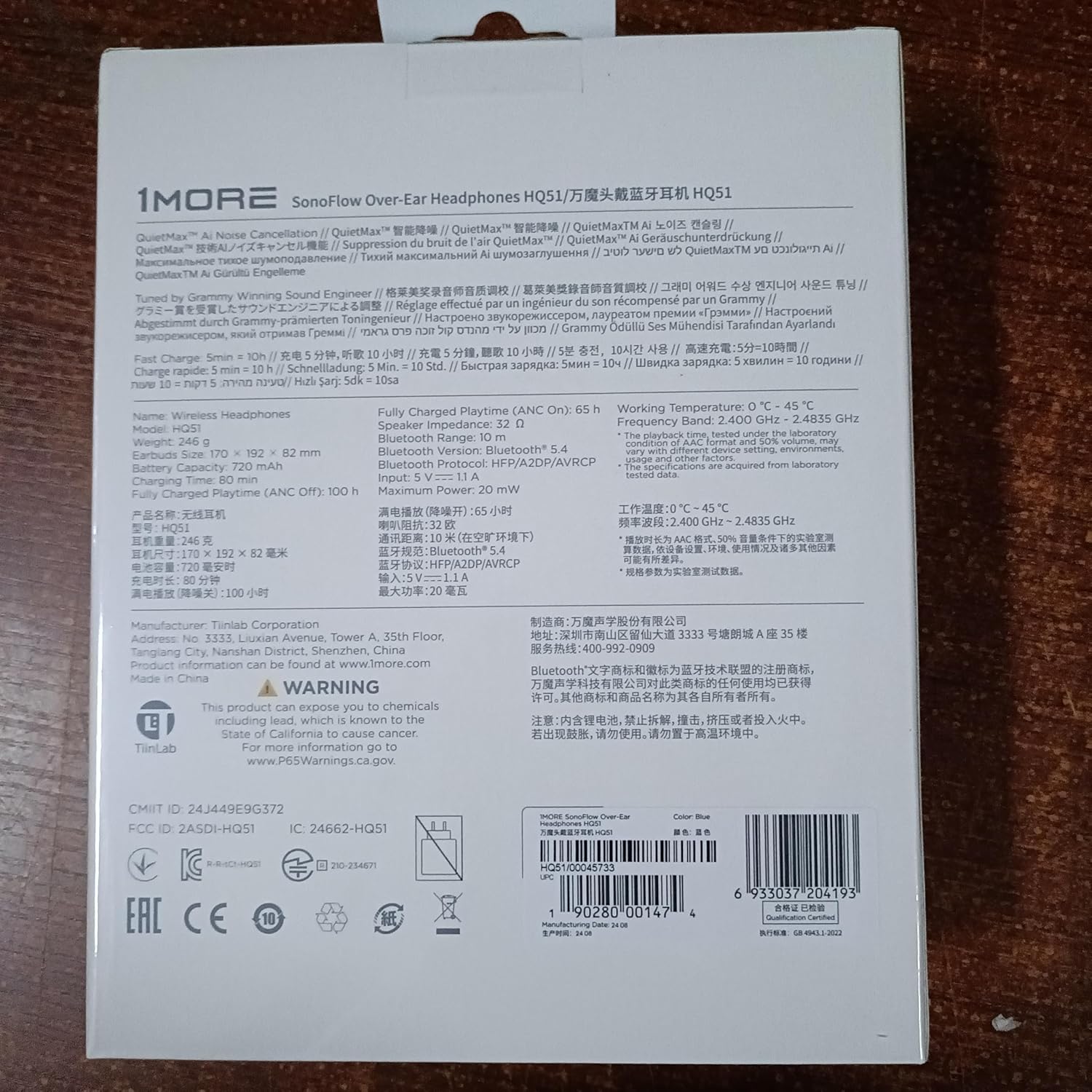
- Long-Lasting Battery with Quick Charge: Keep the music going with up to 100 hours of playtime in standard mode and 65 hours with ANC on. A quick 5-minute charge gives you an extra 10 hours of playtime, ensuring your over ear bluetooth headphones are always ready when you are.
- Precision-Tuned by Grammy-Winning Engineer: Enjoy studio-quality sound wherever you go. These bluetooth headphones over the ear are tuned by Grammy-winning engineer Luca Bignardi to deliver a natural, balanced listening experience, ensuring your music sounds just as the artist intended.
- Crystal Clear Calls with Intelligent Voice Recognition: Whether in a busy office or on the go, 1MORE over the ear headphones ensure your voice is heard clearly. The advanced microphone and AI noise reduction algorithm make every call crisp and clear, no matter the environment.
- Wired and Wireless Flexibility: These over the ear headphones include a 3.5mm audio cable, offering seamless switching between wired and wireless modes. Perfect for audiophiles, content creators, or saving battery, these noise cancelling headphones provide the versatility you need.
- Konnessjoni b'Tagħmir Doppju: The HQ51 noise cancelling headphones can connect with two devices at the same time. In the 1MORE app (not 1MORE music), go to settings and select Experimental Features > Dual-device Connections.
X'hemm fil-Kaxxa
Your 1MORE SonoFlow-Pro headphones package includes:
- 1MORE SonoFlow Pro Headphone
- Kawża tal-Ġarr
- Manwal għall-Utent
- Cable Awdjo 3.5mm
- Iċċarġjar Cable
Prodott Overview
Familiarize yourself with the physical components and controls of your SonoFlow-Pro headphones.

Kontrolli:
The controls are intuitively placed on the right earcup for easy access.

- Volum 'il fuq/Niżżel: Short press for volume adjustment.
- Traċċa 'l Quddiem/Lura: Long hold Volume Up for previous track, Long hold Volume Down for next track.
- Multi-function Button (ANC/Transparency): Toggles between ANC (Active Noise Cancellation), Transparent mode, and ANC Off.
- Buttuna tal-Enerġija/Daqq/Pawża: Long press to power on/off. Short press to play/pause music.
Setup
Tqabbil Inizjali:
- Ensure your SonoFlow-Pro headphones are fully charged.
- Power on the headphones by long-pressing the power button.
- On your device (smartphone, tablet, laptop), enable Bluetooth and search for "1MORE SonoFlow-Pro".
- Agħżel il-headphones biex tqabbadhom. Se tinstema' twissija bil-vuċi biex tikkonferma li l-konnessjoni rnexxiet.
1MORE App Integration:
For full functionality and customization, download the 1MORE app (not 1MORE Music) from your device's app store.

- Download the "1MORE" app from the App Store or Google Play.
- Open the app and follow the on-screen instructions to connect your HQ51 headphones.
- The app allows for firmware updates, custom EQ settings, and control over listening modes.
Istruzzjonijiet Operattivi
Modi ta' Smigħ:
The SonoFlow-Pro headphones offer versatile listening modes to suit your environment.
- Kanċellazzjoni Attiva tal-Ħoss (ANC): Reduces external noise by over 42dB, ideal for noisy environments.
- Modalità Trasparenti: Allows you to hear your surroundings without removing the headphones, useful for conversations or awareness.
- ANC Mitfi: Standard listening mode without noise cancellation or transparency.
Toggle between these modes using the dedicated button on the right earcup or through the 1MORE app.
Daqq u Sejħiet:
- Play/Pawsa: Short press the Power/Play/Pause button.
- Tweġiba/Tmiem Sejħa: Short press the Power/Play/Pause button.
- Irrifjuta Sejħa: Long press the Power/Play/Pause button.
- Aġġustament tal-Volum: Agħfas fil-qosor il-buttuni Volum 'il Fuq (+) jew Volum 'l Isfel (-).
Batterija u Iċċarġjar
The SonoFlow-Pro headphones offer exceptional battery life and fast charging capabilities.
- Ħin tal-logħob (ANC Mitfi): Sa 100-il siegħa fuq ħlas wieħed.
- Ħin tal-logħob (ANC Mixgħul): Sa 65-il siegħa fuq ħlas wieħed.
- Ħlas veloċi: Ċarġ ta' 5 minuti jipprovdi madwar 10 sigħat ta' daqq.

Use the provided USB-C charging cable to charge your headphones. The LED indicator will show charging status.
Konnettività
Your headphones support the latest Bluetooth technology and versatile connection options.
- Bluetooth 5.4: Jiżgura konnessjoni mingħajr fili stabbli u effiċjenti.
- Appoġġ LDAC: For Hi-Res Wireless Audio transmission, delivering superior sound quality.
- Konnessjoni b'ħafna punti: Connect to two devices simultaneously (e.g., laptop and phone). Pause media on one device to play on the other. Incoming calls will automatically switch.
- Konnessjoni bil-fili: Use the included 3.5mm audio cable for wired listening. Note: Headphones must be powered on for wired listening with ANC/EQ features.

Kwalità tal-ħoss
The 1MORE SonoFlow-Pro headphones are engineered for exceptional audio performance.
- 40mm Diamond-Like Carbon (DLC) Dynamic Drivers: Deliver clear, balanced sound across a wide frequency range (20 Hz - 40,000 Hz).
- Awdjo b'Riżoluzzjoni Għolja u LDAC: Certified for Hi-Res Audio, supporting LDAC codec for high-fidelity wireless sound.
- EQ customizable: Use the 1MORE app to select from 12 preset EQs or create your own custom sound profile with the 10-band equalizer.


Manutenzjoni u Kura
- Żomm il-headphones nodfa billi timsaħhom b'ċarruta ratba u niexfa.
- Evita li tesponi l-headphones għal temperaturi estremi, umdità, jew likwidi. Il-headphones mhumiex reżistenti għall-ilma.
- Store the headphones in their protective carrying case when not in use to prevent damage.
- Evita li twaqqa’ l-headphones jew li tissottomettihom għal impatti qawwija.
Issolvi l-problemi
Kwistjonijiet Komuni u Soluzzjonijiet:
| Problema | Soluzzjoni |
|---|---|
| Il-headphones mhux se jixegħlu. | Kun żgur li l-headphones huma ċċarġjati. Qabbadhom ma' sors ta' enerġija billi tuża l-kejbil USB-C. |
| Ma tistax tqabbad mat-tagħmir. | Make sure Bluetooth is enabled on your device and the headphones are in pairing mode. Try forgetting the device in your Bluetooth settings and re-pairing. |
| L-ebda ħoss jew volum baxx. | Check headphone and device volume levels. Ensure headphones are correctly paired. If using wired, ensure the cable is fully inserted and headphones are powered on for full features. |
| Kwalità ħażina tas-sejħa. | Ensure the microphone is not obstructed. Avoid very noisy environments. Disconnect from other paired devices if experiencing interference. |
| Problemi bil-konnessjoni tal-app. | Close and reopen the 1MORE app. Ensure Bluetooth is active and headphones are connected to your device. |
Speċifikazzjonijiet
| Karatteristika | Dettall |
|---|---|
| Isem tal-Mudell | SonoFlow Pro (HQ51) |
| Kontroll tal-Ħoss | Active Noise Cancellation (QuietMax ANC) |
| Teknoloġija tal-Konnettività | Mingħajr fili (Bluetooth 5.4), Bil-fili (Jack ta' 3.5 mm) |
| Codecs Awdjo | LDAC, SBC, AAC |
| Rispons ta' Frekwenza | 20 Hz - 40,000 Hz |
| Daqs tas-Sewwieq tal-Awdjo | 40mm Diamond-Like Carbon (DLC) Dynamic Driver |
| Ħin tal-logħob (ANC Mitfi) | Sa 100 sigħat |
| Ħin tal-logħob (ANC Mixgħul) | Sa 65 sigħat |
| Ħlas Mgħaġġel | 5 minuti ta' ħlas għal sagħtejn ta' daqq |
| Piż | 0.53 Kilogrammi (1.16 libbra) |
| Materjal | Ġilda Faux |
| Livell ta 'Reżistenza għall-Ilma | Mhux Reżistenti għall-Ilma |
Garanzija u Appoġġ
1MORE products come with a limited warranty. For detailed warranty information, product support, or to contact customer service, please visit the official 1MORE webis-sit jew irreferi għall-karta tal-garanzija inkluża fl-imballaġġ tal-prodott tiegħek.
For further assistance, you may also refer to the contact information provided in the 1MORE app under 'Settings' > 'Support'.


