1. Introduzzjoni
Thank you for choosing the PUTRIMS K12 Google TV Projector. This manual provides essential information for the safe and efficient use of your new projector. Please read it thoroughly before operation and keep it for future reference.

Figure 1.1: PUTRIMS K12 Projector
2. Informazzjoni dwar is-Sigurtà
- Tħarisx direttament fil-lenti tal-proġettazzjoni meta tkun qed taħdem.amp hija mixgħula.
- Żgura ventilazzjoni xierqa biex tevita sħana żejda.
- Żomm il-proġettazzjoni 'l bogħod mill-ilma jew likwidi oħra.
- Uża biss l-adapter tal-enerġija pprovdut.
- Evita li tpoġġi l-proġekter fuq uċuħ instabbli.
- Tippruvax tiżżarma jew issewwi l-proġettur int stess. Ikkuntattja l-appoġġ għall-klijenti għall-għajnuna.
3. Kontenut tal-Pakkett
Ivverifika li l-oġġetti kollha huma preżenti fil-pakkett tiegħek:
- Proġettur PUTRIMS K12
- Kontroll mill-bogħod
- Korda tal-Enerġija
- Cable HDMI
- Qoxra tal-Lenti tal-Proġekter
- Manwal għall-Utent (dan id-dokument)
4. Prodott Aktarview
The PUTRIMS K12 projector is designed for a versatile home theater and business experience. It features a sleek design with essential ports for connectivity.
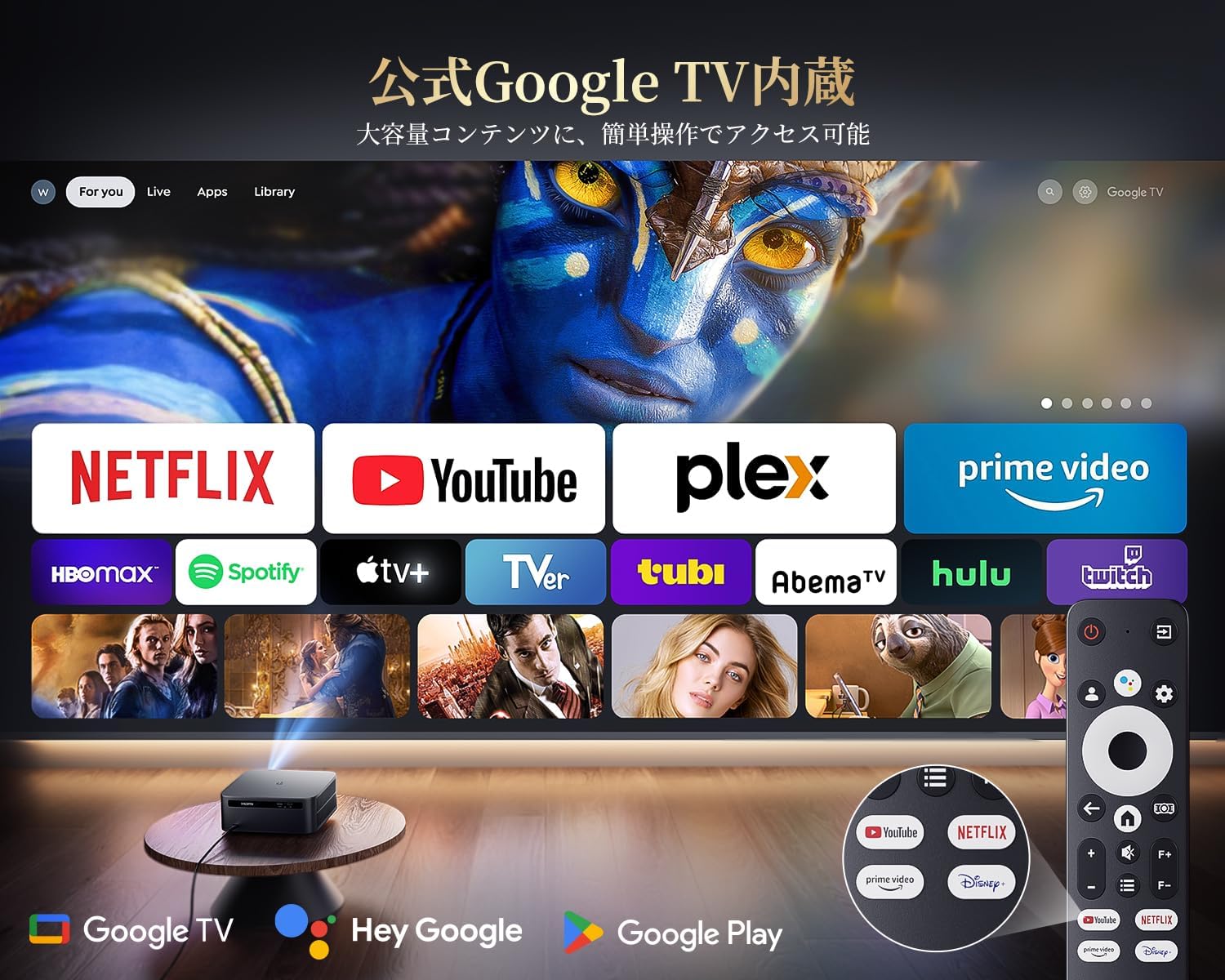
Figura 4.1: Quddiem view of the K12 Projector, showing the lens and auto-focus sensors.

Figura 4.2: Wara view of the K12 Projector, highlighting HDMI, USB, and audio ports.
Video 4.1: General product overview and feature demonstration of the PUTRIMS K12 projector.
5. Setup
5.1 Konfigurazzjoni Fiżika
The K12 projector offers flexible installation options to suit various environments:
- Poġġiment fuq il-mejda: Poġġi l-proġettur fuq wiċċ stabbli u ċatt.
- Immuntar ta' tripod: Use the M5 screw hole on the bottom to attach a tripod.
- Immuntar tas-saqaf: Securely mount the projector to the ceiling using a compatible mount.
- Immuntar tal-ħajt: Attach the projector to a wall using a suitable bracket.

Figure 5.1: Diverse installation methods for the K12 Projector.
5.2 Qawwa Inizjali
- Qabbad il-korda tad-dawl mal-proġekter u żbokk tad-dawl.
- Agħfas il-buttuna tal-qawwa fuq il-proġekter jew il-kontroll mill-bogħod biex tixgħel.
- The projector will automatically perform auto-focus and keystone correction.
5.3 Network Connection (WiFi)
To access online streaming services and updates, connect your projector to a WiFi network:
- Navigate to the 'Settings' menu on the projector.
- Agħżel 'Netwerk' jew 'Settings tal-WiFi'.
- Turn on WiFi and select your desired network from the list.
- Daħħal il-password jekk tintalab u qabbad.
5.4 Konnessjoni Bluetooth
Connect external Bluetooth speakers or headphones for enhanced audio:
- Mur f''Settings' u agħżel 'Bluetooth'.
- Turn on Bluetooth and put your external device into pairing mode.
- Agħżel it-tagħmir tiegħek mil-lista biex tqabbadh.
5.5 Screen Mirroring
Share content from your mobile devices or computer wirelessly:
- For iOS devices (Airplay): Ensure your iOS device and the projector are connected to the same WiFi network. Open the 'iOS Cast' interface on the projector. On your iOS device, open Control Center, tap 'Screen Mirroring', and select 'K12-xxxx' from the list.
- For Android/Windows devices (Miracast): Ensure your device and the projector are connected to the same WiFi network. Open the 'Miracast' interface on the projector. On your Android/Windows device, enable screen mirroring/cast feature and select 'K12-xxxx' to connect.
6. Istruzzjonijiet Operattivi
6.1 Karatteristiċi tat-TV tal-Google
The PUTRIMS K12 comes with official Google TV, providing access to a vast library of content and applications.
- Apps Streaming: Directly access Netflix, Disney+, YouTube, Prime Video, Hulu, and many more with a single click.
- Google Play Store: Download and install over 10,000 applications and games.
- Aġġornamenti regolari: The projector receives periodic updates to enhance security and stability.

Figure 6.1: Google TV interface with popular streaming applications.
6.2 Kontroll tal-Vuċi
Utilize the Google Voice Assistant for convenient control of your projector and content.
- Press the voice control button on your remote.
- Speak commands such as "Open Netflix," "Play One Piece," "Tell me the weather," or "Increase volume."

Figure 6.2: Using the Google Voice Assistant with the remote control.
6.3 Aġġustament tal-Immaġni
The K12 projector features advanced image adjustment capabilities for optimal viewing.
- Auto Focus: The projector automatically adjusts the focus for a clear image upon startup or movement.
- Korrezzjoni Auto Keystone: It automatically corrects horizontal and vertical trapezoidal distortions, ensuring a perfectly rectangular image even from an angle.
- Funzjoni Żum: Adjust the screen size from 50% to 100% without moving the projector.
- Proporzjon tal-aspett: Supports 4:3 and 16:9 aspect ratios.
- Luminożità u Kuntrast: Customize brightness and contrast settings to your preference.

Figure 6.3: Automatic focus and keystone correction in action.

Figure 6.4: Projection distances and corresponding screen sizes (100", 120", 150").
6.4 Konnessjoni ta' Apparati Esterni
The K12 projector offers multiple connectivity options for various devices:
- HDMI ARC: Connect to soundbars, laptops, gaming consoles (Switch, PS5), or DVD players.
- USB: Play media directly from USB memory sticks.
- Port tal-Awdjo ta' 3.5mm: Qabbad ma' sistemi awdjo esterni.

Figure 6.5: Seamless connection with various external devices.
7. Manutenzjoni
7.1 Tindif tal-Lentijiet
To maintain optimal image quality, regularly clean the projector lens.
- Kun żgur li l-proġekter huwa mitfi u splaggjat.
- Gently wipe the lens with a soft, lint-free cloth or a cotton swab.
- For stubborn smudges, use a lens cleaning solution specifically designed for optical surfaces.
- Avoid using abrasive materials or harsh chemicals that could damage the lens.
8 Issolvi l-problemi
Hawn huma soluzzjonijiet għal kwistjonijiet komuni li tista' tiltaqa' magħhom:
- No image/signal: Check all cable connections (HDMI, power). Ensure the correct input source is selected on the projector.
- Immaġini mċajpra: The projector features auto-focus. If the image remains blurry, ensure the lens is clean and there are no obstructions.
- Image not rectangular: The projector has auto-keystone correction. If issues persist, ensure the projector is placed on a stable surface and try repositioning it.
- Ebda ħoss: Check volume settings on both the projector and connected devices. Ensure external speakers are properly connected via Bluetooth or audio cable. If using HDMI ARC, verify the connection and settings.
- WiFi/Bluetooth connection issues: Ensure the projector and your device are within range of the router/device. Restart both the projector and the router/device.
- App crashes or malfunctions (for unofficial Android TV versions): The PUTRIMS K12 has an official Google TV license, which ensures stability. If you experience issues, ensure your system is updated.
Għal aktar assistenza, jekk jogħġbok irreferi għat-taqsima tal-Garanzija u l-Appoġġ.
9. Speċifikazzjonijiet
| Karatteristika | Deskrizzjoni |
|---|---|
| Brand | PUTRIMS |
| Mudell | K12 |
| Luminożità | 1500 lumens ANSI |
| Riżoluzzjoni | 1080P FHD (4K Support) |
| Sistema Operattiva | Google TV Uffiċjali |
| Kontroll tal-Vuċi | Google Voice Assistant |
| Iffoka | Omnidirectional Auto Focus |
| Korrezzjoni Keystone | Horizontal & Vertical Auto Keystone Correction |
| Zoom | 50% -100% |
| Daqs tal-Iskrin Max | 300 pulzieri |
| WiFi | WiFi 6 |
| Bluetooth | Bluetooth 5.3 |
| Output Awdjo | 20W HIFI Speaker, 3.5mm Audio Jack |
| Portijiet tad-dħul | HDMI ARC, USB |
| Dimensjonijiet | 40.5 x 30.2 x 17 ċm |
| Piż | 3.31 kg |
10. Garanzija u Appoġġ
PUTRIMS is committed to providing excellent customer service. Your K12 projector comes with comprehensive support:
- Servizz ta' wara l-bejgħ: 24 hours a day, 365 days a year.
- Appoġġ Tekniku: Professional technical assistance is available.
- Garanzija: Free exchange or 100% refund guarantee for initial defects or natural failures under normal use.
If you have any questions or require assistance, please contact PUTRIMS customer support via the official email address provided in your product packaging or on the official websit.


