1. Introduzzjoni
This instruction manual provides essential information for the safe and effective use of your DALY Smart Battery Management System (BMS) for LiFePO4 battery packs. The DALY Smart BMS is designed to protect your battery pack from various electrical conditions, ensuring its longevity and safe operation. This specific model is a 4S 12V 40A BMS with an integrated Bluetooth module for smart monitoring and control.
2. Informazzjoni dwar is-Sigurtà
Please read and understand all safety instructions before installation and operation. Failure to follow these instructions may result in electric shock, fire, serious injury, or property damage.
- Always wear appropriate personal protective equipment (PPE), including insulated gloves and eye protection, when working with batteries.
- Ensure all connections are correct and secure before applying power. Incorrect wiring can cause damage to the BMS, battery pack, or connected equipment.
- Do not short-circuit the battery terminals or the BMS output.
- Keep the BMS away from water, moisture, and flammable materials. The BMS has waterproof protection, but direct exposure to water should be avoided during installation and operation.
- Do not attempt to disassemble or repair the BMS. Contact qualified personnel for service.
- Ensure proper ventilation around the battery pack and BMS during charging and discharging.
- Verify that the BMS voltage and current ratings match your battery pack requirements.
3. Prodott Aktarview
3.1 Karatteristiċi ewlenin
- Protezzjoni Komprensiva: Includes overcharge, overdischarge, overcurrent, short circuit, and temperature protection.
- Disinn li ma jgħaddix ilma minnu: Features patented glue-injection process for enhanced durability and protection against moisture.
- Parallel Connection Support: Integrated parallel module prevents large current impacts when connecting battery packs in parallel.
- High-Power Pre-charging: Effectively avoids false protection triggers from high startup currents.
- Passive Balancing: 100mA passive balancing extends the lifespan of lithium batteries.
- Monitoraġġ intelliġenti: Bluetooth module allows viewing and setting battery parameters via a mobile app or PC software.
- Konsum ta 'Enerġija Baxxa: Designed for efficient operation with minimal resting current.
3.2 Components and Appearance
The DALY Smart BMS unit typically includes the main BMS board, a Bluetooth module, output wires, NTC temperature sensors, and a manual. The main board is compact and designed for efficient heat dissipation.

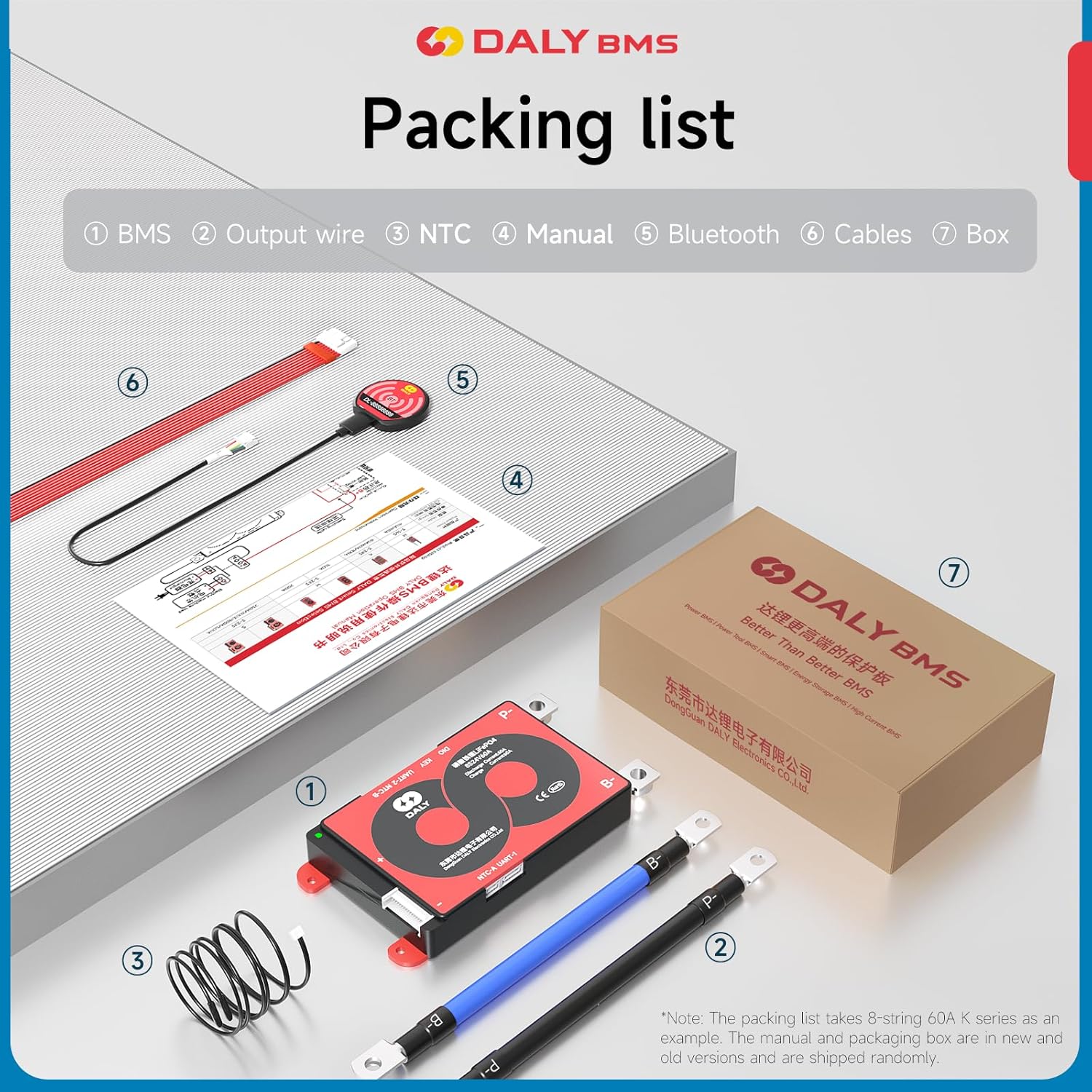
4. Speċifikazzjonijiet
The following table details the specifications for the DALY Smart BMS LifePO4 4S 12V 40A model:

| Parametru | Valur |
|---|---|
| Tip ta' Prodott | LiFePO4 4S 40A common port with balance |
| Kurrent ta' Skarigu | 40A |
| Overdischarge Current | 60±1.2A |
| Kurrent tal-Iċċarġjar | 40A |
| Overcharge Current | 60±1.2A |
| Ħlas żejjed Voltage | 3.75V±0.05V (Can be set) |
| Overdischarge Voltage | 2.2V±0.05V (Can be set) |
| Ħlas Voltage | 14.6V |
| Model (Specific) | LifePO4 4S 12V 40A |
| Model (General Series) | 4S-24S 12V-72V 40A-500A (Specific: R10K for 3-10S series) |
| Dimensjonijiet (L x W x H) | 123 x 65 x 14 mm (4.84 x 2.56 x 0.55 pulzieri) |
| Wajer tal-Ħruġ | 10AWG/100mm |
| Balance Cable | 24AWG/300mm |
| Piż | 170-210g (6.0-7.4 ounces) |
| Manifattur | Dongguan Daly Electronics Co., Ltd. |
5. Setup u Installazzjoni
Proper installation is crucial for the safe and correct operation of the BMS. Refer to the wiring diagram provided with your specific battery pack and BMS model for precise connections. The following are general steps:
- Prepare the Battery Pack: Ensure all individual battery cells are balanced and at a similar voltage level before connecting the BMS.
- Qabbad il-Wajers tal-Bilanċ: Connect the balance wires from the BMS to each cell of your LiFePO4 battery pack in the correct order (B0, B1, B2, B3, B4 for a 4S pack). Always connect the lowest voltage first (B0 to the negative terminal of the first cell) and proceed upwards. Warning: Incorrect balance wire connection order can severely damage the BMS.
- Connect Main Power Wires:
- Connect the main negative terminal of the battery pack to the B- terminal on the BMS.
- Connect the main positive terminal of the battery pack to the P+ terminal on the BMS.
- Connect the load/charger negative terminal to the P- terminal on the BMS.
- Connect NTC Temperature Sensor: Attach the NTC sensor to a central cell or area of the battery pack to monitor temperature.
- Qabbad il-Modulu Bluetooth: Plug the Bluetooth module into the designated port on the BMS.
- Qawwa Inizjali: After all connections are verified, apply power to the system. The BMS should activate.
For detailed wiring diagrams, please refer to the manual included in your product packaging or contact DALY support.
6. Istruzzjonijiet Operattivi
6.1 Kontroll tal-APP Intelliġenti
The DALY Smart BMS features a Bluetooth module that allows for convenient monitoring and control via a dedicated mobile application or PC software. This enables real-time data viewing and parameter adjustments.
- Niżżel l-App: Fittex għal the official DALY BMS app on your smartphone's app store (iOS/Android) or download the PC software from the DALY websit.
- Qabbad permezz tal-Bluetooth: Enable Bluetooth on your device. Open the DALY BMS app and search for available devices. Select your BMS (usually identified by a unique ID).
- Parametri tal-Monitor: The app's main interface will display critical battery information, including:
- Volum ġenerali tal-batterijatage u kurrenti.
- Ċellula individwali voltages.
- Battery State of Charge (SOC).
- Temperature readings from NTC sensors.
- Balancing status and current.
- Protection status (e.g., overcharge, overdischarge, overcurrent).
- Aġġusta Settings: Within the app, you can adjust various parameters such as overcharge/overdischarge voltage thresholds, temperature limits, and balancing settings. Exercise caution when modifying parameters, as incorrect settings can damage the battery or BMS.


6.2 Konnessjoni Parallel
The DALY Smart BMS supports parallel connection of multiple battery packs. The integrated parallel module helps manage current impacts during connection. When connecting multiple battery packs in parallel, ensure all packs have similar voltage levels before connecting them. Consult a qualified technician for complex parallel configurations.
7. Manutenzjoni
Regular maintenance helps ensure the optimal performance and longevity of your DALY Smart BMS and battery pack.
- Spezzjoni Viżwali: Periodically inspect the BMS and all connections for any signs of damage, corrosion, or loose wiring.
- Indafa: Keep the BMS and battery pack clean and free from dust and debris. Use a dry, soft cloth for cleaning.
- Monitoraġġ tat-temperatura: Regularly check the battery temperature via the app to ensure it operates within safe limits.
- Ċellula Voltage Monitoraġġ: Use the app to monitor individual cell voltages to detect any imbalance early. The passive balancing feature will help, but severe imbalances may require manual intervention or professional service.
- Aġġornamenti tal-Firmware: Check the DALY website or app for any available firmware updates for your BMS model to ensure you have the latest features and bug fixes.
8 Issolvi l-problemi
If you encounter issues with your DALY Smart BMS, consider the following troubleshooting steps:
| Problema | Kawża Possibbli | Soluzzjoni |
|---|---|---|
| Il-BMS mhux qed jixgħel / L-ebda output |
|
|
| Kwistjonijiet ta 'konnessjoni Bluetooth |
|
|
| Ċelloli tal-batterija żbilanċjati |
|
|
| Overcurrent protection triggers frequently |
|
|
If the problem persists after attempting these solutions, please contact DALY customer support.
9. Garanzija u Appoġġ
DALY is committed to providing quality products and customer satisfaction. Your DALY Smart BMS comes with a quality guarantee and technical support.
- Garanzija tal-Kwalità: The product is manufactured under strict quality control standards and is ISO/FCC/RoHS/PSE/CE approved.
- Servizz tal-Klijent: DALY provides 24-hour one-on-one customer service and technical support.
- Informazzjoni ta' Kuntatt: If you have any questions, require technical assistance, or need to report an issue, please feel free to contact DALY customer support through the official website or your purchase channel.


