1. Introduzzjoni
This manual provides detailed instructions for the safe and effective use of your Zoom H1 XLR Handy Recorder. The H1 XLR is a portable audio recording device designed for musicians, podcasters, filmmakers, and content creators, featuring 32-bit float recording technology and versatile input options. Please read this manual thoroughly before operating the device to ensure proper functionality and to prevent damage.
2. Prodott Aktarview
2.1. Komponenti u Kontrolli
Familiarize yourself with the various parts and controls of your H1 XLR recorder.

Figura 2.1: Quddiem View of Zoom H1 XLR
This image displays the front of the Zoom H1 XLR, highlighting the two XLR/TRS combo input jacks at the top, the monochrome OLED display in the center, and the main control buttons including Record, Play/Pause, Stop, Menu, and navigation buttons.
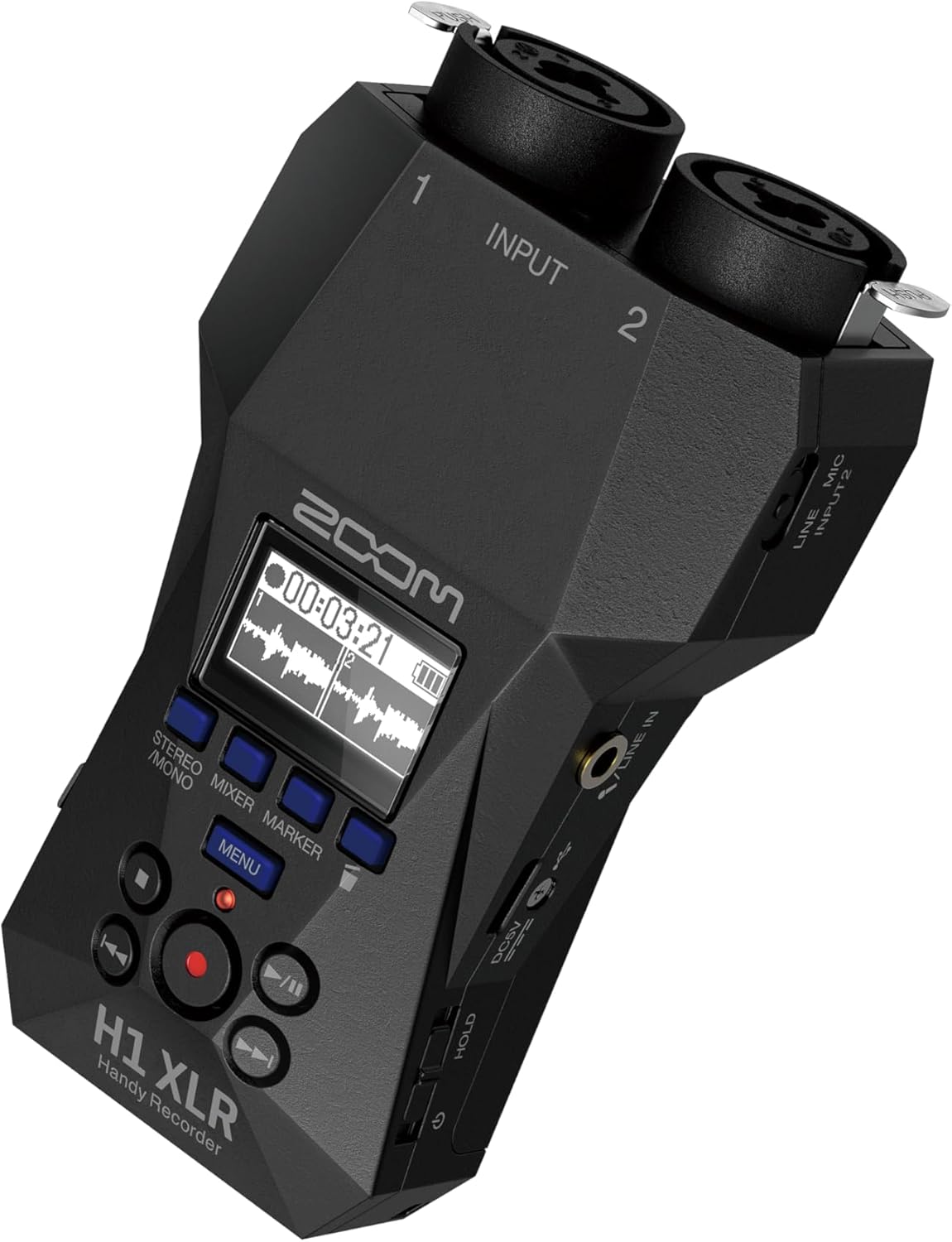
Figura 2.2: Angolat View with Side Controls
Dan angolat view of the H1 XLR shows the side panel, which includes the LINE IN/MIC IN switch, gain adjustment knobs for inputs 1 and 2, the USB-C port, and the power/hold switch.
- XLR/TRS Combo Inputs (1 & 2): Connect XLR microphones or 1/4" TRS line-level devices.
- Display OLED: Shows recording levels, battery status, time, and menu options.
- Buttuna Rekord: Initiates and stops recording.
- Buttuna tal-menu: Aċċessa s-settings u l-għażliet tas-sistema.
- Buttuni tan-Navigazzjoni: Used for menu navigation and playback control.
- LINE IN / MIC IN Switch: Selects input type for the 3.5mm stereo jack.
- Buttuni tal-Gwadann: Aġġusta s-sensittività tad-dħul għal kull kanal.
- Port USB-C: For data transfer, power, and use as an audio interface.
- 3.5mm Stereo Jack: For connecting external microphones or line-level sources.
- Ħruġ tal-headphones: 3.5mm stereo jack for monitoring audio.
- Swiċċ tal-Enerġija/Żamma: Turns the unit on/off and locks controls.
3. Setup
3.1. Installazzjoni tal-batterija
- Kun żgur li l-unità tkun mitfija.
- Iftaħ l-għatu tal-kompartiment tal-batterija fuq wara tal-unità.
- Insert two AA batteries, observing the correct polarity (+/-) as indicated inside the compartment.
- Agħlaq l-għatu tal-kompartiment tal-batterija sew.
The H1 XLR supports alkaline, NiMH, and lithium AA batteries. Battery life is approximately 10 hours with alkaline batteries.
3.2. Installazzjoni tal-Kard MicroSD
- Kun żgur li l-unità tkun mitfija.
- Locate the microSD card slot on the side of the unit.
- Insert a microSD card (up to 1TB capacity supported) into the slot until it clicks into place. Ensure the card is inserted in the correct orientation.
- To remove, gently push the card until it clicks out, then pull it from the slot.
A microSD card is required for recording audio. Format the card using the H1 XLR's menu before first use.
3.3. Tixgħil / Mitfi
- Biex Tixgħel: Slide the Power/Hold switch upwards and hold for a few seconds until the display illuminates.
- Biex Tifi: Slide the Power/Hold switch upwards and hold for a few seconds until the display turns off.
- Funzjoni ta' Żomm: Slide the Power/Hold switch downwards to the 'HOLD' position to lock all buttons and prevent accidental operation during recording or transport.
4. Operazzjoni Bażika
4.1. Connecting Microphones and Line Devices
- Mikrofoni XLR: Connect XLR cables from your microphones to the XLR/TRS combo inputs (1 and 2) at the top of the unit. Ensure the cables lock securely.
- 1/4" TRS Line Devices: Connect 1/4" TRS cables from line-level sources to the XLR/TRS combo inputs (1 and 2).
- Input Stereo ta' 3.5mm: For external stereo microphones or line-level devices, connect to the 3.5mm stereo jack. Use the LINE IN / MIC IN switch to select the appropriate input level.

Figure 4.1: Connecting XLR Cables
This image shows a user holding the H1 XLR with two XLR cables securely connected to the top input jacks, demonstrating the device's readiness for external microphone input.
4.2. Reġistrazzjoni Awdjo
- Connect your audio source(s).
- Power on the H1 XLR.
- Adjust the input gain for each channel using the dedicated gain knobs. Monitor the levels on the OLED display to ensure they are not clipping. The 32-bit float recording feature provides significant headroom, reducing the risk of clipping.
- Agħfas il- Rekord button once to enter record-standby mode. The record indicator will flash.
- Agħfas il- Rekord button again to start recording. The record indicator will illuminate steadily.
- Biex tieqaf tirrekordja, agħfas Waqqaf buttuna. Ir-reġistrat file will be saved to the microSD card.
4.3. Monitoraġġ tal-Awdjo
Connect headphones to the 3.5mm headphone output jack to monitor your audio in real-time during recording or playback. Adjust the headphone volume using the dedicated volume controls.
4.4. Daqq
- Mur fuq dak mixtieq file bl-użu tal-buttuni tan-navigazzjoni.
- Agħfas il- Play/Pawsa buttuna biex tibda d-daqq.
- Agħfas il- Play/Pawsa buttuna għal darb'oħra biex tieqaf daqq.
- Agħfas il- Waqqaf buttuna biex twaqqaf il-plejbek.
5. Karatteristiċi Avvanzati
5.1. USB Audio Interface Functionality
The H1 XLR can function as a 2-input/2-output USB audio interface for your computer or mobile device. Connect the H1 XLR to your computer or smartphone via the USB-C port. Select 'Audio Interface' mode from the device's menu. This allows you to record directly to your digital audio workstation (DAW) or use the H1 XLR as a high-quality microphone input for live streaming or video conferencing.

Figure 5.1: H1 XLR as an Audio Interface
This image illustrates the Zoom H1 XLR connected to a smartphone, showcasing its capability to serve as an external audio interface for mobile recording or streaming setups.
5.2. 32-Bit Float Recording
The H1 XLR utilizes 32-bit float recording technology, which captures audio with an extremely wide dynamic range. This virtually eliminates the need to set input gain levels precisely, as clipping is prevented even with very loud signals. You can adjust the volume of your recordings in post-production without introducing noise or distortion.
6. Manutenzjoni
- Keep the unit dry and clean. Avoid exposure to extreme temperatures, humidity, or direct sunlight.
- Uża drapp artab u niexef biex tnaddaf il-barra. Tużax prodotti tat-tindif jew solventi li joborxu.
- Neħħi l-batteriji jekk l-unità ma tkunx se tintuża għal perjodu estiż biex tevita t-tnixxija.
- Handle the microSD card with care to prevent data loss.
7 Issolvi l-problemi
- L-unità ma tixgħelx: Check battery installation and charge level. Ensure the Power/Hold switch is not in the 'HOLD' position.
- L-ebda awdjo rreġistrat: Verify a microSD card is inserted and formatted. Check input connections and gain levels. Ensure the correct input type (LINE IN/MIC IN) is selected.
- Kwalità fqira tal-awdjo: Check microphone connections. Ensure gain levels are appropriate (though 32-bit float minimizes clipping, extremely low levels can introduce noise). Try a different microphone or cable.
- Buttuni ma jirrispondux: Check if the Power/Hold switch is in the 'HOLD' position.
For further assistance, refer to the official Zoom support resources.
8. Speċifikazzjonijiet
| Karatteristika | Speċifikazzjoni |
|---|---|
| Numru tal-Mudell | H1 XLR |
| Format tar-reġistrazzjoni | WAV (float ta' 32-bit) |
| Inputs | 2 x XLR/TRS Locking Combo Jacks, 1 x 3.5mm Stereo Mini Jack |
| Outputs | 1 x 3.5mm Headphone/Line Output |
| Wiri | 0.96" Monochrome OLED |
| Sors tal-Enerġija | 2 x AA Batteries (Alkaline, NiMH, Lithium) or USB-C |
| Ħajja tal-batterija | Appross. 10 siegħa (alkalin) |
| Midja tal-Ħażna | microSD/microSDHC/microSDXC card (up to 1 TB) |
| Interface USB | USB Type-C (for data transfer, power, and audio interface) |
| Dimensjonijiet (W x D x H) | 5.8 x 3.8 x 1.9 pulzieri (approssimattiv) |
| Piż | 6.4 ounces / 0.4 pounds (without batteries) |
9. Informazzjoni dwar is-Sigurtà
- Tippruvax iżarma jew timmodifika l-unità.
- Evita li twaqqa' l-unità jew li tissottomettiha għal impatti qawwija.
- Żomm fejn ma jintlaħaqx mit-tfal.
- Armi l-batteriji skont ir-regolamenti lokali.
- Uża biss is-sorsi tal-enerġija u l-aċċessorji speċifikati.
10. Garanzija u Appoġġ
Għal informazzjoni dwar il-garanzija u appoġġ tekniku, jekk jogħġbok irreferi għall-paġna uffiċjali ta' Zoom. webis-sit jew ikkuntattja lid-distributur lokali tiegħek. Żomm l-irċevuta tax-xiri tiegħek bħala prova tax-xiri.


