Introduzzjoni
This manual provides detailed instructions for the NBD 4K Digital Camera, Model NBD-LK-SD-EU-2407. Designed for photography and video enthusiasts, this camera offers 4K video recording at 30 frames per second and 48-megapixel still images. It is equipped with both wide-angle and macro lenses, and features 16x digital zoom, making it suitable for various shooting scenarios, from vlogging to detailed close-ups.
X'hemm fil-Kaxxa
Upon unpacking your NBD 4K Digital Camera, please ensure all components are present:
- NBD 4K Digital Camera Body
- Lenti Wide-Angolu
- Lenti Makro
- Rechargeable Lithium-Ion Batteries (1500 mAh)
- Ċarġer tal-batterija
- Cable USB
- 32GB SD Card
- Pouch tal-kamera

Figura 1: NBD 4K Digital Camera with included accessories: wide-angle lens, macro lens, two batteries, battery charger, USB cable, 32GB SD card, and camera pouch.
Setup
1. Installazzjoni u Iċċarġjar tal-batterija
- Iftaħ l-għatu tal-kompartiment tal-batterija li jinsab fil-qiegħ tal-kamera.
- Insert the 1500 mAh lithium-ion battery, ensuring the correct orientation as indicated inside the compartment.
- Agħlaq l-għatu tal-kompartiment tal-batterija sew.
- To charge, connect the battery to the provided charger, then plug the charger into a power outlet. The indicator light on the charger will show charging status.
2. Installazzjoni tal-Kard tal-Memorja
- Sib is-slott tal-kard SD, ġeneralment ħdejn il-kompartiment tal-batterija.
- Daħħal il-kard SD ta' 32GB bil-kuntatti tal-metall iħarsu fid-direzzjoni t-tajba sakemm tikklikkja f'postha.
- Biex tneħħiha, agħfas il-karta bil-mod sakemm toħroġ 'il barra.
3. Attaching Lenses
- The camera comes with a wide-angle lens and a macro lens.
- To attach, align the lens with the camera's main lens thread and gently twist clockwise until secure.
- The wide-angle lens (Truview 0.45x) allows for capturing a broader scene.
- The macro lens (15x) is designed for extreme close-up photography.
Istruzzjonijiet Operattivi
1. Power On/Off
Agħfas u żomm il-buttuna tal-qawwa (ġeneralment tinsab fuq nett jew fil-ġenb tal-kamera) biex tixgħel jew titfi l-kamera.
2. Basic Photography and Video Recording
The camera supports 4K video recording at 30 frames per second and 48-megapixel still images.

Figura 2: Screen display indicating 48 Megapixel shooting, showing children playing outdoors. This image demonstrates the high resolution capture capability.
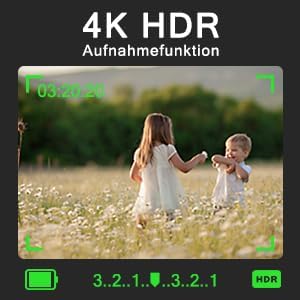
Figura 3: Screen display showing 4K HDR recording function in progress, with two children playing in a field. The image highlights the camera's ability to capture high-dynamic-range video.
3. Manual Focus (MF)
This camera supports manual focus. In either video or camera mode, gently press the camera button. A focus frame will appear on the screen, allowing you to adjust the focus to precisely capture your subject.
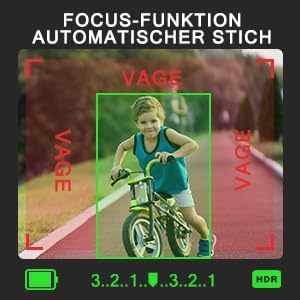
Figura 4: Screen display showing the automatic focus function, with a child on a bicycle in sharp focus within a green frame, while the background is slightly blurred. This illustrates the camera's focusing ability.
4. Zoom Diġitali
The camera features 16x digital zoom. Use the zoom controls (typically a rocker switch) to magnify your subject. Note that digital zoom may reduce image quality compared to optical zoom.

Figura 5: Four panels illustrating the 16x digital zoom capability, showing a family portrait progressively zoomed in from 1x to 16x magnification.
5. Karatteristiċi Speċjali
- Reġistrazzjoni Waqt l-Iċċarġjar: The camera supports recording while connected to a power source, ideal for extended shooting sessions.
- Scene Selections & Filter Effects: Photo and video modes offer 8 scene selections and 16 interesting filter effects. Choose your preferred option before capturing.
- Slow Motion & Time-Lapse: Utilize these modes for creative video capture.
- Continuous & Timed Shooting: Capture a series of photos rapidly or at set intervals.
- Self-Timer: Set a delay before the shutter fires for self-portraits or group shots.
- Flashlight: Use the built-in flashlight for illumination in low-light conditions.
- WebCam Funzjoni: Qabbad il-kamera ma' kompjuter permezz tal-USB biex tużaha bħala webcam.
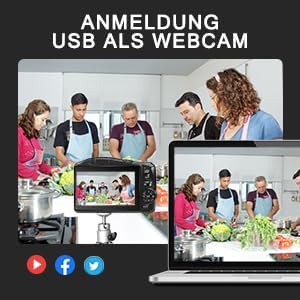
Figura 6: An image depicting the camera connected via USB to a laptop, functioning as a webcam for a video call with multiple participants in a kitchen setting. This highlights the USB webkaratteristika cam.
6. Funzjonijiet tal-buttuna
Familiarize yourself with the camera's controls for optimal use:

Figura 7: A diagram of the camera's rear panel, labeling various buttons and their functions. Key controls include: Buttuna tal-menu, Buttuna OK, Aġġustament EV, and directional controls for functions such as Sensittività għad-dawl, Dewmien, u Mute.
Manutenzjoni
1. Kura tal-batterija
- Always use the provided charger for the 1500 mAh lithium-ion battery.
- Evita li tiċċarġja l-batterija kompletament ta' spiss biex ittawwal il-ħajja tagħha.
- Aħżen il-batteriji f'post frisk u niexef meta ma tkunx qed tuża.
2. Tindif tal-Lentijiet
- Use a soft, lint-free cloth specifically designed for camera lenses.
- Għal tbajja' iebsa, uża ammont żgħir ta' soluzzjoni għat-tindif tal-lentijiet applikata fuq id-drapp, mhux direttament fuq il-lenti.
- Avoid touching the lens surface with your fingers.
3. General Camera Care
- Keep the camera away from dust, moisture, and extreme temperatures.
- Use the camera pouch for protection during transport.
- Do not attempt to disassemble the camera; refer to qualified service personnel for repairs.
Issolvi l-problemi
Kwistjonijiet Komuni u Soluzzjonijiet:
- Il-kamera ma tixgħelx: Kun żgur li l-batterija hija ċċarġjata kompletament u mdaħħla b'mod korrett.
- Kwalità fqira tal-immaġni: Check lens cleanliness, ensure proper focus, and verify lighting conditions. Digital zoom beyond certain levels can also reduce quality.
- Żball fil-karta tal-memorja: Ensure the SD card is correctly inserted and not full. Try reformatting the card (this will erase all data).
- Kamera mhux rikonoxxuta bħala webcam: Ensure the USB cable is securely connected and the camera is in webcam mode (if applicable). Check computer's device manager.
Jekk il-problemi jippersistu, jekk jogħġbok irreferi għas-sezzjoni ta' appoġġ jew ikkuntattja lis-servizz tal-konsumatur.
Speċifikazzjonijiet
| Karatteristika | Dettall |
|---|---|
| Brand | NBD |
| Isem tal-Mudell | NBD-LK-SD-EU-2407 |
| Numru tal-Mudell tal-Oġġett | NBD-LK-SD-EU-2407 |
| Teknoloġija tas-Sensor tar-Ritratti | CMOS |
| Photo Sensor Format | 1/4 pulzier |
| Massimu WebCam Image Riżoluzzjoni | 48 MP |
| Proporzjon ta' l-aspett | 16:9 |
| Appoġġjati File Format | JPEG, MP4 |
| Apertura massima | 3.5 Millimetru |
| Deskrizzjoni tal-kejl | Kejl tal-Matriċi |
| Muntaturi Kompatibbli | M42 |
| Batteriji | 1 batterija tal-jone tal-litju meħtieġa (inkluża) |
| Aġġornamenti tas-Softwer Garantiti Sa | Mhux magħruf |
Garanzija u Appoġġ
Informazzjoni dwar Garanzija
For information regarding warranty and returns, please refer to the retailer's policies where the product was purchased. Typically, products can be returned within 30 days of receipt if you change your mind. For defective or damaged products, specific return policies apply.
Appoġġ għall-Klijent
If you encounter any issues not covered in this manual or require further assistance, please contact NBD customer support through the official brand store or your point of purchase. Keep your purchase receipt and model number handy for faster service.


