1. Introduzzjoni
This manual provides detailed instructions for the proper use and maintenance of your HTC TWS9 True Wireless Bluetooth Earbuds 9. Please read this manual thoroughly before using the product to ensure optimal performance and longevity.
2. X'hemm fil-Kaxxa
- HTC TWS9 True Wireless Bluetooth Earbuds (Left and Right)
- Kawża tal-Iċċarġjar
- Cable tal-Iċċarġjar tal-USB
- Manwal għall-Utent
3. Prodott Aktarview
The HTC TWS9 earbuds feature a compact, in-ear design with a transparent charging case. They are equipped with Bluetooth 5.3 for stable connectivity and offer touch controls for various functions.

Image: HTC TWS9 True Wireless Bluetooth Earbuds 9 in purple, shown with their transparent charging case. The earbuds are visible inside the open case, and also separately above it.

Image: A person holding the HTC TWS9 charging case, highlighting its transparent lid design. The earbuds are visible inside the case.
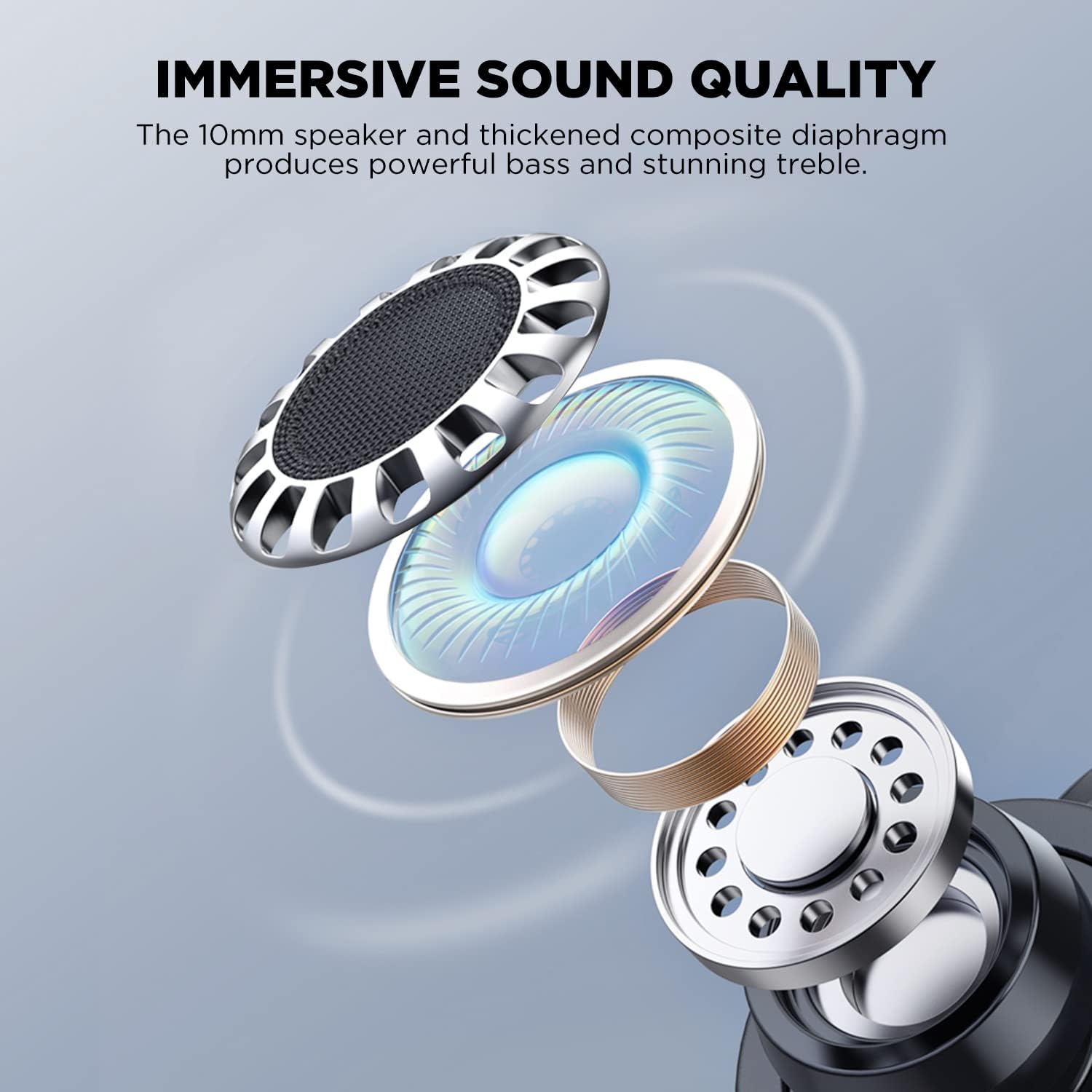
Image: An exploded diagram illustrating the internal components of an HTC TWS9 earbud, including the 10mm speaker and composite diaphragm, designed for sound quality.
4. Setup
4.1. Iċċarġjar tal-Earbuds u l-Kaxxa
Before first use, fully charge the earbuds and charging case. The case supports both wired (USB-C) and wireless charging.
- Poġġi l-earbuds fil-kaxxa tal-iċċarġjar. Kun żgur li huma mqiegħda sew.
- Iċċarġjar bil-Wajer: Connect the provided USB charging cable to the charging port on the case and to a power source.
- Iċċarġjar bla fili: Place the charging case on a compatible wireless charging pad. The charging indicator light on the case will illuminate.
- Charging typically takes approximately 43 minutes for a fast charge.

Image: The HTC TWS9 charging case placed on a wireless charging pad, indicating its wireless charging capability.
4.2. Tqabbil ma' Apparat
The HTC TWS9 earbuds utilize Bluetooth 5.3 for a fast and stable connection.
- Kun żgur li l-Bluetooth tat-tagħmir tiegħek huwa attivat.
- Iftaħ il-kaxxa tal-iċċarġjar u neħħi l-earbuds. Dawn jidħlu awtomatikament fil-modalità ta' tqabbil.
- On your device, search for Bluetooth devices and select "HTC TWS9" from the list.
- Once connected, the earbuds will automatically pair with your device upon removal from the case for subsequent uses.

Image: A smartphone screen displaying the Bluetooth settings, showing "HTC TWS9" as a connected device, illustrating the one-step pairing process.
5. Istruzzjonijiet Operattivi
5.1. Touch Kontrolli
The HTC TWS9 earbuds feature intuitive touch controls on each earbud for managing audio playback and calls.
- Play/Pawsa: Tektek jew earbud darba.
- Track li jmiss: Tektek u żomm il-earbud tal-lemin għal 2 sekondi.
- Track preċedenti: Tektek u żomm il-earbud tax-xellug għal 2 sekondi.
- Irrispondi Sejħa: Tektek jew earbud darba.
- Tmiem Sejħa: Tektek jew earbud darba.
- Tiċħad Sejħa: Tektek u żomm jew earbud għal 2 sekondi.
- Modalità tal-Logħba: Tap and hold either earbud for 2 seconds (to toggle).
- Assistent tal-Vuċi: Tektek tlieta fuq kull earbud.

Image: A visual guide to the smart touch controls on the HTC TWS9 earbuds, detailing actions for game mode, voice assistant, music playback, and call management.
5.2. Modalità Logħba
Activate Game Mode for an ultra-low latency experience (40ms), ideal for gaming. Toggle Game Mode using the touch controls as described above.

Image: A smartphone displaying a mobile game, with the HTC TWS9 earbuds and their open charging case nearby, illustrating the use of Game Mode for low-latency audio.
5.3. L-ilbies tal-Earbuds
The earbuds are designed for an ergonomic fit. Insert them gently into your ear canal and rotate slightly until they feel secure and comfortable.

Image: A person wearing an HTC TWS9 earbud, demonstrating its ergonomic design and how it fits in the ear.
6. Batterija u Iċċarġjar
The HTC TWS9 earbuds offer extended playtime and convenient charging options.
- Ħin tal-logħob tal-widna: Up to 6.5 hours on a single charge (at 50% volume).
- Ħin totali tal-logħob bil-Każ tal-Iċċarġjar: 18 sa 24 sigħat.
- Iċċarġjar veloċi: Madwar 43 minuta għal ċarġ sħiħ.
- Iċċarġjar bla fili: The charging case is compatible with most wireless charging pads.

Image: An infographic detailing the battery performance of the HTC TWS9 earbuds, including 43 minutes for fast charging, 6.5 hours of playtime, and 18 hours with the charging case.
7. Manutenzjoni
Manutenzjoni xierqa tiżgura l-lonġevità u l-prestazzjoni tal-earbuds tiegħek.
- Tindif: Naddaf il-earbuds u l-kaxxa tal-iċċarġjar regolarment b'ċarruta ratba u niexfa. Evita li tuża kimiċi ħarxa jew materjali li joborxu.
- Ħażna: Meta ma tkunx qed tużahom, aħżen il-earbuds fil-kaxxa tal-iċċarġjar tagħhom biex tipproteġihom u żżommhom iċċarġjati.
- Reżistenza għall-Ilma: The earbuds are water-resistant, making them suitable for sports and gym use. However, they are not waterproof; avoid submerging them in water.
8 Issolvi l-problemi
Jekk tiltaqa' ma' xi problemi, irreferi għas-soluzzjonijiet komuni li ġejjin:
- Il-earbuds mhux qed jitqabbdu: Ensure Bluetooth is enabled on your device and the earbuds are in pairing mode. Try resetting the earbuds by placing them back in the case and then removing them again.
- Ebda ħoss: Iċċekkja l-livell tal-volum fuq l-apparat tiegħek u kun żgur li l-earbuds huma konnessi sew.
- Kwistjonijiet tal-iċċarġjar: Verify that the charging cable is securely connected or that the wireless charging pad is functioning correctly. Ensure the earbuds are properly seated in the case.
- Il-kontrolli tattili ma jirrispondux: Ensure your fingers are clean and dry. A quick tap or firm press may be required depending on the function.
9. Speċifikazzjonijiet
| Karatteristika | Dettall |
|---|---|
| Isem tal-Mudell | TWS9 |
| Teknoloġija tal-Konnettività | Mingħajr fili (Bluetooth 5.3) |
| Verżjoni Bluetooth | 5.3 |
| Latency tal-Awdjo | 40ms (Modalità tal-Logħob) |
| Earbud Playtime | Sa 6.5-il Siegħa |
| Ħin Totali tal-Logħob (bil-Kaxxa) | 18-24 Sigħat |
| Iċċarġjar | Wireless Charging Supported, Fast Charging (43 mins) |
| Tip ta' Kontroll | Touch Control |
| Kontroll tal-Ħoss | Iżolament tal-Ħoss |
| Livell ta 'Reżistenza għall-Ilma | Reżistenti għall-Ilma |
| Materjal | Plastik Trasparenti |
| Piż tal-oġġett | 0.09 Kilogrammi (3.2 uqija) |
| UPC | 768649987303 |
10. Vidjo Uffiċjali tal-Prodott
Video: An official product video from HTC-TECH showcasing the HTC True Wireless Bluetooth Earbuds 9, highlighting various features and design aspects.
11. Garanzija u Appoġġ
For warranty information and customer support, please refer to the documentation included with your product or visit the official HTC support website. Contact information for customer service is typically provided in the Quick Start Guide or on the product packaging.


