1. Introduzzjoni
This manual provides essential instructions for setting up, operating, and maintaining your HONOR 200 5G ELI-NX9 smartphone. Please read this guide thoroughly to ensure proper use and to maximize the device's capabilities. Keep this manual for future reference.
2. Informazzjoni dwar is-Sigurtà
To prevent injury to yourself or others, and to avoid damage to your device, read all safety information before using the product. This includes:
- Tesponix l-apparat għal temperaturi estremi jew dawl tax-xemx dirett.
- Avoid using the device in wet or dusty environments.
- Use only HONOR-approved chargers and accessories.
- Tippruvax iżarma jew isewwi l-apparat lilek innifsek.
- Observe all local laws and regulations regarding mobile phone use, especially while driving.
3. Device Overview
Familiarize yourself with the physical components of your HONOR 200 5G ELI-NX9.

Figura 3.1: Quddiem u lura view of the HONOR 200 5G ELI-NX9 smartphone. The front displays the large screen with a punch-hole camera, while the back features a distinctive camera module and the HONOR branding.

Figura 3.2: Wara view of the HONOR 200 5G ELI-NX9, highlighting the oval-shaped triple camera system and the textured Moonlight White finish.
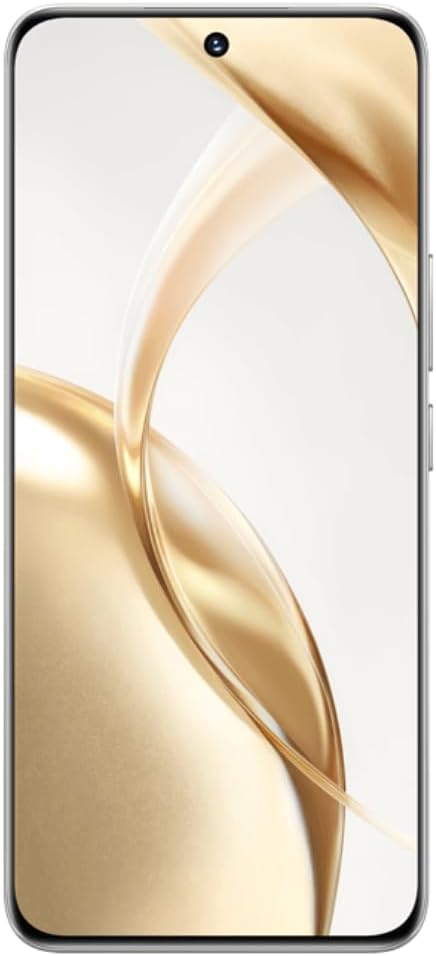
Figura 3.3: Quddiem view of the HONOR 200 5G ELI-NX9, showcasing its large, curved display and the centered punch-hole front camera.

Figura 3.4: Side profile of the HONOR 200 5G ELI-NX9, illustrating the slim design and the placement of the power and volume buttons on the right edge.
3.1 Kontenut tal-Pakkett
Kun żgur li l-pakkett tiegħek fih l-oġġetti li ġejjin:
- HONOR 200 5G ELI-NX9 Smartphone
- Cable USB
- Gwida Quick Start (dan il-manwal)
- Għodda Eject SIM
- Karta ta' Garanzija
- Adapter tal-Enerġija (jista' jvarja skont ir-reġjun)
4. Setup
4.1 Daħħal il-Kards tas-SIM
The HONOR 200 5G ELI-NX9 supports Dual SIM functionality.
- Sib it-trej tal-kard SIM fuq il-ġenb tat-tagħmir tiegħek.
- Daħħal l-għodda tal-ħruġ tas-SIM fit-toqba ż-żgħira ħdejn it-trej u imbotta bil-mod sakemm it-trej joħroġ 'il barra.
- Place your Nano-SIM cards into the designated slots on the tray, ensuring the gold contacts face down.
- Erġa' daħħal it-trej tas-SIM fl-apparat bir-reqqa.
4.2 Tixgħel/Jitfi
- Biex Tixgħel: Press and hold the Power button (located on the right side) until the HONOR logo appears.
- Biex Tifi: Agħfas u żomm il-buttuna tal-Enerġija, imbagħad agħżel "Itfi" mill-għażliet fuq l-iskrin.
- Biex terġa' tibda: Agħfas u żomm il-buttuna tal-Enerġija, imbagħad agħżel "Restart" mill-għażliet.
4.3 Konfigurazzjoni Inizjali tal-Apparat
Upon first power-on, follow the on-screen prompts to set up your device:
- Agħżel il-lingwa u r-reġjun tiegħek.
- Qabbad ma 'netwerk Wi-Fi.
- Aċċetta l-Ftehim tal-Liċenzja tal-Utent Finali.
- Idħol bil-kont Google tiegħek jew oħloq wieħed ġdid.
- Issettja l-illokkjar tal-iskrin (PIN, mudell, password, marka tas-swaba', ftuħ bil-wiċċ).
- Irrestawra d-dejta minn apparat preċedenti (mhux obbligatorju).
5. Tħaddim tat-Tagħmir Tiegħek
5.1 Navigazzjoni Bażika
Your HONOR 200 5G ELI-NX9 uses a touch-sensitive display for interaction:
- Tektek: Agħżel oġġett jew iftaħ applikazzjoni.
- Swipe: Innaviga permezz ta' skrins jew listi.
- Oqros: Iżżumja 'l ġewwa jew 'il barra fuq l-immaġnijiet u web paġni.
- Stampa Twila: Aċċessa l-menus kuntestwali jew iċċaqlaq l-ikoni.
5.2 Funzjonijiet tal-Kamera
The device features a powerful camera system:
- Kameras ta' wara: 50 MP Main, 50 MP Telephoto, 12 MP Ultra-Wide/Macro.
- Kamera ta' quddiem: 50 MP for high-resolution selfies.
- AI Portrait Engine: Enhances facial features and applies various portrait effects.
- Modalità bil-lejl: Optimizes photos in low-light conditions for clearer images.
- Reġistrazzjoni tal-vidjo: Supports 1080p video capture.
5.3 Display and Multimedia
Experience vibrant visuals on the 6.7-inch OLED display:
- Riżoluzzjoni: 1200 x 2664 pixels for sharp images and text.
- Fond tal-Kulur: 1 Billion colors for rich and accurate reproduction.
- Appoġġ HDR: Enhanced contrast and color for compatible content (Netflix, Amazon HDR certified).
5.4 Prestazzjoni u Batterija
- Proċessur: Qualcomm Snapdragon 7 Gen 3 (4 nm) Octa-core for efficient multitasking and gaming.
- Memorja: 12 GB RAM ensures smooth operation.
- Ħażna: 512 GB internal storage for apps, photos, and videos.
- Batterija: 5200 mAh Silicon-Carbon battery provides extended usage.
- Iċċarġjar veloċi: Jappoġġja ċċarġjar veloċi ta' 100W.
6. Manutenzjoni
6.1 Tindif tal-Apparat Tiegħek
Biex iżżomm l-apparat tiegħek f'kundizzjoni ottimali:
- Imsaħ l-iskrin u l-korp b'ċarruta ratba u mingħajr suf.
- Evita li tuża kimiċi ħarxa, prodotti tat-tindif li joborxu, jew sprejs tal-ajrusol.
- Tesponix l-apparat għal umdità eċċessiva.
6.2 Aġġornamenti tas-Software
Regularly check for and install software updates to enhance performance, security, and introduce new features. Navigate to Settings > Sistema u aġġornamenti > Aġġornament tas-softwer.
6.3 Kura tal-Batterija
Biex ittawwal il-ħajja tal-batterija:
- Evita li tiċċarġja l-batterija kompletament ta' spiss.
- Tħallix l-apparat jiċċarġja għal perjodi twal wara li jilħaq il-100%.
- Keep the device within recommended operating temperatures.
7 Issolvi l-problemi
Jekk tiltaqa' ma' problemi bit-tagħmir tiegħek, ipprova s-soluzzjonijiet li ġejjin:
7.1 Kwistjonijiet Komuni
- Apparat mhux qed jixgħel: Kun żgur li l-batterija hija ċċarġjata. Qabbad ma' ċarġer għal mill-inqas 10 minuti, imbagħad ipprova ixgħelha.
- L-apps jiġġarraf jew jiffriża: Agħlaq u erġa' iftaħ l-app. Neħħi l-cache tal-app (Settings > Apps > [Isem tal-App] > Ħażna > Neħħi l-cache). Erġa' ibda l-apparat.
- Kwistjonijiet ta' konnettività tan-netwerk: Check if Airplane Mode is off. Restart the device. Reset network settings (Settings > Sistema u aġġornamenti > Irrisettja > Irrisettja s-settings tan-netwerk).
- Prestazzjoni bil-mod: Agħlaq l-apps fl-isfond li mhumiex meħtieġa. Ħallat l-ispazju tal-ħażna. Erġa' ibda l-apparat.
7.2 Irrisettja l-Fabbrika
Jekk il-problemi jippersistu, jista' jkollok bżonn tagħmel reset tal-fabbrika. Twissija: Dan se jħassar id-dejta kollha fuq l-apparat tiegħek. Agħmel backup tad-dejta importanti qabel ma tipproċedi.
- Mur fuq Settings > System & updates > Reset > Reset phone.
- Confirm your decision and enter your screen lock password if prompted.
- The device will restart and restore to its factory settings.
8. Speċifikazzjonijiet
Key technical specifications for the HONOR 200 5G ELI-NX9:
| Brand | UNUR |
| Mudell | Honor 200 5G (ELI-NX9) |
| Sistema Operattiva | Android 14 |
| Proċessur | Qualcomm Snapdragon 7 Gen 3 (4 nm), Octa-core (1x2.63 GHz, 4x2.4 GHz, 3x1.8 GHz) |
| RAM | 12 GB |
| Ħażna Interna | 512 GB |
| Wiri | 6.7 inches OLED, 1B colors, 1200 x 2664 pixels, 120Hz |
| Kamera ta' wara | 50 MP (main), 50 MP (telephoto), 12 MP (ultrawide/macro) |
| Kamera ta' Quddiem | 50 MP |
| Kapaċità tal-batterija | 5200 mAh |
| Iċċarġjar | 100W Iċċarġjar Mgħaġġel |
| Appoġġ SIM | SIM doppju |
| Teknoloġija Ċellulari | 5G |
| Numru tal-Mudell tal-Oġġett | Honor 200 5G |
| UPC | 6936520843787 |
| IMEI (Example) | 868420070415840 (Note: Actual IMEI is unique to each device) |

Figura 8.1: Example product label showing model (ELI-NX9), ROM/RAM, color, IMEI, and UPC. This information is unique to each device.
9. Garanzija u Appoġġ
Your HONOR 200 5G ELI-NX9 comes with a limited warranty. Please refer to the separate warranty card included in your package for detailed terms and conditions.
For further assistance, technical support, or to find service centers, please visit the official HONOR website or contact their customer service in your region. Keep your proof of purchase for warranty claims.
Official HONOR Websit: www.hihonor.com


