1. Introduzzjoni
Welcome to your new ECHTPower Switch 2 Wireless Controller. This manual provides detailed instructions for setup, operation, maintenance, and troubleshooting to ensure you get the most out of your gaming experience. This controller features vibrant RGB lighting, advanced macro programming, responsive turbo functions, and adjustable vibration feedback, offering broad compatibility with Nintendo Switch/Switch 2, PC, Android, and iOS devices.
2. Informazzjoni dwar is-Sigurtà
- Tesponix il-kontrollur għal temperaturi estremi, umdità, jew dawl tax-xemx dirett.
- Evita li twaqqa' jew li tissottometti l-kontrollur għal impatti qawwija.
- Tippruvax tiżżarma jew timmodifika l-kontrollur. Dan jannulla l-garanzija.
- Żomm il-kontrollur 'il bogħod mill-ilma u likwidi oħra.
- Uża biss il-kejbil tal-iċċarġjar provdut jew wieħed ekwivalenti ċċertifikat.
- Żomm fejn ma jintlaħaqx mit-tfal żgħar.
3. Kontenut tal-Pakkett
Jekk jogħġbok iċċekkja l-kontenut tal-pakkett biex tiżgura li l-oġġetti kollha huma preżenti:
- 1 x ECHTPower Wireless Controller (Starry Sky Blue)
- 1 x USB Iċċarġjar Cable
- 1 x Manwal għall-Utent
4. It-Tqassim tal-Kontrollur
Familiarize yourself with the buttons and features of your ECHTPower controller:
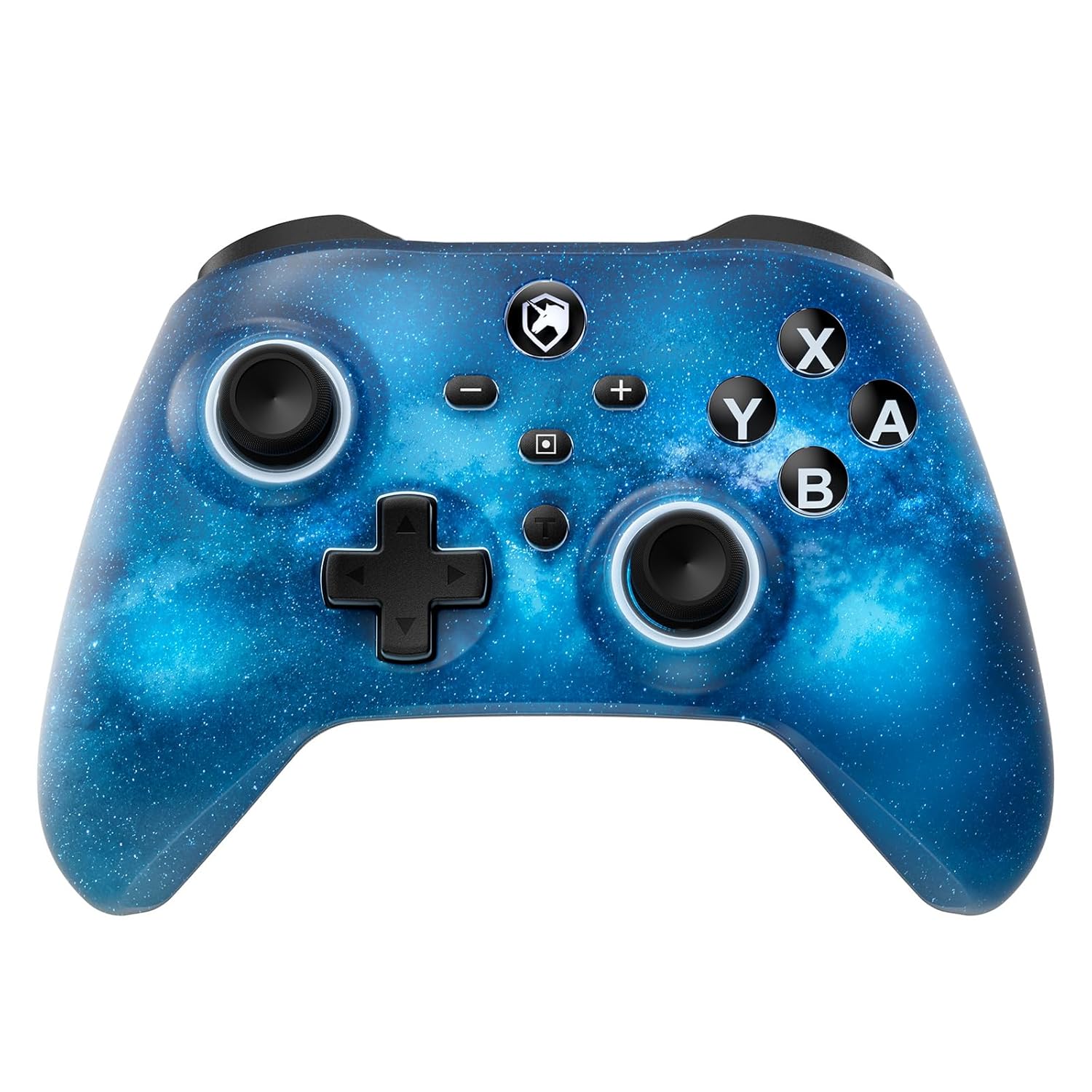
Quddiem view of the ECHTPower Wireless Controller, showcasing its Starry Sky Blue design and button layout.
- Stick Analogu tax-Xellug: Għall-moviment u l-kontroll tal-kamera.
- Stick Analogu tal-Lemin: Għall-kontroll tal-kamera u l-immirar.
- D-Pad: Input direzzjonali.
- Buttuni A/B/X/Y: Buttuni ta' azzjoni standard.
- Buttuni tax-Xellug/Lemin: Buttuni fuq l-ispalla.
- Triggers ta' ZL/ZR: Triggers analogi għal input preċiż.
- Buttuna tad-dar: Jirritorna għall-iskrin ewlieni tas-sistema.
- Buttuna tal-Iscreenshot: Jaqbad screenshots.
- Buttuni Plus (+) / Inqas (-): System menu navigation.
- Turbo (T) Button: Activates and adjusts turbo functions.
- Macro (M) Button: Initiates macro programming.
- Buttuni M1/M2: Programmable back paddles.
5. Setup
5.1 Iċċarġjar inizjali
Before first use, fully charge your controller. Connect the included USB charging cable to the controller's USB-C port and a USB power source (e.g., console, PC, USB wall adapter). The charging indicator will illuminate during charging and turn off when fully charged.

The controller features a 1000mAh battery, providing approximately 6-8 hours of playtime with lights on, and takes 2-3 hours to fully charge.
5.2 Pairing with Nintendo Switch/Switch 2
To pair your controller with a Nintendo Switch or Switch 2 console:
- Mill-Menu HOME, agħżel Kontrolluri > Ibdel il-Maqbad/Ordni.
- Fuq il-kontrollur, agħfas u żomm il- Buttuna tad-dar for 3-5 seconds until the LED indicators begin to flash rapidly.
- Once paired, the corresponding player LED(s) on the controller will light up solid.

The ECHTPower controller is compatible with Nintendo Switch 2, though it does not support the C key, 3.5mm audio jack, or wake-up function on Switch 2.
5.3 Pairing with PC (Windows)
To connect to a Windows PC:
- Kun żgur li l-PC tiegħek għandu l-Bluetooth attivat.
- Mur fuq Settings > Apparati > Bluetooth u apparat ieħor.
- Agħżel Żid Bluetooth jew apparat ieħor > Bluetooth.
- Agħfas u żomm il- Buttuna tad-dar on the controller until the LEDs flash.
- Select the controller from the list of available devices to pair.
5.4 Pairing with Android/iOS
To connect to Android or iOS devices:
- Ippermetti Bluetooth fuq it-tagħmir mobbli tiegħek.
- Agħfas u żomm il- Buttuna tad-dar on the controller until the LEDs flash.
- Select the controller from the Bluetooth device list on your phone/tablet.

The ECHTPower Wireless Controller offers wide compatibility across Switch, PC, Android, and iOS platforms.
6. Istruzzjonijiet Operattivi
6.1 Power On/Off
- Qawwa Mixgħul: Agħfas il- Buttuna tad-dar darba.
- Itfi: Agħfas u żomm il- Buttuna tad-dar for 5 seconds, or the controller will automatically power off after 5 minutes of inactivity (adjustable via KeyLinker app).
6.2 Kontroll tad-Dawl RGB
The controller features 9 different light effects and 3 light models (Breathing Cycle, Laser Mode, Neon Mode) with 4 levels of brightness adjustment (25%-50%-75%-100%).
- Ibdel il-Kulur: Agħfas Macro (M) + Minus (-).
- Ibdel il-Modalità tad-Dawl: Agħfas Macro (M) + Plus (+).
- Aġġusta l-luminożità: Agħfas Macro (M) + Left Analog Stick (down).

The controller's RGB lighting offers 9 colors and 4 light modes, creating a dynamic visual experience.
Official ECHTPower video demonstrating the wireless controller's features, including its RGB lighting and responsiveness.
6.3 Programmazzjoni Makro
The programmable function allows you to map up to 16 button functions to the M1 or M2 back paddles, enabling complex skill execution with a single press.
- Daħħal il-Mod ta 'Programmar: Agħfas u żomm il- Macro (M) button, imbagħad agħfas il- M1 or M2 button you wish to program. The indicator light will flash slowly.
- Record Sequence: Press the sequence of buttons you want to record (up to 16 inputs).
- Ħruġ mill-Modalità tal-Ipprogrammar: Agħfas il- Macro (M) button again. The indicator light will stop flashing.
- Makro ċara: In programming mode, press the M1 or M2 button twice without inputting any sequence.

The controller's ultra-programmable design allows mapping various buttons to the M1 and M2 back paddles for enhanced gameplay.
6.4 Funzjoni Turbo
The controller supports both auto and manual Turbo functions with three adjustable speeds: 5 rounds/s, 12 rounds/s, and 25 rounds/s.
- Issettja Turbo: Agħfas u żomm il- Turbo (T) button, then press the desired action button (A/B/X/Y/L/R/ZL/ZR). The button will now have Turbo functionality.
- Aġġusta l-Veloċità Turbo: Agħfas u żomm il- Turbo (T) button, imbagħad agħfas il- Right Analog Stick (up/down) to cycle through speeds.
- Turbo ċara: Agħfas u żomm il- Turbo (T) button, then press the Turbo-enabled action button again.

The controller offers strong manual and auto turbo capabilities, allowing up to 25 shots per second for rapid actions.
6.5 Aġġustament tal-Vibrazzjoni
The built-in dual vibration motors provide 4 levels of feedback: Strong, Medium, Weak, and None, for a realistic gaming experience.
- Aġġusta l-Vibrazzjoni: Agħfas u żomm il- Turbo (T) button, imbagħad agħfas il- D-Pad (up/down) to cycle through vibration intensities.

Adjustable dual vibration provides four intensity levels (0%, 30%, 70%, 100%) for a customized gaming experience.
7. Manutenzjoni
- Tindif: Uża drapp artab u niexef biex tnaddaf il-kontrollur. Tużax kimiċi ħarxa jew materjali li joborxu.
- Ħażna: Aħżen il-kontrollur f'post frisk u niexef 'il bogħod mix-xemx diretta u minn temperaturi estremi meta ma jkunx qed jintuża.
- Kura tal-batterija: Biex ittawwal il-ħajja tal-batterija, evita li tiċċarġja l-kontrollur kompletament ta' spiss. Iċċarġjah regolarment, anke jekk ma tkunx qed tużah kontinwament.
8 Issolvi l-problemi
If you encounter any issues with your ECHTPower controller, please refer to the table below for common problems and solutions:
| Problema | Kawża Possibbli | Soluzzjoni |
|---|---|---|
| Il-kontrollur ma jixgħelx. | Batterija baxxa. | Charge the controller for 2-3 hours. |
| Unable to pair with device. | Il-kontrollur mhux fil-modalità ta' tqabbil; interferenza tal-Bluetooth; il-Bluetooth tal-apparat mitfi. | Ensure controller is in pairing mode (flashing LEDs). Turn off/on device Bluetooth. Move closer to the device. |
| Buttons/Joysticks unresponsive. | Connection issue; software glitch. | Reconnect the controller. Reset the controller (refer to manufacturer's specific reset instructions if available, usually a small pinhole button). |
| Il-vibrazzjoni ma taħdimx jew hija dgħajfa/qawwija wisq. | Vibration setting is off or at minimum/maximum. | Adjust vibration intensity using Turbo (T) + D-Pad (up/down). |
| Macro not working correctly. | Programmazzjoni mhux korretta. | Re-program the macro carefully following the instructions in Section 6.3. |
9. Speċifikazzjonijiet
| Karatteristika | Dettall |
|---|---|
| Numru tal-Mudell | SP06GA |
| Kapaċità tal-batterija | 1000 mAh Lithium Ion |
| Ħin tal-Iċċarġjar | Appross. 2-3 sigħat |
| Ħin tal-logħob | Approx. 6-8 hours (with lights on) |
| Kompatibilità | Nintendo Switch/Switch Lite/Switch 2, PC (Windows), Android, iOS |
| Konnettività | Mingħajr fili (Bluetooth), Bil-fili (USB-C) |
| Vibrazzjoni | Muturi doppji, 4 livelli aġġustabbli |
| Sensor tal-ġiroskopji | 6-axis gyro |
| Dimensjonijiet | 6.3 x 4.69 x 2.72 pulzieri |
| Piż | 9.91 uqija |
10. Garanzija u Appoġġ
ECHTPower provides a standard warranty for this product. For detailed warranty information, product support, or any questions not covered in this manual, please contact ECHTPower customer service through the retailer's platform or visit the official ECHTPower websit. Jekk jogħġbok żomm il-prova tax-xiri tiegħek għal talbiet ta' garanzija.


