1. Introduzzjoni
This manual provides essential instructions for the safe and efficient use of your GT POWER 200W AC/DC Adapter, Model 475. This adapter is designed to provide power to compatible portable power stations, such as the Anker Powerhouse II 400 and Anker 533. Please read this manual thoroughly before using the product and retain it for future reference.
2. Istruzzjonijiet tas-Sigurtà
WARNING: Failure to follow these safety instructions may result in fire, electric shock, or other injury.
- Użu fuq ġewwa biss: Dan l-adapter huwa ddisinjat għal użu fuq ġewwa f'postijiet niexfa. Tesponihx għax-xita, umdità, jew temperaturi estremi.
- Proper Voltage: Tiżgura l-input voltage (AC 100-240V) matches your local power supply.
- Ventilazzjoni: Do not cover the adapter or place it in an enclosed space during operation. Ensure adequate ventilation to prevent overheating.
- Integrità tal-Cable: Regularly inspect the power cord and adapter for any damage. Do not use if the cord is frayed or the adapter casing is cracked.
- Skonnettja l-Enerġija: Always unplug the adapter from the power outlet before cleaning or when not in use for extended periods.
- Ebda Żarmar: Do not attempt to open or repair the adapter. It contains no user-serviceable parts. Unauthorized disassembly voids the warranty and poses a safety risk.
- Tfal u Pets: Żomm l-adapter u l-kejbils tiegħu fejn ma jintlaħqux mit-tfal u l-annimali domestiċi.
- Kompatibilità: Use this adapter only with compatible devices as specified. Using it with incompatible devices may cause damage or malfunction.
- Karatteristiċi ta' Protezzjoni: Dan l-adapter jinkludi Over VoltagProtezzjoni minn Kurrent Żejjed (OVP), Protezzjoni minn Kurrent Żejjed (OCP), u Protezzjoni minn Ċirkwit Qasir (SCP) biex tissalvagwardja l-apparati tiegħek.
ATTENZJONI: RISKJU TA' XOKK ELETTRIKU. TIFTUX.
3. Kontenut tal-Pakkett
Ivverifika li l-oġġetti kollha huma preżenti fil-pakkett tiegħek:
- GT POWER 200W AC/DC Adapter (Model 475)
- Kurdun tal-Enerġija tad-Dħul AC
4. Prodott Aktarview
The GT POWER 200W AC/DC Adapter is a robust power supply designed for efficient charging of your portable power station.

Figura 4.1: Quddiem view of the GT POWER 200W AC/DC Adapter, showing the model number (H-200-24), input (AC 100-240V, 1.8A, 50-60Hz), and output (DC 24V, 8A) specifications, along with safety certifications and a "Risk of Electric Shock" warning.

Figura 4.2: Fuq view of the GT POWER 200W AC/DC Adapter, highlighting the LED indicator light which shows the operational status of the adapter.

Figura 4.3: Close-up of the DC output barrel connector, which connects to the portable power station.
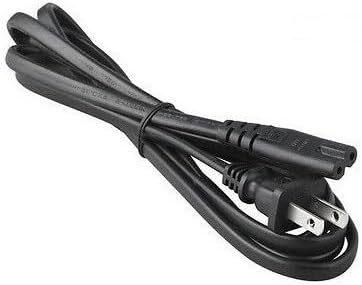
Figura 4.4: The AC input power cord, featuring a standard US plug for connecting the adapter to a wall outlet.
Komponenti Ewlenin:
- Adapter Unit: The main body containing the power conversion circuitry.
- Port tal-Input AC: Where the AC power cord connects to the adapter.
- DC Output Cable with Barrel Connector: Permanently attached cable that delivers power to your device.
- Indikatur LED: Illuminates when the adapter is receiving power and operating correctly.
- Kurdun tal-Enerġija AC: Connects the adapter to a wall outlet.
5. Istruzzjonijiet ta' Setup
Follow these steps to set up your GT POWER AC/DC Adapter:
- Ippakkja: Carefully remove the adapter and AC power cord from the packaging.
- Connect AC Cord: Insert the female end of the AC power cord firmly into the AC input port on the adapter unit.
- Qabbad mal-Power Station: Plug the DC barrel connector from the adapter's output cable into the DC input port of your compatible portable power station (e.g., Anker Powerhouse II 400/533). Ensure a secure connection.
- Qabbad ma' Wall Outlet: Plug the male end of the AC power cord into a standard wall outlet (AC 100-240V).
- Ivverifika l-Enerġija: The LED indicator on the adapter should illuminate, indicating that it is receiving power and ready to charge.
Nota: Always connect the adapter to the device first, then to the wall outlet, and disconnect from the wall outlet first, then from the device.
6. Istruzzjonijiet Operattivi
Once set up, the adapter operates automatically:
- When connected to a power outlet and a compatible power station, the adapter will begin supplying power for charging.
- The LED indicator will remain lit during operation.
- The adapter features an "Automatic Off" special feature, which implies it will cease charging or power delivery once the connected device is fully charged or if an overload/fault condition is detected. Refer to your power station's manual for specific charging indicators.
- To stop operation, first unplug the AC power cord from the wall outlet, then disconnect the DC barrel connector from your power station.
7. Manutenzjoni
Proper maintenance ensures the longevity and safe operation of your adapter:
- Tindif: Skonnettja l-adapter mis-sorsi kollha tal-enerġija qabel ma tnaddaf. Uża drapp artab u niexef biex timsaħ il-barra. Tużax prodotti tat-tindif likwidi jew solventi.
- Ħażna: When not in use, store the adapter in a cool, dry place, away from direct sunlight and moisture. Coil the cables loosely to prevent damage.
- Spezzjoni: Spezzjona l-adapter c perjodikamentasing, cables, and connectors for any signs of wear, cuts, or damage. If damage is found, discontinue use immediately and replace the adapter.
8 Issolvi l-problemi
Jekk tiltaqa' ma' problemi bl-adapter tiegħek, irreferi għall-problemi u s-soluzzjonijiet komuni li ġejjin:
| Problema | Kawża Possibbli | Soluzzjoni |
|---|---|---|
| Adapter LED is off, no power output. |
|
|
| Power station not charging. |
|
|
| L-adapter iħoss jaħraq wisq. |
|
|
Jekk il-problema tippersisti wara li tipprova dawn is-soluzzjonijiet, jekk jogħġbok ikkuntattja l-appoġġ għall-klijenti.
9. Speċifikazzjonijiet
| Numru tal-Mudell | 475 (H-200-24) |
| Input Voltage | AC 100-240V, 1.8A, 50-60Hz |
| Ħruġ Voltage | DC 24V |
| Kurrent tal-Ħruġ | 8A |
| Wattage | 200W |
| Tip ta' Konnettur | Konnettur tal-Barmil |
| Karatteristiċi ta' Protezzjoni | OVP (Over VoltagProtezzjoni minn Kurrent Żejjed), OCP (Protezzjoni minn Kurrent Żejjed), SCP (Protezzjoni minn Ċirkwit Qasir) |
| Karatteristika Speċjali | Mitfi awtomatikament |
| Apparati Kompatibbli | Anker Powerhouse II 400, Anker 533 Portable Power Stations (and other devices requiring 24V, 8A DC input with compatible barrel connector) |
| Dimensjonijiet (Approx.) | 7 x 5 x 3 pulzieri (Dimensjonijiet tal-Pakkett) |
| Piż (Approx.) | 14 uqija |
10. Appoġġ għall-Klijent u Garanzija
For technical assistance, warranty information, or to report any issues with your GT POWER 200W AC/DC Adapter, please contact your retailer or the manufacturer directly.
Jekk jogħġbok żomm in-numru tal-mudell tal-prodott tiegħek (475) u l-informazzjoni tax-xiri lesti meta tikkuntattja l-appoġġ.
Warranty details are typically provided at the point of purchase or on the manufacturer's official websit.


