Introduzzjoni
This user manual provides comprehensive instructions for the installation, operation, maintenance, and troubleshooting of your ONNAIS RV Door Lock Replacement. Please read this manual thoroughly before installation and use to ensure proper function and safety.
The ONNAIS RV Door Lock offers advanced security features including a 10-digit keypad, dual-door remote control, and a backup mechanical key, designed for secure and convenient travel.
Karatteristiċi tal-Prodott
- Durable and Secure Material: Built with all-metal construction, waterproof, and resistant to break-ins.
- Three Unlocking Methods: FOB remote access, keypad entry, and a hidden mechanical key for backup.
- Dual Door Control FOB: Control both front and rear RV doors with a single fob, effective over 100 feet. Includes 2 remote control fobs.
- Peek-Proof Keypad: Allows random digits before and after the correct password (up to 32 digits total) for enhanced security.
- Perfectly Sized for RVs: Fits standard camper openings (3.75" x 2.75" x 1.5") and has an exterior size of 6.1" x 4.7", suitable for most RV doors with right-side hinges.
- Serratura tas-Sikurezza tat-Tfal: Disables settings buttons to prevent accidental adjustments by children.
Kontenut tal-Pakkett
Jekk jogħġbok ivverifika li l-komponenti kollha huma preżenti qabel tibda l-installazzjoni:
- ONNAIS RV Door Lock Body
- 2 x FOB Remote Controls
- 2 x Ċwievet mekkaniċi
- Installation Tools (5 screws, screwdriver, battery removal tool)
- Strike Plate
- Manwal għall-Utent (dan id-dokument)
Note: Batteries (2 Lithium Ion AA) are not supplied and must be purchased separately.

Image: The ONNAIS RV Door Lock unit, showing the keypad and handle, alongside two remote key fobs, one with a visible mechanical key.
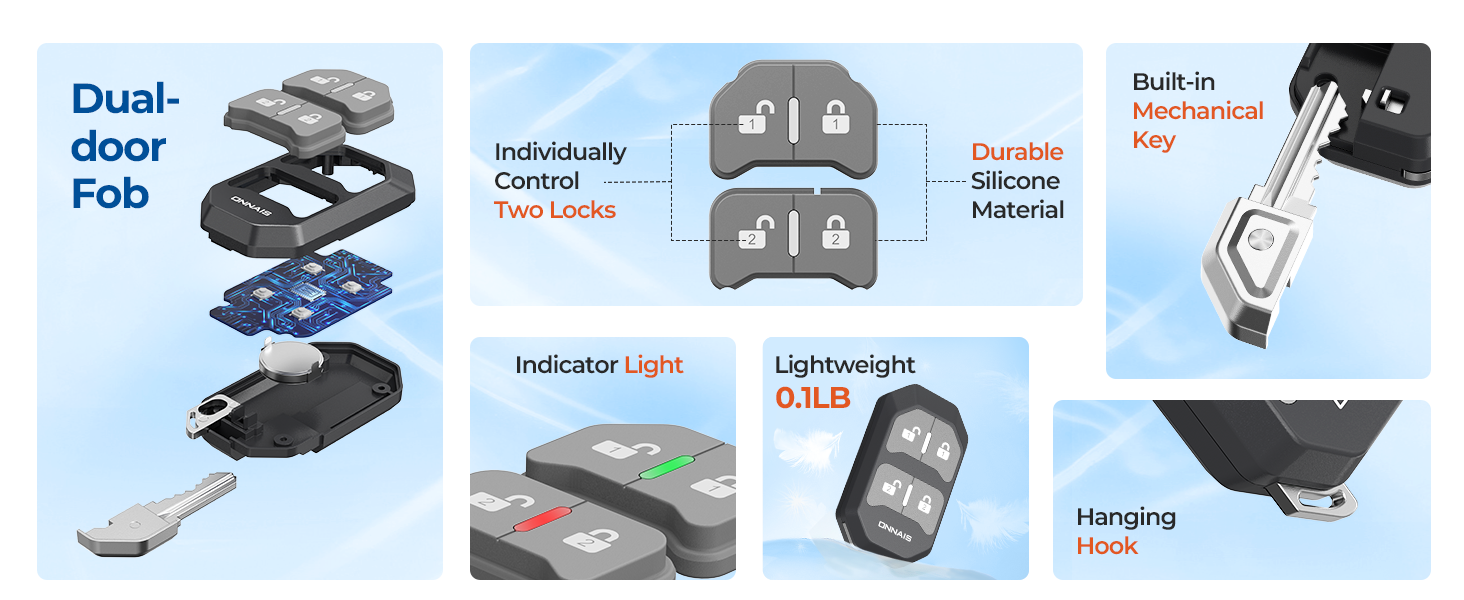
Immaġni: Sploda view diagram illustrating all components included in the ONNAis RV Door Lock package, such as the lock body, fobs, keys, screws, and tools.
Gwida għall-Installazzjoni
1. Kontroll ta' Qabel l-Installazzjoni
Ensure your RV door meets the following specifications:
- Standard camper opening: 3.75" x 2.75" x 1.5"
- Exterior lock size: 6.1" x 4.7"
- Suitable for RV doors with right-side hinges.
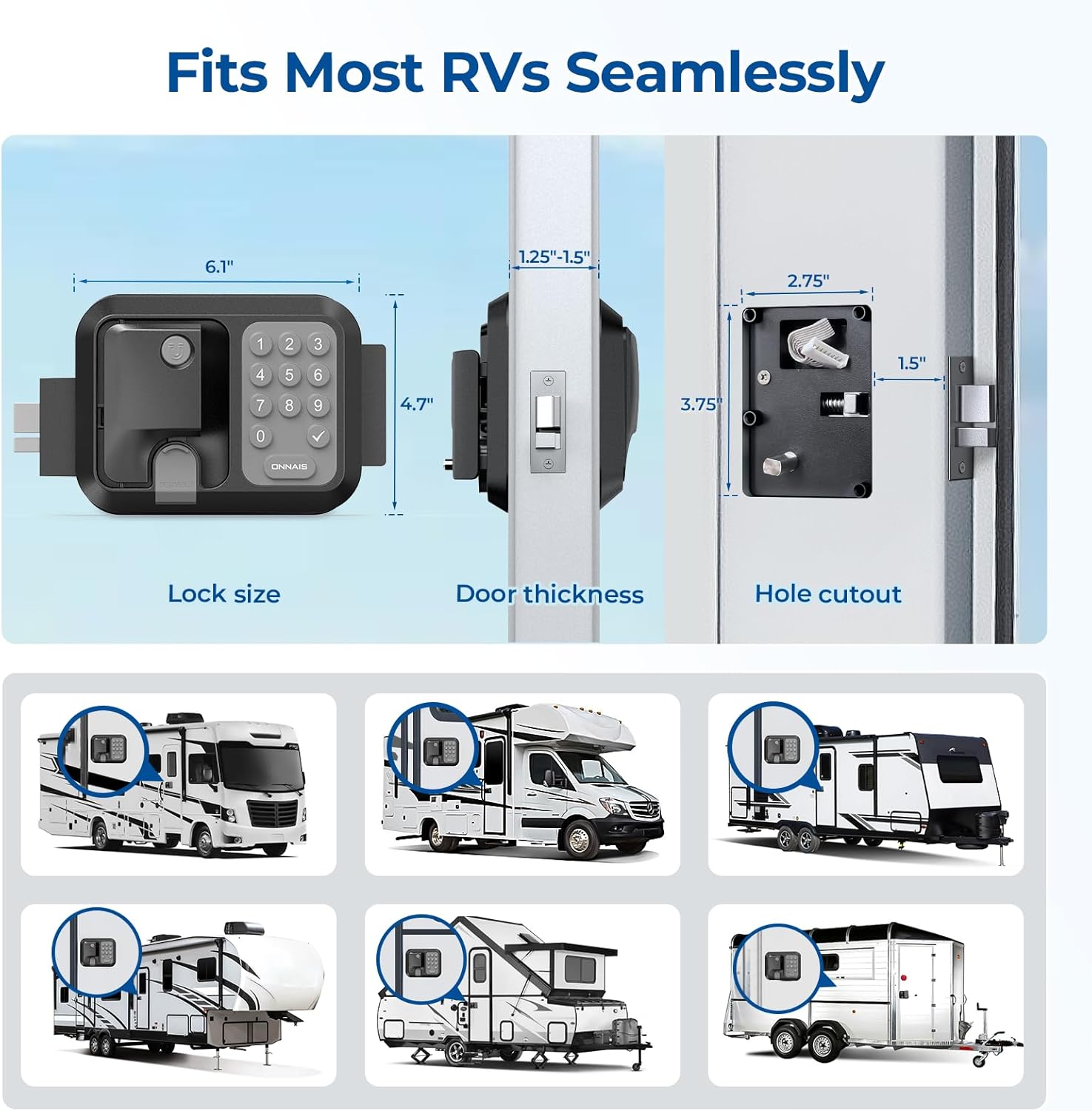
Image: A diagram illustrating the lock's dimensions (lock size, door thickness, hole cutout) and showing various types of RVs and trailers it is compatible with, including motorhomes, travel trailers, and toy haulers.

Image: An illustration demonstrating that the ONNAIS RV Door Lock is designed to fit RV doors with right-side hinges, showing several different RV models.
2. Removing the Old Lock
- Using a screwdriver, remove the screws securing the interior and exterior parts of your existing RV door lock.
- Carefully remove both parts of the old lock from the door.
- Remove the old strike plate from the door frame.
3. Installing the New Lock
- Insert the new lock body into the prepared opening in the RV door. Ensure the deadbolt mechanism aligns correctly.
- Secure the lock body with the provided screws.
- Install the new strike plate on the door frame, aligning it with the deadbolt.

Immaġni: Dijagramma sploduta li turiasing the secure and reliable mechanical lock structure, highlighting components like the automatic zinc alloy latch and strong aviation aluminum construction.
Istruzzjonijiet Operattivi
1. Installazzjoni tal-batterija
The lock requires 2 Lithium Ion AA batteries (not included). Use the provided battery removal tool to open the battery compartment on the interior side of the lock. Insert batteries according to polarity markings and close the compartment.
2. Issettjar tal-Passcodes
The keypad allows for up to 32 digits, incorporating a peek-proof system. You can add random digits before and after your actual password.
- Press the 'SET' button on the interior side of the lock.
- Enter your desired password (e.g., 12345).
- Press the 'SET' button again to confirm.
- To use the peek-proof feature, you can enter random numbers before and after your password (e.g., 73225613B1234522157878461). The lock will recognize the embedded correct password.
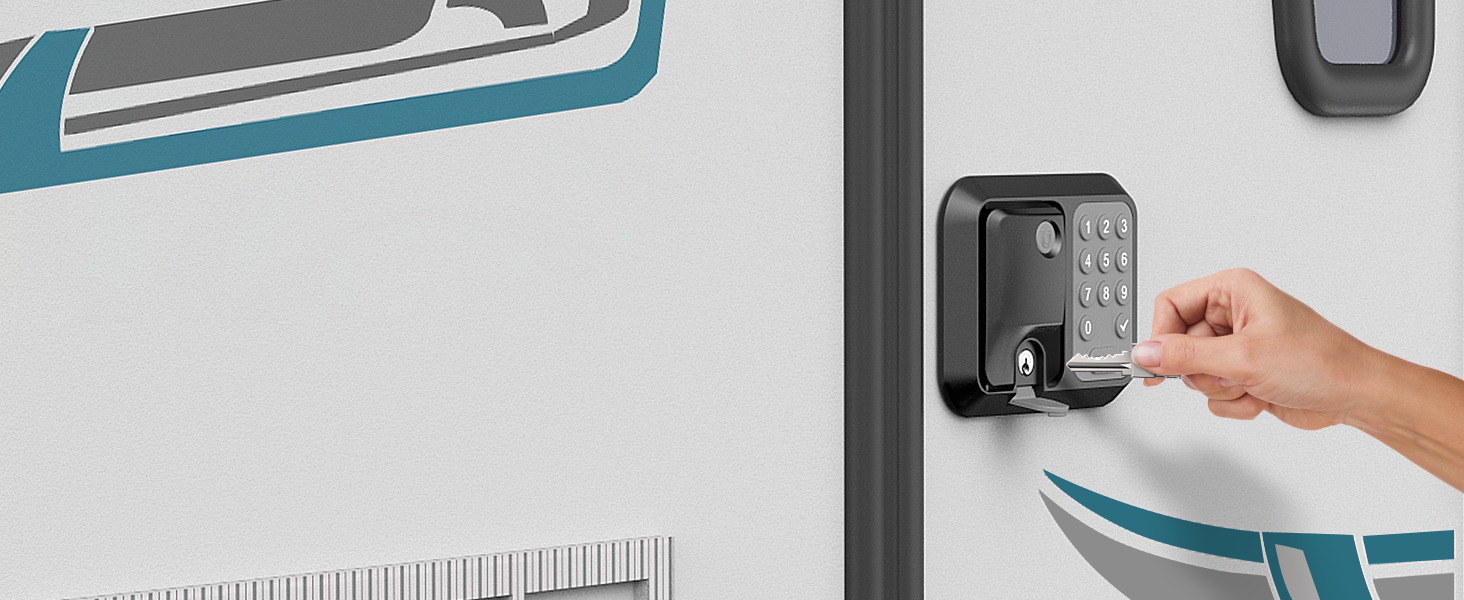
Image: A visual explanation of the peek-proof code system, showing how random digits can be added around the correct password, and demonstrating one-touch locking for convenience.
3. Using the FOB Remote Control
The two included FOB remote controls can control both front and rear RV doors.
- To pair a FOB, press the 'SET' button on the interior side of the lock.
- Press any button on the FOB remote control. The lock will beep to confirm pairing.
- Use the lock/unlock buttons on the FOB to control the door. The FOB has an extended range of over 100 feet.

Image: A person's hand holding the ONNAIS remote fob, demonstrating its use to control an RV door from a distance, highlighting the dual lock control feature.

Immaġni: Dettaljata view of the dual-door fob, emphasizing its lightweight design, keychain-friendly nature, and the hidden physical key mechanism for secure entry.

Image: An intricate diagram of the dual-door fob, detailing its internal components, durable silicone material, indicator light, lightweight design (0.1LB), and integrated hanging hook, along with its ability to individually control two locks.
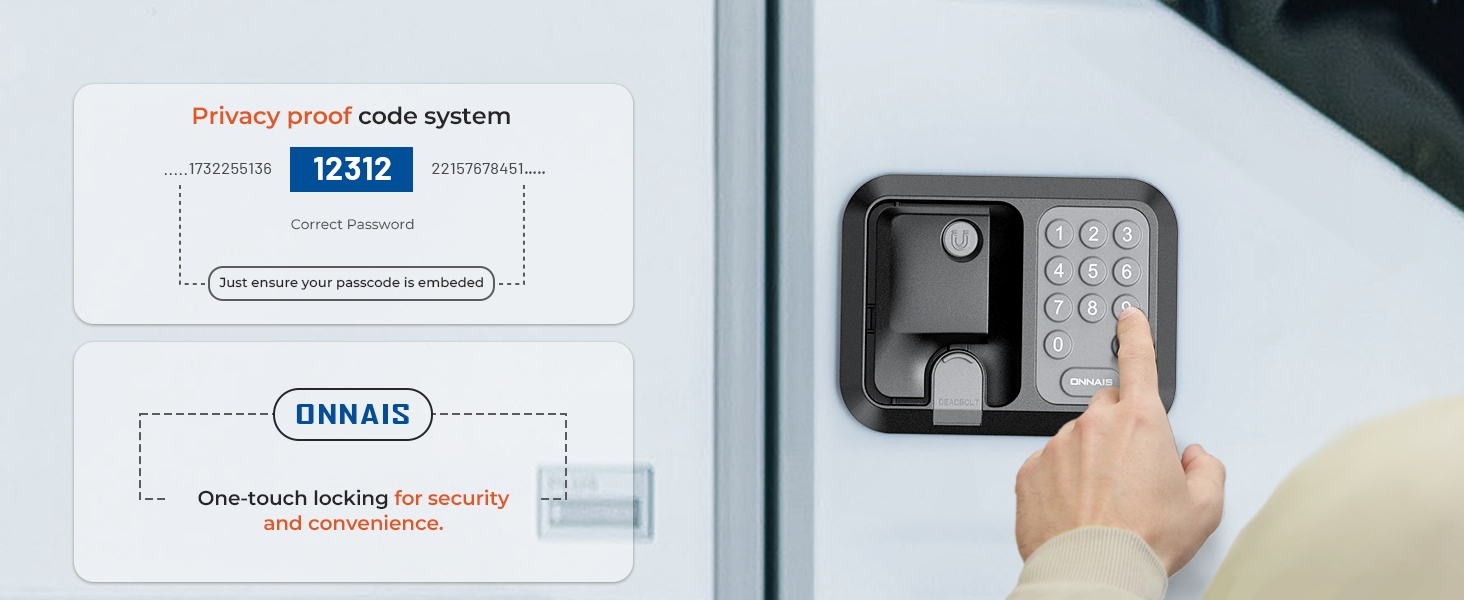
Image: Two scenarios demonstrating the dual lock control feature, where a single fob can operate locks on two separate RVs, highlighting its versatility.
4. Using the Mechanical Key
The mechanical key serves as a backup in case of battery depletion or electronic system failure. The key is integrated into the FOB remote control.
- Slide the release button on the FOB to extract the mechanical key.
- Insert the key into the keyhole on the lock and turn to unlock.
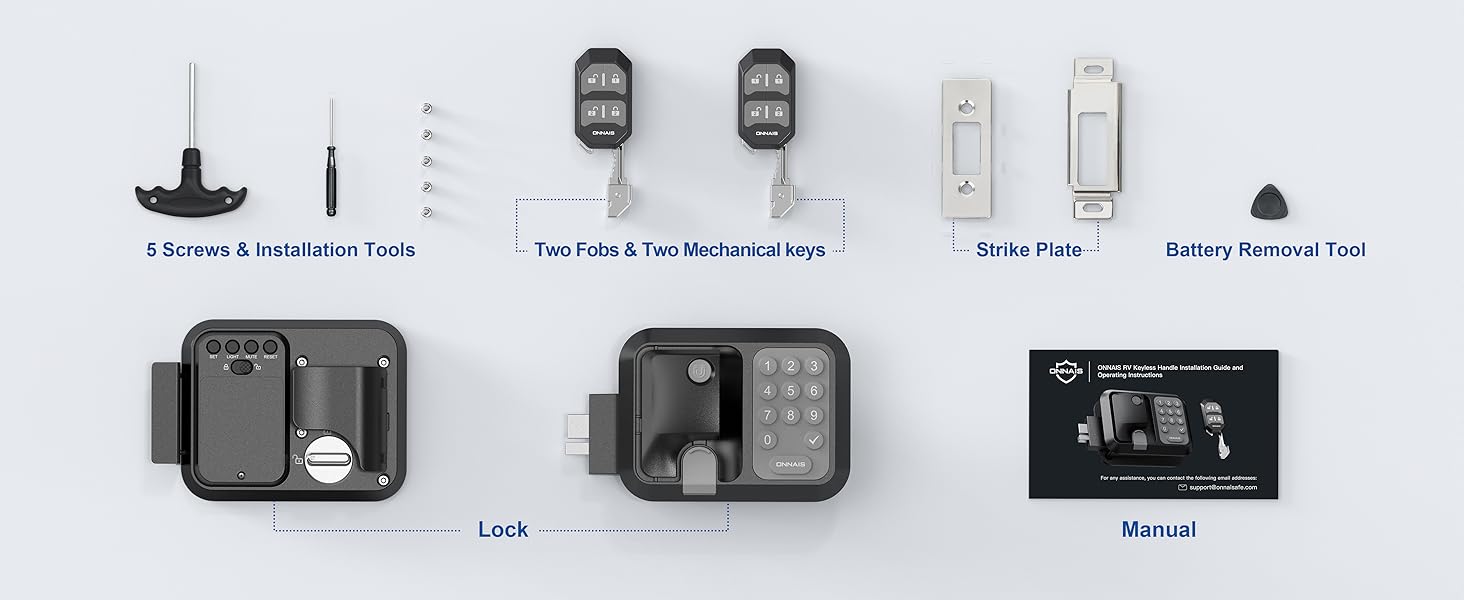
Image: A hand inserting the mechanical backup key into the RV door lock, demonstrating the manual override option.
5. Lock tas-Sigurtà tat-Tfal
To activate the child safety mode, locate the child safety switch on the interior side of the lock. Slide the switch to the 'locked' position to disable the settings buttons, preventing accidental adjustments.

Image: A child reaching for the RV door lock, with an inset showing a close-up of the child safety lock switch (labeled SET, LIGHT, MUTE, RESET) in the locked position, indicating that it prevents accidental changes.
Manutenzjoni
- Sostituzzjoni tal-batterija: Replace batteries when the low battery indicator activates or when the lock's performance degrades. Always use 2 Lithium Ion AA batteries for optimal performance, especially in cold weather.
- Tindif: Imsaħ il-barra tas-serratura b'ċarruta ratba u damp drapp. Evita prodotti tat-tindif jew solventi li joborxu li jistgħu jagħmlu ħsara lill-finitura jew lill-komponenti elettroniċi.
- Lubrikazzjoni: Periodically lubricate the mechanical parts of the deadbolt and latch with a silicone-based lubricant to ensure smooth operation.
- Kontrolli regolari: Periodically check all screws for tightness and ensure the lock operates smoothly.
Issolvi l-problemi
| Problema | Kawża Possibbli | Soluzzjoni |
|---|---|---|
| Lock does not respond to keypad or FOB. | Low or dead batteries; FOB not paired; electronic malfunction. | Replace batteries. Re-pair FOB. Use mechanical key. Contact support if issue persists. |
| Keypad input is inconsistent. | Weak batteries; dirty keypad; environmental interference. | Replace batteries. Clean keypad. Ensure clear line of sight for FOB. |
| Mechanical key does not work smoothly. | Lack of lubrication; debris in keyhole. | Apply silicone lubricant to the keyhole. Clear any debris. |
| Child safety lock cannot be disengaged. | Switch is stuck or damaged. | Ensure the switch is fully in the 'unlocked' position. Do not force. Contact support. |
Speċifikazzjonijiet
- Ditta: ONNAIS
- Isem tal-Mudell: ONNAIS RV Door Lock Guard Pro
- Numru tal-Mudell: W007B
- Tip ta' serratura: Tastiera
- Materjal: Metal (Automatic Zinc Alloy Latch, Strong Aviation Aluminum)
- Kulur: Iswed
- Dimensjonijiet tal-oġġett (L x W x H): 7.87 x 4.72 x 4.52 pulzieri
- Exterior Lock Size: 6.1" x 4.7"
- Standard Ċamper Opening: 3.75" x 2.75" x 1.5"
- Piż tal-oġġett: 3.76 libbra (1.71 Kilogrammi)
- Sors tal-Enerġija: 2 Lithium Ion AA batteries (not included)
- Karatteristiċi Speċjali: Anti-Peeping Password, Passcode Unlock, Child Safety Lock
- Tip ta 'Kontrollur: FOB, Keypad, Mechanical knob
- FOB Remote Control Range: Aktar minn 100 pied
- Keypad Digits: Up to 32 digits (including random digits)
- Ċertifikazzjonijiet: ANSI/BHMA Grade 2 Certification
- Klassifikazzjoni li ma jgħaddix ilma minnha: IPX5
- UPC: 860012389810
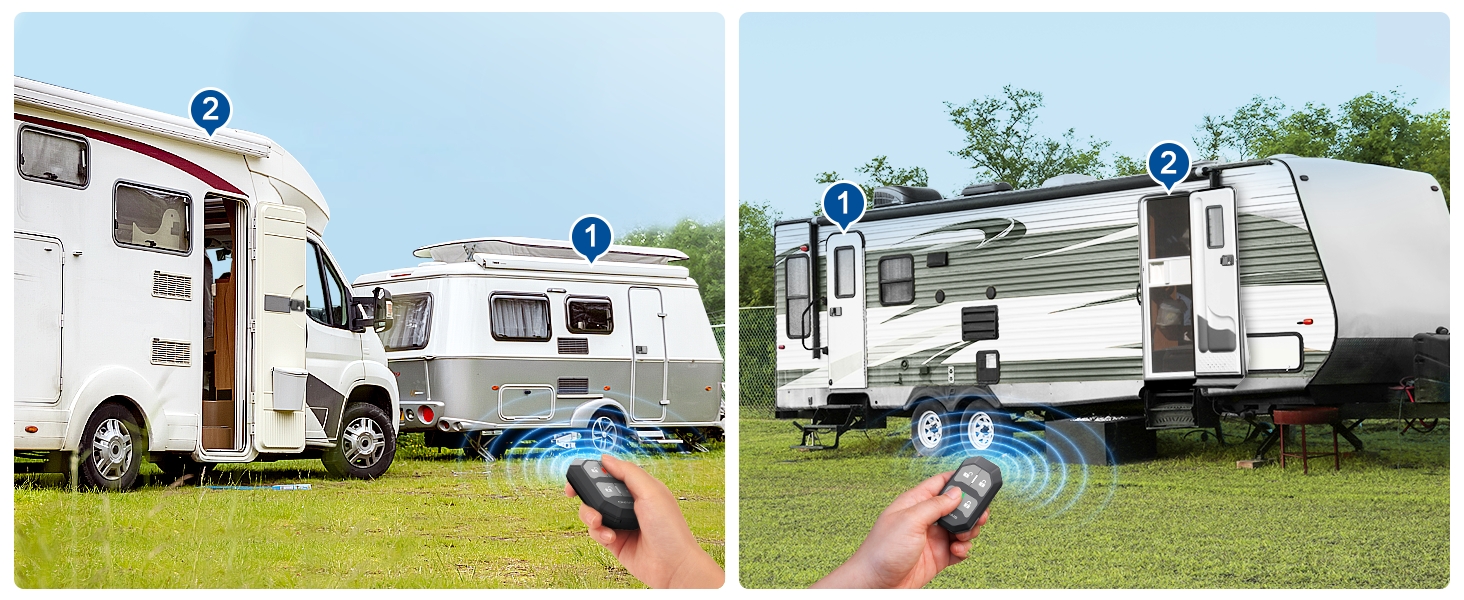
Image: An infographic highlighting the robust features of the ONNAIS RV Door Lock, including its ability to withstand attacks, IPX5 waterproof rating, durable silicone keyboard, strong aviation aluminum, ANSI/BHMA Grade 2 certification, and quick set/reset capabilities.
Garanzija u Appoġġ
For warranty information and technical support, please refer to the contact details provided on the product packaging or visit the official ONNAIS websit. Żomm l-irċevuta tax-xiri tiegħek bħala prova tax-xiri.
Servizz tal-Klijent: For any questions or assistance, please contact ONNAIS customer support. Contact information can typically be found on the product packaging or the manufacturer's official websit.
Informazzjoni Importanti dwar is-Sigurtà
- Do not attempt to disassemble or repair the lock yourself. This may void the warranty and could lead to malfunction.
- Ensure the mechanical key is always accessible outside the RV in case of electronic failure or dead batteries.
- Keep remote fobs and mechanical keys in a secure location to prevent unauthorized access.
- Avoid exposing the lock to extreme temperatures or harsh chemicals.


