Introduzzjoni
This manual provides essential instructions for the setup, operation, and maintenance of your Carrera Wireless 2.0 Duo Controllers and Receiver. This system is designed to enhance your Carrera DIGITAL 132 and DIGITAL 124 slot car racing experience by providing wireless control.

Image: The Carrera Wireless 2.0 Duo Controllers and Receiver set, showing two controllers and one receiver unit.
The Wireless 2.0 system utilizes 2.4-GHz radio technology, ensuring an interruption-free connection and a range of up to 15 meters. This allows for greater freedom of movement around your racetrack. The controllers operate on standard AAA 1.5-V batteries (not included).
Setup
1. Żpakkjar u Komponenti
Carefully unpack all components. The package should contain:
- 2 Wireless 2.0 Speed Controllers
- 1 Wireless 2.0 Receiver
2. Battery Installation (Controllers)
Each Wireless 2.0 Speed Controller requires one (1) AAA 1.5-V battery (not included).
- Locate the battery compartment on the back of each controller.
- Iftaħ l-għatu tal-kompartiment tal-batterija.
- Daħħal batterija AAA waħda, waqt li tiżgura l-polarità korretta (+/-).
- Agħlaq l-għatu tal-kompartiment tal-batterija sew.
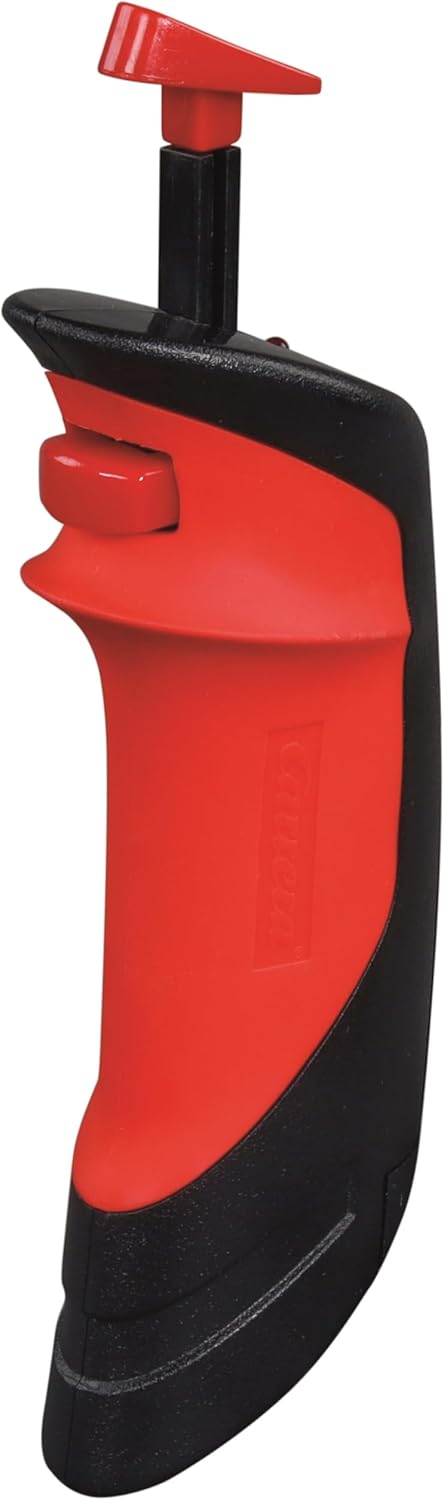
Image: A single Carrera Wireless 2.0 Speed Controller, showing its ergonomic design. The battery compartment is located on the underside/back.
3. Konnessjoni tar-riċevitur
The Wireless 2.0 Receiver connects to your Carrera Digital Control Unit.
- Locate an available port on your Carrera Digital Control Unit.
- Insert the connector cable from the Wireless 2.0 Receiver into the designated port on the Control Unit.
- Kun żgur li l-konnessjoni hija soda.

Image: The Carrera Wireless 2.0 Receiver unit with its connection cable, displaying the 'CHANNEL' indicator and 'SET' button.
4. Pairing Controllers with Receiver
After connecting the receiver and installing batteries in the controllers, you must pair the controllers with the receiver. The specific pairing process is detailed in the instruction manual for your Carrera Digital Control Unit. Generally, this involves:
- Activating pairing mode on the Control Unit.
- Pressing a designated button on the Wireless 2.0 controller to initiate pairing.
- Confirming successful pairing via an indicator light or display on the Control Unit or receiver.
Importanti: Ensure that vehicle addresses are not assigned twice if operating multiple wireless systems (e.g., Wireless 2.0 and Wireless+).
Istruzzjonijiet Operattivi
Operazzjoni Bażika
Once the controllers are paired and the system is powered on, you can control your slot cars wirelessly.
- Kontroll tat-throttle: Use the trigger on the controller to adjust the speed of your assigned vehicle.
- Tibdil fil-Karreġġjata: Utilize the lane change button (if applicable to your track system and vehicle) to switch lanes.
- Firxa: The 2.4-GHz radio technology provides a reliable connection up to 15 meters from the receiver, allowing for flexible positioning around your track.
Noti ta 'Kompatibilità
The Carrera Wireless 2.0 system has specific compatibility requirements:
- Wireless 2.0 hand-held controllers are exclusively compatible with a Wireless 2.0 receiver.
- Previous Wireless+ hand-held controllers are only compatible with Wireless+ receivers.
- Operazzjoni Parallela: It is possible to operate both Wireless 2.0 and Wireless+ systems simultaneously. To do this, both a Wireless 2.0 receiver (Model 20010122) and a Wireless+ receiver (Model 20010112) must be connected to the Carrera Digital Control Unit. Ensure that the addresses assigned to the vehicles are unique and not duplicated across the systems.
Manutenzjoni
Sostituzzjoni tal-batterija
When the controller's performance diminishes or it fails to connect, it is likely time to replace the AAA battery. Follow the battery installation steps outlined in the Setup section. Always use fresh, high-quality AAA 1.5-V alkaline or rechargeable batteries.
Tindif
To maintain the longevity and appearance of your controllers and receiver:
- Imsaħ l-uċuħ b'ċarruta ratba u niexfa.
- Evita li tuża prodotti tat-tindif li joborxu, solventi, jew kimiċi ħarxa.
- Do not immerse the controllers or receiver in water or any other liquid.
Issolvi l-problemi
| Problema | Kawża Possibbli | Soluzzjoni |
|---|---|---|
| Il-kontrollur ma jirrispondix |
|
|
| Receiver not recognized by Control Unit |
|
|
| Konnessjoni intermittenti |
|
|
| Cannot use Wireless 2.0 and Wireless+ simultaneously |
|
|
Speċifikazzjonijiet
| Brand | Carrera |
| Numru tal-Mudell | 20010120 |
| Komponenti Inklużi | 2 Wireless 2.0 Speed Controllers, 1 Wireless 2.0 Receiver |
| Sors tal-Enerġija | Mħaddma bil-batterija |
| Tip ta 'batterija | AAA 1.5-V Alkaline (2 required, not included) |
| Teknoloġija tar-Radju | 2.4 GHz |
| Medda Operattiva | Sa 15 metri (madwar 49 pied) |
| Piż tal-oġġett | 0.31 Kilogrammi (madwar 0.68 lbs) |
| Dimensjonijiet tal-oġġett (L x W x H) | 11 x 7 x 2 pulzieri (madwar 27.9 x 17.8 x 5.1 ċm) |
| Tip ta' Materjal | Plastik |
| Firxa ta 'Età Rakkomandata | 8 snin 'il fuq |
| UPC | 050227109246 |
Twissija: Fih partijiet żgħar. Mhux adattat għal tfal taħt it-3 snin.
Informazzjoni dwar Garanzija
Specific warranty details for the Carrera Wireless 2.0 Duo Controllers and Receiver are typically provided with the product packaging or can be found on the official Carrera websit. Jekk jogħġbok żomm il-prova tax-xiri tiegħek għal talbiet ta' garanzija.
Appoġġ għall-Klijent
For further assistance, technical support, or to inquire about replacement parts, please visit the official Carrera websit jew ikkuntattja lid-dipartiment tas-servizz tal-konsumatur tagħhom.
Official Carrera Websit: www.carrera-toys.com


