1. Prodott Aktarview
The TONOR T90LP RGB Gaming Mic Arm is designed to provide a low-profile, adjustable, and stable mounting solution for microphones and webcams. It features customizable RGB lighting, integrated cable management, and broad compatibility with various microphone threads and desk thicknesses. This manual provides instructions for setup, operation, and maintenance to ensure optimal performance.

Figure 1: TONOR T90LP RGB Gaming Mic Arm with microphone and control app interface.
2. X'hemm fil-Kaxxa

Figure 2: All components included in the TONOR T90LP package.
- Pro baxxfile RGB Mic Stand x1
- 3/8'' to 5/8'' Adapter x1
- 3/8'' to 1/4'' Adapter x1
- Desk Clamp x1
- Cable tal-USB x1
- Manwal x1
- Allen Wrench x1
3. Istruzzjonijiet ta' Setup
3.1 Desk Clamp Installazzjoni
- Ħoll l-iskrivanija clamp to open its jaws.
- Poġġi l-clamp on the edge of your desk. Ensure the desk surface is flat and not irregularly shaped. The clamp fits desks up to 2.36 inches (6 cm) thick.
- Issikka l-clamp securely until it is firmly attached to the desk. The soft pad on the clamp protects your desk from scratches.
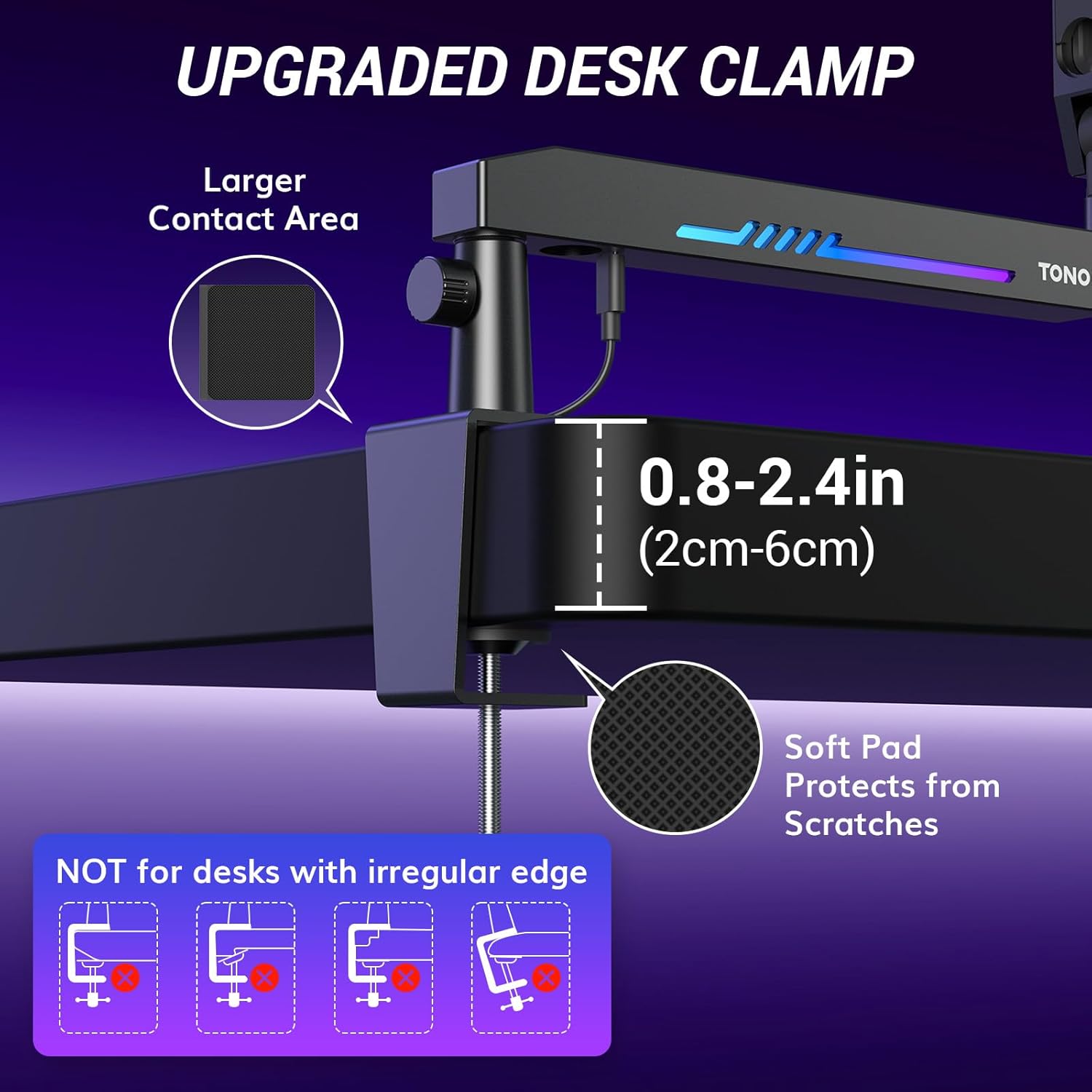
Figure 3: Securely attaching the upgraded desk clamp.
3.2 Assemblaġġ tad-Driegħ tal-Boom
- Insert the base of the boom arm into the hole on the installed desk clamp.
- Tighten the screw on the side of the desk clamp biex tassigura d-driegħ tal-boom fil-post.
3.3 Microphone/Webcam Attachment
- Identify the thread size of your microphone or webcam. The boom arm features a 3/8'' thread.
- If your device has a 5/8'' or 1/4'' thread, use the appropriate adapter (3/8'' to 5/8'' or 3/8'' to 1/4'') provided.
- Screw your microphone or webcam onto the boom arm's thread or adapter until secure.

Figure 4: Adapters for wide compatibility with microphones and webkammijiet.
3.4 Rotot tal-Cable
- Open the cable channel covers located on the underside of the boom arm segments.
- Route your microphone's cable through these channels for a clean and organized setup.
- Close the cable channel covers to secure the cable.
4. Istruzzjonijiet Operattivi
4.1 Kontroll tad-Dawl RGB
The T90LP features customizable RGB lighting. Connect the provided USB cable from the mic arm to a power source (e.g., computer USB port, USB wall adapter). Control the lighting effects via a dedicated smart app (refer to the manual for app download instructions). The app allows you to:
- Customize brightness (0% to 100%).
- Select from 1600+ million colors.
- Choose from 18 lighting modes and 30 color combinations.

Figure 5: Customizable RGB lighting via smart app.
4.2 Arm Adjustments
The T90LP mic arm offers flexible positioning for optimal use:
- Rotazzjoni: The arm features 360-degree rotation for full coverage.
- Aġġustament Vertikali: Adjust the vertical angle up to 90 degrees.
- Estensjoni: The arm can extend up to 26.7 inches (68 cm) and raises to 18.1 inches (46 cm).
- Aġġustament tat-tensjoni: Use the provided Allen wrench to tighten or loosen the joints for desired tension and stability.

Figure 6: Flexible adjustments for optimal microphone positioning.
5. Ġestjoni tal-Kejbil
The T90LP is designed with integrated cable management tunnels. These tunnels allow you to neatly tuck away your microphone's cable, maintaining a clean and organized workspace. Simply open the covers, place the cable inside, and close the covers to secure it.
6. Kompatibilità
The mic arm is compatible with most microphones and webcams due to its standard 3/8'' thread and included adapters for 5/8'' and 1/4'' threads. The upgraded desk clamp accommodates desks up to 2.36 inches (6 cm) thick.
7. Manutenzjoni
- Regularly check all screws and clamps to ensure they are tight and secure.
- Clean the surface of the mic arm with a soft, dry cloth. Avoid using abrasive cleaners or solvents.
- Ensure cables are properly routed within the management channels to prevent pinching or damage.
8 Issolvi l-problemi
- Id-driegħ ma jżommx il-pożizzjoni: Use the provided Allen wrench to tighten the tension screws at the joints until the desired stability is achieved.
- Id-dawl RGB mhux qed jaħdem: Ensure the USB cable is securely connected to both the mic arm and a functioning power source. Check the smart app settings for any disabled lighting effects or low brightness.
- Mikrofonu/Webcam unstable: Verify that the microphone/webcam is correctly screwed onto the arm or adapter, and that the adapter is fully tightened.
9. Speċifikazzjonijiet
| Numru tal-Mudell | 23004.01BL.V1 |
| Piż tal-oġġett | 2.8 libbra (1270 Gramm) |
| Dimensjonijiet tal-Prodott | 14.96 x 7.48 x 2.76 pulzieri |
| Materjal tal-Korp | Azzar Liga, Akrilonitrile Butadien Styrene (ABS) |
| Kulur | Iswed |
| Tagħbija Max | 3.3 lbs (1.5 kg) |
| Desk Clamp Ħxuna | Sa 2.36 pulzier (6 ċm) |
10. Garanzija u Appoġġ
For warranty information, technical support, or any inquiries regarding your TONOR T90LP RGB Gaming Mic Arm, please refer to the contact details provided in the included manual or visit the official TONOR websit.


