1. Introduzzjoni
Thank you for choosing the Darmoshark N3PRO 8K Wireless Gaming Mouse. This manual provides detailed instructions for setting up, operating, and maintaining your new gaming mouse. Please read this manual thoroughly before use to ensure optimal performance and longevity of the product.
2. Kontenut tal-Pakkett
- Darmoshark N3PRO Wireless Gaming Mouse
- USB-C għal USB-A Charging Cable
- 2.4G USB Riċevitur
- Manwal għall-Utent

Image: The Darmoshark N3PRO wireless gaming mouse shown with its accompanying 2.4G USB receiver.
3. Prodott Aktarview
The Darmoshark N3PRO features a lightweight, ergonomic design with multiple connectivity options and programmable buttons.
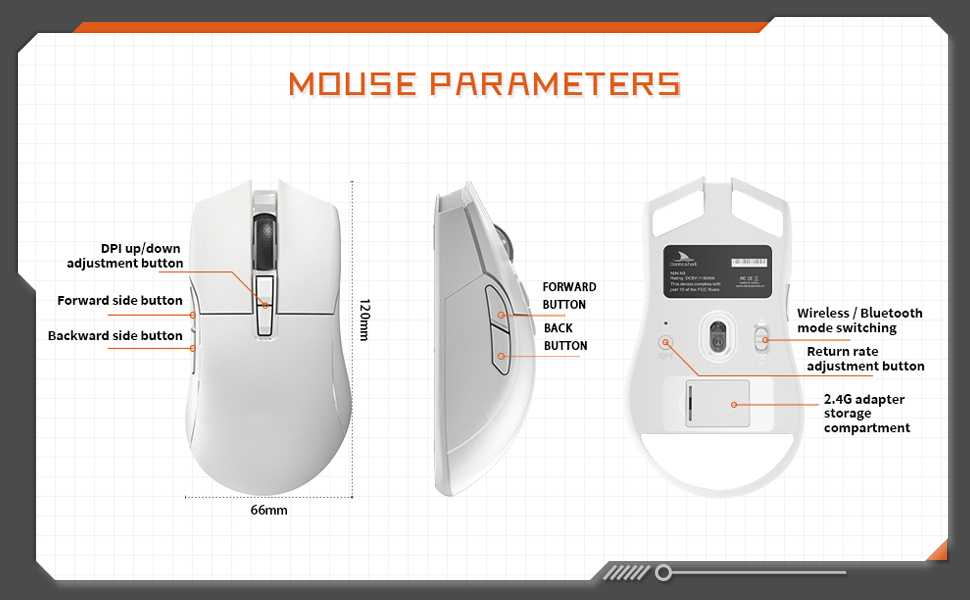
Image: A diagram illustrating the Darmoshark N3PRO mouse from top, side, and bottom views, with labels for buttons and dimensions. Key labels include DPI up/down adjustment button, forward side button, backward side button, forward button, back button, wireless/Bluetooth mode switching, return rate adjustment button, and 2.4G adapter storage compartment.
Funzjonijiet tal-buttuna:
- Buttuna tal-Ikklikkjar tax-Xellug: Standard left mouse button function.
- Buttuna tal-Ikklikkjar bil-Lemin: Standard right mouse button function.
- Scroll Wheel: Scroll up/down, and middle click function.
- DPI Up/Down Adjustment Buttons: Adjust the mouse's sensitivity (DPI) levels.
- Forward Side Button: Default function is 'Forward' in web brawżers/applikazzjonijiet.
- Backward Side Button: Default function is 'Back' in web brawżers/applikazzjonijiet.
- Mode Switch (Bottom): Toggles between 2.4G wireless and Bluetooth modes.
- Return Rate Adjustment Button (Bottom): Adjusts the polling rate.
4. Setup
The Darmoshark N3PRO supports three connection modes: Wired (USB-C), 2.4G Wireless, and Bluetooth 5.0. You can connect up to 3 devices simultaneously.

Image: The Darmoshark N3PRO mouse connected to a laptop via a 2.4G receiver, to a device via USB-C cable, and wirelessly to a smartphone via Bluetooth 5.0, illustrating its tri-mode connectivity.
4.1 Konnessjoni bil-Fili
- Connect the USB-C end of the charging cable to the mouse.
- Connect the USB-A end of the charging cable to an available USB port on your computer.
- The mouse will be automatically detected and ready for use. This mode also charges the mouse.
4.2 Konnessjoni bla fili 2.4G
- Locate the 2.4G USB receiver, typically stored in a compartment on the underside of the mouse.
- Ipplaggja r-riċevitur USB 2.4G f'port USB disponibbli fuq il-kompjuter tiegħek.
- Slide the mode switch on the bottom of the mouse to the 2.4G position.
- Il-maws se jikkonnettja awtomatikament.
4.3 Konnessjoni Bluetooth
- Slide the mode switch on the bottom of the mouse to the Bluetooth position.
- Fuq il-kompjuter jew l-apparat tiegħek, iftaħ is-settings tal-Bluetooth.
- Fittex għal new devices and select "Darmoshark N3PRO" from the list.
- Segwi kwalunkwe prompts fuq l-iskrin biex tlesti l-proċess ta 'tqabbil.
5. Istruzzjonijiet Operattivi
5.1 Aġġustament DPI
The mouse features a PAW3395 optical sensor with adjustable DPI settings up to 26000 DPI. Use the dedicated DPI adjustment buttons on the top of the mouse to cycle through preset DPI levels. The current DPI level may be indicated by an LED color change or through the software.
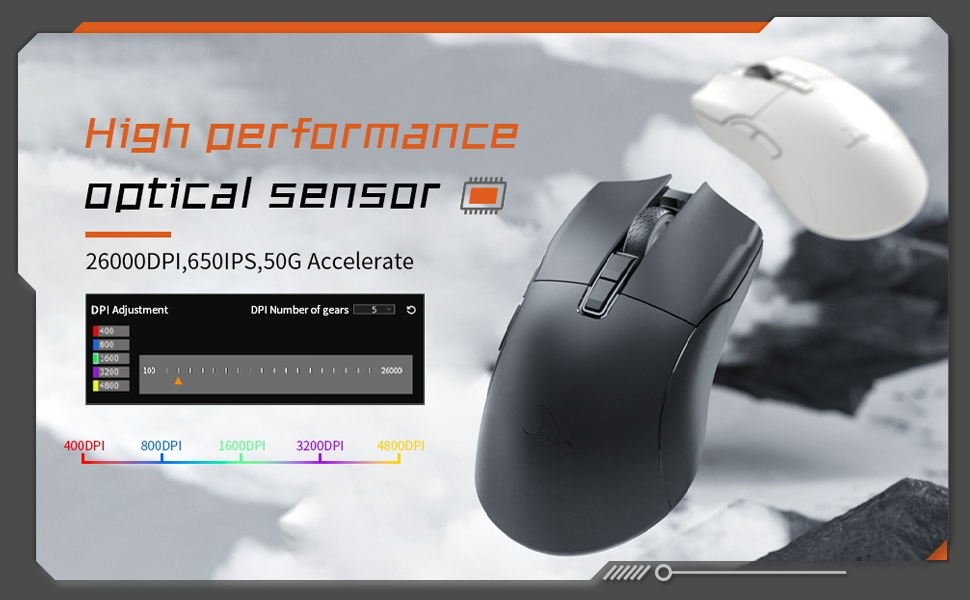
Image: The Darmoshark N3PRO mouse with a blue glowing light, highlighting its adjustable DPI (up to 26000) and IPS (650) settings for precision and speed.
5.2 Polling Rate Adjustment
The polling rate can be adjusted using the button on the underside of the mouse or through the customization software. The N3PRO supports polling rates up to 8000Hz for ultra-responsive tracking.
5.3 Programmable Buttons and Software Customization
The Darmoshark N3PRO features 7 programmable buttons. To customize button functions, DPI settings, macros, and other advanced features, download the official Darmoshark software from the manufacturer's website. The software allows for personalized configurations to suit your preferences.
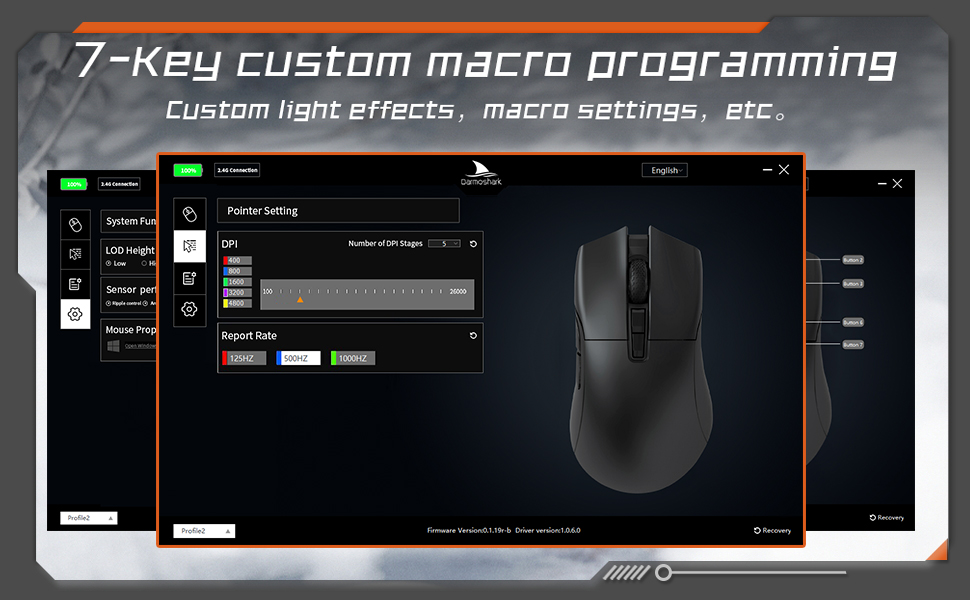
Image: A screenshot of the Darmoshark N3PRO customization software interface, showing options for DPI settings, polling rate, and button assignments, with a visual representation of the mouse.
5.4 Iċċarġjar tal-Maws
Connect the mouse to your computer using the provided USB-C cable. The mouse will charge automatically. A full charge provides approximately 80 hours of battery life (depending on usage and polling rate). The mouse is equipped with a 300mAh Lithium Ion battery.

Image: A close-up of the Darmoshark N3PRO mouse, indicating its 300mAh battery capacity.
6. Manutenzjoni
- Tindif: Uża drapp artab u niexef biex tnaddaf il-maws. Għal ħmieġ iebes, neħħi ftit drapp.amp Jista' jintuża drapp, u jiżgura li ma jidħol l-ebda likwidu fil-maws.
- Sensor: Żomm is-senser ottiku fuq in-naħa ta' taħt tal-maws nadif u ħieles mit-trab jew mill-fdalijiet għal traċċar preċiż.
- Ħażna: Meta ma tkunx qed tużah għal perjodi twal, aħżen il-maws f'post niexef u frisk.
- Kura tal-batterija: Avoid fully discharging the battery frequently. Charge the mouse when the battery indicator is low.
7 Issolvi l-problemi
| Problema | Soluzzjoni |
|---|---|
| Il-maws ma jirrispondix (Wired) |
|
| Mouse not responding (2.4G Wireless) |
|
| Il-maws ma jirrispondix (Bluetooth) |
|
| Traċċar mhux preċiż jew dewmien tal-cursor |
|
| Il-buttuni ma jaħdmux kif mistenni |
|
8. Speċifikazzjonijiet
- Mudell: N3PRO
- Konnettività: Tri-Mode (2.4G Wireless, Bluetooth 5.0, USB-C Wired)
- Sensor: Senser Ottiku PAW3395
- DPI: Sa 26000 DPI
- Veloċità tat-Traċċar: 650 FPS
- Aċċelerazzjoni: 50G
- Rata tal-votazzjoni: Up to 8000Hz (wired/2.4G, depending on settings)
- Buttuni: 7 Buttuni Programmabbli
- Piż: Madwar 64g
- Dimensjonijiet: 120mm x 66mm x 40mm (Length x Width x Height)
- Batterija: 300mAh Jonju tal-Litju (Riċarġabbli)
- Tul tal-Ħajja tat-Tastiera: 60 million clicks (approx.)
- Kompatibilità: PC, Laptop, Windows, Linux (Bluetooth for various devices)
9. Garanzija u Appoġġ
Darmoshark products are designed for reliability and performance. For warranty information, technical support, or to download the latest software and drivers, please visit the official Darmoshark webis-sit jew ikkuntattja s-servizz tal-konsumatur tagħhom. Żomm il-prova tax-xiri tiegħek għal talbiet ta’ garanzija.
Nota: L-ispeċifikazzjonijiet u l-karatteristiċi tal-prodott jistgħu jinbidlu mingħajr avviż minn qabel.


