1. Introduzzjoni
Thank you for choosing the ieGeek 5MP Indoor WiFi Camera SC1. This camera is designed to provide comprehensive indoor surveillance with advanced features such as 5MP resolution, dual-band WiFi connectivity (2.4GHz and 5GHz), 360° pan and 55° tilt (PTZ) rotation, enhanced night vision, two-way audio, automatic motion tracking, and compatibility with Alexa. Please read this manual carefully before use to ensure proper installation and operation.
2. Prodott Aktarview u l-Kontenut tal-Pakkett
Before proceeding with installation, please verify that all components are present in your package.
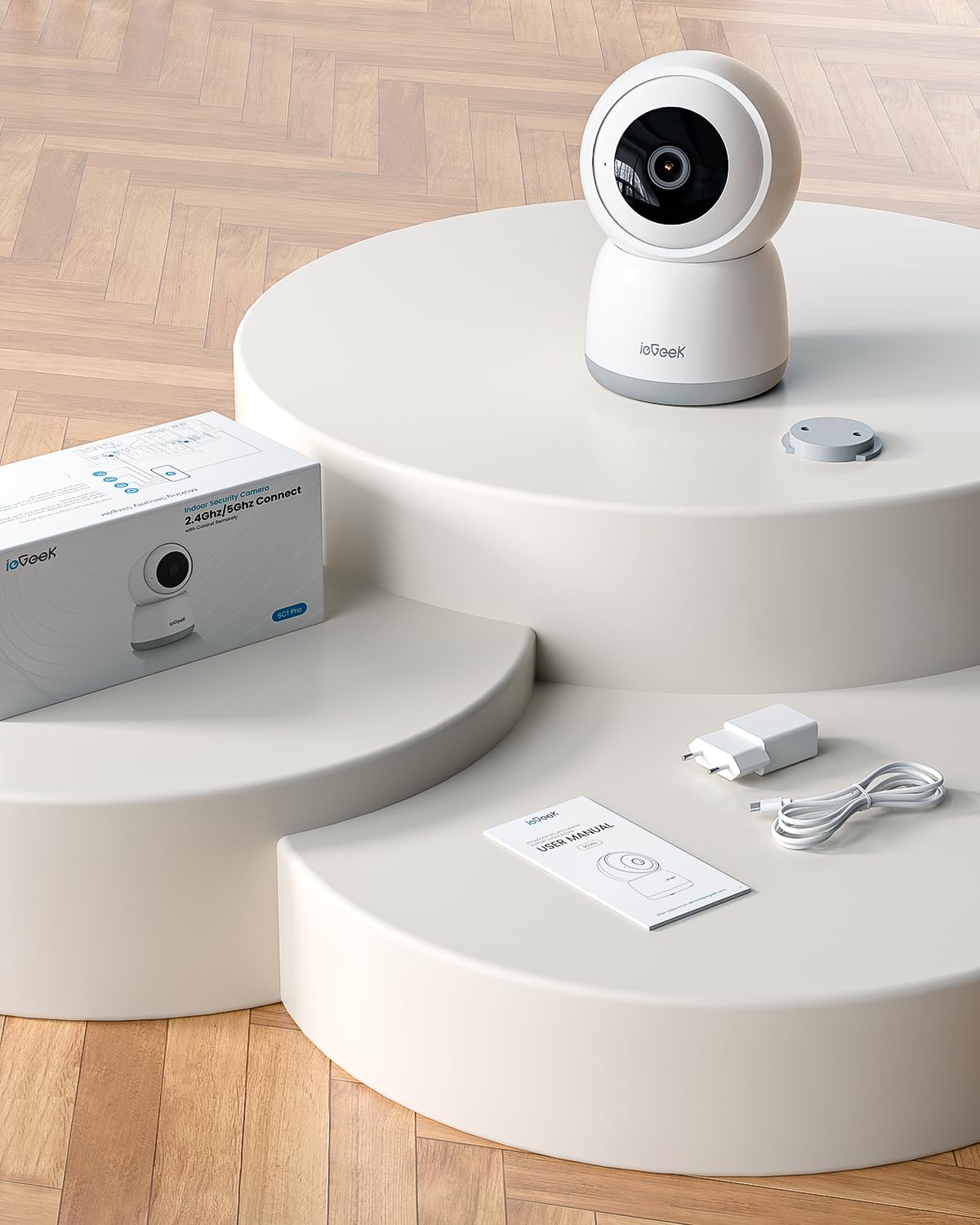
Image: The ieGeek SC1 camera, power adapter, USB cable, user manual, and mounting base are included in the package.
Kontenut tal-Pakkett:
- ieGeek 5MP Indoor WiFi Camera SC1
- Adapter tal-Enerġija
- Kejbil tal-Enerġija USB
- Bażi tal-Immuntar
- Viti tal-Immuntar
- Manwal għall-Utent
3. Gwida ta' Setup
3.1 Installazzjoni tal-App
Niżżel il- ieGeek Cam app from your smartphone's app store (Google Play Store for Android or Apple App Store for iOS). Register an account and log in.
3.2 Mixgħul
Connect the camera to a power source using the provided USB cable and power adapter. The camera will power on and initiate its startup sequence.
3.3 Konnessjoni WiFi
The ieGeek SC1 supports both 2.4GHz and 5GHz WiFi networks. Follow the in-app instructions to connect your camera to your home WiFi network. This typically involves selecting your WiFi network and scanning a QR code generated by the app with the camera lens.

Image: Visual guide showing the two main steps for WiFi connection: 1. Connecting to WiFi via the app, and 2. Scanning the QR code on the camera's back.
3.4 Għażliet ta 'Immuntar
The camera can be placed on a flat surface, mounted on a wall, or inverted for ceiling mounting. Use the provided mounting base and screws for secure installation.

Image: Demonstrates various mounting options for the ieGeek SC1 camera, including tabletop, wall, and ceiling installations.
4. Operazzjoni
4.1 5MP Resolution and Night Vision
The camera features a 5MP sensor, providing clear and detailed video footage. Its advanced night vision capabilities ensure visibility up to 15 meters in low-light conditions.

Image: Illustrates the high detail provided by the 5MP resolution, highlighting the new CMOS sensor for ultra-clear images.
4.2 Dual-Band WiFi Connectivity
Benefit from stable and reliable connectivity with support for both 2.4GHz and 5GHz WiFi bands, allowing you to choose the best option for your network environment.

Image: Shows the camera with visual representations of 5GHz and 2.4GHz, indicating stronger network signal and greater transmission distance.
4.3 Kontroll PTZ
Control the camera's pan (360°) and tilt (55°) remotely via the ieGeek Cam app to monitor every corner of your room. This feature allows for a comprehensive view mingħajr blind spots.
Video: Demonstrates the PTZ (Pan-Tilt-Zoom) control functionality of the camera, showing its ability to rotate horizontally 360 degrees and vertically 55 degrees, controlled via the mobile app.
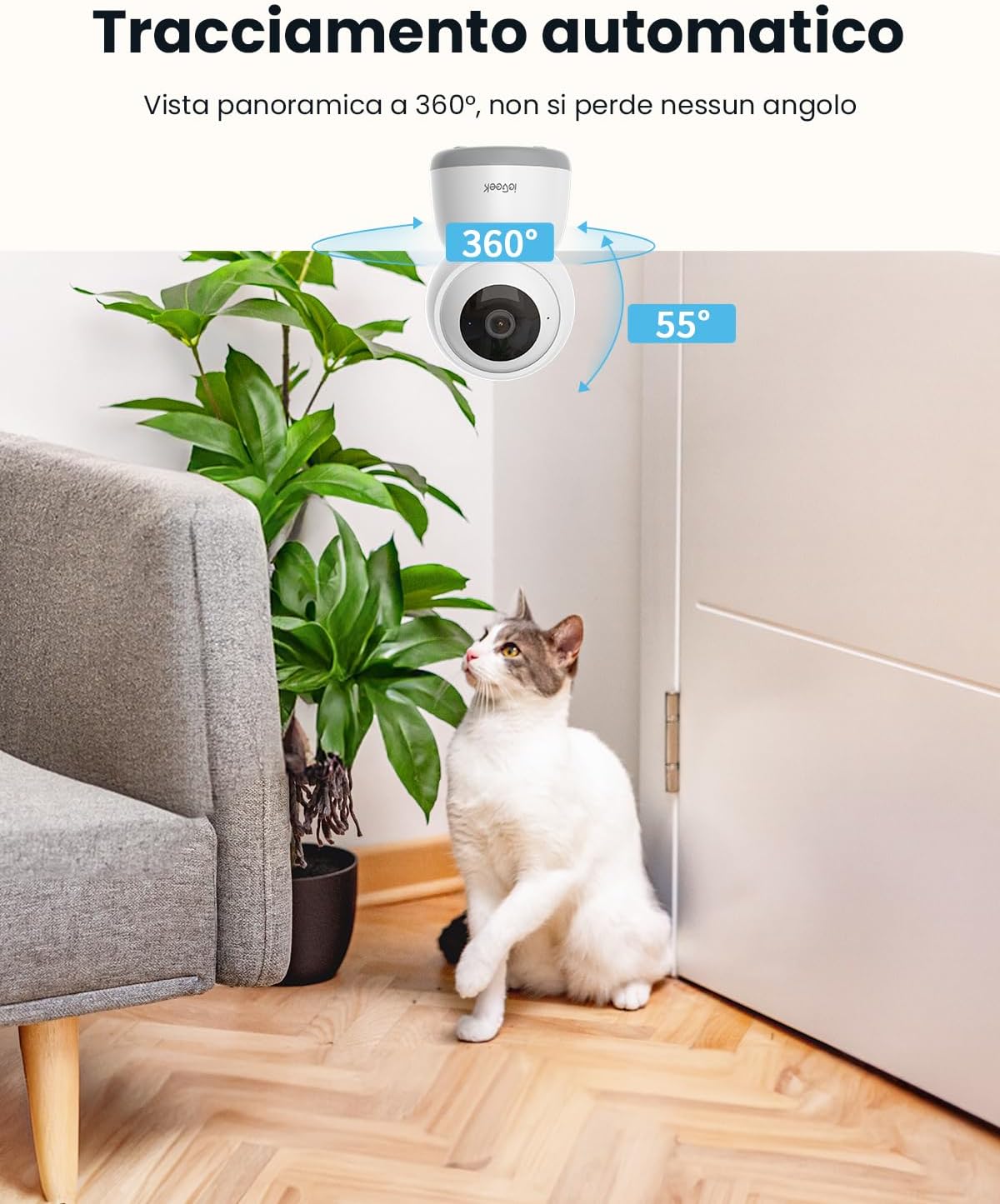
Image: Shows the camera automatically tracking a cat, illustrating its 360° panoramic view and ability to follow movement without missing any angle.
4.4 Awdjo b'żewġ direzzjonijiet
Communicate directly through the camera using the built-in microphone and speaker. This feature is ideal for comforting pets, speaking to family members, or deterring intruders.
Video: Illustrates the two-way audio feature, showing a person interacting with their dog remotely via the camera, providing comfort and communication.
4.5 Motion Tracking and Alerts
The camera automatically tracks detected movement and sends real-time notifications to your smartphone. It can also detect abnormal sounds like a baby crying, providing immediate alerts.

Image: Shows the camera's accurate detection of a child in a kitchen, with an on-screen notification indicating movement in the area.

Image: Displays a smartphone screen showing live footage of a baby, with icons for two-way conversation, infrared night vision, and noise detection, emphasizing baby monitoring capabilities.
4.6 Integrazzjoni ta' Alexa
Integrate your ieGeek SC1 camera with Amazon Alexa for convenient voice control. Use simple voice commands to view live streams on compatible Alexa-enabled devices with screens.

Image: Shows an Alexa-enabled smart display showing a live feed from the camera, with the text "Alexa, show me the garden" and "Works with Alexa" logo, indicating voice control integration.
4.7 Modalità ta' Privatezza
Activate the privacy mode via the app to disable the camera lens and protect your privacy when needed. This feature ensures that no video or audio is recorded or streamed.

Image: Depicts a person sleeping peacefully while the camera's app shows a "lens is disabled" message, highlighting the Sleep Privacy Mode feature with manual camera shutdown, authentication steps, and 128-bit AES encryption.
5. Għażliet ta 'Ħażna
The ieGeek SC1 offers flexible storage solutions for your recordings.
5.1 Ħażna Lokali
Insert a Micro SD card (up to 256GB, not included) into the camera for continuous 24/7 local recording without monthly fees.
5.2 Ħażna fis-Sħab
Utilize the cloud storage option, which includes a free 6-second loop recording feature. Cloud storage provides secure backup and remote access to your video history.

Image: Illustrates the multiple storage options available, including 6s free cloud storage and Micro SD card support up to 256GB (not included), alongside 24/7 recording capabilities.
6. Manutenzjoni
6.1 Tindif
Naddaf il-lenti tal-kamera regolarment b'ċarruta ratba u niexfa biex tiżgura ċarezza ottimali tal-immaġni. Evita li tuża kimiċi ħarxa jew materjali li joborxu.
6.2 Aġġornamenti tal-Firmware
Check the ieGeek Cam app periodically for available firmware updates. Keeping your camera's firmware up-to-date ensures access to the latest features and security enhancements.
7 Issolvi l-problemi
If you encounter any issues with your ieGeek SC1 camera, please refer to the following common solutions:
- Kwistjonijiet ta' Konnessjoni: Ensure your WiFi network is stable and the camera is within range. Verify that you have selected the correct 2.4GHz or 5GHz network during setup.
- Kwalità Fqira tal-Immaġni: Check the lens for dirt or smudges. Ensure adequate lighting, especially for night vision performance.
- Ebda Notifiki: Confirm that app notifications are enabled on your smartphone and within the ieGeek Cam app settings.
- Il-Kontroll tal-PTZ Ma Jirrispondix: Check your internet connection. Restart the camera and the app.
For more detailed troubleshooting or technical support, please contact ieGeek customer service.
8. Speċifikazzjonijiet
| Isem tal-Mudell | SC1 |
| Riżoluzzjoni | 5MP (2880*1600) |
| Konnettività WiFi | 2.4GHz & 5GHz Doppju Banda |
| Rotazzjoni PTZ | 360° Pan, 55° Mejjel |
| Medda tal-Viżjoni Lejl | Sa 15 metri |
| Awdjo | Awdjo b'żewġ direzzjonijiet (Mikrofonu u Speaker integrati) |
| Għażliet ta' Ħażna | Karta Mikro SD (sa 256GB, mhux inkluża), Ħażna fis-Sħab |
| Kompatibilità | Amazon Alexa, ieGeek Cam App (iOS/Android) |
| Sors tal-Enerġija | Elettriku bil-fili |
| Tip ta 'Immuntar | Wall, Ceiling, Tabletop |
| Dimensjonijiet (LxWxH) | 11 x 7 x 7 ċm |
| Piż | 370 g |
9. Garanzija u Appoġġ
ieGeek provides a 2-year warranty for this product. If you have any questions, require technical assistance, or need to claim warranty service, please contact ieGeek customer support through the official webis-sit jew l-informazzjoni ta’ kuntatt ipprovduta fl-imballaġġ tal-prodott.


