1. Introduzzjoni
Welcome to the Blackstar ID:Core V4 Stereo 10 Digital Combo Amplifier user manual. This document provides essential information for the safe and effective operation of your new amplifier. The ID:Core V4 Stereo 10 is a versatile 10-watt, 2x3 inch digital combo amplifier featuring Bluetooth connectivity and a 4-channel USB-C output, designed for guitarists seeking a compact yet powerful practice and recording solution.
Please read this manual thoroughly before using the amplifier to ensure proper setup, operation, and to maximize your experience with its advanced features.
2. Istruzzjonijiet tas-Sigurtà
- Provvista tal-Enerġija: Only use the power adapter supplied with your ID:Core V4 Stereo 10 amplifier. Ensure the voltage taqbel mal-provvista tal-enerġija lokali tiegħek.
- Ventilazzjoni: Timblokkax xi fetħiet tal-ventilazzjoni. Kun żgur li jkun hemm fluss tal-arja adegwat madwar amplifier biex jipprevjeni sħana żejda.
- Umdità: Tesponix il- amplifier to rain, moisture, or any liquids. Avoid placing objects filled with liquids on or near the ampaktar ħaj.
- Sorsi tas-Sħana: Żomm il- amplifier away from heat sources such as radiators, heat registers, stoves, or other apparatus that produce heat.
- Kejbils: Ipproteġi l-korda tad-dawl milli timxi fuqha jew maqrusa, partikolarment fil-plakek, ir-reċipjenti tal-konvenjenza, u l-punt fejn joħorġu mill-apparat.
- Servizzi: Tippruvax isservi dan il-prodott int stess. Irreferi l-manutenzjoni kollha lil persunal tas-servizz kwalifikat.
- Tindif: Spluggja l- amplifier from the power outlet before cleaning. Use a dry cloth for cleaning.
3. Prodott Aktarview
Kontrolli tal-Panew ta' Quddiem u Konnessjonijiet
The front panel of the ID:Core V4 Stereo 10 provides access to all primary controls and input/output connections.
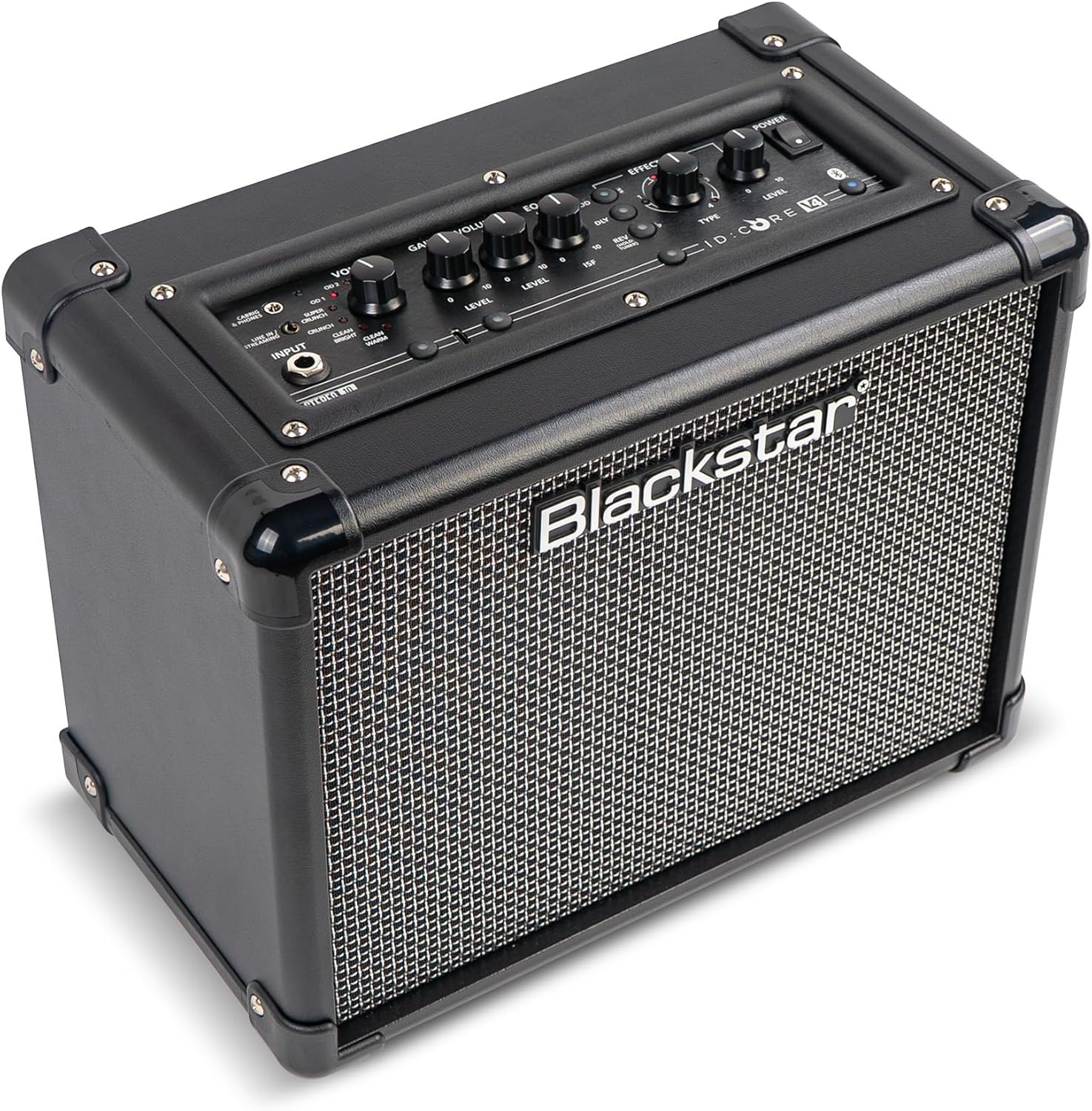
Immaġni: Quddiem view of the Blackstar ID:Core V4 Stereo 10 amplifier, highlighting the control layout and speaker grille.
- Jack tal-Input: Qabbad il-kitarra tiegħek hawn.
- Voice Selector: Rotary switch to select between six distinct amp voices: Clean Warm, Clean Bright, Crunch, Super Crunch, OD1, and OD2.
- Gwadan Kontroll: Adjusts the amount of overdrive or distortion.
- Kontroll tal-Volum: Jaġġusta l-volum ġenerali tal-ħruġ.
- EQ (ISF) Control: Blackstar's patented Infinite Shape Feature (ISF) control allows you to sweep between a 'British' and 'American' amplifier tone.
- Taqsima tal-Effetti: Includes controls for Modulation (Type, Level), Delay (Type, Level), and Reverb (Type, Level).
- Tap Button: Used to set the tempo for delay and modulation effects.
- Swiċċ tal-Enerġija: Dawwar il- amplifier mixgħul jew mitfi.
- Buttuna Bluetooth: Jattiva l-modalità ta' tqabbil Bluetooth.
- Line In / Streaming Input: 3.5mm jack for connecting external audio devices or streaming.
- CabRig & Phones Output: 3.5mm jack for headphones or direct recording with CabRig Lite emulation.
- Port USB-C: For direct recording to a computer and connection to Blackstar Architect software.
- Buttuna Manwali: Saves current settings or recalls manual mode.
- 1W/10W Power Reduction: Button to switch between 1-watt and 10-watt output for practice at different volume levels.
Konnessjonijiet tal-Panew ta' wara
The rear panel houses the power input and product information.

Immaġni: Wara view of the Blackstar ID:Core V4 Stereo 10 amplifier, displaying the DC power input and regulatory labels.
- Input DC: Connect the supplied 16V DC power adapter here.
4. Setup
- Spakkjar: Neħħi bil-galbu ampŻomm l-imballaġġ għal trasport jew ħażna fil-futur.
- Konnessjoni tal-Enerġija: Connect the supplied 16V DC power adapter to the DC Input on the rear panel of the ampIpplaggja t-tarf l-ieħor f'sokit tal-enerġija adattat.
- Konnessjoni tal-Kitarra: Plug your guitar into the Input Jack on the front panel using a standard 1/4-inch instrument cable.
- Qawwa Inizjali Mixgħula: Ensure all volume controls are set to a low level. Press the Power Switch to turn on the amplifier. The power indicator LED will illuminate.
5. Istruzzjonijiet Operattivi
5.1 Operazzjoni Bażika
- Selecting a Voice: Rotate the Voice selector knob to choose from the six available amp voices. Experiment with each to find the desired tone.
- Adjusting Gain and Volume: Use the Gain control to adjust the amount of drive, and the Volume control for the overall output level.
- Using the ISF Control: Turn the ISF knob clockwise for a more 'American' sound with a tight bottom end and aggressive mids, or counter-clockwise for a 'British' sound with a woody, less aggressive response.
- Applikazzjoni ta' Effetti: Select the desired effect type (Modulation, Delay, Reverb) and adjust its Level. Use the Tap button to set the tempo for time-based effects.
- Tnaqqis tal-Qawwa: Press the 1W/10W button to switch between full 10-watt output for louder playing or 1-watt output for quiet practice sessions.
5.2 Konnettività Bluetooth
The ID:Core V4 Stereo 10 features Bluetooth for wireless audio streaming.
- Tiżgura l- amplifier huwa mixgħul.
- Press and hold the Bluetooth button on the front panel until the Bluetooth indicator LED begins to flash. This indicates pairing mode.
- On your audio device (smartphone, tablet, computer), navigate to Bluetooth settings and select 'Blackstar ID:Core V4' from the list of available devices.
- Once paired, the Bluetooth indicator LED on the amplifier will glow solid. You can now stream audio wirelessly to the ampaktar ħaj.
5.3 USB-C Recording
The USB-C port allows for direct, high-quality recording to your computer.

Immaġni: Dettaljata view tal- amplifier's control panel, highlighting the USB-C port for recording and software connectivity.
- Connect a USB-C cable from the amplifier's USB-C port to your computer.
- Il- amplifier will be recognized as an audio interface.
- Utilize your preferred Digital Audio Workstation (DAW) to record the 4-channel output, which typically includes stereo emulated output and dry guitar signal.
5.4 Blackstar Architect Software
The Blackstar Architect software provides advanced control over your amplifier's settings.
- Download and install the Blackstar Architect software from the official Blackstar websit.
- Qabbad tiegħek amplifier to your computer via the USB-C port.
- The software allows for deep patch editing, creating custom presets, and sharing your tones with other users.
5.5 CabRig Lite Emulated Output
The CabRig Lite feature provides realistic cabinet and microphone emulation for direct recording or headphone use.
- Connect headphones or a recording device to the CabRig & Phones output.
- Use the Blackstar Architect software to customize cabinet types, microphone models, and microphone placement for a tailored emulated sound.
6. Manutenzjoni
- Tindif: Uża drapp ratba u niexfa biex tnaddaf il-barra tal- ampTużax prodotti tat-tindif jew solventi li joborxu.
- Ħażna: Meta ma tkunx qed tużaha għal perjodi twal, aħżenha amplifier f'post niexef u frisk, 'il bogħod mix-xemx diretta u minn temperaturi estremi.
- Trasport: Meta tittrasporta l- amplifier, ensure it is securely packed to prevent damage.
7 Issolvi l-problemi
| Problema | Kawża Possibbli | Soluzzjoni |
|---|---|---|
| Ebda ħoss minn ampaktar ħaj |
|
|
| Bluetooth mhux pairing |
|
|
| USB-C recording issues |
|
|
8. Speċifikazzjonijiet
| Karatteristika | Dettall |
|---|---|
| Mudell | IDCORE10V4BT |
| Output Wattage | 10 Watts (switchable to 1 Watt) |
| Kelliema | 2 x 3 pulzier |
| Piż tal-oġġett | 8.15 liri (3.7 kg) |
| Dimensjonijiet tal-Prodott | 7.24"D x 10.51"W x 13.19"Għ (18.4 x 26.7 x 33.5 ċm) |
| Apparati Kompatibbli | Kitarra |
| Tip ta' Konnettur | 3.5mm Jack (Line In/Streaming, CabRig & Phones), USB-C |
| Sors tal-Enerġija | Elettriku bil-Fili (16V DC) |
| Karatteristiċi | 6 Amp Voices, ISF Control, Built-in Effects, Bluetooth, 4-channel USB-C Output, CabRig Lite, Architect Software Compatibility |
9. Garanzija u Appoġġ
Blackstar products are manufactured to high standards and are covered by a limited warranty. For detailed warranty information, registration, and technical support, please visit the official Blackstar Amplifikazzjoni website. You can also find FAQs, software downloads, and contact information for customer service.
Riżorsi onlajn: For the latest software updates, additional guides, and community forums, please refer to the Blackstar Amplifikazzjoni websit.


