1. Introduzzjoni
Thank you for choosing the SCHWAIGER RAFM0100 Bathroom Radio Plug. This device combines an FM radio, Bluetooth speaker, alarm clock, and an integrated light sensor into a compact plug-in unit. This manual provides essential information for the safe and efficient operation of your device. Please read these instructions carefully before use and retain them for future reference.
2. Istruzzjonijiet tas-Sigurtà
- Kun żgur li l-apparat huwa konness ma' sokit tal-enerġija ertjat kif suppost.
- Tesponix l-apparat għal temperaturi estremi, dawl tax-xemx dirett, jew umdità għolja.
- Avoid placing the device near water sources or in areas where it may be splashed.
- Tippruvax tiftaħ jew issewwi l-apparat int stess. Irreferi għal kull manutenzjoni f'idejn persunal kwalifikat.
- Żomm fejn ma jintlaħaqx mit-tfal.
- Aqla 'l-apparat mill-iżbokk tad-dawl qabel it-tindif.
3. Kontenut tal-Pakkett
- 1x SCHWAIGER RAFM0100 Bathroom Radio Plug
- 1x Manwal għall-Utent
4. Prodott Aktarview
The SCHWAIGER RAFM0100 is designed for convenience and functionality, featuring an integrated plug for direct power connection. It includes an LED display, control buttons, a rotary volume knob, a speaker, and a light sensor.

SCHWAIGER RAFM0100 Bathroom Radio Plug, front view showing the LED display and control buttons, with a German flag ribbon indicating 'Deutsche Marke'.
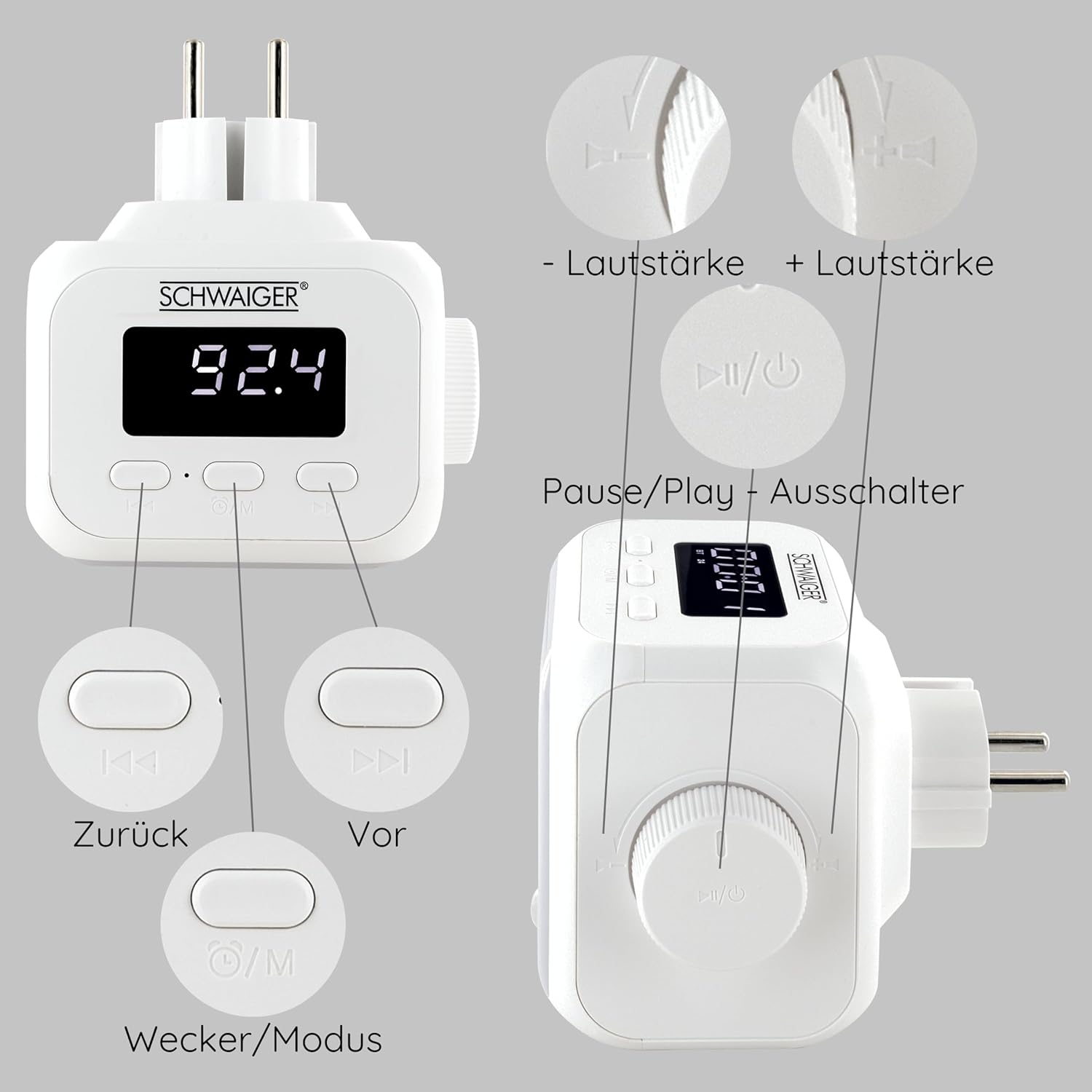
Detailed diagram of the SCHWAIGER RAFM0100 controls, showing buttons for volume, track navigation, power/mode, and alarm.
Kontrolli u Indikaturi:
- Wiri LED: Shows time, FM frequency, and mode indicators.
- Buttuna tal-Volum: Rotary control for adjusting audio volume. Press to Power On/Off or Play/Pause.
- Previous Button (<<): Skips to the previous track in Bluetooth mode or tunes down in FM mode.
- Next Button (>>): Skips to the next track in Bluetooth mode or tunes up in FM mode.
- Mode/Alarm Button (⏰/M): Switches between FM, Bluetooth, and AUX modes. Long press to enter alarm setting.
- Sensor tad-Dawl: Automatically activates LED lighting in dark environments when noise is detected.
5. Setup
- Konnessjoni tal-Enerġija: Plug the device directly into a standard wall power outlet. The LED display will illuminate.
- Qawwa Inizjali Mixgħula: Press the Volume knob (Power/Play/Pause button) to turn on the device.
6. Istruzzjonijiet Operattivi
6.1 Power On/Off
- Biex Tixgħel: Agħfas il-buttuna tal-Volum.
- Biex Tifi: Press and hold the Volume knob for a few seconds.
6.2 Tħaddim tar-Radju FM

The SCHWAIGER RAFM0100 radio plug highlighting its FM radio functionality, with a graphic representation of radio waves.
- Select FM Mode: Press the Mode/Alarm button (⏰/M) until 'FM' is displayed.
- Tiftix ta' Stazzjon Awtomatiku: Press and hold the Play/Pause button (Volume knob) in FM mode to initiate an automatic scan for available stations. The radio will save found stations.
- Irfinar Manwali: Briefly press the Previous (<<) or Next (>>) buttons to manually tune to the next available station.
6.3 Tqabbil tal-Bluetooth
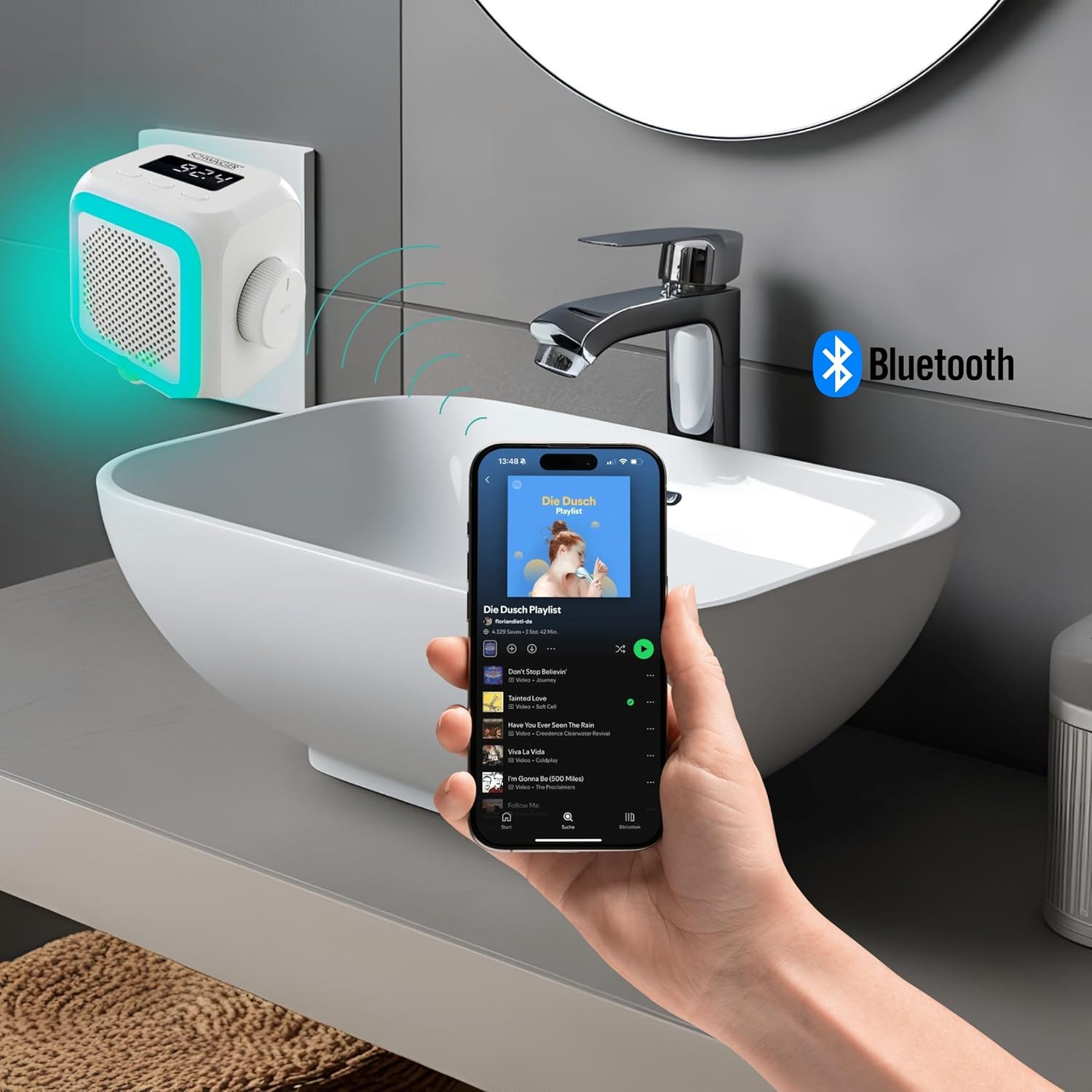
The SCHWAIGER RAFM0100 radio plug in a bathroom setting, connected via Bluetooth to a smartphone playing music.
- Agħżel il-Modalità Bluetooth: Press the Mode/Alarm button (⏰/M) until 'BT' is displayed on the screen. The device will enter pairing mode.
- Ippermetti l-Bluetooth fuq l-Apparat Tiegħek: Fuq l-ismartphone, it-tablet, jew apparat ieħor li jaħdem bil-Bluetooth tiegħek, mur fis-settings tal-Bluetooth u attiva l-Bluetooth.
- Qabbad: Fittex għal 'SCHWAIGER RAFM0100' in the list of available devices and select it to pair. A confirmation sound will indicate successful pairing.
- Play Mużika: Once paired, you can play audio from your connected device through the radio's speaker. Use the Previous (<<), Next (>>), and Play/Pause (Volume knob) buttons to control playback.
6.4 Aġġustament tal-Volum
- Dawwar il-pum tal-Volum lejn l-arloġġ biex iżżid il-volum.
- Dawwar il-pum tal-Volum kontra l-arloġġ biex tnaqqas il-volum.
6.5 Funzjoni ta 'allarm
- Issettja Allarm: Press and hold the Mode/Alarm button (⏰/M) to enter alarm setting mode. Use the Previous (<<) and Next (>>) buttons to adjust the hour and minute, and press the Mode/Alarm button to confirm each setting.
- Attiva / Iddiżattiva l-Allarm: Briefly press the Mode/Alarm button to toggle the alarm on or off. An alarm icon will appear on the display when active.
- Tnaqqis When the alarm sounds, press any button to activate snooze.
- Waqqaf Allarm: To stop the alarm completely, press and hold the Volume knob.
6.6 Integrated Light Sensor

Ġenb view of the SCHWAIGER RAFM0100 radio plug, showing the speaker grille and the integrated light sensor at the bottom.
The device features an integrated light sensor that, in dark environments, will automatically activate the LED display and ambient lighting when it detects noise. This provides a convenient night light function.
7. Manutenzjoni
- Tindif: Disconnect the device from the power outlet before cleaning. Use a soft, dry cloth to wipe the surface. Do not use abrasive cleaners or solvents.
- Ħażna: Jekk ma tkunx qed tużah għal perjodu twil ta' żmien, aqla' l-apparat u aħżnu f'post frisk u niexef.
8 Issolvi l-problemi
| Problema | Kawża Possibbli | Soluzzjoni |
|---|---|---|
| L-apparat ma jixgħelx. | Not properly plugged in; Power outlet not active. | Ensure the device is securely plugged into a working power outlet. Test the outlet with another device. |
| Riċeviment ħażin tar-radju FM. | Weak signal; Interference from other electronics. | Try repositioning the device. Move away from other electronic devices that may cause interference. |
| Ma tistax tqabbad permezz tal-Bluetooth. | Bluetooth not enabled on source device; Device already paired; Out of range. | Ensure Bluetooth is enabled on your device and it's in pairing mode. Make sure the radio is in 'BT' mode. Unpair from other devices if necessary. Keep devices within 10 meters. |
| L-ebda ħoss jew volum baxx. | Volume too low; Muted; Incorrect mode selected. | Increase volume using the rotary knob. Check volume on the connected Bluetooth device. Ensure the correct mode (FM/BT) is selected. |
9. Speċifikazzjonijiet
- Ditta: SCHWAIGER
- Numru tal-Mudell: RAFM0100
- Kulur: Abjad
- Teknoloġija tal-Konnettività: Bluetooth
- Karatteristiċi Speċjali: Bluetooth, Integrated Clock, Compact Size, Night Light (Light Sensor)
- Apparati Kompatibbli: Smartphone, Tablet, MP3 Player, Laptop, Headphones
- Dimensjonijiet tal-Prodott: 8.6L x 11.4W x 9.7H ċentimetri
- Teknoloġija tal-Irfinar: FM
- Stil: Moderna
- Sors tal-Enerġija: Corded Elettriku
- Baned tar-Radju Appoġġjati: FM
- Komponenti Inklużi: Manwal tas-Sid
10. Garanzija u Appoġġ
SCHWAIGER products are designed and manufactured to the highest quality standards. For information regarding warranty, returns, or technical support, please refer to the warranty card included with your product or visit the official SCHWAIGER website. Please have your model number (RAFM0100) and purchase details ready when contacting support.


