1. Introduzzjoni
Grazzi tax-xiriasing the Peakeep Projection Alarm Clock. This device combines a digital alarm clock with a unique projection feature, a colorful nightlight, and a convenient USB charging port. Designed for ease of use and optimal visibility, it offers multiple brightness settings for both the main display and the projection, along with adjustable alarm volume to suit various preferences. Please read this manual carefully to ensure proper setup and operation.
2. Informazzjoni dwar is-Sigurtà
- Tesponix l-apparat għal temperaturi estremi, dawl tax-xemx dirett, jew umdità għolja.
- Żomm l-apparat 'il bogħod mill-ilma jew likwidi oħra.
- Uża biss l-adapter AC/DC provdut.
- Tippruvax tiżżarma jew issewwi l-apparat int stess. Irreferi għal kull manutenzjoni f'idejn persunal kwalifikat.
- Ensure proper ventilation around the clock.
- Armi l-batteriji b'mod responsabbli skont ir-regolamenti lokali.
3. Kontenut tal-Pakkett
- Peakeep Projection Alarm Clock (Model MHP6050)
- AC/DC Power Adapter (60-inch cord)
- Manwal għall-Utent
4. Prodott Aktarview

Figura 4.1: Quddiem view of the Peakeep Projection Alarm Clock, showing the main display, projection, and USB charging capability.

Figura 4.2: Wara view of the Peakeep Projection Alarm Clock, highlighting the control buttons, USB IN/OUT ports, and focus wheel for the projector.
Buttuni tal-Kontroll u Portijiet:
- DIMMER: Adjusts the brightness of the main LED display.
- ĦIN IPPOST: Jidħol fil-modalità tal-issettjar tal-ħin.
- 12/24HR: Jaqleb bejn il-formati tal-ħin ta' 12-il siegħa u 24 siegħa.
- VOLUM: Jaġġusta l-volum tal-allarm.
- ALARM SET ON/OFF: Sets and activates/deactivates the alarm.
- NIGHTLIGHT ON/OFF: Turns the RGB nightlight on or off.
- PROJECTION DIMMER: Adjusts the brightness of the projected time.
- PROJECTION ON/FLIP/OFF: Controls the projection (on, flip orientation, off).
- FOCUS Wheel: Jaġġusta ċ-ċarezza tal-immaġni pproġettata.
- 5V IN: Power input port for the AC/DC adapter.
- USB OUT: Port tal-iċċarġjar USB għal apparati esterni.
- Kompartiment tal-batterija: For 2 AAA backup batteries (not included).
5. Setup
5.1 Konnessjoni tal-Enerġija
Connect the provided AC/DC power adapter to the 5V IN port on the back of the clock and plug the adapter into a standard wall outlet. The clock display will illuminate.

Figure 5.1: Power connection and battery backup illustration.
5.2 Installazzjoni ta' Backup tal-Batterija
For battery backup, open the battery compartment on the back of the clock and insert 2 AAA batteries (not included), observing the correct polarity (+/-). These batteries will preserve your time and alarm settings during a power outage and trigger the alarm if power is lost.
5.3 Issettjar tal-Ħin Inizjali
- Agħfas u żomm il- IL-ĦIN IPPOST buttuna. Iċ-ċifri tas-sigħat jibdew jteptpu.
- Uża l- VOLUM or SET TA 'ALLARM buttuni biex taġġusta s-siegħa.
- Agħfas IL-ĦIN IPPOST Agħfas mill-ġdid biex tikkonferma s-siegħa u tmur għall-issettjar tal-minuti. Iċ-ċifri tal-minuti se jteptpu.
- Uża l- VOLUM or SET TA 'ALLARM buttuni biex jaġġustaw il-minuti.
- Agħfas IL-ĦIN IPPOST one more time to save the time and exit time setting mode.
- Biex taqleb bejn il-format ta' 12-il siegħa u ta' 24 siegħa, agħfas il-buttuna 12/24HR button. In 12-hour format, 'AM' or 'PM' indicators will be displayed.
6. Istruzzjonijiet Operattivi
6.1 Issettjar tal-Allarm
- Agħfas u żomm il- SET TA 'ALLARM buttuna. Iċ-ċifri tas-siegħa tal-allarm se jteptep.
- Uża l- VOLUM or SET TA 'ALLARM buttuni biex taġġusta s-siegħa tal-allarm.
- Agħfas SET TA 'ALLARM again to confirm the alarm hour and move to alarm minute setting. The alarm minute digits will flash.
- Uża l- VOLUM or SET TA 'ALLARM buttuni biex taġġusta l-minuti tal-allarm.
- Agħfas SET TA 'ALLARM one more time to save the alarm time.
- Biex tattiva jew tiddiżattiva l-allarm, agħfas qasir il-buttuna SET TA 'ALLARM buttuna. Ikona ta' allarm tidher fuq id-displej meta tiġi attivata.
6.2 Aġġustament tal-Volum tal-Allarm
The alarm volume can be set to 5 levels, ranging from 60dB to 108dB. While the alarm is sounding or in standby mode, press the VOLUM button repeatedly to cycle through the 5 volume levels (U01 to U05). Select the desired volume.

Figure 6.1: Alarm volume levels.
6.3 Funzjoni Snooze
Meta jdoqq l-allarm, agħfas il-buttuna l-kbira SNOOZE button on top of the clock to temporarily silence the alarm for 9 minutes. The alarm will sound again after 9 minutes. To turn off the alarm completely, press any other button.
6.4 Karatteristiċi tal-Projezzjoni
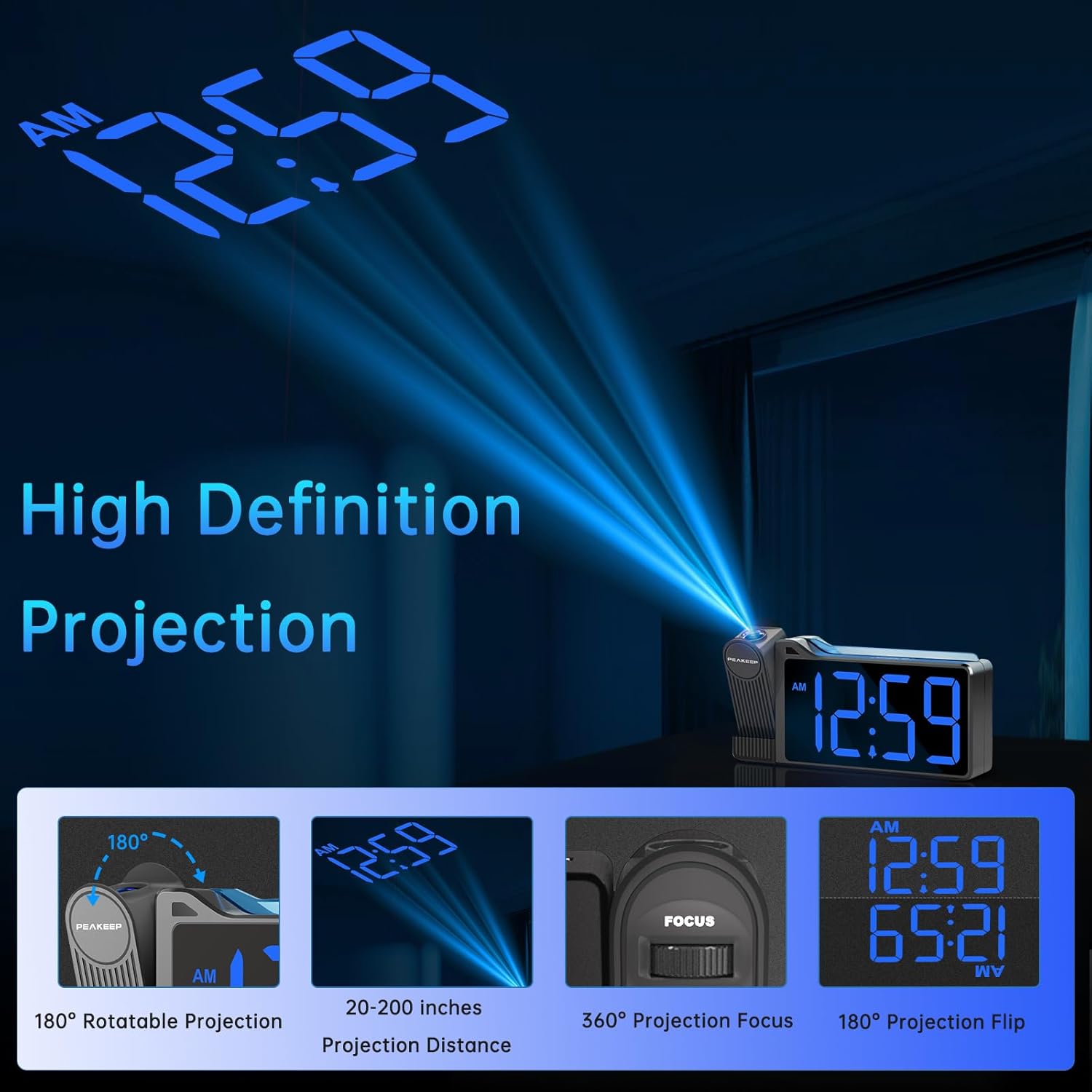
Figure 6.2: High Definition Projection capabilities.
- Projezzjoni li ddur ta' 180°: The projector arm can be rotated 180 degrees to project the time onto a ceiling or wall.
- Distanza ta' Projezzjoni: The optimal projection distance ranges from 20 inches to 200 inches.
- Adjusting Projection Brightness: Agħfas il- PROJECTION DIMMER button repeatedly to cycle through 5 brightness levels (L01 to L05) for the projected time.
- Projection ON/FLIP/OFF: Agħfas il- PROJEZZJONI ON/FLIP/OFF button to turn the projection on, flip its orientation (180 degrees), or turn it off.
- Aġġustament tal-Focus: Uża l- FOCUS wheel on the side of the projector to sharpen the clarity of the projected time.

Figure 6.3: Adjustable Projection Brightness levels.
6.5 Nightlight ikkulurit
The clock features an RGB color-changing nightlight on its top surface. Press the NIGHTLIGHT ON/OFF button to turn the nightlight on or off. When on, it will cycle through various colors, providing a soothing ambiance.

Figure 6.4: RGB Color-changing Nightlight.
6.6 Aġġustament tal-Luminożità tad-Displej
The main LED display has 6 levels of adjustable brightness (L1 to L5, plus OFF). Press the DIMMER button repeatedly to cycle through these brightness levels to suit your preference and environment.

Figure 6.5: Main display brightness levels.
6.7 Port tal-Iċċarġjar tal-USB
The clock is equipped with a USB OUT port (5V) on its back, allowing you to charge your smartphone or other USB-powered devices conveniently at your bedside. Simply connect your device's USB charging cable to this port.
7. Manutenzjoni
- Naddaf il-wiċċ tal-arloġġ b'ċarruta ratba u niexfa. Tużax prodotti tat-tindif jew solventi li joborxu.
- Keep the projection lens clean to ensure clear time projection. Use a soft, lint-free cloth.
- If the clock will not be used for an extended period, remove the backup batteries to prevent leakage.
8 Issolvi l-problemi
| Problema | Kawża Possibbli | Soluzzjoni |
|---|---|---|
| Clock display is off / Clock not working. | Power adapter not connected or faulty; Power outage. | Ensure the power adapter is securely plugged into the clock and a working outlet. Check power supply. |
| Time/Alarm settings are lost after power disconnection. | No backup batteries installed or batteries are dead. | Install 2 new AAA batteries in the battery compartment. |
| Projected time is blurry or unclear. | Focus not adjusted; Incorrect projection distance. | Aġġusta l- FOCUS wheel on the projector. Ensure the clock is within the 20-200 inch projection range. |
| Projected time is not visible. | Projection is off or too dim. | Agħfas PROJEZZJONI ON/FLIP/OFF to turn on. Adjust PROJECTION DIMMER biex tiżdied il-luminożità. |
| L-allarm mhux qawwi biżżejjed. | Alarm volume set too low. | Agħfas il- VOLUM button to increase the alarm volume level (U01-U05). |
| USB charging is slow or not working. | Device requires higher charging current; Cable issue. | Ensure your device is compatible with 5V USB charging. Try a different USB cable. Note: This port is for charging, not data transfer. |
9. Speċifikazzjonijiet
| Karatteristika | Dettall |
|---|---|
| Numru tal-Mudell | MHP6050 |
| Tip ta 'Wiri | LED diġitali |
| Kulur tal-Wiri | Ċifri Blu |
| Dimensjonijiet tal-Prodott | 6.9"W x 3.5"Għ |
| Piż tal-oġġett | 8.8 uqija |
| Sors tal-Enerġija | Elettriku bil-Fili (Adapter AC/DC inkluż) |
| Backup tal-batterija | 2 x batteriji AAA (mhux inklużi) |
| Rotazzjoni tal-Projezzjoni | 180° |
| Luminożità tal-Projezzjoni | 5 livelli |
| Il-luminożità tal-wiri | 6 levels (including OFF) |
| Dawl bil-lejl | RGB Color-changing |
| Alarm Volume Range | 60-108 dB (5 levels) |
| Output USB | 5V (for charging devices) |
| Materjal | Plastik |
10. Garanzija u Appoġġ
Peakeep products are manufactured with high-quality materials and craftsmanship. For any questions, technical support, or warranty claims, please contact Peakeep customer service through the retailer's platform or the official Peakeep websit. Jekk jogħġbok żomm il-prova tax-xiri tiegħek għal skopijiet ta' garanzija.


