1. Introduzzjoni
The Vantrue LTE Module (LT01) is designed to enhance the functionality of your Vantrue E1 Pro, S1 Pro, and N2X dash cameras by providing advanced connectivity features. This module enables real-time remote viewing, incident notifications, vehicle tracking, and cloud storage, ensuring you stay connected to your vehicle from anywhere.

2. Setup
2.1. Kontenut tal-Pakkett
Before you begin, please verify that all items are included in your package:
- Vantrue LT01 LTE Module
- Labra mwaħħla
- Stiker li jwaħħal
- Stikers Elettrostatiċi (2 biċċiet)
- Gwida Quick
- Manwal għall-Utent

2.2. Installazzjoni
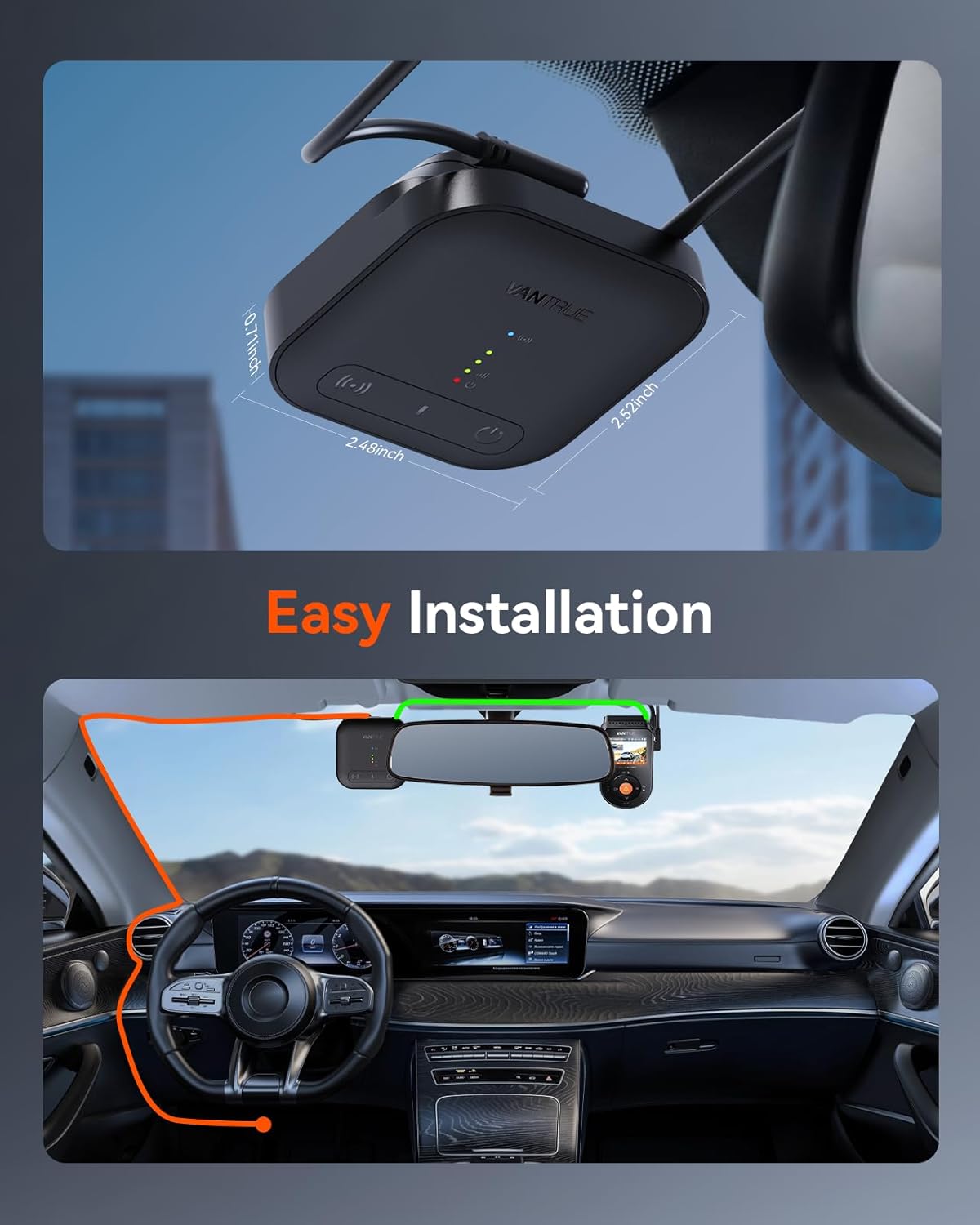
The Vantrue LTE Module is designed for easy installation, typically mounting near your dash camera on the windshield. Ensure the module is placed in a location that does not obstruct your view jew jinterferixxi mal-iskjerament tal-airbag.
2.3. SIM Card Insertion and Activation
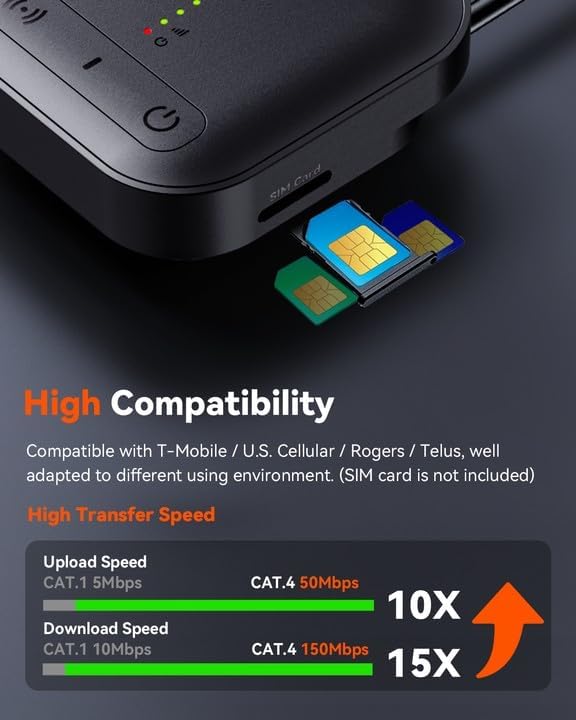
The LT01 module supports multi-carriers (T-Mobile, U.S. Cellular, Rogers, Telus) for flexible usage. A SIM card is required for LTE functionality (not included). Ensure you have an active data-only SIM card from a compatible carrier.
To activate your LT01 LTE Module:
- Download the Vantrue APP from your device's app store (App Store for iOS, Google Play for Android).
- Turn on Bluetooth (BT) function on your phone.
- Insert the SIM card into the LT01 module and start the device.
- Complete the registration process within the Vantrue APP.
- Select and connect your device in the app.
- Select the correct SIM card type.
- Attiva l-apparat.
For detailed activation steps and troubleshooting, please refer to the official user manual available online: https://www.vantrue.net/usermanual/lt01
3. Karatteristiċi Operattivi
3.1. Real-time Remote Preview
Aċċess live footage from your dash camera from anywhere, allowing you to monitor your vehicle and its surroundings in real-time. This feature supports seamless, low-latency multi-camera live streaming via LTE high-speed transmission.

You can also engage in two-way communication to enhance deterrence effectiveness. Capture screenshots or instantly record and save current dashcam footage directly to your phone for quick evidence collection and sharing.
Video 3.1: Official Vantrue LT01 LTE Module Overview. This video demonstrates the module's features including remote live view, impact alerts, and vehicle tracking.
3.2. Real-time Event Notifications
Receive instant AI Parking Monitor triggered video alerts and geofence breach notifications pushed directly to the app. This ensures prompt awareness of any activity around your vehicle, providing peace of mind.

3.3. Vehicle Location Tracking
Retrieve the dashcam's latest GPS location data uploaded to the cloud. You can use this information to navigate precisely to your vehicle via third-party map applications, making it easy to find your car in large parking lots or unfamiliar areas.

3.4. Hotspot Mobbli
The LT01 module can function as a mobile hotspot, supporting connections for up to 5 devices simultaneously for internet access. This powerful feature provides convenient connectivity for passengers on the go.

3.5. Smart Cloud Storage
Benefit from free 2GB cloud storage for secure backup of your dashcam footage. This greatly reduces the risk of data loss and provides easy access to important video files minn kullimkien.

3.6. Remote SD Card Management
Unique technology enables remote playback and download of files directly from the SD card within your dash camera. This feature transcends standard cloud storage limits, offering comprehensive access to all recorded data.
3.7. Ċint Elettroniku (Ġeofencing)
Set up unlimited geofences with customizable ranges from 1km to 300km. Receive notifications when your vehicle enters or leaves these predefined areas, with flexible editing options for your fences. This is useful for monitoring vehicle movement and security.
3.8. Remote Wake-up Function
Regardless of whether the dashcam is in parking mode, you can remotely activate your device as long as the LTE module is online, ensuring control at all times.
3.9. Over-the-Air (OTA) Updates
Stay updated effortlessly with convenient OTA upgrades that enhance user experience continuously, providing new features and performance improvements.
4. Manutenzjoni
To ensure optimal performance and longevity of your Vantrue LTE Module, follow these general maintenance guidelines:
- Tindif: Use a soft, dry cloth to clean the module. Avoid using harsh chemicals or abrasive materials that could damage the surface.
- Temperatura: Operate and store the module within the recommended temperature ranges specified in the product specifications to prevent damage.
- Aġġornamenti tal-Firmware: Regularly check for and install OTA firmware updates to ensure your device has the latest features and bug fixes.
- SIM Card Care: Handle the SIM card carefully during insertion and removal to avoid damaging the contacts.
5 Issolvi l-problemi
If you encounter issues with your Vantrue LTE Module, consider the following common troubleshooting steps:
- No LTE Connection:
- Ensure the SIM card is correctly inserted and activated with a compatible carrier.
- Check your data plan status with your carrier.
- Verify that the module is receiving power.
- Try restarting the module and your dash cam. - Kwistjonijiet ta' Konnettività tal-App:
- Ensure your phone's Bluetooth and internet connection are active.
- Make sure the Vantrue APP is updated to the latest version.
- Try restarting the app or reinstalling it. - Remote Features Not Working:
- Confirm that the LTE module has a strong signal.
- Check cloud storage availability and settings.
- Ensure your dash cam is properly connected to the LTE module. - Veloċitajiet tad-Dejta Baxxi:
- Signal strength may be low in your current location.
- Network congestion from your carrier.
- Ensure your SIM card supports the required speeds.
For more detailed troubleshooting guides and technical support, please visit the official Vantrue support website or refer to the comprehensive online user manual.
6. Speċifikazzjonijiet
| Karatteristika | Dettall |
|---|---|
| Mudell | LT01 |
| Piż tal-oġġett | 4.9 uqija (138 Grammi) |
| Dimensjonijiet tal-Prodott | 1 x 1 x 1 pulzieri |
| Teknoloġija tal-Konnettività | Wi-Fi, LTE |
| Kapaċità tal-Ħżin tal-Memorja | 2 GB (Cloud Storage) |
| Tip ta 'Immuntar | Mount Windskrin |
| Karatteristika Speċjali | App Control |
| Tip ta 'Servizz tal-Vettura | Karozza |
| Komponenti Inklużi | Adhesive Sticker, User Manual, Quick Guide, Stuck Needle, Electrostatic Stickers*2 |
7. Garanzija u Appoġġ
7.1. Informazzjoni dwar Garanzija
The Vantrue LTE Module (LT01) comes with a 12-il xahar garanzija mid-data tax-xiri. Din il-garanzija tkopri difetti fil-manifattura u malfunzjonamenti taħt użu normali. Jekk jogħġbok żomm il-prova tax-xiri tiegħek għal talbiet ta' garanzija.
7.2. Appoġġ għall-Klijent
For any questions, technical assistance, or warranty inquiries, please contact Vantrue Customer Support through their official website. You can find detailed FAQs, troubleshooting guides, and contact information at:
Always refer to the latest information available on the official Vantrue website for the most up-to-date support and product details.


