1. Prodott Aktarview
The Sandberg Survivor Powerbank 27000 PD65W is a robust and high-capacity portable charging solution designed for various mobile devices, including smartphones and laptops. Its durable construction is IP66 certified, providing resistance against water, shock, and dust, making it suitable for demanding environments. This power bank features multiple charging outputs, including USB-C Power Delivery, standard USB-A ports, and wireless charging capabilities, alongside an integrated flashlight.

Stampa 1.1: Quddiem view of the Sandberg Survivor Powerbank, highlighting the power button, USB-A ports, and USB-C port.
2. Kontenut tal-Pakkett
- Sandberg Survivor Powerbank 27000 PD65W (Model 420-99)
- USB-C għal USB-C Charging Cable
- Manwal għall-Utent (dan id-dokument)
3. Karatteristiċi tal-prodott
- Kapaċità Għolja: 27000 mAh / 99.9 Wh for extended power.
- Disinn imħatteb: IP66 certified for water, shock, and dust resistance.
- Kunsinna tal-Enerġija USB-C: Up to 65W output for laptops and fast-charging devices, 60W input for rapid recharging.
- Ħruġ doppju tal-USB-A: Two 18W (QC 3.0) ports for standard device charging.
- Iċċarġjar bla fili: 15W maximum output for compatible devices.
- Flashlight Integrata: Powerful 120 lumen LED flashlight with a range of 12-15 meters.
- Output DC5525: Ħruġ ta' 12V/2A.

Stampa 3.1: Wara view of the power bank, illustrating the wireless charging area and the integrated lanyard attachment point.
4. Setup
4.1 Iċċarġjar inizjali
- Qabel l-ewwel użu, iċċarġja l-power bank kompletament.
- Qabbad il-kejbil USB-C provdut mal-port tad-dħul USB-C tal-power bank.
- Connect the other end of the USB-C cable to a compatible USB-C power adapter (not included) with a minimum output of 60W for optimal charging speed.
- The LED indicators on the power bank will illuminate to show the charging status. All indicators lit steadily signify a full charge.
4.2 Power Indicators
The power bank features LED indicators to display the remaining battery level. Press the power button once to check the current charge status. The number of lit LEDs corresponds to the approximate charge level.
5. Istruzzjonijiet Operattivi
5.1 Charging Devices via USB-C
- Qabbad il-kejbil tal-iċċarġjar USB-C tat-tagħmir tiegħek mal-port tal-ħruġ USB-C tal-power bank.
- Qabbad it-tarf l-ieħor tal-kejbil mat-tagħmir tiegħek.
- Il-power bank jibda jiċċarġja awtomatikament. Jekk le, agħfas il-buttuna tal-qawwa darba.
5.2 Charging Devices via USB-A
- Connect your device's USB-A charging cable to one of the power bank's USB-A output ports.
- Qabbad it-tarf l-ieħor tal-kejbil mat-tagħmir tiegħek.
- Il-power bank jibda jiċċarġja awtomatikament. Jekk le, agħfas il-buttuna tal-qawwa darba.
5.3 Iċċarġjar bla fili
- Kun żgur li l-apparat tiegħek jappoġġja l-iċċarġjar mingħajr fili (l-istandard Qi).
- Place your wireless charging compatible device directly onto the designated wireless charging pad on the power bank.
- The power bank will detect the device and begin wireless charging. An indicator light may illuminate to confirm wireless charging is active.
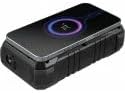
Stampa 5.1: Fuq view of the power bank demonstrating a device being charged wirelessly, indicated by a glowing circle.
5.4 L-użu tal-flashlight
- To turn on the flashlight, press and hold the power button for approximately 2-3 seconds.
- To turn off the flashlight, press and hold the power button again for approximately 2-3 seconds.
6. Manutenzjoni
- Tindif: Uża drapp artab u niexef biex tnaddaf il-power bank. Evita li tuża kimiċi ħarxa jew materjali li joborxu.
- Ħażna: Store the power bank in a cool, dry place away from direct sunlight and extreme temperatures. For long-term storage, it is recommended to keep the power bank charged to approximately 50-75% capacity.
- Espożizzjoni għall-Ilma: While IP66 rated, ensure all port covers are securely closed before exposing the device to water or dust. After exposure, dry the device thoroughly before opening port covers or charging.
7 Issolvi l-problemi
- Il-power bank mhux qed jiċċarġja:
- Ensure the USB-C cable is securely connected to both the power bank and the power adapter.
- Verify that the power adapter is functioning correctly and provides sufficient power (e.g., 60W USB-C PD adapter).
- Ipprova kejbil USB-C u/jew adapter tal-enerġija differenti.
- L-apparat mhux qed jiċċarġja mill-power bank:
- Agħfas il-buttuna tal-qawwa fuq il-power bank biex tattiva l-output.
- Kun żgur li l-kejbil tal-iċċarġjar huwa konness sew kemm mal-power bank kif ukoll mat-tagħmir tiegħek.
- Ivverifika li l-port tal-iċċarġjar tat-tagħmir tiegħek huwa nadif u bla ħsara.
- Ipprova kejbil jew port tal-iċċarġjar differenti fuq il-power bank.
- Iċċekkja jekk il-bank tal-enerġija għandux biżżejjed ħlas.
- L-iċċarġjar mingħajr fili mhux qed jaħdem:
- Ensure your device is placed centrally on the wireless charging pad.
- Neħħi kwalunkwe kisi oħxon mit-tagħmir tiegħek li jista' jinterferixxi mal-iċċarġjar mingħajr fili.
- Ivverifika li t-tagħmir tiegħek jappoġġja l-iċċarġjar mingħajr fili Qi.
- Flashlight not turning on/off:
- Ensure you are pressing and holding the power button for the correct duration (2-3 seconds).
- Iċċekkja jekk il-bank tal-enerġija għandux biżżejjed ħlas.
8. Speċifikazzjonijiet
| Numru tal-Mudell | 420-99 |
| Kapaċità tal-batterija | 27000mAh / 99.9Wh |
| Klassifikazzjoni tal-Protezzjoni tad-Dħul (IP). | IP66 (Water, Shock, Dust Resistant) |
| Input USB-C | 5V/3A, 9V/3A, 12V/3A, 15V/3A, 20V/3A (PD60W max) |
| Output USB-C | 5V/3A, 9V/3A, 12V/3A, 15V/3A, 20V/3.25A (PD65W max) |
| USB-A 1 Output | 5V/3A, 9V/2A, 12V/1.5A (18W max, QC 3.0) |
| USB-A 2 Output | 5V/3A, 9V/2A, 12V/1.5A (18W max, QC 3.0) |
| Ħruġ ta 'Iċċarġjar Bla Fili | 15W max |
| Output DC5525 | 12V/2A |
| Flashlight | 120 lumens, 12-15 meter range |
| Piż | 805 Gramm |
9. Informazzjoni dwar is-Sigurtà
- Do not disassemble, open, or shred the power bank.
- Tesponix il-power bank għas-sħana jew għan-nar. Evita li taħżnu fid-dawl tax-xemx dirett.
- M'għandekx short-circuit il-bank tal-enerġija.
- Tesponix il-power bank għal xokk mekkaniku.
- In case of a battery leak, do not allow the liquid to come into contact with skin or eyes. If contact has been made, wash the affected area with copious amounts of water and seek medical advice.
- Żomm il-bank tal-enerġija fejn ma jintlaħaqx mit-tfal.
- Kun żgur li jkun hemm ventilazzjoni xierqa meta tiċċarġja.
- Armi l-power bank b'mod responsabbli skont ir-regolamenti lokali.
10. Garanzija u Appoġġ
Sandberg products are built to high quality standards. For information regarding warranty terms and technical support, please refer to the official Sandberg webis-sit jew ikkuntattja lill-bejjiegħ lokali tiegħek. Żomm l-irċevuta tax-xiri tiegħek għal talbiet ta' garanzija.
Għal aktar għajnuna, żur: www.sandberg.it


