1. Introduzzjoni
Thank you for choosing the DreamSky DS216 AM/FM Portable Radio. This manual provides essential information for the safe and efficient operation of your new radio. Please read it thoroughly before use and retain it for future reference.
Kontenut tal-Pakkett:
- DreamSky AM/FM Radio
- Adapter tal-Enerġija
- Manwal tas-Sid
2. Karatteristiċi ewlenin
- Strong Reception: Pulls in both AM and FM signals effectively.
- Clear Loud Sound: Equipped with a large speaker for crisp audio quality.
- Operazzjoni faċli: Features a smooth, large analog dial for simple tuning and volume control.
- Għażliet ta' Enerġija Doppju: Operates via AC plug-in (adapter included) or 4 AA alkaline batteries (not supplied).
- Disinn portabbli: Kompatt u ħafif b'manku konvenjenti għal trasport faċli.
- Smigħ Privat: Includes a 3.5mm earphone jack.
3. Komponenti tal-Prodott
Familiarize yourself with the main components of your DreamSky DS216 radio:
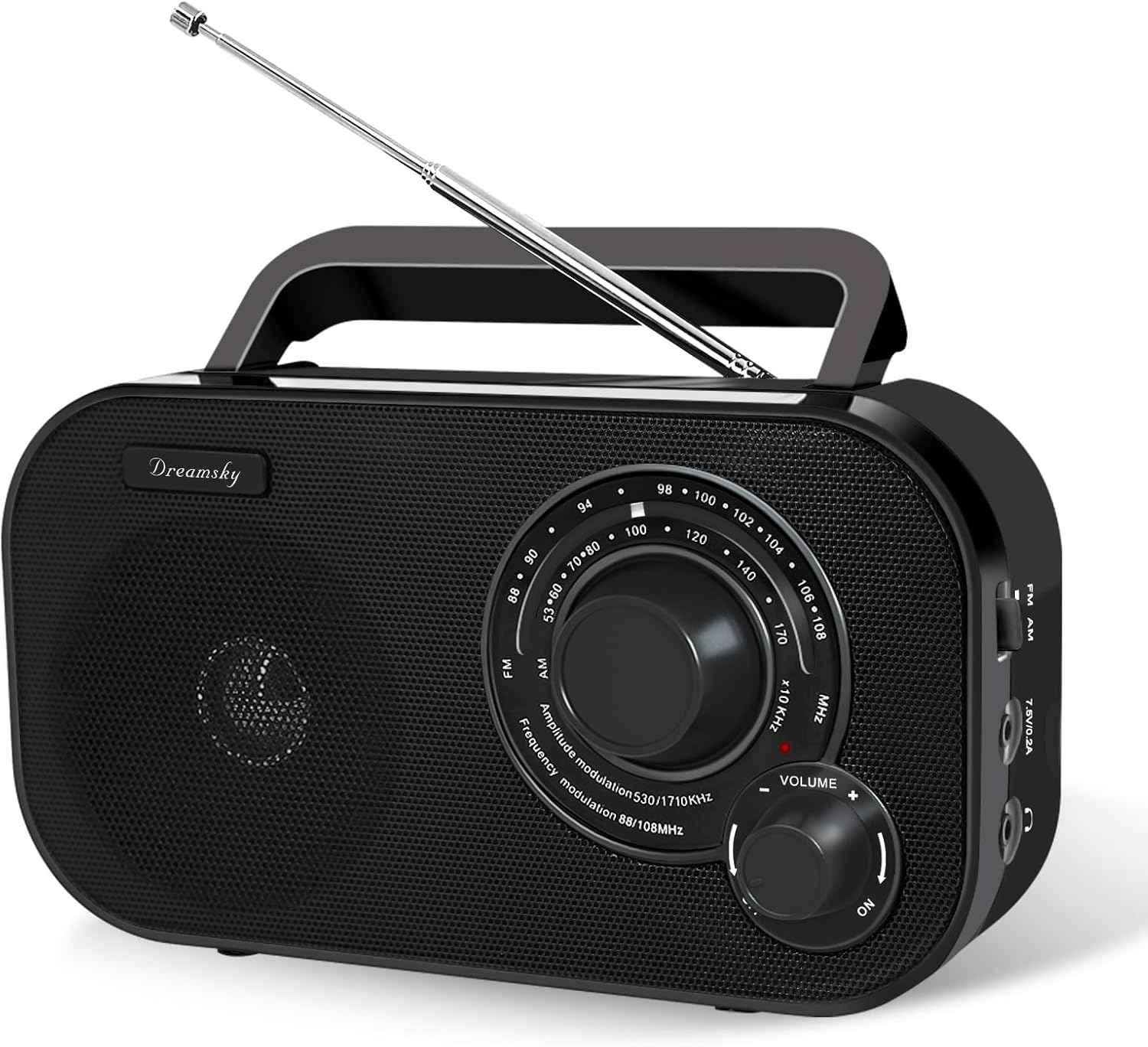
This image displays the front of the radio, highlighting the large tuning dial for station selection, the volume control knob, and the integrated speaker. The "DreamSky" brand name is visible on the left side.

This image shows the side panel of the radio, detailing the slide switch for selecting between AM and FM bands, the power input port for the AC adapter, and the 3.5mm headphone jack for private listening.

Din l-immaġni tipprovdi view of the radio's top and rear, highlighting the integrated carrying handle for portability and the extendable telescopic antenna for improved reception.
4. Setup
4.1 Powering Your Radio
Your DreamSky DS216 radio offers two power options:
- Qawwa AC: Connect the included power adapter to the "7.5V/0.2A" port on the side of the radio and plug it into a standard wall outlet.
- Qawwa tal-batterija: For portable use, open the battery compartment on the back of the radio and insert 4 AA alkaline batteries (not supplied), ensuring correct polarity. Close the compartment securely.

This image visually demonstrates how to power the radio using either the provided AC adapter or by inserting four AA batteries into the rear compartment.
4.2 Aġġustament tal-Antenna
For optimal FM reception, extend the telescopic antenna located on the back of the radio. Adjust its position and angle to achieve the clearest signal. For AM reception, the internal antenna is generally sufficient, but rotating the radio itself may improve signal strength.
5. Istruzzjonijiet Operattivi
5.1 Mixgħul/Mitfi u Kontroll tal-Volum
Dawwar il- VOLUM knob clockwise to turn the radio ON and increase the volume. Rotate counter-clockwise to decrease the volume and turn the radio OFF.
5.2 Selecting a Band (AM/FM)
Uża l- FM/AM slide switch located on the side of the radio to select your desired band.
5.3 Tuning to a Station
Dawwar il-kbir IRTUNING dial on the front of the radio to scan for stations. The red indicator light will illuminate when a strong signal is detected.

This image highlights the radio's capability for strong reception and clear audio output, with visual cues representing radio waves and sound quality.
5.4 Użu ta' Headphones
For private listening, plug any standard 3.5mm headphones (not included) into the headphone jack on the side of the radio. The internal speaker will automatically mute.

This image focuses on the 3.5mm earphone jack, indicating its location for connecting headphones for personal listening.
6. Manutenzjoni u Kura
- Żomm ir-radju niexef u 'l bogħod mill-umdità.
- Naddaf il-barra b'ċarruta ratba u niexfa. Tużax prodotti tat-tindif jew solventi li joborxu.
- Neħħi l-batteriji jekk ir-radju ma se jintużax għal perjodu estiż biex tevita t-tnixxija.
- Evita temperaturi estremi u dawl tax-xemx dirett.
7 Issolvi l-problemi
| Problema | Kawża Possibbli | Soluzzjoni |
|---|---|---|
| Ebda qawwa | Il-batteriji huma mejta jew imdaħħla ħażin; l-adapter tal-AC mhux imqabbad jew difettuż. | Replace batteries, check polarity; ensure AC adapter is securely connected and functional. |
| Riċeviment ħażin/statiku | Weak signal; antenna not extended or positioned correctly; interference from other electronics. | Extend and adjust the telescopic antenna (FM); rotate the radio (AM); move away from electronic devices. |
| L-ebda ħoss mill-kelliem | Volume too low; headphones plugged in. | Increase volume; unplug headphones. |
8. Speċifikazzjonijiet
- Mudell: DS216
- Dimensjonijiet: 8.2 x 2.2 x 4.6 pulzieri
- Piż: 1.41 liri
- Sors tal-Enerġija: AC 120V/60Hz or DC 6V (4 x AA batteries)
- Medda tal-Frekwenza FM: 87 - 108 MHz
- Medda ta' Frekwenzi AM: 520 - 1710 KHz
- Konnettività: AM/FM Tuner, 3.5mm Headphone Jack
- Manifattur: ShenZhen litian technology Co.,Ltd
9. Garanzija u Appoġġ
For warranty information or customer support, please refer to the contact details provided in your original purchase documentation or visit the official DreamSky website. You may also contact the manufacturer directly at info@dreamskyu.com.
Dan il-prodott huwa Verified by Transparency, ensuring authenticity and product information.
10. Informazzjoni dwar is-Sigurtà
- Tesponix l-unità għax-xita jew għall-umdità biex tevita nar jew xokk elettriku.
- Tiftaħx is-casing. Irreferi s-servizz kollu lil persunal kwalifikat.
- Armi l-batteriji kif suppost skont ir-regolamenti lokali.
11. Vidjows tal-Prodott
DreamSky Portable AM FM Radio - Overview
Dan il-video jipprovdi ħarsa komprensivaview of the DreamSky Portable AM FM Radio, demonstrating its features, ease of use, and portable design. It highlights the tuning process, power options, and overall functionality of the device.
DreamSky AM FM Radio Portable - Features Showcase
This video showcases various features of the DreamSky AM FM Portable Radio, including its compact size, handle for easy carrying, and the simple controls for tuning and volume. It also briefly touches upon its dual power capabilities.


