Introduzzjoni
This manual provides detailed instructions for the safe and efficient operation, maintenance, and troubleshooting of your LEVOIT 36" Bladeless Tower Fan and LEVOIT Core Mini-P Air Purifier. Please read this manual thoroughly before use and retain it for future reference.
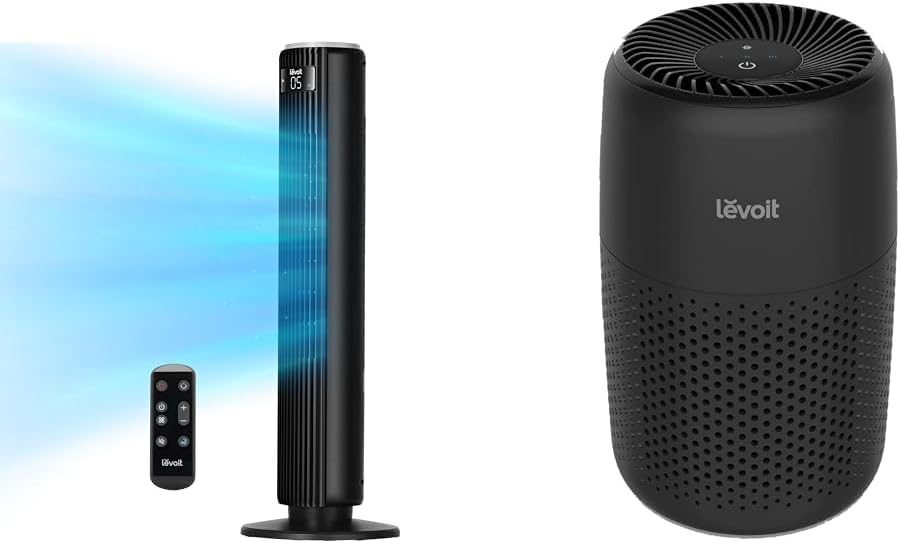
Image: The LEVOIT 36-inch Bladeless Tower Fan and the LEVOIT Core Mini-P Air Purifier shown together, highlighting their compact and modern design.
Informazzjoni Importanti dwar is-Sigurtà
Biex tnaqqas ir-riskju ta’ nar, xokk elettriku, jew korriment, jekk jogħġbok osserva l-prekawzjonijiet ta’ sigurtà li ġejjin:
- Dejjem aqla’ l-apparat qabel ma tnaddaf jew tagħmel xi manutenzjoni.
- Tħaddem ebda fann b'korda jew plagg bil-ħsara. Armi l-fann jew erġa' lura f'faċilità ta' servizz awtorizzata għal eżami u/jew tiswija.
- Tmexxix korda taħt it-twapet. Tgħattix il-korda b'twapet tat-twapet, runners, jew kisi simili. Irranġa l-korda 'l bogħod miż-żona tat-traffiku u fejn ma titfixkelx.
- Do not insert or allow fingers or foreign objects to enter any ventilation or exhaust opening as this may cause an electric shock or damage the appliance.
- M'għandekx timblokka d-dħul jew l-egżost tal-arja bl-ebda mod.
- Uża dan l-apparat biss kif deskritt f'dan il-manwal. Kwalunkwe użu ieħor mhux rakkomandat mill-manifattur jista 'jikkawża nar, xokk elettriku, jew korriment lil persuni.
- Tużax barra.
- Dan l-apparat għandu plagg polarizzat (xafra waħda hija usa 'mill-oħra). Biex jitnaqqas ir-riskju ta 'xokk elettriku, dan il-plagg huwa maħsub biex jidħol fi żbokk polarizzat mod wieħed biss. Jekk il-plagg ma jidħolx għal kollox fl-iżbokk, aqleb il-plagg. Jekk xorta ma taqbilx, ikkuntattja elettriċista kwalifikat. Tippruvax tegħleb din il-karatteristika tas-sigurtà.
Kontenut tal-Pakkett
- LEVOIT 36" Bladeless Tower Fan
- Kontroll mill-bogħod għall-Fann tat-Torri
- LEVOIT Core Mini-P Air Purifier
- 3-in-1 Filtration Filter (Pre-installed in Air Purifier)
- Aroma Pad (Pre-installed in Air Purifier)
- Power Adapter for Air Purifier
- Manwal għall-Utent
Prodott Overview
LEVOIT 36" Bladeless Tower Fan

Image: The LEVOIT 36-inch Bladeless Tower Fan standing upright with its remote control. Blue lines illustrate the powerful airflow emanating from the fan's vertical vent.
The tower fan features a sleek, bladeless design for safety and easy cleaning. It includes a digital display on top, indicating settings such as speed and timer. The base provides stability, and the unit comes with a remote control for convenient operation.
LEVOIT Core Mini-P Air Purifier

Immaġni: Close-up view of the LEVOIT Core Mini-P Air Purifier. It is a compact, cylindrical device with a matte black finish and perforated sides for air intake, featuring control buttons on its top surface.
The Core Mini-P Air Purifier is a compact, cylindrical device designed for small to medium-sized rooms. It features a 3-stage filtration system and a fragrance sponge for aromatherapy. Control buttons are located on the top panel.
Setup
Setting up the Tower Fan
- Carefully remove the tower fan from its packaging.
- Ensure the base is securely attached. If not, align the base with the fan body and twist clockwise until it locks into place.
- Poġġi l-fann fuq wiċċ sod u livellat.
- Ipplaggja l-korda tad-dawl fi żbokk elettriku standard.
Twaqqif tal-Purifikatur tal-Arja
- Neħħi l-purifikatur tal-arja mill-imballaġġ tiegħu.
- Turn the air purifier upside down and twist the base cover counter-clockwise to unlock and remove it.
- Remove the plastic packaging from the 3-in-1 filtration filter.
- Place the filter back into the air purifier, ensuring it is seated correctly.
- Replace the base cover and twist clockwise to lock it.
- Connect the power adapter to the air purifier and then plug it into a standard electrical outlet.
- To use the aromatherapy feature, add 2-3 drops of essential oil (not included) onto the aroma pad located at the bottom of the air purifier.
Istruzzjonijiet Operattivi
Tħaddim tal-Fann tat-Torri
The tower fan can be operated using the control panel on top of the unit or the included remote control.
- Buttuna tal-Qawwa: Agħfas biex tixgħel jew titfi l-fann.
- Buttuna tal-Modalità: Cycle through 4 modes: Normal, Turbo, Sleep, and Auto.
- Modalità Normali: Fluss tal-arja kostanti b'veloċità magħżula.
- Modalità Turbo: Fluss massimu tal-arja għal tkessiħ rapidu.
- Modalità Sleep: Gradually decreases fan speed for quiet operation.
- Modalità Awtomatika: Adjusts fan speed based on ambient room temperature (detected by smart sensors).
- Aġġustament tal-veloċità: Use the '+' and '-' buttons to select from 5 speed settings.
- Buttuna ta 'oxxillazzjoni: Press to activate or deactivate 90° oscillation, allowing the fan to sweep air across a wider area.
- Buttuna tat-Tajmer: Set the fan to automatically turn off after a specified period (up to 12 hours). Each press adds 1 hour.
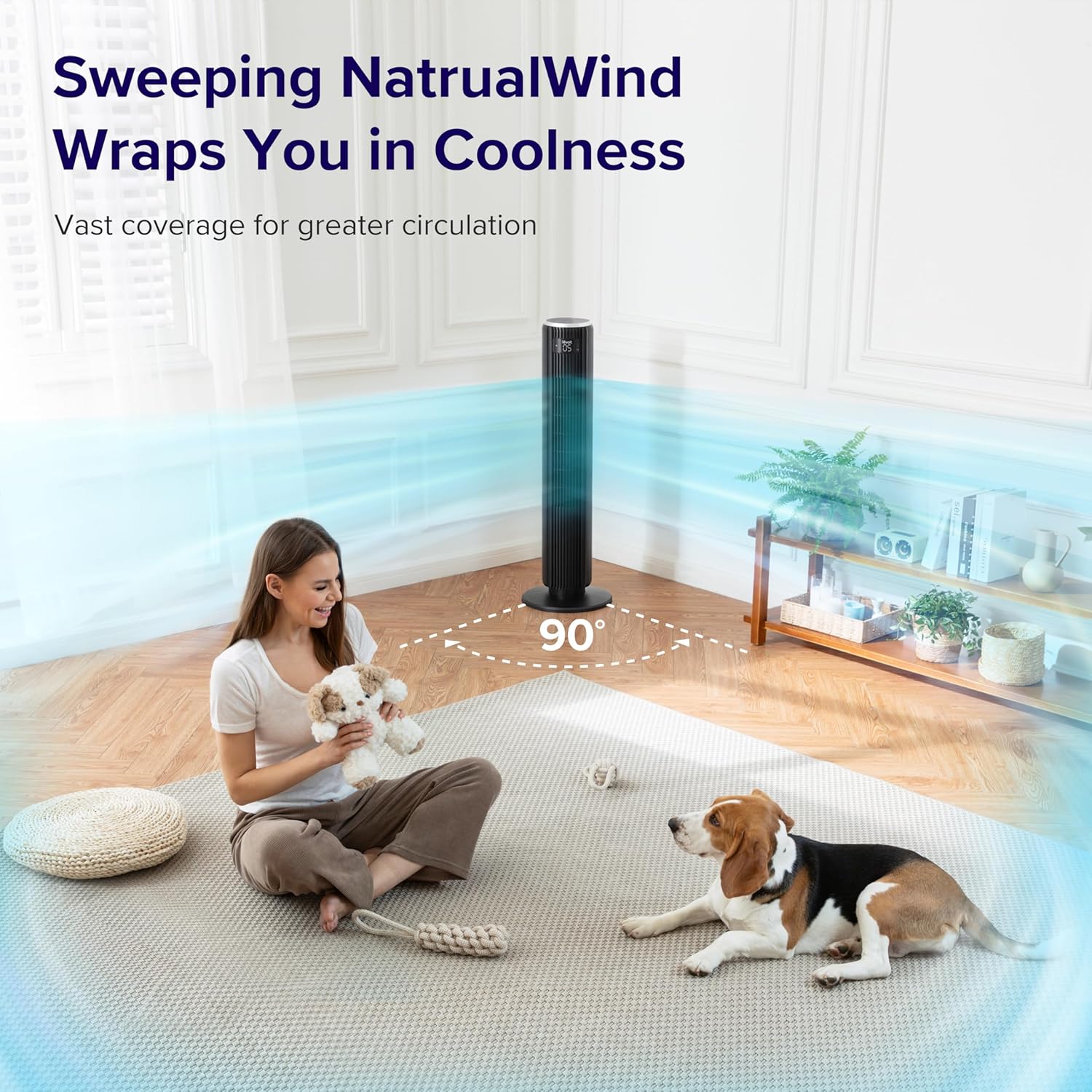
Image: The LEVOIT 36-inch Bladeless Tower Fan is shown oscillating 90 degrees, indicated by blue airflow lines covering a wide area in a living room setting. A person and a dog are comfortably within the fan's cooling range.

Image: The LEVOIT 36-inch Bladeless Tower Fan is positioned in a bedroom, emitting a gentle, natural-feeling breeze, illustrated by light blue airflow lines. A person is meditating peacefully in the background, emphasizing the fan's quiet operation and comfortable airflow.
It-tħaddim tal-Purifikatur tal-Arja
The air purifier is controlled via the touch buttons on its top panel.
- Buttuna tal-Qawwa: Press to turn the air purifier on or off.
- Buttuna tal-veloċità tal-fann: Cycle through 3 quiet fan speeds (Low, Medium, High).
- Aroma Feature: The aroma pad allows for the diffusion of essential oils. Add 2-3 drops of essential oil to the pad located at the bottom of the unit. The fan will then circulate the scent.

Image: The LEVOIT Core Mini-P Air Purifier is shown on a nightstand in a bedroom, with a mother and child in the background. Text overlays emphasize "Multi-Layered Protection" including Pre-Filter, Efficient Filter, and Activated Carbon Filter, illustrating its air purification capabilities.

Image: The LEVOIT Core Mini-P Air Purifier is placed on a table in a living room. A hand is shown adding essential oil drops to the aroma pad, demonstrating the "Refresh With Fragrance" feature for destressing and staying focused.
Manutenzjoni
Tindif tal-Fan tat-Torri
- Dejjem aqla l-fann qabel it-tindif.
- Uża artab, damp drapp biex timsaħ l-uċuħ ta’ barra tal-fann.
- Tużax tindif jew solventi li joborxu.
- For dust accumulation in the air inlet/outlet, use a vacuum cleaner with a brush attachment to gently remove dust.
Cleaning and Filter Replacement for Air Purifier
- Unplug the air purifier before cleaning or replacing the filter.
- Imsaħ il-barra b'ċarruta ratba u niexfa.
- The 3-in-1 filtration filter should be replaced every 6-8 months, or sooner depending on air quality and usage.
- Biex tissostitwixxi l-filtru:
- Turn the air purifier upside down and twist the base cover counter-clockwise to unlock.
- Neħħi l-filtru l-qadim u armih kif suppost.
- Insert a new LEVOIT Core Mini-P replacement filter (ensure plastic packaging is removed).
- Replace the base cover and twist clockwise to lock.
- Clean the aroma pad as needed with a damp cloth and allow it to dry completely before reapplying essential oils.
Issolvi l-problemi
| Problema | Kawża Possibbli | Soluzzjoni |
|---|---|---|
| Fan/Purifier does not turn on. | Mhux imdaħħla; is-sokit tal-elettriku mhux qed jaħdem; il-buttuna tal-qawwa mhux ippressata. | Ensure unit is securely plugged in. Test outlet with another device. Press the power button firmly. |
| Weak airflow from fan. | Fan speed too low; air inlet/outlet blocked. | Increase fan speed. Check for obstructions and clean air inlets/outlets. |
| Air purifier not effectively cleaning air. | Filter is dirty or expired; plastic packaging not removed from filter. | Replace the filter. Ensure all plastic packaging is removed from the new filter before installation. |
| Il-fann huwa storbjuż. | Unit not on a level surface; internal obstruction. | Place the fan on a flat, stable surface. Check for any foreign objects inside the fan. |
| Il-kontroll mill-bogħod ma jaħdimx. | Batteries are dead or incorrectly inserted; remote too far from fan. | Replace batteries. Ensure correct polarity. Use remote within range and point towards the fan's receiver. |
Speċifikazzjonijiet
LEVOIT 36" Bladeless Tower Fan
- Mudell: 5ddce951-f1e5-4fc2-b790-0e25bd06f240
- Sors tal-Enerġija: Corded Elettriku
- Kapaċità tal-Fluss tal-Arja: 1062 pied kubu fil-minuta (CFM)
- Veloċità tal-Ajru: Sa 25 pied/sekonda
- Oxxillazzjoni: 90°
- Livell ta' Storbju: Sa 28dB
- Modi: Normal, Turbo, Sleep, Auto
- Veloċitajiet: 5
- Timer: 1-12 sigħat
- Metodu ta' Kontroll: Remot, Pannell tat-Touch
- Karatteristiċi Speċjali: Bladeless, Temperature Sensor
LEVOIT Core Mini-P Air Purifier
- Mudell: Core Mini-P (part of bundle)
- Filtrazzjoni: 3-in-1 (Pre-Filter, Efficient Filter, Activated Carbon Filter)
- Żona ta' Kopertura: Sa 129 pied²
- Livell ta' Storbju: 25-44dB
- Veloċitajiet: 3
- Karatteristiċi Speċjali: Fragrance Sponge for Aromatherapy, Portable
Garanzija u Appoġġ
LEVOIT provides a limited warranty for this product. For detailed warranty information, including duration and coverage, please refer to the warranty card included in your product packaging or visit the official LEVOIT websit.
For technical support, troubleshooting assistance, or to inquire about replacement parts (such as air purifier filters), please contact LEVOIT Customer Support:
- Websit: www.levoit.com
- Email: support@levoit.com
- Telefon: (Refer to LEVOIT websit għal numri ta' kuntatt reġjonali)
Please have your model number (5ddce951-f1e5-4fc2-b790-0e25bd06f240) and purchase information ready when contacting support.


