1. Introduzzjoni
Thank you for choosing the VOLT PLUS TECH Dual USB-C + MicroUSB Switch Cable. This versatile cable is designed to provide efficient charging and high-speed data transfer for a wide range of devices, featuring both Micro USB and USB-C connectors. This manual provides essential information for setup, operation, maintenance, and troubleshooting to ensure optimal performance of your cable.
2. Karatteristiċi ewlenin
- Kompatibilità Universali: Equipped with both Micro USB and USB-C connectors, ensuring compatibility with a vast majority of modern devices.
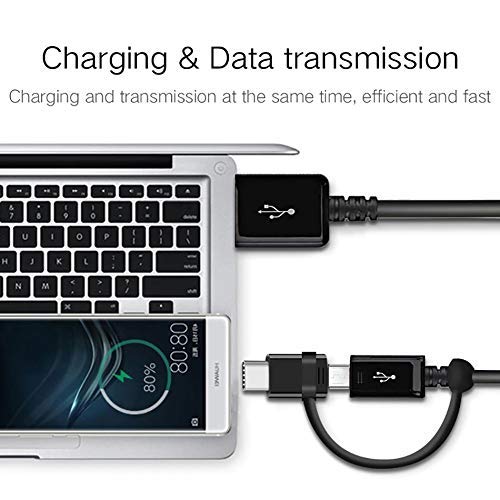
- Funzjonalità Doppju: Supports both power delivery for charging and high-speed data transmission simultaneously.
- Appoġġ għall-Iċċarġjar Mgħaġġel: Engineered to support various fast charging technologies, including Quick Charge (QC 3.0/2.0/1.0) and Power Delivery (PD) up to 25W, for compatible devices.
- Trasferiment tad-Dejta b'Veloċità Għolja: Utilizes USB 3.1 technology for rapid data synchronization between your device and computer.
- Kostruzzjoni Durabbli: Built with premium materials and advanced engineering for enhanced durability and a long lifespan, designed to withstand daily use.
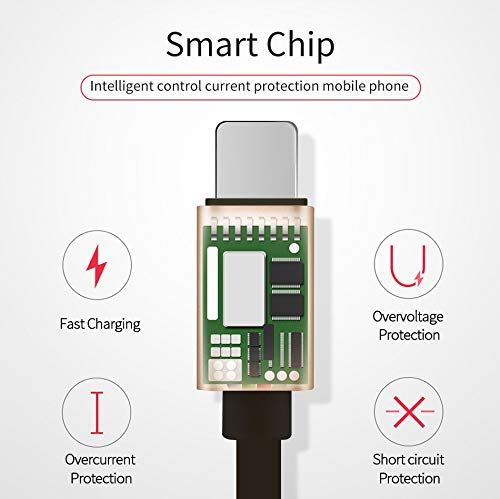
- Integrated Smart Chip: Features an intelligent circuit system for automatic device recognition and protection against overcharging, overcurrent, overvoltage, u short circuits.

3. Istruzzjonijiet ta' Setup
Follow these steps to connect your VOLT PLUS TECH Dual USB-C + MicroUSB Switch Cable:
- Identify Device Connector: Determine whether your device requires a Micro USB or a USB-C connection. The cable features a switch tip design where the USB-C connector attaches over the Micro USB connector.
- Qabbad mal-Apparat: Gently insert the appropriate connector (Micro USB or USB-C) into your device's charging/data port. Ensure a secure fit.
- Qabbad mas-Sors tal-Enerġija jew mal-Kompjuter: Insert the standard USB-A end of the cable into a compatible USB power adapter for charging, or into a USB port on your computer for both charging and data transfer.

4. Tħaddim tal-Kejbil
4.1 Iċċarġjar tat-Tagħmir Tiegħek
Once connected as described in the Setup section, your device will begin charging. The cable supports fast charging when paired with a compatible fast charger and a device that supports fast charging protocols.
4.2 Trasferiment tad-Data
To transfer data between your device and a computer:
- Qabbad it-tarf USB-A tal-kejbil mal-port USB tal-kompjuter tiegħek.
- Connect the appropriate Micro USB or USB-C end to your mobile device.
- Your computer should recognize the connected device. You may need to select a 'File Transfer' or 'MTP' mode on your mobile device if prompted.
- You can now access your device's storage to copy files, photos, or videos. The cable's USB 3.1 support ensures efficient transfer speeds.
5. Kura u Manutenzjoni
To ensure the longevity and optimal performance of your cable, please observe the following guidelines:
- Ħażna: Aħżen il-kejbil f'ambjent nadif u niexef 'il bogħod mix-xemx diretta u minn temperaturi estremi.
- Immaniġġjar: Evita li tgħawweġ, tidwir jew tiġbed wisq il-kejbil, speċjalment ħdejn il-konnetturi, biex tevita ħsara interna.
- Tindif: Jekk meħtieġ, imsaħ il-kejbil u l-konnetturi bil-mod b'ċarruta ratba u niexfa. Tużax prodotti tat-tindif likwidi jew materjali li joborxu.
- Protezzjoni: Do not expose the cable to water or other liquids.

6 Issolvi l-problemi
If you encounter issues with your cable, please refer to the following common problems and solutions:
- Apparat Mhux Iċċarġja:
- Ensure both ends of the cable are securely plugged into the device and the power source.
- Verify that the power adapter or USB port is functional by testing with another cable or device.
- Iċċekkja l-port tal-iċċarġjar tat-tagħmir tiegħek għal xi debris jew ħsara.
- Iċċarġjar bil-mod:
- Confirm that your power adapter supports fast charging (e.g., QC 3.0, PD) and provides sufficient wattage.
- Ensure your device itself is compatible with fast charging technology.
- Kwistjonijiet ta' Trasferiment tad-Dejta:
- Make sure the cable is firmly connected to both your device and computer.
- On your mobile device, check if you have selected the correct USB connection mode (e.g., 'File Transfer' or 'MTP') when prompted.
- Ipprova qabbad il-kejbil ma' port USB differenti fuq il-kompjuter tiegħek.
7. Speċifikazzjonijiet
| Brand | VOLT PLUS TECH |
| Numru tal-Mudell | VPT-2074 |
| Tip ta' Konnettur | Mikro USB, USB Tip A, USB Tip Ċ |
| Tip ta' Cable | USB Type-C / MicroUSB to USB-A |
| Apparati Kompatibbli | Android, iOS, Mac, Vivo Xplay5 Elite, Windows devices |
| Karatteristiċi Speċjali | Digital IC Chip, Heavy Duty, Lightweight, Multi-Functional, Tangle Free Cord |
| Dimensjonijiet tal-Pakkett | 2 x 0.3 x 0.3 pulzieri |
| Piż tal-oġġett | 1.4 uqija |

8. Informazzjoni dwar Garanzija
For detailed warranty information regarding your VOLT PLUS TECH Dual USB-C + MicroUSB Switch Cable, please refer to the documentation included with your purchase or visit the official VOLT PLUS TECH websit. It-termini u l-kundizzjonijiet tal-garanzija jistgħu jvarjaw.
9. Appoġġ għall-Klijent
If you require further assistance or have questions not covered in this manual, please contact VOLT PLUS TECH customer support through their official website or the retailer from whom you purchased the product. Please have your model number (VPT-2074) and purchase details ready when contacting support.


