1. Introduzzjoni
This manual provides detailed instructions for the installation, operation, and maintenance of the Geekworm X1004 PCIe to Dual M.2 HAT NVMe SSD Peripheral Board. This board is designed to expand storage capabilities for the Raspberry Pi 5 by adding dual M.2 NVMe SSD slots via the PCIe interface.
2. Prodott Aktarview
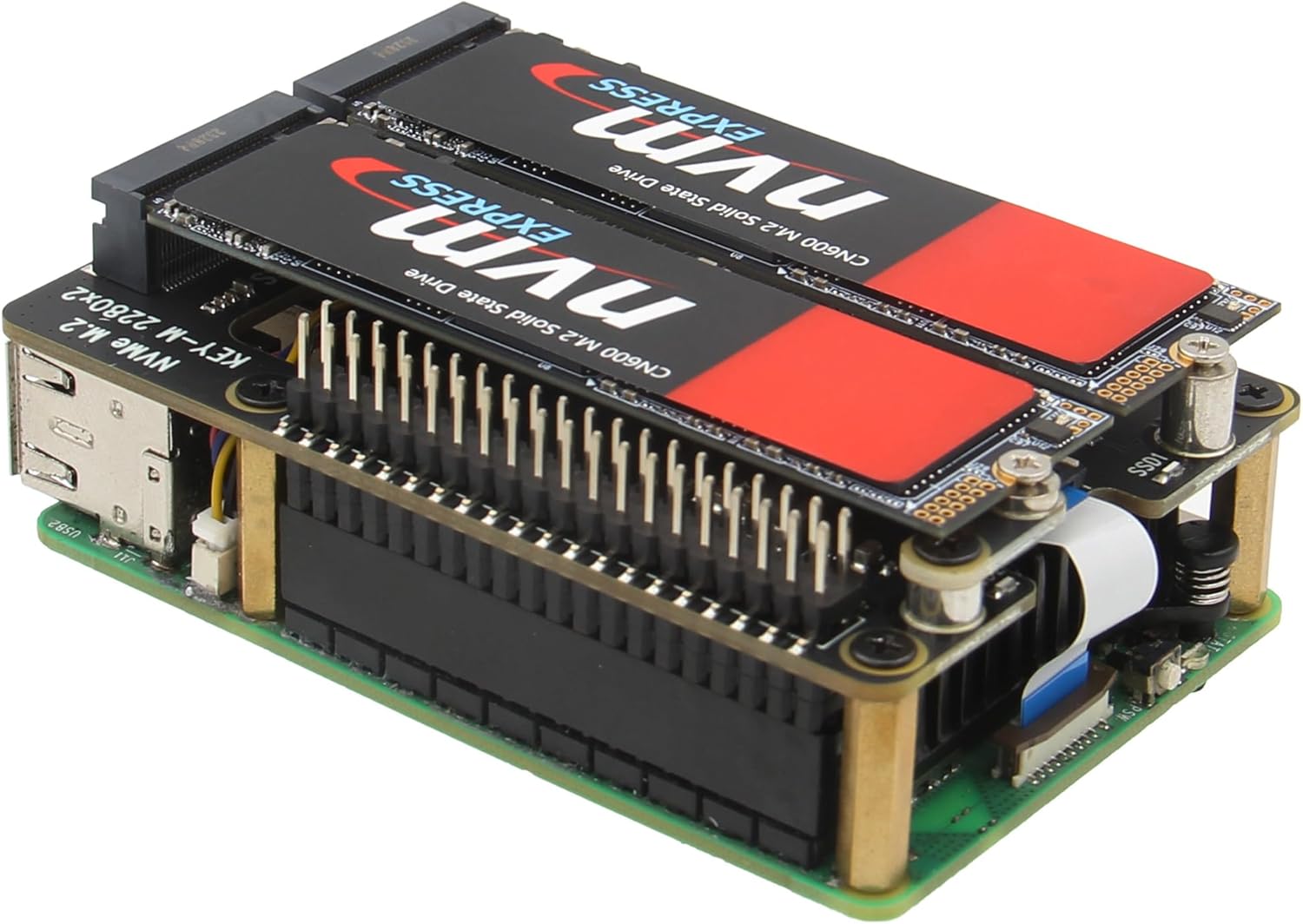
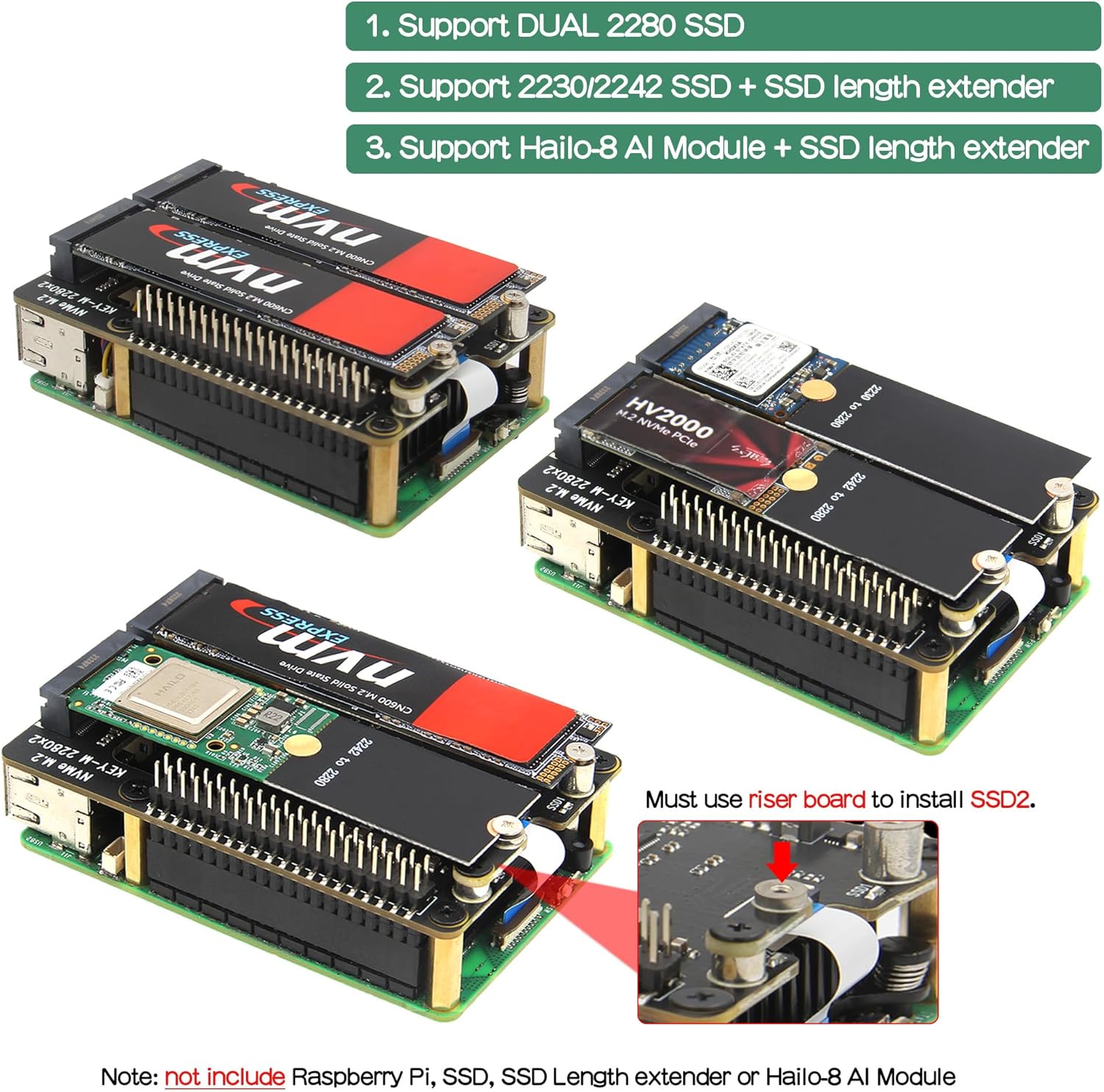
The Geekworm X1004 is a Peripheral Board (HAT) specifically engineered for the Raspberry Pi 5. It enables the use of two M.2 Key-M NVMe SSDs, supporting the 2280 form factor natively, and 2230/2242 with an SSD length extender. The board features dual independent power delivery to each SSD for stable performance and allows booting the Raspberry Pi 5 directly from an NVMe SSD.
3. Karatteristiċi
- Appoġġ doppju M.2 NVMe SSD: Accommodates two M.2 Key-M NVMe SSDs (2280 length, or 2230/2242 with an extender).
- Boot from NVMe SSD: Supports booting the Raspberry Pi 5 directly from an installed NVMe SSD (requires bootloader version 2024-05-17 or later).
- Dual Independent Power: Two high-efficiency DC/DC step-down converters provide a dedicated 3.3V/up to 3.5A to each SSD, ensuring stable operation.
- Interface PCIe: Utilizes the Raspberry Pi 5's PCIe interface for high-speed data transfer.
- 40-Pin GPIO Header: Allows for stacking with other HATs.

4. Kompatibilità
- Lampun Pi: Compatible only with Raspberry Pi 5 (2GB, 4GB, 8GB, 16GB models).
- Każijiet: Only P579-V2/V3 and later versions of compatible cases can support X1004 installation.
- SSD Types: Supports M.2 Key-M NVMe SSDs. SATA SSDs are le appoġġjati.
5. Kontenut tal-Pakkett
Iċċekkja li l-oġġetti kollha elenkati hawn taħt huma inklużi fil-pakkett tiegħek:
- 1 x X1004 PCIe to M.2 NVMe Shield
- Mounting accessories (screws, spacers, FFC cable)

6. Gwida għas-Setup u l-Installazzjoni
Follow these steps to properly install the X1004 board onto your Raspberry Pi 5.

- Prepare the Raspberry Pi 5: Ensure your Raspberry Pi 5 is powered off and disconnected from all peripherals.
- Insert FFC Cable and Spacers: Carefully insert the provided FFC (Flexible Flat Cable) into the PCIe connector on the Raspberry Pi 5. Secure the M2.5x17.5mm spacers onto the Raspberry Pi 5's mounting holes. If using an active cooler, install it at this stage.
- Mount the X1004 Board: Align the X1004 board with the Raspberry Pi 5's 40-pin GPIO header and the FFC cable. Gently but firmly press the X1004 straight onto the GPIO header until it is fully seated. Secure the board with the M2.5x5mm screws.
- Connect FFC to X1004: Insert the other end of the FFC cable into the corresponding PCIe socket on the X1004 board. Ensure it is properly aligned and secured.
- Install NVMe SSD(s): Insert your M.2 NVMe 2280 SSD(s) into the designated SSD1 and SSD2 slots on the X1004 board. Secure each SSD with the M2x4mm screw. If using 2230/2242 SSDs, attach the SSD length extender first.
Nota: The Raspberry Pi 5, NVMe SSDs, and SSD length extenders are not included with the X1004 board.

7. Operating Instructions: Booting from NVMe SSD
To boot your Raspberry Pi 5 from an NVMe SSD installed on the X1004 board, ensure your Raspberry Pi 5's bootloader is updated to version 2024-05-17 or later. Refer to the official Raspberry Pi documentation for instructions on updating the bootloader.
- Prepare NVMe SSD: Use the Raspberry Pi Imager (version 1.9.6 or later) to write your desired operating system onto the NVMe SSD. You may need a USB to NVMe adapter for this step.
- Installa l-NVMe SSD: Insert the prepared NVMe SSD into the SSD1 slot on the X1004 board.
- Qawwa Mixgħul: Connect the appropriate 27W USB-C Power Supply (5.1V, 5A recommended) to your Raspberry Pi 5. The system should attempt to boot from the NVMe SSD.
- Verify Boot: Monitor the boot process. If successful, the operating system will load from the NVMe SSD.
For optimal performance, use the official Raspberry Pi 27W USB-C Power Supply or an alternative power supply capable of delivering 5.1V at 5A. An incompatible power supply with a lower output voltage may lead to power issues on the system.

8. Manutenzjoni
- Keep Connections Secure: Periodically check that all screws and cables, especially the FFC cable, are securely fastened to prevent intermittent connectivity issues.
- Prevenzjoni tat-Trab: Keep the Raspberry Pi 5 and X1004 assembly in a clean, dust-free environment to ensure proper cooling and prevent short circuits.
- Provvista tal-Enerġija: Always use a stable and sufficiently powerful USB-C power supply (5.1V, 5A recommended) to avoid power-related problems, especially when using two NVMe SSDs.
- Aġġornamenti tal-Firmware: Regularly check for and apply Raspberry Pi OS and bootloader updates to ensure optimal compatibility and performance with the X1004 board.
9 Issolvi l-problemi
- SSD Mhux Individwat:
- Ensure the NVMe SSD is correctly seated in its slot and secured.
- Verify the FFC cable is properly inserted and locked at both the Raspberry Pi 5 and X1004 ends.
- Confirm the SSD is an M.2 Key-M NVMe type, not a SATA SSD.
- Check the power supply; an underpowered supply can cause detection issues.
- Cannot Boot from NVMe:
- Ensure your Raspberry Pi 5 bootloader is updated to version 2024-05-17 or later.
- Verify the operating system image was correctly written to the NVMe SSD.
- Try booting with only one NVMe SSD in the SSD1 slot.
- Kwistjonijiet ta' Prestazzjoni:
- Ensure you are using a recommended 27W USB-C power supply.
- Check for proper ventilation and cooling of the Raspberry Pi 5 and SSDs, especially under heavy load.
- Verify PCIe generation settings in `raspi-config` if experiencing lower than expected speeds.
- Physical Installation Difficulties:
- If the HAT is difficult to seat on the GPIO pins, ensure it is perfectly aligned before applying gentle, even pressure. Avoid forcing it.
- Double-check that the correct spacers and screws are used as per the installation guide.
For further assistance and a detailed FAQ, please visit the official Geekworm Wiki and search for 'X1004'.
10. Speċifikazzjonijiet
| Karatteristika | Dettall |
|---|---|
| Mudell | X1004 (TB-2024-19) |
| Kompatibilità | Raspberry Pi 5 (2GB/4GB/8GB/16GB) |
| SSD Support | Dual M.2 Key-M NVMe SSD (2280, 2230/2242 with extender) |
| Interface | PCIe |
| Kunsinna tal-Enerġija | Dual independent 3.3V/3.5A DC/DC converters for each SSD |
| Dimensjonijiet | 87mm x 57mm x 17.5mm (approximate, with spacers) |
| Piż | 33 Gram (1.16 uqija) |
| Sistema Operattiva | Raspberry Pi OS (or compatible Linux distributions) |
11. Appoġġ u Garanzija
For additional information, detailed guides, and frequently asked questions, please refer to the official Geekworm Wiki. Fittex għal 'X1004' to find relevant resources.
If you encounter issues that cannot be resolved using this manual or the online resources, please contact Geekworm customer support through the vendor's official channels or the platform where the product was purchased. Specific warranty terms and conditions are typically provided at the point of purchase or on the official Geekworm websit.
Geekworm Websit: www.geekworm.com