Introduzzjoni
The Irfora ET13S is a versatile 2-in-1 device combining a thermal imager and a 10,000-count multimeter. This integrated solution is designed for temperature detection and electrical parameter measurement across various fields such as transportation, energy, and electronics manufacturing. Its compact and lightweight design ensures portability for electricians and maintenance technicians.
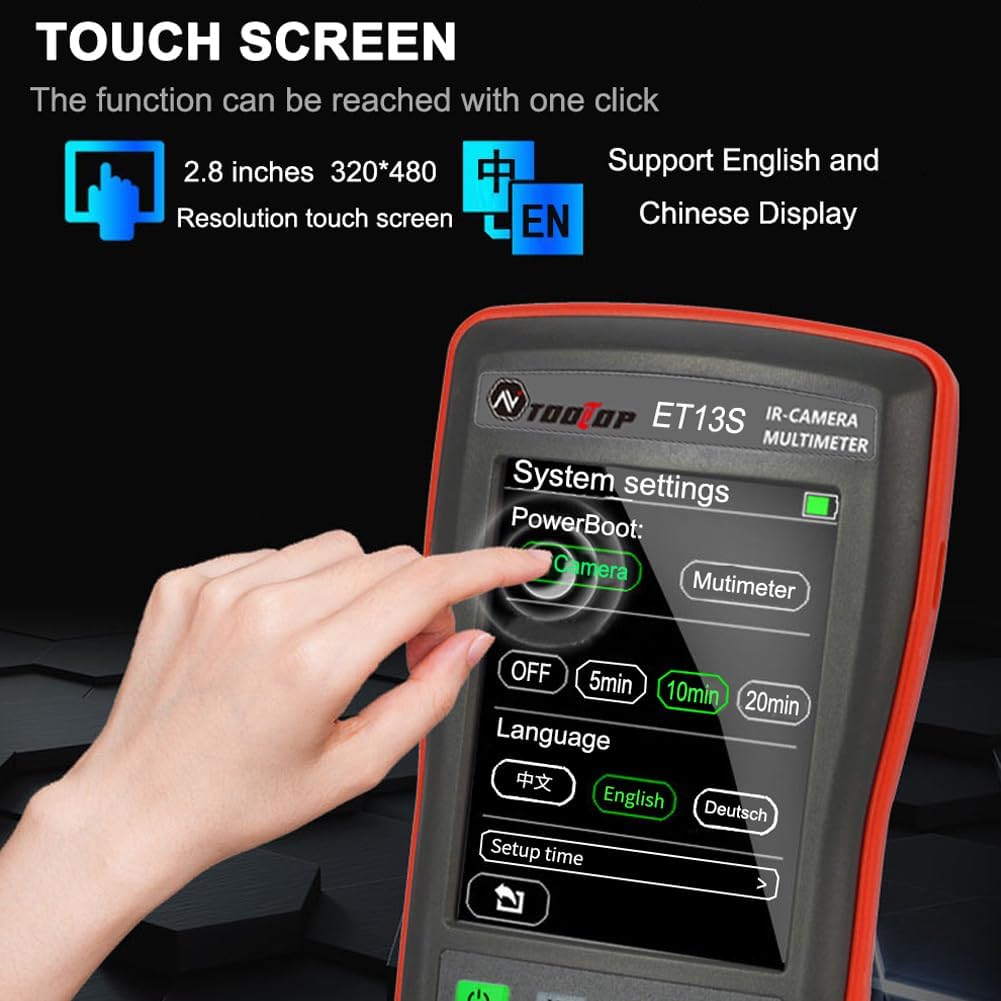
Equipped with a 2.8-inch touchscreen, the device offers a 192x192 infrared resolution for clear imaging. It supports one-button access to functions and allows users to set parameters for accurate measurements. Both Chinese and English display options are available.
The thermal imager function displays maximum, minimum, and center temperatures, providing a comprehensive understanding of temperature distribution. It includes five color palettes (iron red, rainbow, fusion, white-hot, and white-hot highlight) and an automatic hotspot tracking function to quickly identify temperature anomalies.
The multimeter offers extensive functions including DC/AC voltage, resistance, diode, continuity, and capacitance measurements. It also features an analog bar display, room temperature display, automatic measurement, and NCV non-contact voltage test. Data logging and transfer to a PC via USB Type-C are supported for in-depth analysis.
The device is powered by a built-in 3.7V 1000mAh lithium battery, rechargeable via USB. Intelligent power-saving features like automatic screen shutdown and power-off extend battery life, enhancing efficiency and portability.


Setup
Qawwa mixgħul/mitfi
To power on the ET13S, press and hold the power button for 2 seconds. The device will boot up and display the main interface. To power off, press and hold the power button again for 2 seconds.
Iċċarġjar
The ET13S features a built-in 3.7V 1000mAh lithium battery. Connect the device to a USB power source using the provided USB Type-C cable for charging. The charging port is located under the stand on the rear of the device.
Settings tal-Lingwa
Access the system settings via the touchscreen to select your preferred display language (Chinese or English).
Emissivity Settings
For accurate thermal measurements, adjust the emissivity setting in the thermal imager menu. The default value is 0.95, but it can be tuned from 0.1 to 0.99 depending on the material being measured. Refer to the emissivity table in the appendix for common materials.
Fusion Alignment
To enhance the precision of image overlap between thermal and visual images, perform fusion alignment calibration through the device settings.

Operazzjoni
Bdil tal-Modalità
To switch between multimeter mode and thermal imaging mode, long-press the IR/DMM key. The device will toggle between the two main operating modes.
Funzjonijiet Multimeter
- By default, the device enters voltage measurement mode. Short-press the power key to toggle between DC and AC voltage. Short-press the return key to cycle through resistance, diode, and continuity test modes.
- For current measurement, short-press the power key to switch to current mode, then toggle between DC and AC current by pressing it again. Connect the black probe to the COM port and the red probe to the appropriate current port (high current for ≤9.999A, low current for ≤250mA) for measurements.
- Use the HOLD key to lock readings. Short-press to enable data hold and press again to cancel. Short-press the SAVE key to enable or disable data logging curves. Long-press the REL key to enter or exit relative value measurement mode.
Thermal Imager Functions
- In thermal imaging mode, the display shows maximum, minimum, and center temperatures. The 'CENT' value indicates the crosshair center point temperature, while 'MAX' and 'MIN' auto-track the highest and lowest temperatures in the view.
- Short-press the IR key to adjust infrared-visible light fusion, blending the thermal image with the visual image for better context.
- Use the palette key to switch between the available color schemes (Iron Red, Rainbow, Fusion, White-Hot, White-Hot Highlight).
- The automatic hotspot tracking function helps quickly locate temperature anomaly areas.
Image Capture and Data Transfer
- Long-press the SAVE key to capture screenshots of the thermal image. These images are saved internally.
- The device is equipped with a USB Type-C data transfer interface. Connect the device to a computer to transfer saved images and measurement data for analysis using the upper computer software.


Manutenzjoni
Ġestjoni tal-batterija
The built-in 3.7V 1000mAh lithium battery supports USB charging. The device features automatic screen shutdown and automatic power-off functions to effectively prolong battery life. These settings can be configured in the system settings menu.
Luminożità tal-iskrin
Adjust the screen brightness through the system settings to optimize visibility and conserve battery power.
Irrisettja l-Fabbrika
If you encounter persistent issues or wish to clear all custom settings, you can restore the device to factory settings via the system settings menu.
Issolvi l-problemi
L-apparat ma jixgħelx
Ensure the battery is sufficiently charged. Connect the device to a USB power source and allow it to charge for at least 30 minutes before attempting to power on again. If the issue persists, contact customer support.
Qari mhux preċiż tat-temperatura
Verify the emissivity setting is correct for the material being measured. Adjust it in the thermal imager menu if necessary. Ensure the lens is clean and free from obstructions.
Multimeter measurements are incorrect
Check that the test leads are properly connected to the correct ports (COM and V/mA/A) for the desired measurement type. Ensure the correct measurement mode (DC/AC voltage, resistance, etc.) is selected. If measuring current, confirm the appropriate current port is used.
Cannot transfer data to PC
Ensure the USB Type-C cable is securely connected to both the device and the computer. Verify that the device's USB communication setting is enabled in the system settings. Try using a different USB port or cable on your computer.
Speċifikazzjonijiet
| Karatteristika | Dettall |
|---|---|
| Dimensjonijiet tal-Prodott | 7.28 x 6.3 x 1.57 pulzieri |
| Piż tal-oġġett | 10.8 uqija |
| Riżoluzzjoni IR | 192 x 192 pixel |
| Firxa tal-Kejl tat-Temperatura | -20℃ sa 550℃ (-4°F sa 1022°F) |
| Multimeter Counts | 10,000 għadd |
| Daqs tal-Wiri | Touchscreen ta' 2.8 pulzieri |
| Batterija | Mibnija fil-batterija tal-litju 3.7V 1000mAh |
| Sors tal-Enerġija | Mħaddma bil-batterija |
| Display Image Resolution | 320x240 |
| Qasam ta View (FoV) | 50.0°(H) × 50°(V) / 72.1°(D) |
| Emissività | 0.1-0.99 (default 0.95) |
| Żball fil-Kejl tat-Temperatura | ±2℃ jew ±2% |
| Display Temperature Accuracy | 0.1℃ / 0.1°F |
| DC Highest Input Voltage | 1000V |
| AC Highest Input Voltage | 750V |

Garanzija u Appoġġ
For any warranty claims or technical support, please refer to the product packaging or contact Irfora customer service directly. Keep your purchase receipt for warranty validation.
