1. Introduzzjoni
The Mastech MS2203 is a professional 3-Phase Digital Power Clamp Meter designed for accurate measurement of electrical parameters in three-phase systems. This instrument features high sensitivity, True-RMS measurement, power factor correction, and a USB interface for data logging. This manual provides essential information for the safe and effective operation, maintenance, and troubleshooting of your MS2203 meter.
2. Informazzjoni dwar is-Sigurtà
Biex tiżgura t-tħaddim u s-servizz sikuri tal-miter, segwi dawn il-prekawzjonijiet ta' sigurtà:
- Dejjem żomm mal-kodiċijiet tas-sigurtà lokali u nazzjonali.
- Tużax il-miter jekk jidher li hu bil-ħsara jew jekk l-insulazzjoni fuq il-wajers tat-test tkun kompromessa.
- Ensure the rotary switch is in the correct position for the desired measurement before connecting to the circuit.
- Teċċedix il-klassifikazzjonijiet massimi tad-dħul għal kwalunkwe funzjoni.
- Oqgħod attent ħafna meta taħdem ma' ċirkwiti ħajjin.
- Żomm subgħajk wara l-protezzjonijiet tas-swaba' fuq il-wajers tat-test waqt il-kejl.
- Ibdel il-batteriji meta jidher l-indikatur ta' batterija baxxa biex tiżgura qari preċiż.
3. Prodott Aktarview
The Mastech MS2203 is a versatile clamp meter capable of measuring AC voltage, AC current, frequency, active power, apparent power, reactive power, and power factor. It features a large LCD display with backlight, data hold, MAX/MIN recording, and a bar graph for quick visual indication.
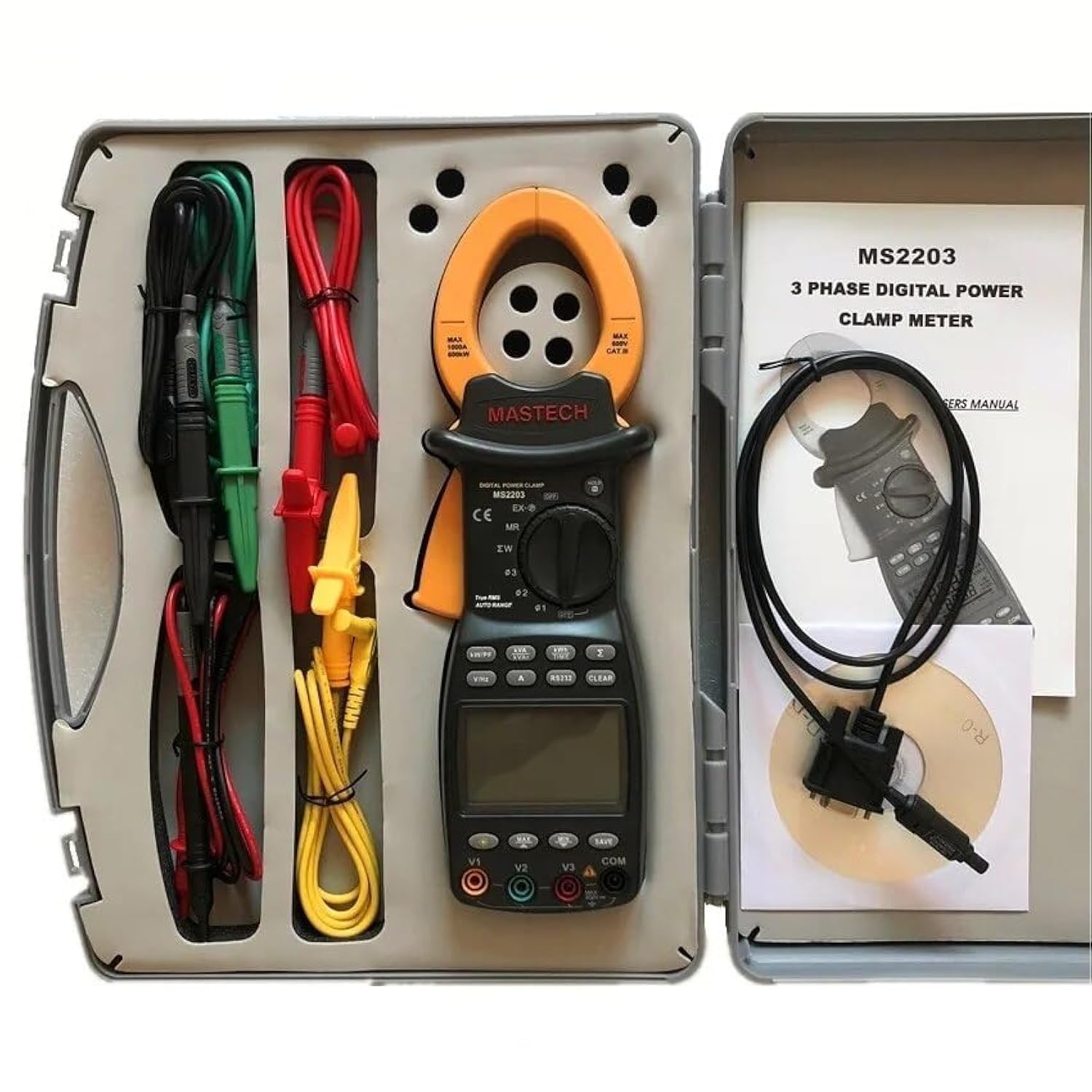
Image 3.1: The Mastech MS2203 3-Phase Digital Power Clamp Meter and its accessories, neatly organized within its protective carrying case. The kit includes the clamp meter, test leads, USB cable, and user manual.
Karatteristiċi ewlenin:
- Wiri: 9999 għadd
- Jaw Opening: Φ50mm/2.0"
- Auto & Manwal Li jvarjaw
- Data Logging: 28 groups
- True Root Mean Square (True-RMS) measurement
- Bar Graph display
- MAX/MIN Measurement function
- Funzjoni ta' Żomm tad-Data
- Display Backlight for low-light conditions
- Indikatur tal-Wiri tal-Batterija Baxxa
- RS232 Interface for Windows OS connectivity
4. Żpakkjar u Kontenut
Carefully unpack the meter and check for any damage. Verify that all items listed below are present. If any item is missing or damaged, contact your dealer immediately.

Image 4.1: An illustrative diagram detailing the contents included with the Mastech MS2203, such as the main unit, test leads, alligator clips, RS232 cable, software, carrying case, and batteries.
Kontenut tal-Pakkett:
- Mastech MS2203 3-Phase Digital Power Clamp Miter
- Test Leads (Red, Yellow, Green, Black)
- Klipps tal-Alligator
- RS232 Interface Cable
- PC data record graph software (CD-ROM)
- Kawża tal-Ġarr
- Batteries (2 x LR44, included)
- Gwida Quick Start
- Ċertifikat ta 'Kalibrazzjoni
5. Setup
5.1 Installazzjoni tal-batterija
- Sib l-għatu tal-kompartiment tal-batterija fuq wara tal-miter.
- Use a screwdriver to loosen the screw(s) and remove the cover.
- Insert the two LR44 batteries, observing the correct polarity (+/-) as indicated inside the compartment.
- Erġa’ poġġi l-għatu tal-batterija u waħħalha bil-vit(i).
5.2 Konnessjoni tal-wajers tat-test
Insert the banana plugs of the test leads into the appropriate input jacks on the meter. For most measurements, the common (COM) jack will be used with the black lead, and the V1, V2, V3, or A jacks will be used with the colored leads (red, yellow, green) depending on the measurement type and phase configuration.
5.3 USB/RS232 Interface Setup
To connect the meter to a computer for data logging and analysis:
- Install the provided PC data record graph software from the CD-ROM onto your Windows OS computer.
- Connect one end of the RS232 interface cable to the meter's RS232 port.
- Connect the other end of the cable to an available USB port on your computer (an RS232-to-USB adapter may be required if your computer lacks an RS232 port).
- Follow the software instructions to establish communication with the meter.
6. Istruzzjonijiet Operattivi
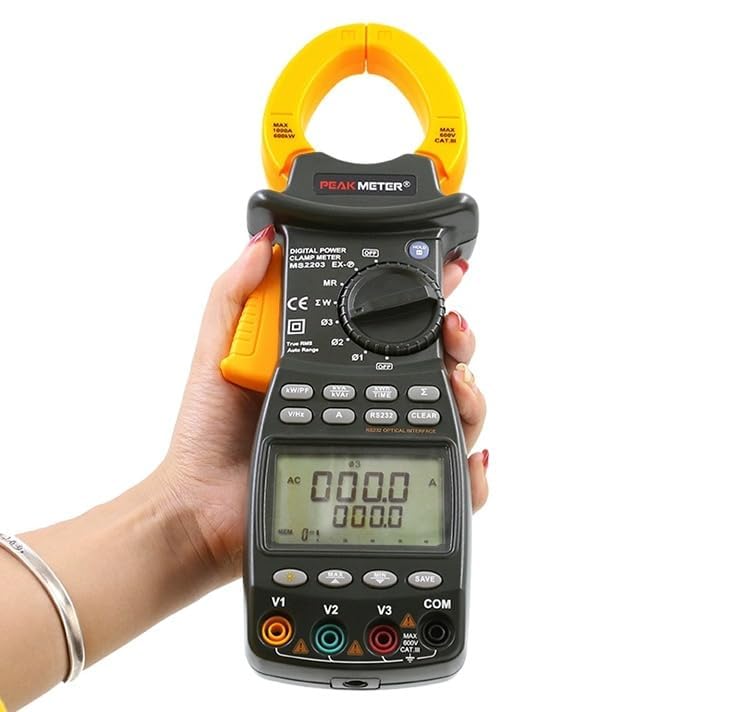
Image 6.1: The Mastech MS2203 in use, highlighting the digital display and the rotary selector for various measurement functions.
6.1 Power On/Off
To power on the meter, rotate the function switch from the 'OFF' position to any desired measurement function. To power off, rotate the switch back to 'OFF'.
6.2 Għażla tal-Funzjoni
The rotary switch allows selection of different measurement modes. Ensure the switch is set to the appropriate function before taking a measurement.
6.3 Proċeduri tal-Kejl
Kejl tal-Kurrent AC:
- Rotate the function switch to the 'A' (AC Current) position.
- Iftaħ il-clamp xedaq billi tagħfas il-grillu.
- Enclose only one conductor of the circuit within the jaws. Ensure the jaws are fully closed.
- Aqra l-valur attwali fuq id-displej.
AC Voltage Measurement (3-Phase):
- Rotate the function switch to the 'V' (AC Voltage) pożizzjoni.
- Connect the test leads to the V1, V2, V3, and COM input jacks.
- Connect the test leads to the respective phase conductors and neutral/ground of the 3-phase system.
- The meter will display the voltage readings for each phase.
Power Measurement (Active, Apparent, Reactive, Power Factor):
- Rotate the function switch to the 'W/PF' (Power/Power Factor) position.
- Connect the test leads and clamp the current jaws as required for 3-phase power measurement.
- The meter will display active power (W), apparent power (VA), reactive power (VAR), and power factor (PF).
6.4 Funzjonijiet Speċjali
- Żamma tad-Data: Agħfas il-buttuna 'HOLD' biex tiffriża l-qari attwali fuq id-displej. Agħfas mill-ġdid biex tirrilaxxa.
- MAX/MIN Measurement: Press the 'MAX/MIN' button to record the maximum and minimum values during a measurement session. Press again to cycle through MAX, MIN, and current readings.
- Logging tad-Data: The meter can store up to 28 groups of data. Refer to the detailed software manual for instructions on logging and retrieving data via the RS232 interface.
- Dawl ta' wara: Press the backlight button to illuminate the display for use in dimly lit environments.
- True-RMS: The MS2203 provides True-RMS measurements for accurate readings on non-sinusoidal waveforms.
7. Manutenzjoni
7.1 Tindif
Imsaħ il-miter b'reklamaramp drapp u deterġent ħafif. Tużax abrażivi jew solventi. Kun żgur li l-miter ikun niexef għalkollox qabel l-użu.
7.2 Sostituzzjoni tal-batterija
When the low battery indicator appears on the display, replace the batteries as described in Section 5.1. Remove batteries if the meter is not to be used for an extended period.
7.3 Ħażna
Store the meter in its carrying case in a cool, dry environment, away from direct sunlight and extreme temperatures.
8 Issolvi l-problemi
- Ebda Display: Check battery installation and charge. Ensure the rotary switch is not in the 'OFF' position.
- Qari mhux eżatt: Verify correct function selection and proper test lead connection. Ensure the clamp jaws are fully closed around a single conductor for current measurements. Check for low battery.
- No PC Communication: Ensure the RS232 cable is correctly connected and the software drivers are installed. Check COM port settings in the software.
9. Speċifikazzjonijiet
Immaġni 9.1: Ħarsa dettaljata 'l fuq minnview of the Mastech MS2203's technical specifications, including measurement ranges and display capabilities.
| Parametru | Valur |
|---|---|
| Wiri | 9999 għadd |
| Ftuħ tax-xedaq | 50mm / 2.0" |
| AC Voltage | 600V |
| Kurrent AC | 1000A |
| Frekwenza | 1000Hz |
| Qawwa Attiva | 600kW |
| Qawwa apparenti | 600kVA |
| Qawwa Reattiva | 600kVAR |
| Numru tal-Mudell tal-Oġġett | YQ-MS2203 |
| Dimensjonijiet tal-Prodott | 7.87 x 5.91 x 9.84 pulzieri |
| Piż tal-oġġett | 1 Kilogramma (2.2 Liri) |
| Batteriji | 2 batteriji LR44 (inklużi) |
10. Garanzija u Appoġġ
Mastech products are designed for reliability and performance. For warranty information, technical support, or service inquiries, please refer to the warranty card included with your product or visit the official Mastech website. Do not attempt to repair the meter yourself, as this may void the warranty and pose a safety risk.


