Mastech MS2101 AC/DC Digital Clamp Manwal għall-Utent tal-Meter
Model: MS2101 | Brand: Mastech
1. Informazzjoni Importanti dwar is-Sigurtà
Please read and understand all safety information and operating instructions before using this instrument. Improper use may result in electric shock or damage to the meter. Always adhere to local and national safety codes.
- Teċċedix il-valuri massimi tad-dħul speċifikati għal kull funzjoni.
- Ensure the test leads are properly connected and in good condition before making any measurements.
- Tużax il-miter jekk jidher li hu bil-ħsara jew jekk l-insulazzjoni fuq il-wajers tat-test tkun kompromessa.
- Oqgħod attent ħafna meta taħdem bil-voltag'il fuq minn 30V AC RMS, 42V peak, jew 60V DC. Dawn il-volumitages joħolqu periklu ta' xokk.
- Dejjem skonnettja l-enerġija taċ-ċirkwit u armi l-kurrent kollu ta' vultaġġ għolitagil-kapaċitaturi qabel ma tkejjel ir-reżistenza, il-kontinwità, id-dijodi, jew il-kapaċitanza.
- Ibdel il-batteriji immedjatament meta jidher l-indikatur ta' batterija baxxa biex tiżgura qari preċiż.
- This device is rated for CAT III 600V and CAT II 1000V. Adhere to these safety categories.
2. Prodott Aktarview
The Mastech MS2101 is a versatile AC/DC digital clamp meter designed for accurate measurement of current, voltage, resistance, capacitance, frequency, and temperature. It features auto-ranging capabilities and a clear digital display, making it suitable for both domestic and industrial electrical testing.
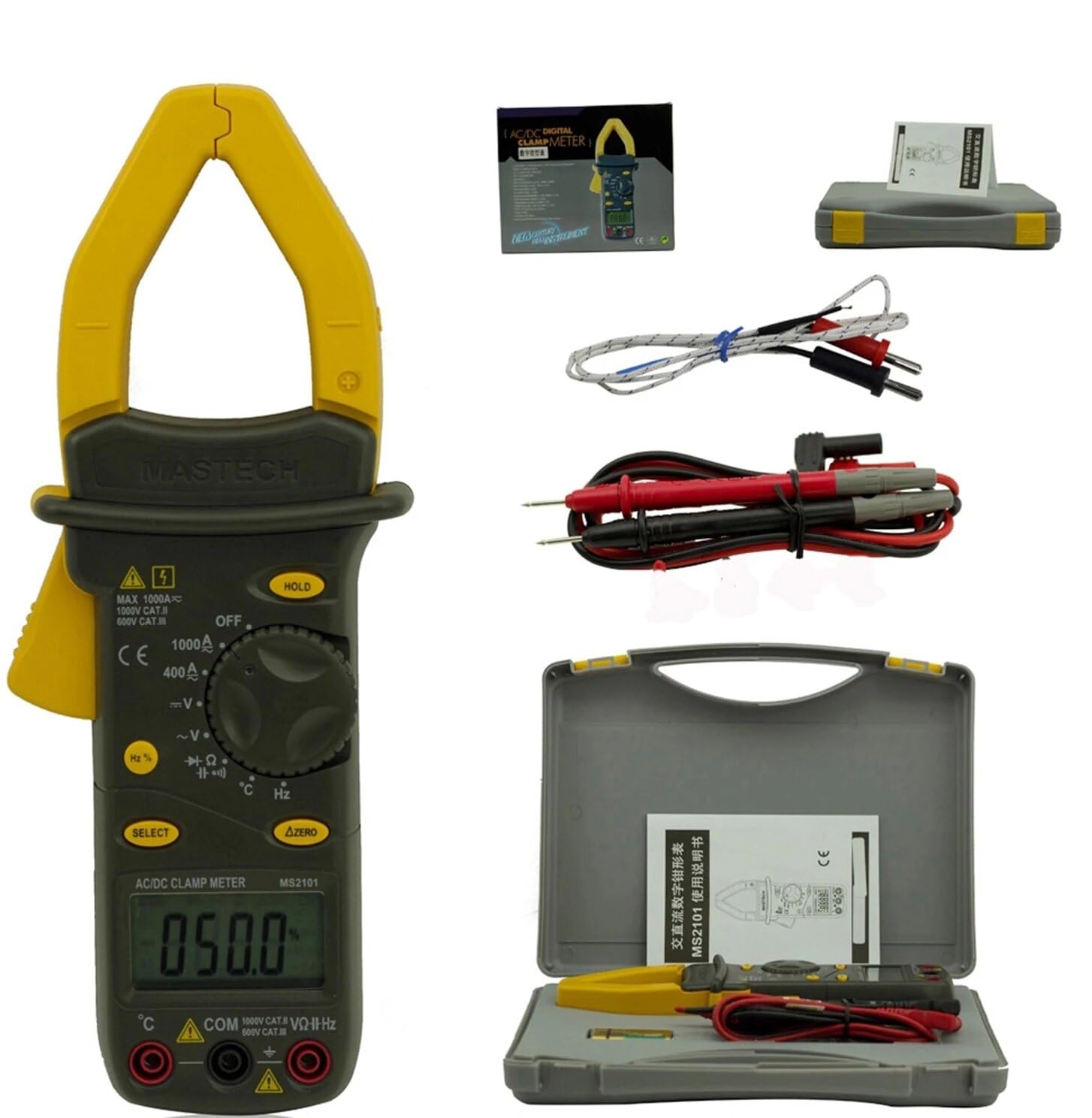
Image: Mastech MS2101 clamp meter with included test leads, temperature probe, and carrying case.
2.1 Karatteristiċi ewlenin
- Wiri: 4000 għadd
- Jaw Opening: Φ42mm / 1.7 inches
- Awtomatiku u Manwali
- Funzjoni Auto Power Off
- Diode Open Voltage: 2.2V
- Continuity Buzzer: Activates at <50±20Ω
- Funzjoni ta' Żomm tad-Data
- Low Battery Display indicator
3. Kontenut tal-Pakkett
Upon opening the package, verify that all items listed below are present and in good condition.

Image: Contents of the Mastech MS2101 package, including the meter, test leads, and documentation.
- Mastech MS2101 AC/DC Digital Clamp Miter
- Test Leads (one pair)
- K-Type Thermocouple (for temperature measurement)
- Borża tal-Ġarr
- Ċertifikat ta 'Kalibrazzjoni
- Gwida Quick Start
- Batteries (2 x LR44, included)
4. It-Tqassim u l-Kontrolli tal-Apparat
Familiarize yourself with the various parts and controls of your MS2101 clamp metru.

Immaġni: Quddiem view of the Mastech MS2101, highlighting the display, rotary switch, and function buttons.
- Cl kurrentiamp Xedaq: Użat għall-kejl tal-kurrent AC/DC mingħajr kuntatt.
- Trigger tax-xedaq: Squeeze to open the current clamp xedaq.
- Swiċċ li jdur: Selects the desired measurement function (OFF, V, A, Ω, Capacitance, Hz, Diode, Continuity, Temperature).
- Display LCD: Juri l-qari tal-kejl, l-unitajiet, u l-indikaturi tal-funzjoni.
- Buttuna ŻOMM: Jiffriża l-qari attwali fuq id-displej.
- Buttuna Agħżel: Toggles between AC/DC modes or different functions within a rotary switch position (e.g., Diode/Continuity, AC/DC Voltagu).
- ΔZERO Button: Used to zero out DC current readings or relative measurements.
- Jack tal-Input COM: Input komuni (negattiv) għall-wajers tat-test.
- VΩHz Input Jack: Input pożittiv għall-volumtagKejl ta' e, reżistenza, frekwenza, kapaċitanza, dijodu, u kontinwità.
- Temperature Input Jack: Specific input for the K-type thermocouple.
5. Setup Inizjali
5.1 Installazzjoni tal-batterija
The Mastech MS2101 requires two LR44 batteries for operation. These are typically included in the package.

Immaġni: Wara view of the Mastech MS2101, indicating the location of the battery compartment screws.
- Kun żgur li l-miter ikun MITFI.
- Sib il-kompartiment tal-batterija fuq wara tal-miter.
- Use a screwdriver to remove the screws securing the battery cover.
- Neħħi bir-reqqa l-għatu tal-batterija.
- Insert two LR44 batteries, observing the correct polarity (+ and -) as indicated inside the compartment.
- Erġa’ poġġi l-għatu tal-batterija u waħħalha bil-viti.
6. Istruzzjonijiet Operattivi
6.1 Power On/Off
To power on the meter, rotate the rotary switch from the 'OFF' position to any desired measurement function. To power off, rotate the switch back to 'OFF'.
6.2 Għażla tal-Funzjoni
Turn the rotary switch to the desired measurement function. For functions with multiple modes (e.g., AC/DC Voltage, Diode/Continuity), press the 'SELECT' button to toggle between them.
6.3 Kejl tal-Kurrent AC/DC
- Rotate the switch to the 'A' (Current) position.
- Press 'SELECT' to choose between AC or DC current measurement.
- Agħfas il-grillu tax-xedaq biex tiftaħ il-clamp xedaq.
- Enclose only one conductor of the circuit within the clamp xedaq. Kun żgur li x-xedaq ikun magħluq għalkollox.
- Aqra l-valur kurrenti fuq il-wiri LCD.
- For DC current, use the 'ΔZERO' button to zero the display before measurement if necessary.
6.4 Kejl AC/DC Voltage
- Rotate the switch to the 'V' (Voltage) pożizzjoni.
- Press 'SELECT' to choose between AC or DC voltage kejl.
- Insert the red test lead into the 'VΩHz' jack and the black test lead into the 'COM' jack.
- Qabbad il-probi tat-test b'mod parallel maċ-ċirkwit jew il-komponent li tixtieq tkejjel.
- Aqra l-voltage valur fuq il-wiri LCD.
6.5 Kejl tar-Reżistenza
- Rotate the switch to the 'Ω' (Resistance) position.
- Insert the red test lead into the 'VΩHz' jack and the black test lead into the 'COM' jack.
- Kun żgur li ċ-ċirkwit jew il-komponent ma jkollux l-enerġija qabel ma tqabbad is-sondi tat-test miegħu.
- Aqra l-valur tar-reżistenza fuq id-displej LCD.
6.6 Kapaċitanza tal-Kejl
- Rotate the switch to the 'Capacitance' position.
- Insert the red test lead into the 'VΩHz' jack and the black test lead into the 'COM' jack.
- Ensure the capacitor is fully discharged before connecting the test probes across it.
- Aqra l-valur tal-kapaċità fuq il-wiri LCD.
6.7 Measuring Frequency/Duty Cycle
- Rotate the switch to the 'Hz' (Frequency) position.
- Insert the red test lead into the 'VΩHz' jack and the black test lead into the 'COM' jack.
- Qabbad il-probi tat-test mas-sors tas-sinjal.
- Read the frequency or duty cycle value on the LCD display. Press 'SELECT' to toggle between frequency and duty cycle.
6.8 Test tad-Diode
- Rotate the switch to the Diode/Continuity position. Press 'SELECT' until the diode symbol appears.
- Insert the red test lead into the 'VΩHz' jack and the black test lead into the 'COM' jack.
- Qabbad is-sonda l-ħamra mal-anodu u s-sonda s-sonda s-sewda mal-katodu tad-dijodu.
- Aqra l-quddiem voltage drop on the display. Reverse the probes to check for open circuit (OL) in reverse bias.
6.9 Test ta' Kontinwità
- Rotate the switch to the Diode/Continuity position. Press 'SELECT' until the continuity buzzer symbol appears.
- Insert the red test lead into the 'VΩHz' jack and the black test lead into the 'COM' jack.
- Qabbad il-probi tat-test madwar iċ-ċirkwit jew il-komponent.
- Jekk ir-reżistenza tkun taħt madwar 50Ω, il-buzzer se jdoqq, u jindika kontinwità.
6.10 Kejl tat-Temperatura
- Rotate the switch to the '°C/°F' (Temperature) position.
- Insert the K-type thermocouple into the dedicated temperature input jacks, observing polarity.
- Place the thermocouple tip on or near the object whose temperature you wish to measure.
- Read the temperature on the LCD display. Press 'SELECT' to toggle between Celsius and Fahrenheit.
6.11 Funzjoni ta' Żamma tad-Data
Agħfas il-buttuna 'HOLD' biex tiffriża l-qari attwali fuq id-displej. Agħfasha mill-ġdid biex teħles mill-hold u terġa' tibda l-kejl dirett.
6.12 Zeroing (ΔZERO) Function
In DC current mode, press the 'ΔZERO' button to zero the display before making a measurement. This compensates for any residual magnetic fields or offsets, ensuring more accurate DC current readings.
6.13 Tifi Awtomatiku
The meter will automatically power off after approximately 15 minutes of inactivity to conserve battery life. To reactivate, turn the rotary switch to 'OFF' and then back to the desired function.
7. Manutenzjoni
7.1 Tindif
Imsaħ il-marka tal-miterasing b'reklamaramp drapp u deterġent ħafif. Tużax abrażivi jew solventi. Kun żgur li l-miter ikun niexef għalkollox qabel l-użu.
7.2 Sostituzzjoni tal-batterija
When the low battery indicator appears on the display, replace the batteries as described in Section 5.1. Always use two new LR44 batteries.
7.3 Ħażna
Jekk il-miter ma jintużax għal perjodu estiż, neħħi l-batteriji biex tevita t-tnixxija u l-ħsara. Aħżen il-miter f'post frisk u niexef, 'il bogħod mix-xemx diretta u minn temperaturi estremi.
8 Issolvi l-problemi
- Il-miter ma jixgħelx: Iċċekkja l-installazzjoni tal-batterija u kun żgur li l-batteriji mhumiex eżawriti.
- L-ebda qari jew 'OL' muri: Ensure test leads are properly connected and making good contact. For current measurements, ensure only one conductor is within the clamp jaw. For resistance/continuity, ensure the circuit is de-energized. 'OL' (Overload) indicates the measured value is beyond the meter's range.
- Qari mhux preċiż: Check battery level. Ensure the correct function is selected. For DC current, use the 'ΔZERO' function.
- Buzzer not sounding in continuity mode: The resistance may be too high (above 50Ω), or the circuit is open.
9. Speċifikazzjonijiet Tekniċi
Detailed specifications for the Mastech MS2101 clamp meter are provided below.

Image: Table detailing the measurement ranges, resolutions, and accuracies of the Mastech MS2101.
| Kejl | Firxa | Riżoluzzjoni | Eżattezza |
|---|---|---|---|
| DC Voltage | 400mV/4V/40V/400V 1000V | 0.1mV/1mV/10mV/0.1V 1V | ±(0.7%+1) ±(0.8%+3) |
| AC Voltage | 4V/40V/400V 750V | 1mV/10mV/0.1V 1V | ±(0.8%+5) ±(1.0%+10) |
| Kurrent DC | 400A/1000A | 0.1A/1A | ±(3.0%+3) |
| Kurrent AC | 400A/1000A | 0.1A/1A | ±(3.0%+3) |
| Reżistenza | 400Ω/4kΩ/40kΩ/400kΩ/4MΩ 40MΩ | 0.1Ω/1Ω/10Ω/100Ω/1kΩ 10kΩ | ±(1.2%+1) ±(2.0%+3) |
| Kapaċità | 4nF/40nF/400nF 4µF/40µF/100µF | 1pF/10pF/0.1nF 1nF/10nF/100nF | ±(4.0%+10) ±(4.0%+10) |
| Frekwenza | 40Hz/400Hz/4kHz/40kHz/100kHz | 0.01Hz/0.1Hz/1Hz/10Hz/0.1kHz | ±(2.0%+1) |
| Iċ-Ċiklu tax-Xogħol | 0.1% ~ 99.9% | 0.10% | ±(2.0%+2) |
| Temperatura | -40°C ~ 0°C 1°C ~ 400°C 401°C ~ 750°C | 1°C 1°C 1°C | ±(1.0%+6) ±(1.0%+3) ±(1.0%+5) |
| Wiri | 4000 għadd | ||
| Ftuħ tax-xedaq | 42mm / 1.7 pulzieri | ||
| Buzzer tal-Kontinwità | <50±20Ω | ||
| Diode Open Voltage | 2.2V | ||
| Sors tal-Enerġija | 2 batteriji LR44 | ||
| Dimensjonijiet (L x W x H) | 7.87 x 5.91 x 9.84 pulzieri | ||
| Piż | 1 Kilogramma (2.2 Liri) | ||
10. Garanzija u Appoġġ
The Mastech MS2101 Digital Clamp Meter comes with a 1-year warranty from the date of purchase, covering manufacturing defects. Please retain your proof of purchase for warranty claims.
For technical support, product information, or warranty inquiries, please visit the official Mastech webis-sit jew ikkuntattja lis-servizz tal-klijenti tagħhom:
- Official Mastech Websit: www.mastech-group.com
- Paġna ta' Appoġġ: http://www.mastech-group.com/support.php?n=0


