1. Introduzzjoni
This instruction manual provides essential information for the safe and effective operation of your Mastech MS2000G Digital Clamp Meter. Please read this manual thoroughly before use and retain it for future reference. This device is designed for measuring AC current, AC/DC voltage, resistance, continuity, diode, frequency, and temperature in various electrical applications.
2. Informazzjoni dwar is-Sigurtà
WARNING: To avoid electric shock or personal injury, always follow these safety precautions.
- Always disconnect measuring leads before removing the battery cover.
- Applikax voltage or current that exceeds the maximum specified limits for the meter.
- Ensure the rotary switch is in the correct position for the desired measurement before connecting to the circuit.
- Spezzjona l-wajers tat-test għal insulazzjoni bil-ħsara jew metall espost qabel kull użu. Ibdel jekk bil-ħsara.
- Tużax il-miter jekk jidher li hu bil-ħsara jew jekk il-kaxxa tkun miftuħa.
- The Mastech MS2000G is rated for CAT II 1000V and CAT III 600V. Adhere to these category ratings for safe operation.
- Oqgħod attent ħafna meta taħdem ma' ċirkwiti ħajjin.
For detailed safety guidelines, refer to relevant electrical safety standards.
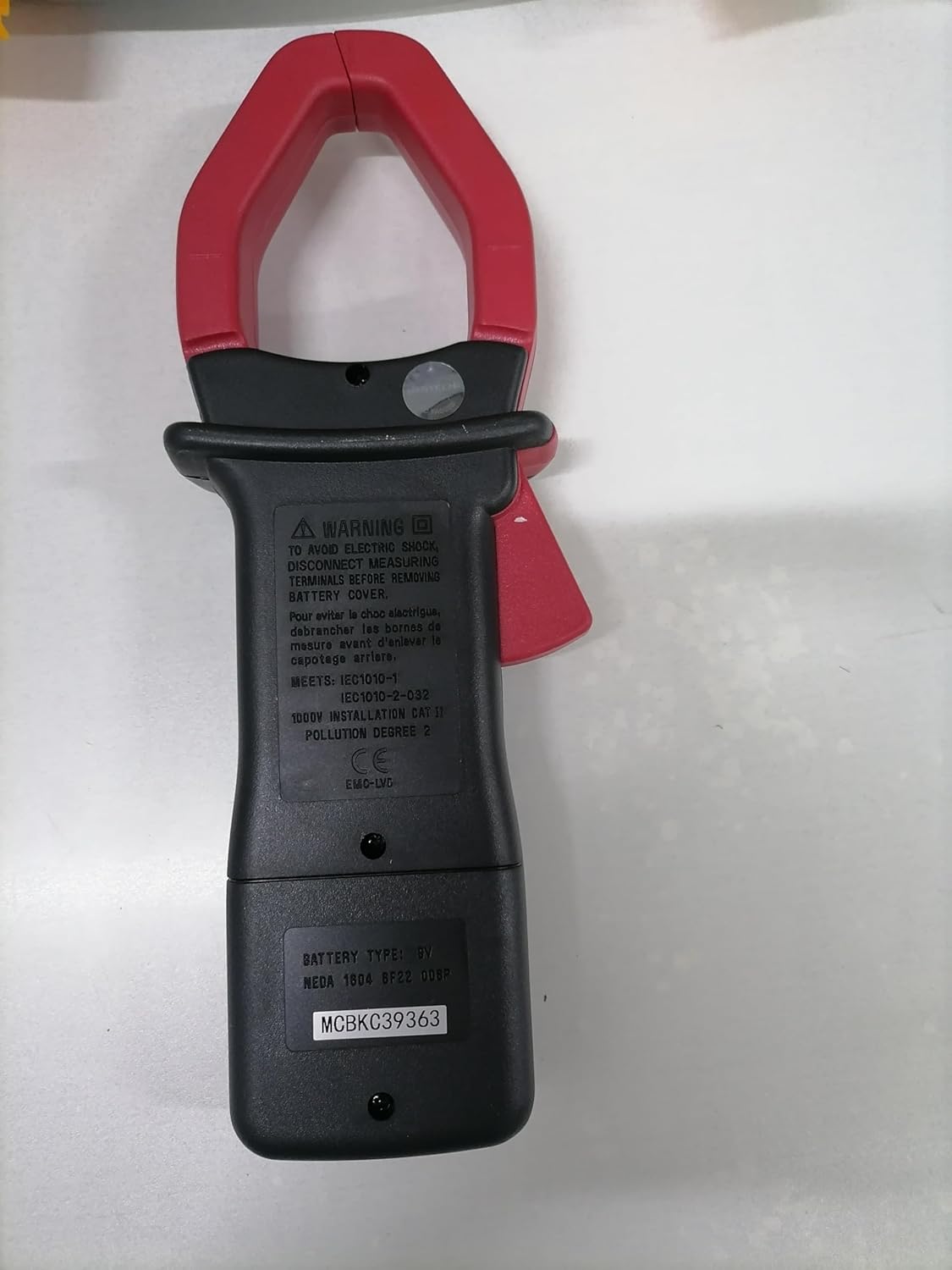
Wara view of the Mastech MS2000G Digital Clamp Meter, showing the battery compartment and safety warnings, including instructions to disconnect leads before opening.
3. Karatteristiċi tal-prodott
- 2000 Counts Digital Display
- Jaw Opening: 55mm (2.2 inches)
- Diode Open Voltage: 3.0V
- Continuity Buzzer: Activates below 30Ω
- Funzjoni ta 'Żamma tad-Dejta
- Display Backlight for low-light conditions
- Low Battery Display Indicator
4. Prodott Aktarview
The Mastech MS2000G features a robust design for professional and home use. Key components include:
- Clamp Xedaq: Used for non-contact AC current measurement.
- Swiċċ li jdur: Selects measurement functions (AC Current, Voltage, Resistance, etc.).
- Display LCD: Juri l-qari tal-kejl, l-unitajiet, u l-indikaturi.
- Ġakkijiet tad-dħul: For connecting test leads for voltage, resistance, continuity, diode, frequency, and temperature measurements.
- Buttuna taż-Żamma tad-Data: Jiffriża l-qari attwali fuq id-displej.
- Buttuna Backlight: Jdawwal il-wiri għal viżibilità aħjar.

Quddiem view of the Mastech MS2000G Digital Clamp Meter, highlighting the display, rotary switch, and clamp xedaq.
5. Setup
5.1 Installazzjoni tal-batterija
- Ensure the meter is turned OFF and all test leads are disconnected.
- Sib l-għatu tal-kompartiment tal-batterija fuq wara tal-miter.
- Uża tornavit biex tħoll il-vit(i) li jassiguraw l-għatu tal-batterija.
- Neħħi l-għatu.
- Daħħal batterija ġdida ta' 9V, waqt li tosserva l-polarità korretta (+ u -).
- Erġa’ poġġi l-għatu tal-batterija u waħħalha bil-vit(i).
5.2 Konnessjoni tal-wajers tat-test
For measurements requiring test leads (voltage, resistance, continuity, diode, frequency, temperature):
- Insert the red test lead into the VHzΩ input jack.
- Daħħal iċ-ċomb iswed tat-test fil-jack tal-input COM.
- For temperature measurements, connect the K-type thermocouple to the designated input terminals, observing polarity.
6. Istruzzjonijiet Operattivi
To operate the Mastech MS2000G, turn the rotary switch to the desired function. The display will show the measurement reading.
6.1 Kejl tal-Kurrent AC
- Turn the rotary switch to the 'A' (AC Current) range.
- Iftaħ il-clamp xedaq billi tagħfas il-grillu.
- Encircle only one conductor of the circuit with the clamp xedaq. Kun żgur li x-xedaq ikun magħluq għalkollox.
- Aqra l-valur tal-kurrent AC fuq id-displej.
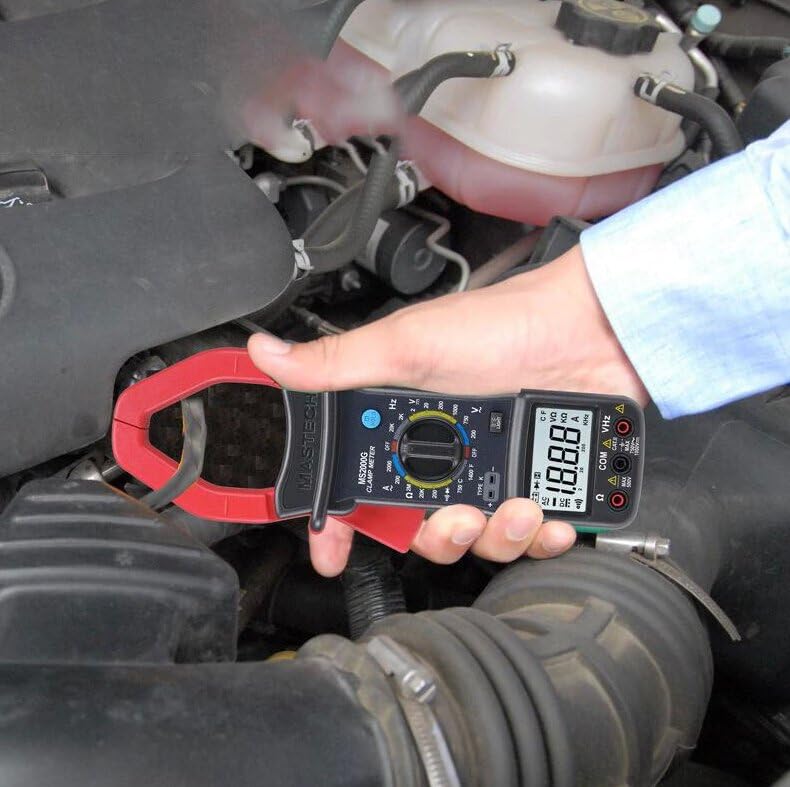
Demonstration of the Mastech MS2000G measuring AC current around a single conductor.
6.2 AC/DC Voltage Kejl
- Qabbad il-wajers tat-test kif deskritt fit-Taqsima 5.2.
- Dawwar is-swiċċ rotatorju għall-'V~' (Volum ACtage) jew 'V=' (Volum DCtage) firxa.
- Qabbad il-probi tat-test b'mod parallel maċ-ċirkwit jew il-komponent li qed jiġi ttestjat.
- Aqra l-voltagIl-valur fuq il-wiri.
6.3 Kejl tar-Reżistenza
- Qabbad il-wajers tat-test.
- Turn the rotary switch to the 'Ω' (Resistance) range.
- Ensure the circuit or component is de-energized before connecting the probes.
- Qabbad il-probi tat-test mal-komponent.
- Aqra l-valur tar-reżistenza fuq il-wiri.
6.4 Test ta' Kontinwità
- Qabbad il-wajers tat-test.
- Turn the rotary switch to the 'Ω' (Resistance) range and press the 'SELECT' button if necessary to choose continuity mode (indicated by a buzzer symbol).
- Qabbad il-probi tat-test madwar iċ-ċirkwit jew il-komponent.
- Jekk ir-reżistenza tkun taħt madwar 30Ω, il-buzzer se jdoqq, u jindika kontinwità.
6.5 Test tad-Diode
- Qabbad il-wajers tat-test.
- Turn the rotary switch to the 'Ω' (Resistance) range and press 'SELECT' to choose diode mode (indicated by a diode symbol).
- Qabbad is-sonda l-ħamra mal-anodu u s-sonda s-sonda s-sewda mal-katodu tad-dijodu.
- Id-displej se juri l-volum 'il quddiemtage drop. Reverse the probes; the display should show 'OL' (Open Loop) for a good diode.
6.6 Kejl tal-Frekwenza
- Qabbad il-wajers tat-test.
- Turn the rotary switch to the 'Hz' (Frequency) range.
- Connect the test probes to the circuit where frequency is to be measured.
- Aqra l-valur tal-frekwenza fuq id-displej.
6.7 Kejl tat-Temperatura
- Connect the K-type thermocouple to the designated input terminals, observing polarity.
- Turn the rotary switch to the '°C' or '°F' (Temperature) range.
- Poġġi s-sonda tat-termokoppja fuq jew viċin l-oġġett li t-temperatura tiegħu trid titkejjel.
- Aqra l-valur tat-temperatura fuq id-displej.
6.8 Funzjoni ta' Żamma tad-Data
Press the 'HOLD' button to freeze the current reading on the display. Press it again to release and resume live measurements.
6.9 Display Backlight
Press the 'LIGHT' button to turn on the display backlight for improved visibility in dimly lit environments. Press it again to turn off the backlight.
7. Manutenzjoni
7.1 Tindif
Imsaħ il-kaxxa tal-miter b'reklamaramp drapp u deterġent ħafif. Tużax sustanzi abrażivi jew solventi. Kun żgur li l-miter ikun niexef qabel l-użu.
7.2 Sostituzzjoni tal-batterija
When the 'Low Battery' indicator appears on the display, replace the 9V battery as described in Section 5.1. Prompt battery replacement ensures accurate readings.
7.3 Ħażna
Jekk il-miter ma jintużax għal perjodu estiż, neħħi l-batterija biex tevita t-tnixxija u l-ħsara. Aħżen il-miter f'post frisk u niexef, 'il bogħod mix-xemx diretta u minn temperaturi estremi.
8 Issolvi l-problemi
- Ebda Wiri/Wiri Dgħajjef: Check battery installation and replace the 9V battery if necessary.
- Qari Skorrett: Ensure the rotary switch is set to the correct function and range. Verify test lead connections. Check for damaged test leads.
- 'OL' on Display: Indicates an over-range condition or an open circuit. Select a higher range or check the circuit connection.
- Buzzer Not Sounding in Continuity Mode: The resistance may be above the continuity threshold (30Ω), or the circuit is open.
9. Speċifikazzjonijiet
| Parametru | Speċifikazzjoni |
|---|---|
| Wiri | 2000 Għadd |
| Ftuħ tax-xedaq | 55mm (2.2") |
| AC Voltage | 750V |
| DC Voltage | 1000V |
| Kurrent AC | 1000A |
| Reżistenza | 2MΩ |
| Frekwenza | 20kHz |
| Kontinwità | <30Ω (Buzzer) |
| Diode Open Voltage | 3.0V |
| Temperatura (Tip K) | -0°C sa 750°C (32°F sa 1382°F) |
| Klassifikazzjoni tas-Sigurtà | CAT II 1000V, CAT III 600V |
| Sors tal-Enerġija | Batterija 9V (inkluża) |
| Dimensjonijiet tal-Prodott | 7.87 x 5.91 x 9.84 pulzieri |
| Piż tal-oġġett | 1 Kilogramma (2.2 Liri) |

Detailed specifications and features for the Mastech MS2000G and other models.
10. X'hemm fil-Kaxxa
The Mastech MS2000G package typically includes:
- Mastech MS2000G Digital Clamp Miter
- Test Leads (one pair)
- Wrapping Case
- Termokoppja tat-Tip K
- Batterija 9V
- Ċertifikat ta 'Kalibrazzjoni
- Gwida għall-Bidu Mgħaġġel / Manwal tal-Utent

Contents of the Mastech MS2000G package, including the clamp meter and accessories.
11. Garanzija u Appoġġ
For warranty information and technical support, please refer to the documentation included with your product or contact the seller/manufacturer directly. Keep your purchase receipt as proof of purchase.


