Fanvil CA400 All-in-One Video Conference Solution User Manual
Mudell: CA400
1. Introduzzjoni
This user manual provides detailed instructions for the setup, operation, and maintenance of your Fanvil CA400 All-in-One Video Conference Solution. Please read this manual thoroughly before using the device to ensure proper functionality and to prevent damage.
2. Informazzjoni dwar is-Sigurtà
Jekk jogħġbok osserva l-prekawzjonijiet ta' sigurtà li ġejjin biex tevita ħsara lill-apparat jew korriment lilek innifsek:
- Tesponix l-apparat għall-ilma jew l-umdità.
- Tiżżarmax jew timmodifikax l-apparat. Irreferi kull manutenzjoni lil persunal kwalifikat.
- Uża biss l-adapter tal-enerġija fornut mal-apparat.
- Żomm l-apparat 'il bogħod minn sorsi ta' sħana u dawl tax-xemx dirett.
- Kun żgur li jkun hemm ventilazzjoni xierqa madwar l-apparat waqt it-tħaddim.
3. Kontenut tal-Pakkett
Ivverifika li l-oġġetti kollha huma preżenti fil-pakkett tiegħek:
- Fanvil CA400 All-in-One Video Conference Solution (CM70 Camera, MS10 Speakerphone, RC10 Receiver Hub)
- Cable USB
- Adapter tal-Enerġija
- Gwida Quick Start
4. Prodott Aktarview
Familiarize yourself with the components of the Fanvil CA400 system.

Figura 4.1: Aktarview of the Fanvil CA400 system, showing the CM70 4K UHD camera, MS10 screen-sharing speakerphone, and RC10 receiver hub.
4.1 CM70 4K UHD Camera

Figure 4.2: The CM70 4K UHD camera, featuring a 1/2.8-inch 4K Sony sensor for high-resolution video capture.
- Lenti: High-quality optical lens for clear video.
- Clip Muntaġġ: Adjustable clip for secure placement on monitors or flat surfaces.
- Indikatur tal-Istat: LED light indicating camera activity.
4.2 MS10 Screen-Sharing Speakerphone

Figure 4.3: The MS10 screen-sharing speakerphone, equipped with 8 array microphones and a 3W vocal enhanced speaker.
- Array tal-mikrofonu: 8 array mics for 360-degree voice pickup.
- Kelliem: Integrated 3W vocal enhanced speaker for clear audio output.
- Buttuni tal-Kontroll: Buttons for volume, mute, and screen sharing.
- Port USB: For connection to the RC10 Receiver Hub or a computer.
4.3 RC10 Receiver Hub
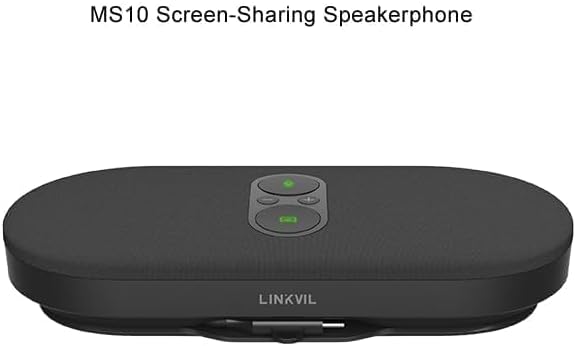
Figure 4.4: The RC10 receiver hub, facilitating wireless 4K UHD screen sharing and BYOD device connectivity.
- Portijiet USB: For connecting the CM70 camera and MS10 speakerphone.
- Ħruġ HDMI: Għall-konnessjoni ma' display.
- Port tal-Enerġija: Għall-konnessjoni tal-adapter tal-enerġija.
- Indikatur tal-Istat: Dawl LED li jindika l-istatus tal-konnessjoni.
5. Setup
Follow these steps to set up your Fanvil CA400 system:
- Connect the RC10 Receiver Hub:
- Connect the power adapter to the RC10 Receiver Hub and plug it into a power outlet.
- Connect the RC10 Receiver Hub to your display (monitor, TV, or projector) using an HDMI cable (not included).
- Connect the CM70 Camera:
- Mount the CM70 camera on top of your display or a stable surface.
- Connect the CM70 camera to one of the USB ports on the RC10 Receiver Hub using the provided USB cable.
- Connect the MS10 Speakerphone:
- Place the MS10 speakerphone on a flat surface in the center of your meeting area.
- Connect the MS10 speakerphone to another USB port on the RC10 Receiver Hub using the provided USB cable.
- Qawwa Mixgħul:
- Ensure all connections are secure. The system will power on automatically.
- The status indicators on the devices will light up, indicating they are ready for use.
6. Istruzzjonijiet Operattivi
6.1 Operazzjoni Bażika
- Power On/Off: The system powers on automatically when connected to power. Disconnect power to turn off.
- Kontroll tal-Volum: Use the volume buttons on the MS10 speakerphone to adjust audio output.
- Mikrofonu Mute: Press the mute button on the MS10 speakerphone to mute/unmute the microphones.
6.2 Wireless Screen Sharing (4K UHD)
The Fanvil CA400 supports wireless 4K UHD screen sharing via the RC10 Receiver Hub.
- Ensure your device (laptop, tablet) is connected to the same network as the Fanvil CA400 system.
- On your device, select the screen sharing option (e.g., Miracast, AirPlay, or a dedicated application if provided by Fanvil).
- Select the Fanvil CA400 system from the list of available devices.
- Your screen will now be mirrored on the connected display.
6.3 Video Conferencing (BYOD)
The Fanvil CA400 acts as a BYOD (Bring Your Own Device) solution, allowing you to use your preferred video conferencing software.
- Connect your laptop or computer to the RC10 Receiver Hub via a USB cable (if not already connected for screen sharing). The system will be recognized as a USB camera and speakerphone.
- Open your desired video conferencing application (e.g., Zoom, Microsoft Teams, Google Meet).
- In the application's audio and video settings, select the "Fanvil CA400 Camera" or "UVC Camera" as your video input.
- Select the "Fanvil CA400 Speakerphone" or "USB Audio Device" as your microphone and speaker.
- Start or join your video conference.
7. Manutenzjoni
To ensure the longevity and optimal performance of your Fanvil CA400 system, follow these maintenance guidelines:
- Tindif: Use a soft, dry cloth to clean the surfaces of the devices. Do not use liquid cleaners or aerosols.
- Ħażna: Meta ma tkunx qed tużah għal perjodi twal, aħżen l-apparat f'post frisk u niexef 'il bogħod mix-xemx diretta.
- Ġestjoni tal-Kejbil: Kun żgur li l-kejbils mhumiex mgħawġin jew maqbudin biex tevita l-ħsara.
8 Issolvi l-problemi
If you encounter issues with your Fanvil CA400, refer to the following common problems and solutions:
| Problema | Kawża Possibbli | Soluzzjoni |
|---|---|---|
| L-ebda output tal-vidjo fuq il-wiri. | Loose HDMI cable, incorrect input source on display, camera not connected. | Check HDMI connection. Select correct HDMI input on your display. Ensure CM70 camera is securely connected to RC10. |
| No audio from speakerphone. | Volume too low, speakerphone muted, incorrect audio output selected in software. | Increase volume on MS10. Unmute speakerphone. In your conferencing software, select "Fanvil CA400 Speakerphone" as audio output. |
| Il-mikrofonu mhux qed jaqbad il-ħoss. | Microphone muted, incorrect audio input selected in software. | Unmute microphone on MS10. In your conferencing software, select "Fanvil CA400 Speakerphone" as audio input. |
| Wireless screen sharing not working. | Device not on same network, network interference, software issue. | Ensure both devices are on the same Wi-Fi network. Restart RC10 and your sharing device. Check for software updates. |
9. Speċifikazzjonijiet
Technical specifications for the Fanvil CA400 All-in-One Video Conference Solution:
- Ditta: Fanvil
- Mudell: CA400
- Sensor tal-Kamera: 1/2.8-inch 4K Sony sensor (IMX 415)
- Riżoluzzjoni tal-Qbid tal-Vidjo: 4K, 1080p, 720p
- Tul Fokali Massimu: 118.5 Millimetru
- Apertura massima: 2.5 f
- Tip ta' Memorja Flash: Memorja flash interna
- Format tal-Qbid tal-Vidjo: MJPEG
- Format Awdjo Appoġġjat: MP3
- Screen Size (Speakerphone): 1 Inches (referring to a small display or indicator, not main screen)
- Teknoloġija tal-Konnettività: USB
- Mikrofoni: 8 array mics (on MS10 Speakerphone)
- Kelliem: 3W vocal enhanced speaker (on MS10 Speakerphone)
- Kondiviżjoni tal-Iskrin: Wireless 4K UHD
- Tip ta' Apparat: BYOD (Bring Your Own Device)
10. Garanzija u Appoġġ
For warranty information and technical support, please refer to the warranty card included with your product or visit the official Fanvil websit. Żomm il-prova tax-xiri tiegħek għal talbiet ta' garanzija.
Riżorsi onlajn: For the latest drivers, firmware updates, and additional support resources, please visit www.fanvil.com.


