Introduzzjoni
Thank you for choosing the Tracer M45 Portable Bluetooth Speaker. This manual provides essential information for the safe and efficient use of your device. Please read it thoroughly before operating the speaker and keep it for future reference.
The Tracer M45 is a versatile 45W portable Bluetooth speaker designed for high-quality audio playback from various sources, including Bluetooth-enabled devices, FM radio, and other audio inputs. It features a robust design and intuitive controls for an enhanced listening experience.
Informazzjoni dwar is-Sigurtà
- Tesponix l-ispiker għall-ilma, umdità, jew temperaturi estremi.
- Evita li twaqqa’ jew tissuġġetta lill-kelliem għal impatti qawwija.
- Tiżżarmax, issewwiex, jew timmodifikax l-ispiker int stess. Irreferi għal kull manutenzjoni lil persunal kwalifikat.
- Żomm l-ispiker 'il bogħod minn sorsi ta' sħana u dawl tax-xemx dirett.
- Uża biss il-kejbil tal-iċċarġjar u l-adapter tal-enerġija speċifikati.
- Naddaf l-ispiker b'ċarruta ratba u niexfa. Tużax prodotti tat-tindif jew solventi li joborxu.
- Aċċerta ruħek li jkun hemm ventilazzjoni xierqa meta tħaddem l-ispiker.
Kontenut tal-Pakkett
Jekk jogħġbok iċċekkja li l-oġġetti kollha huma preżenti fil-pakkett:
- Tracer M45 Portable Bluetooth Speaker
- Iċċarġjar Cable
- Kontroll mill-bogħod
- Manwal għall-Utent (dan id-dokument)
Prodott Overview
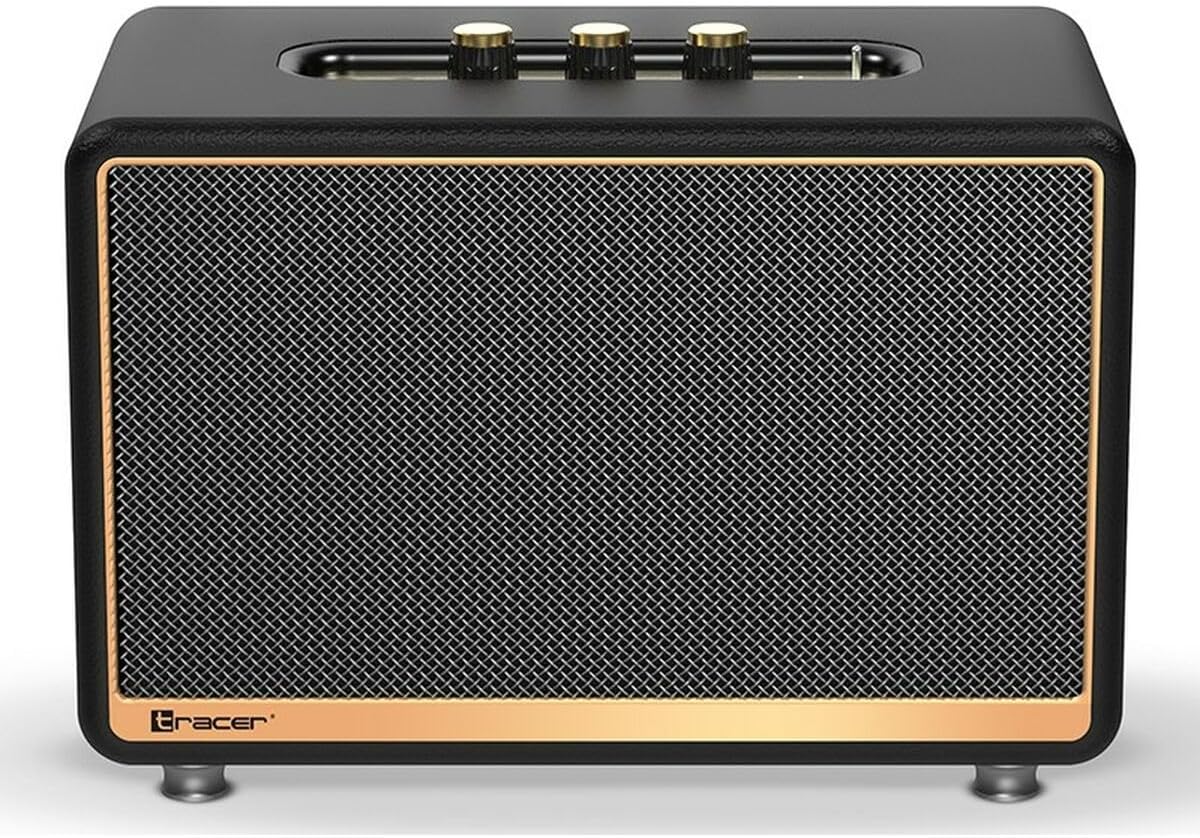
Figura 1: Quddiem view of the Tracer M45 Portable Bluetooth Speaker. The speaker features a black mesh grille with a gold-colored trim, and three gold-colored control knobs are visible on the top panel. The Tracer logo is located at the bottom left of the grille.
Kontrolli u Portijiet
Familiarize yourself with the various controls and ports on your Tracer M45 speaker:
- Buttuna/Swiċċ tal-Enerġija: Located on the rear or top panel, used to turn the speaker ON/OFF.
- Buttuni tal-Volum: Three gold-colored knobs on the top panel for adjusting volume, bass, and treble.
- Buttuna tal-Modalità: To switch between Bluetooth, FM Radio, and other input modes.
- Buttuna Play/Pause: For controlling audio playback.
- Buttuni tal-Track ta' Preċedenti/Li jmiss: For navigating through tracks or FM radio stations.
- Port tal-Iċċarġjar: Għall-konnessjoni tal-kejbil tal-iċċarġjar.
- Port tal-Aux-in: Għall-konnessjoni ta' apparati awdjo esterni permezz ta' kejbil awdjo ta' 3.5mm.
- Port USB: (If present) For playing music from a USB drive.
- Indikatur LED: Juri l-istatus tal-enerġija, l-istatus tal-iċċarġjar, u l-istatus tal-akkoppjar tal-Bluetooth.
Setup
1. Iċċarġja l-Ispeaker
Before first use, fully charge the speaker. Connect the charging cable to the speaker's charging port and the other end to a suitable USB power adapter (not included) or a computer's USB port. The LED indicator will show the charging status and turn off or change color when fully charged.
2. Tixgħil / Mitfi
To turn the speaker ON, locate the power switch/button and slide it to the "ON" position or press and hold it for a few seconds. The LED indicator will light up. To turn OFF, repeat the process.
3. Tqabbil tal-Bluetooth
- Ensure the speaker is ON and in Bluetooth mode. If not, press the Mode button until you hear a Bluetooth pairing prompt or see the LED indicator flashing rapidly.
- On your smartphone, tablet, or other Bluetooth device, enable Bluetooth.
- Fittex għal available devices. You should see "Tracer M45" or a similar name in the list.
- Select "Tracer M45" to connect. Once paired, the speaker will indicate a successful connection (e.g., a sound prompt or steady LED light).
- The speaker will automatically reconnect to the last paired device when in range and Bluetooth is enabled.
4. Connecting via Aux-in
For devices without Bluetooth, connect a 3.5mm audio cable (not included) from your device's headphone jack to the speaker's Aux-in port. The speaker should automatically switch to Aux mode, or you may need to press the Mode button.
5. Is-Setup tar-Radju FM
To use the FM Radio function, switch the speaker to FM mode using the Mode button. For best reception, ensure the speaker is in an open area. Press and hold the Play/Pause button to auto-scan and save available FM stations. Use the Previous/Next Track buttons to navigate between saved stations.
Operazzjoni
Daqq Bażiku
- Play/Pawsa: Agħfas il-buttuna Play/Pause darba biex tilgħab jew twaqqaf l-awdjo.
- Kontroll tal-Volum: Rotate the main volume knob on the top panel to increase or decrease the volume. Use the bass and treble knobs to adjust sound equalization.
- Track Li jmiss / Preċedenti: Press the Next or Previous track buttons to skip to the next or previous song/station.
Bl-użu tal-Kontroll mill-bogħod
The Tracer M45 comes with a remote control for convenient operation. Ensure the remote has working batteries. The remote allows you to control power, mode, volume, track navigation, and FM radio functions from a distance.
Manutenzjoni
- Tindif: Wipe the speaker's surface with a soft, dry, lint-free cloth. Do not use liquid cleaners, sprays, or solvents.
- Ħażna: Meta ma tkunx qed tużah għal perjodi twal, aħżen l-ispiker f'post frisk u niexef, 'il bogħod mix-xemx diretta u minn temperaturi estremi.
- Kura tal-batterija: Biex ittawwal il-ħajja tal-batterija, evita li tiċċarġja kompletament il-batterija ta’ spiss. Iċċarġja l-ispiker regolarment, anke jekk ma jkunx qed jintuża.
Issolvi l-problemi
| Problema | Kawża Possibbli | Soluzzjoni |
|---|---|---|
| L-ispeaker ma jixgħelx. | Il-batterija hija baxxa jew eżawrita. | Iċċarġja l-ispiker kompletament. |
| Ma tistax tqabbad permezz tal-Bluetooth. | L-ispiker mhux fil-modalità ta' tqabbil; il-Bluetooth huwa mitfi fuq l-apparat; l-apparat huwa 'l bogħod wisq. | Ensure speaker is in Bluetooth pairing mode. Turn on Bluetooth on your device. Move device closer to speaker (within 10 meters). |
| L-ebda ħoss. | Volume is too low; incorrect input mode; device not playing. | Increase speaker and device volume. Check if the correct input mode (Bluetooth, Aux) is selected. Ensure audio is playing on the connected device. |
| Riċeviment ħażin tar-radju FM. | Sinjal dgħajjef; interferenza. | Relocate the speaker to an area with better signal. Perform auto-scan again. |
Speċifikazzjonijiet
| Karatteristika | Dettall |
|---|---|
| Numru tal-Mudell | S9174238 |
| Brand | Tracer |
| Teknoloġija tal-Konnettività | Bluetooth 5.0 |
| Qawwa massima tal-Ħruġ | 45 Watts |
| Tip ta' Kelliem | Portable Bluetooth Speaker (with Subwoofer component) |
| Modalità tal-Ħruġ tal-Awdjo | BAŻIKU |
| Tip ta 'Immuntar | Stand tal-mejda |
| Karatteristiċi Speċjali | Wireless, LED Indicator, ON/OFF Switch, FM Radio |
| Użi Rakkomandati | For computer, For smartphone or tablet |
| Tip ta' Kontrollur | Kontroll mill-bogħod |
| Kulur | Iswed |
| Dimensjonijiet tal-Prodott (L x W x H) | 22 x 20 x 32 ċm (8.66 x 7.87 x 12.6 pulzieri) |
| Piż | 4.04 kg (8.9 lbs) |
Garanzija u Appoġġ
Tracer products are designed and manufactured to the highest quality standards. For information regarding warranty coverage, please refer to the warranty card included with your product or visit the official Tracer websit. Żomm l-irċevuta tax-xiri tiegħek bħala prova tax-xiri.
For technical support, troubleshooting assistance, or service inquiries, please contact Tracer customer support through their official channels. Contact information can typically be found on the product packaging or the manufacturer's websit.
Nota: It-termini u l-kundizzjonijiet tal-garanzija jistgħu jvarjaw skont ir-reġjun.


