Prodott Overview
The JTEMAN 360 Rotating Cell Phone Stand with Wireless Bluetooth Speaker with Light is a versatile device designed to enhance your mobile experience. It integrates a rotatable phone stand, a Bluetooth speaker, and an atmosphere light into a single unit. This manual provides detailed instructions for its setup, operation, and maintenance.
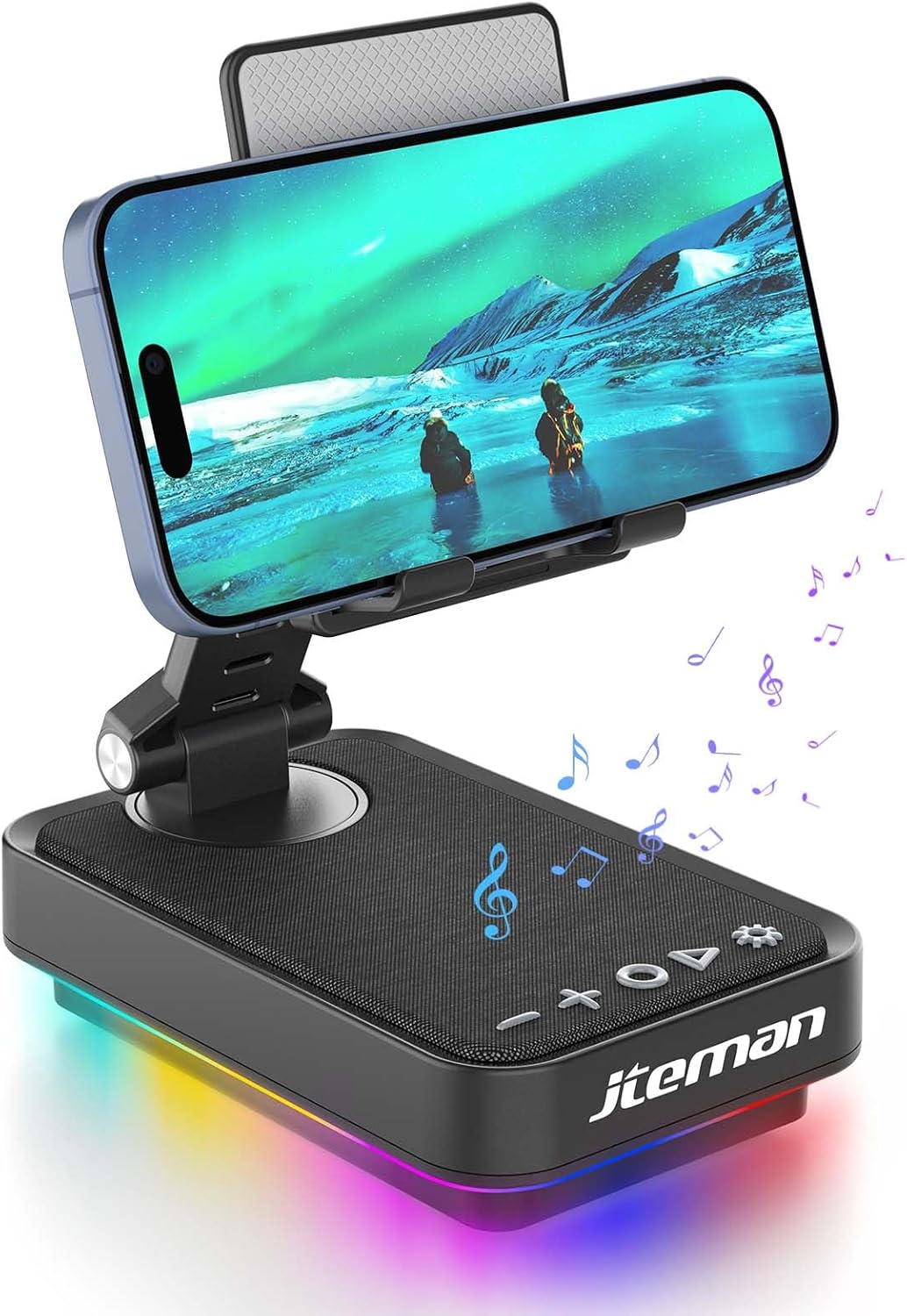
Figure 1: JTEMAN 360 Rotating Cell Phone Stand with Wireless Bluetooth Speaker with Light.
Komponenti Inklużi:
- Bluetooth Speaker (with integrated phone stand and light)
- Kejbil tat-Tip Ċ
- Manwal ta' Istruzzjoni
Gwida ta' Setup
1. Unboxing and Initial Inspection:
Carefully remove all components from the packaging. Inspect the device and accessories for any signs of damage. Ensure all listed components are present.
Video 1: Unboxing and initial setup of the JTEMAN phone stand and Bluetooth speaker.
2. Preparing the Phone Stand:
Before first use, locate and remove the silicone protective patch from the device's base. This patch protects the surface during shipping.
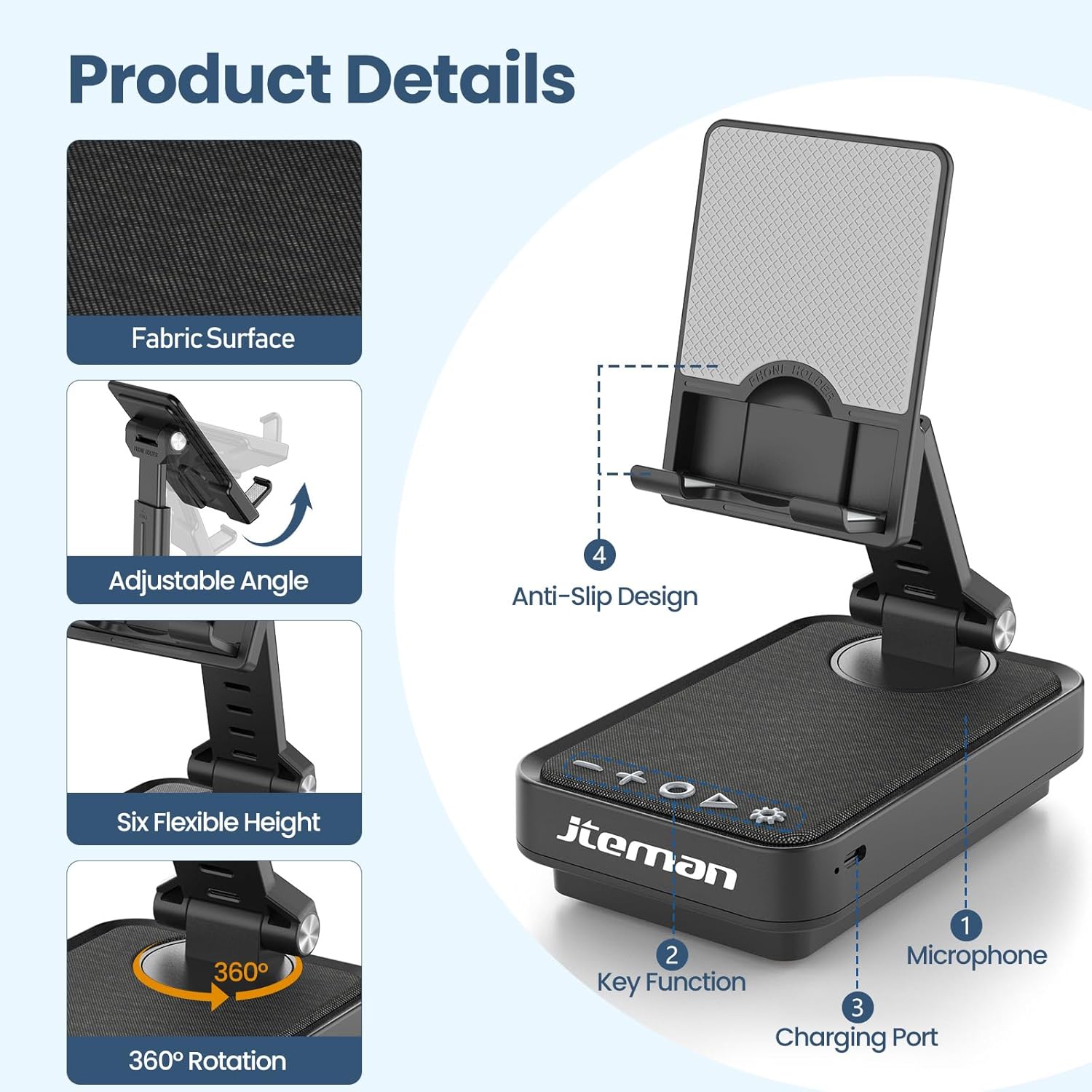
Figure 2: Product details and components. Note the anti-slip design and key functions.
3. Iċċarġja l-Apparat:
Connect the provided Type-C cable to the charging port on the device and the other end to a compatible USB power adapter (not included). The power indicator light will show red during charging and turn green when fully charged.
- Dawl aħmar: Il-batterija qed tiċċarġja.
- Dawl aħdar: Il-batterija hija kompletament iċċarġjata.

Figura 3: Il-kapaċità tal-batterija u l-ħinijiet stmati tal-użu.
4. Tqabbil tal-Bluetooth:
- Long press the Power ON/OFF button (3) for 3 seconds to turn on the speaker. The speaker will enter pairing mode, indicated by a flashing blue light.
- On your smartphone or tablet, navigate to Bluetooth settings.
- Select "L39-1" from the list of available devices.
- Once connected, the blue light will become solid.

Figure 4: Bluetooth connection with a laptop, demonstrating wireless audio playback.
Istruzzjonijiet Operattivi
Control Panel Matulview:

Figura 5: Dettaljat view tal-pannell tal-kontroll u l-funzjonijiet tiegħu.
- VOL- (1): Agħfas biex tnaqqas il-volum.
- VOL+ (2): Agħfas biex iżżid il-volum.
- Answer/Hang up/Play/Pause/Next (4):
- Agħfas qasir biex tilgħab/pawża mużika.
- Short press to answer/hang up calls.
- Agħfas fit-tul biex taqbeż għall-binarju li jmiss.
- Power ON/OFF (3):
- Agħfas fit-tul għal 3 sekondi biex tixgħel/itfi l-kelliem.
- Double press to switch between Bluetooth and AUX modes.
- Short press to adjust the brightness of the atmosphere lights (4 levels).
- Atmosphere Light (5):
- Long press for 3 seconds to turn on/off the light.
- Short press to switch lighting mode (11 modes available, 3 modes sync with music).
- Mikrofonu (6): Għal sejħiet mingħajr idejn.
- Port tal-Iċċarġjar (7): Type-C input for charging.
- Power Indicator Light (8): Shows charging status and Bluetooth connection status.
Phone Stand Adjustment:
The phone stand features 360° rotation and adjustable height and angle to suit various viewing needs. The anti-slip silicone pads ensure device stability.

Figure 6: The phone stand supports a wide range of devices, including smartphones and tablets (4-13 inches).
The stand is foldable for easy portability.

Figure 7: The foldable design allows for easy storage and transport.
Manutenzjoni
Tindif:
Wipe the device with a soft, dry cloth. Do not use abrasive cleaners, solvents, or harsh chemicals, as these may damage the surface or internal components. Avoid exposing the device to excessive moisture.
Ħażna:
When not in use for extended periods, store the device in a cool, dry place away from direct sunlight and extreme temperatures. Ensure the device is fully charged before storing to prolong battery life.
Kura tal-batterija:
To maximize battery lifespan, avoid fully discharging the battery frequently. Charge the device regularly, even if not in constant use. Do not expose the battery to high temperatures.
Issolvi l-problemi
| Problema | Kawża Possibbli | Soluzzjoni |
|---|---|---|
| L-apparat ma jixgħelx. | Batterija baxxa. | Iċċarġja l-apparat billi tuża l-kejbil tat-Tip Ċ provdut. |
| Ma nistax nikkonnettja permezz tal-Bluetooth. | Bluetooth not enabled on device; speaker not in pairing mode; too far from speaker. | Ensure Bluetooth is enabled on your phone/tablet. Long press Power ON/OFF button to enter pairing mode (flashing blue light). Move device closer to the speaker. |
| L-ebda ħoss mill-ispiker. | Volume too low; device not connected; AUX mode active. | Increase volume on both the speaker and your connected device. Verify Bluetooth connection. Double press Power ON/OFF button to switch to Bluetooth mode if in AUX mode. |
| Atmosphere lights not working. | Id-dwal mitfija; batterija baxxa. | Long press the Atmosphere Light button (5) to turn on. Charge the device. |
Speċifikazzjonijiet
| Karatteristika | Dettall |
|---|---|
| Isem tal-Mudell | L39-1 |
| Tip ta 'Immuntar | Immonta fuq il-mejda |
| Tip ta' Kelliem | Surround Sound |
| Karatteristika Speċjali | Dawl LED |
| Użi Rakkomandati | Għal Smartphones jew Pilloli |
| Apparati Kompatibbli | Smartphone, Tablet (4-13 inches) |
| Tip ta' Kontrollur | Buttuna, Touch |
| Surround Sound Channel | 2.0 |
| Dimensjonijiet tal-Prodott | 5.3"D x 3.5"W x 2.3"H |
| Huwa Waterproof | FALZ |
| Sors tal-Enerġija | Mħaddma bil-batterija |
| Tip ta 'batterija | 1 Lithium Ion (inkluż) |
| Tip ta' Sewwieq Awdjo | Sewwieq Dinamika |
| Konnettività bla fili | Bluetooth 5.3 |
| Qawwa tal-Ħruġ Massimu tal-Ispeaker | 5 Watts |
| Rispons ta' Frekwenza | 1 KHz |
| Piż tal-oġġett | 15.5 uqija |
Informazzjoni dwar Garanzija
This JTEMAN product comes with a Garanzija ta' Sena mid-data tax-xiri. Din il-garanzija tkopri difetti fil-manifattura u malfunzjonijiet taħt użu normali. Ma tkoprix ħsara kkawżata minn użu ħażin, inċidenti, modifiki mhux awtorizzati, jew xedd u kedd normali.
Please retain your proof of purchase for warranty claims. For detailed warranty terms and conditions, refer to the official JTEMAN websit jew ikkuntattja l-appoġġ tal-klijent.
Appoġġ għall-Klijent
If you encounter any issues or have questions not covered in this manual, please contact JTEMAN customer support. Provide your product model number (L39-1) and a detailed description of the issue to assist our support team.
For the most up-to-date contact information, please visit the official JTEMAN websit: JTEMAN Store on Amazon


