1. Introduzzjoni
Grazzi tax-xiriasing the ELECTROPRIME HOCO BS59 Pearlescent Wireless Karaoke Bluetooth Speaker. This manual provides essential information for setting up, operating, and maintaining your device. Please read it carefully before use and retain it for future reference.
2. Informazzjoni dwar is-Sigurtà
- Tesponix the device to extreme temperatures, humidity, or direct sunlight.
- Evita li twaqqa’ or subjecting the device to strong impacts.
- Żarmax or attempt to repair the device yourself. Contact qualified service personnel.
- Żomm fejn ma jintlaħaqx tat-tfal.
- Uża biss the provided or recommended charging cables and adapters.
- Tiżgura ventilazzjoni xierqa when operating the speaker.
3. Kontenut tal-Pakkett
Jekk jogħġbok iċċekkja li l-oġġetti kollha huma preżenti fil-pakkett tiegħek:
- 1 x HOCO BS59 Karaoke Bluetooth Speaker
- 2 x Mikrofoni Wireless
- 1 x Cable tal-Iċċarġjar (USB-C)
- 1 x Manwal għall-Utent
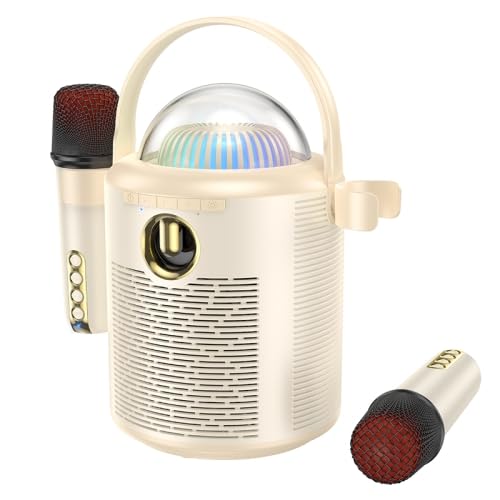
Image: The main unit of the HOCO BS59 speaker in beige, featuring a transparent dome with colorful lights, a handle, and two wireless microphones attached to its sides. Another microphone is shown separately at the bottom right.
4. Prodott Aktarview
Familiarize yourself with the main components of your karaoke speaker system.
- Main Speaker Unit: Houses the 8W full-range speaker and 2W tweeter, control buttons, and light dome.
- Wireless Microphones (x2): For vocal input during karaoke.
- Panel tal-Kontroll: Buttuni għall-qawwa, il-modalità, il-volum, u l-effetti tad-dawl.
- Koppla tad-Dawl: Provides colorful light effects.
- Portijiet tal-Iċċarġjar: For speaker and microphones.
- Input AUX: Għal konnessjoni awdjo bil-fili.
- Slott tal-Karta TF: Għad-daqq tal-mużika direttament minn memory card.
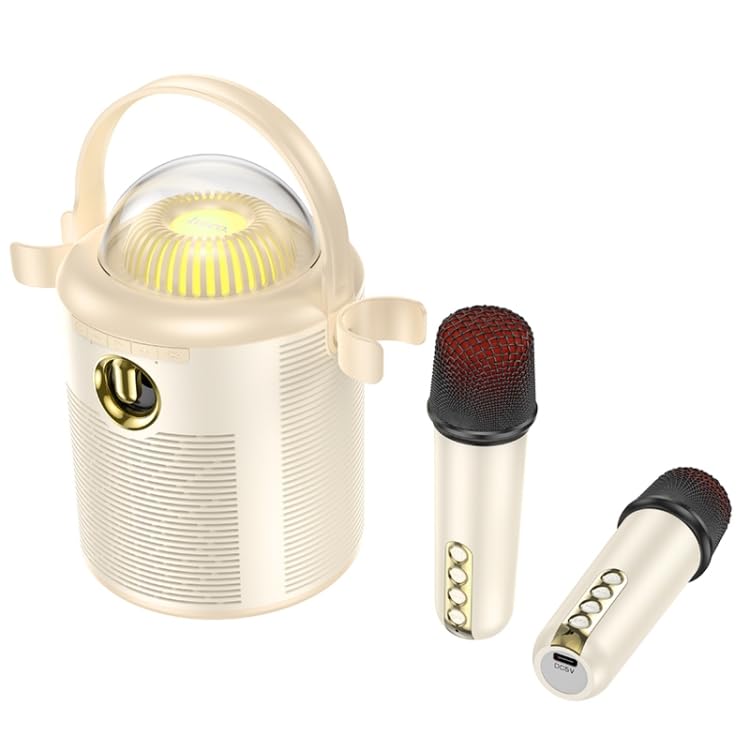
Immaġni: Dettaljata view of the HOCO BS59 speaker and its two wireless microphones. The speaker's front panel with controls and the transparent light dome are clearly visible. One microphone is shown attached to the speaker, and the other is lying separately, showcasing its buttons and charging port.
5. Setup
5.1. Iċċarġjar tal-Apparat
Before first use, fully charge the speaker and both microphones.
- Kelliem: Connect the charging cable to the speaker's charging port and a suitable USB power adapter (not included). The charging indicator will show charging status. Full charge takes approximately 3 hours.
- Mikrofoni: Connect the charging cable to each microphone's charging port. Full charge takes approximately 2 hours per microphone.
5.2. Tixgħil / Mitfi
- Kelliem: Press and hold the Power button on the speaker for a few seconds to turn it on or off.
- Mikrofoni: Press and hold the Power button on each microphone to turn it on or off.
5.3. Tqabbil tal-Bluetooth
- Kun żgur li l-ispiker ikun mixgħul u fil-modalità Bluetooth (indikat b'sinjal bil-vuċi jew LED).
- Ippermetti l-Bluetooth fuq l-ismartphone, it-tablet, jew apparat awdjo ieħor tiegħek.
- Fittex għal "HOCO BS59" or similar in your device's Bluetooth list.
- Select "HOCO BS59" to pair. A confirmation sound will indicate successful pairing.
- The microphones will automatically connect to the speaker when both are powered on.
5.4. Konnessjoni permezz tal-Input AUX
Use a 3.5mm audio cable (not included) to connect an external audio source to the speaker's AUX port. The speaker will automatically switch to AUX mode or you may need to press the Mode button.
5.5. Playing from TF Card
Daħħal kard TF (microSD) b'awdjo MP3 files fl-islott magħżul. L-ispiker awtomatikament jaqleb għall-modalità TF card u jibda daqq.
6. Istruzzjonijiet Operattivi
6.1. Daqq tal-mużika
- Play/Pawsa: Press the Play/Pause button on the speaker.
- Kontroll tal-Volum: Uża l-buttuni tal-volum fuq l-ispiker jew fuq l-apparat konness tiegħek.
- Track Li jmiss / Preċedenti: Use the track skip buttons on the speaker.
6.2. Funzjoni tal-Karaoke
Once your music source is playing and microphones are connected:
- Volum tal-mikrofonu: Adjust the volume on the microphones directly.
- One-Click Original Sound Cancellation: Press the dedicated button on the speaker or microphone (refer to device markings) to remove vocals from a song, allowing you to sing along. Press again to restore original vocals.
- Eku/Reverb: Some microphones may have controls for echo effects.
6.3. Dwal Kuluriti
The speaker features colorful lights. Press the Light button on the speaker to cycle through different light modes or turn them off.
7. Manutenzjoni
- Tindif: Wipe the speaker and microphones with a soft, dry cloth. Do not use abrasive cleaners or solvents.
- Ħażna: Store the device in a cool, dry place away from direct sunlight when not in use for extended periods.
- Kura tal-batterija: To prolong battery life, avoid fully discharging the device frequently. Charge regularly, even if not in use.
8 Issolvi l-problemi
| Problema | Kawża Possibbli | Soluzzjoni |
|---|---|---|
| Ebda qawwa | Il-batterija hija eżawrita | Iċċarġja l-ispiker/mikrofoni kompletament. |
| L-ebda ħoss | Volume too low; Not paired; Incorrect mode | Increase volume; Ensure successful Bluetooth pairing; Switch to correct input mode (Bluetooth, AUX, TF). |
| Mikrofonu mhux qed jaħdem | Microphone off; Battery low; Not paired with speaker | Turn on microphone; Charge microphone; Ensure speaker and microphone are both on and within range. |
| Konnessjoni Bluetooth instabbli | Too far from device; Interference | Move speaker closer to the paired device; Avoid obstacles and other wireless devices. |
9. Speċifikazzjonijiet
| Karatteristika | Dettall |
|---|---|
| Mudell | EDA006048701A |
| Verżjoni Bluetooth | 5.1 (Chip: JL AC6965E4) |
| Kapaċità tal-Batterija tal-Ispeaker | 1800mAh |
| Kapaċità tal-Batterija tal-Mikrofonu | 500mAh |
| Ħin tal-Iċċarġjar tal-Ispeaker | Appross. 3 sigħat |
| Ħin tal-Iċċarġjar tal-Mikrofonu | Appross. 2 sigħat |
| Speaker Usage Time | Appross. 5 sigħat |
| Microphone Usage Time | Appross. 16 sigħat |
| Unità tal-Ispeaker | 8W full-range speaker + 2W tweeter |
| Potenza Totali | 10W |
| Dimensjonijiet (Speaker) | 190 x 120 x 215mm |
| Weight (Speaker) | 774g |
| Modi Appoġġjati | Bluetooth, TF card, AUX |
| Karatteristiċi Speċjali | Dual wireless microphones, One-click original sound cancellation, Colorful lights |
10. Garanzija u Appoġġ
This product comes with a standard manufacturer's warranty. Please refer to the warranty card included in your package for specific terms and conditions. For technical support, troubleshooting assistance, or warranty claims, please contact ELECTROPRIME customer service through your retailer or the official brand websit.
Għal aktar informazzjoni, tista' żżur il- ELECTROPRIME brand store.