1. Introduzzjoni
This manual provides essential information for the installation, operation, and maintenance of your NZXT C1200 Gold ATX 3.1 Power Supply. Please read this manual thoroughly before installation and retain it for future reference. The NZXT C1200 Gold ATX 3.1 is a fully modular, low-noise power supply designed for high-performance PC gaming systems, offering 1200 Watts of power with 80 PLUS Gold efficiency and a 12V-2x6 connector.

Figure 1: NZXT C1200 Gold ATX 3.1 Power Supply (White)
2. Informazzjoni dwar is-Sigurtà
TWISSIJA: Failure to follow these safety instructions may result in electric shock, fire, or damage to the product and connected components.
- Dejjem skonnettja l-provvista tal-enerġija mis-sokit tal-AC qabel l-installazzjoni jew il-manutenzjoni.
- Tiftaħx l-unità tal-provvista tal-enerġija. Volum għolitagĠewwa hemm xi partijiet, u m'hemm l-ebda partijiet li jistgħu jiġu sservisjati mill-utent. Il-ftuħ tal-unità jannulla l-garanzija.
- Ensure the power supply is installed in a well-ventilated area, away from heat sources, direct sunlight, and moisture.
- Use only the modular cables provided with this NZXT C1200 Gold ATX 3.1 power supply. Using cables from other power supplies may cause damage.
- Kun żgur li l-konnetturi kollha huma mwaħħlin sew qabel ma tixgħel is-sistema.
- This product is designed for use in desktop personal computers only. Do not use it for any other purpose.
- Żomm fejn ma jintlaħaqx mit-tfal.
3. Kontenut tal-Pakkett
Ivverifika li l-oġġetti kollha huma preżenti fil-pakkett:
- NZXT C1200 Gold ATX 3.1 Power Supply Unit
- Modular Cable Set (see Figure 2 for details)
- Kurdun tal-Enerġija AC
- Viti tal-Immuntar
- Manwal għall-Utent (dan id-dokument)

Figure 2: Included Modular Cable Set
4. Karatteristiċi tal-prodott
The NZXT C1200 Gold ATX 3.1 Power Supply incorporates several key features for optimal performance and reliability:
- Konformità mal-ATX 3.1: Designed to meet the ATX 3.1 standard, ensuring stable and efficient power delivery for modern high-performance PC components, with enhanced resistance to power spikes.
- 40 Series Ready: Features a durable, heat-resistant 12V-2x6 connector capable of supplying up to 600 watts to NVIDIA GeForce RTX 40 Series graphics cards.
- High Efficiency, Low Noise: Certified with 80 PLUS Gold Efficiency, Cybenetics Gold Efficiency, and Cybenetics A- Noise Level ratings, indicating high energy efficiency and quiet operation.
- Ultra-Low Noise Fan: Equipped with a 135mm fluid dynamic bearing fan that includes a Zero Fan Mode, allowing for completely silent operation when the power supply is under 50% load.
- Kostruzzjoni ta' Kwalità Għolja: Utilizes 100% premium Japanese capacitors, which contribute to improved hold-up time and minimal ripple noise, ensuring reliable and stable power delivery.

Figure 3: Key Features and Certifications
5. Setup u Installazzjoni
5.1 Lista ta 'Kontroll ta' Qabel l-Installazzjoni
- Ensure your computer case supports ATX power supplies and has adequate space for the unit (dimensions: 6.3 x 5.91 x 3.39 inches).
- Iġbor l-għodda meħtieġa: tornavit Phillips.
- Unpack the power supply and all modular cables.
5.2 Installazzjoni Fiżika
- Itfi l-kompjuter tiegħek u skonnettja l-korda tal-enerġija AC mis-sokit tal-ħajt.
- Iftaħ il-każ tal-kompjuter tiegħek.
- If replacing an existing power supply, disconnect all cables from the old PSU and remove it from the case.
- Carefully slide the NZXT C1200 Gold ATX 3.1 power supply into the designated PSU bay in your computer case.
- Waħħal il-provvista tal-enerġija mal-kaxxa billi tuża l-viti tal-immuntar provduti.

Figure 4: Power Supply Installed in PC Case
5.3 Konnessjonijiet tal-Cable
Connect only the necessary modular cables to the power supply and your components. This helps improve airflow and cable management.
- Kejbil tal-Motherboard ATX ta' 24-pin: Connect the large 24-pin cable to the corresponding port on your motherboard.
- 8-pin (4+4) CPU Power Cable: Connect the CPU power cable(s) to the CPU power connector(s) on your motherboard. High-end motherboards may require two 8-pin CPU cables.
- PCIe Power Cables (6+2 pin and 12V-2x6):
- For graphics cards requiring 6-pin or 8-pin PCIe connectors, use the provided 8-pin (6+2) PCIe cables.
- For NVIDIA GeForce RTX 40 Series graphics cards, use the dedicated 16-pin (12V-2x6) PCIe cable. Ensure it is fully seated into both the power supply and the graphics card.
- Kejbils tal-Enerġija SATA: Qabbad il-kejbils tal-enerġija SATA mad-drajvs tal-ħażna tiegħek (SSDs, HDDs) u apparati oħra li jaħdmu bis-SATA.
- Peripheral Power Cables: Connect peripheral cables for devices such as case fans, fan controllers, or older components requiring Molex connectors.

Figure 5: Modular Cable Connections, including 12V-2x6

Figure 6: 12V-2x6 Cable Connected
After all cables are connected, ensure they are routed neatly to avoid obstructing airflow. Close your computer case.
6. Istruzzjonijiet Operattivi
6.1 Kif Tixgħel is-Sistema Tiegħek
- Connect the AC power cord to the power supply's AC inlet and then to a wall outlet.
- Dawwar is-swiċċ tal-enerġija fuq wara tal-provvista tal-enerġija għall-pożizzjoni "ON" (I).
- Press the power button on your computer case to start the system.
6.2 Zero Fan Mode
The NZXT C1200 Gold ATX 3.1 features a Zero Fan Mode. When the power supply load is below 50%, the fan will remain off for silent operation. As the load increases above 50%, the fan will automatically activate to maintain optimal temperatures.
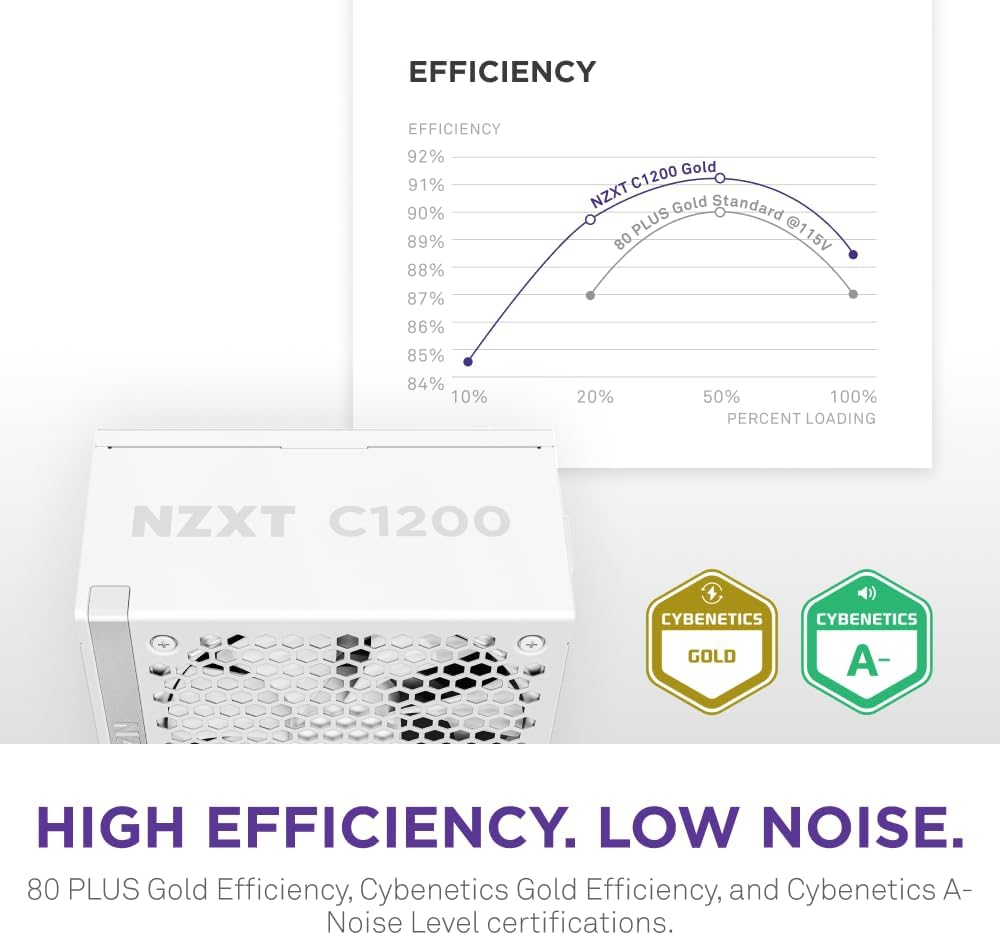
Figure 7: Efficiency and Noise Level Certifications
7. Manutenzjoni
Manutenzjoni xierqa tiżgura l-lonġevità u l-prestazzjoni ottimali tal-provvista tal-enerġija tiegħek.
- Tindif tat-Trab: Periodically clean the exterior of the power supply and its fan grille using compressed air to remove dust buildup. Ensure the system is powered off and unplugged before cleaning. Do not spray liquids directly onto the unit.
- Kundizzjonijiet Ambjentali: Operate the power supply within its specified temperature and humidity ranges. Avoid extreme temperatures and high humidity environments.
- Ġestjoni tal-Kejbil: Kun żgur li l-kejbils mhumiex qed jostakolaw il-fluss tal-arja fil-kaxxa tal-PC.
8 Issolvi l-problemi
If you encounter issues with your power supply, refer to the following troubleshooting steps:
8.1 Ebda Qawwa fis-Sistema
- Iċċekkja l-Enerġija AC: Ensure the AC power cord is securely connected to both the power supply and the wall outlet. Verify the wall outlet is functional.
- Swiċċ tal-PSU: Confirm the power switch on the back of the power supply is in the "ON" (I) position.
- Konnessjonijiet Interni: Double-check that all modular cables (24-pin ATX, CPU, PCIe) are firmly connected to both the power supply and the respective components.
- Short Circuit: Disconnect all components except the motherboard, CPU, and one stick of RAM. If the system powers on, reconnect components one by one to identify the faulty component.
8.2 Instabbiltà tas-Sistema jew Għeluq każwali
- Tagħbija żejda: Ensure your system's total power consumption does not exceed the power supply's 1200W capacity. Use a power calculator if unsure.
- Integrità tal-Cable: Verify all power cables are correctly and securely connected. Loose connections can cause instability.
- Ventilazzjoni: Ensure adequate airflow within your PC case and that the power supply fan is not obstructed. Overheating can lead to shutdowns.
- Kontroll tal-Komponent: Test other components (RAM, GPU) if possible, as they can also cause instability.
8.3 Il-Fann Mhux Idur
- Modalità Fan Żero: The fan may not spin if the power supply load is below 50% (Zero Fan Mode). This is normal operation.
- Akkumulazzjoni tat-Trab: Check for dust accumulation on the fan blades or grille that might impede movement. Clean if necessary (with power off and unplugged).
If issues persist after following these steps, please contact NZXT customer support.
9. Speċifikazzjonijiet
| Karatteristika | Dettall |
|---|---|
| Brand | NZXT |
| Isem tal-Mudell | NZXT C1200 Gold ATX 3.1 |
| Numru tal-Mudell tal-Oġġett | PA-2G2BW-US |
| Output Wattage | 1200 Watts |
| Klassifikazzjoni tal-Effiċjenza | 80 PLUS Gold, Cybenetics Gold |
| Standard ATX | ATX 3.1 |
| Fattur tal-Formola | ATX |
| Metodu tat-tkessiħ | Air (135mm Fluid Dynamic Bearing Fan with Zero Fan Mode) |
| Livell ta' Storbju | Cybenetics A- |
| Kondensers | 100% Kondensers Ġappuniżi |
| Modulari | Kompletament Modulari |
| Dimensjonijiet (LxWxH) | 6.3 x 5.91 x 3.39 pulzieri (160 x 150 x 86 mm) |
| Piż tal-oġġett | 8.34 libbra (3.79 Kilogrammi) |
| Kulur | Abjad |
| Tip ta' Konnettur | ATX, 12V-2x6 |

Figure 8: Internal Components with Japanese Capacitors
10. Garanzija u Appoġġ
10.1 Informazzjoni dwar Garanzija
The NZXT C1200 Gold ATX 3.1 Power Supply comes with a garanzija ta 'sena from the date of purchase. This warranty covers defects in materials and workmanship under normal use. Please retain your proof of purchase for warranty claims. The warranty does not cover damage caused by improper installation, accidents, abuse, misuse, natural disasters, or unauthorized modifications.
10.2 Appoġġ għall-Klijent
For technical assistance, troubleshooting, or warranty inquiries, please visit the official NZXT support websit jew ikkuntattja lid-dipartiment tas-servizz tal-konsumatur tagħhom.
- Appoġġ NZXT Websit: www.nzxt.com/support
- Refer to the NZXT webis-sit għall-aktar informazzjoni ta' kuntatt u riżorsi ta' appoġġ aġġornati.


