Introduzzjoni
This manual provides essential information and instructions for the safe and efficient use of your Realme 12 Pro Plus 5G RMX3840 smartphone. Please read this guide thoroughly before operating your device to ensure optimal performance and longevity. Keep this manual for future reference.
Setup
1. Kontenut tal-Pakkett
- Realme 12 Pro Plus 5G RMX3840 Smartphone
- Cable USB
- Għodda Ejector SIM
- Gwida Quick Start
- Informazzjoni dwar is-Sigurtà
2. Daħħal SIM Cards
Locate the SIM card tray on the side of your device. Use the provided SIM ejector tool to open the tray. Insert your Nano-SIM cards into the designated slots with the gold contacts facing down. Ensure the tray is fully reinserted into the device.

Immaġni: Ġenb view of the Realme 12 Pro Plus 5G, illustrating the location of the SIM card tray and USB-C port.
3. L-Ewwel Tixgħel u l-Konfigurazzjoni
Press and hold the Power button on the side of the device until the Realme logo appears. Follow the on-screen instructions to select your language, connect to a Wi-Fi network, and set up your Google account. This process will guide you through essential settings to personalize your device.
Tħaddem l-Apparat Tiegħek
1. Ixgħel/Itfi u Erġa' Ibda
- Qawwa Mixgħul: Agħfas u żomm il-buttuna tal-Qawwa sakemm l-apparat jivvibra u jidher il-logo.
- Itfi/Ibda mill-ġdid: Press and hold the Power button until the power menu appears. Select 'Power off' or 'Restart'.
2. Navigazzjoni tal-Iskrin
The Realme 12 Pro Plus 5G features an AMOLED touchscreen display. Use touch gestures such as tap, swipe, pinch-to-zoom, and long-press to navigate the interface, open applications, and interact with content.

Immaġni: Quddiem view of the Realme 12 Pro Plus 5G, showcasinbil-wiri AMOLED vibranti tiegħu.
3. Nagħmlu Telefonati u Nibagħtu Messaġġi
Tap the 'Phone' icon to access the dialer and make calls. Tap the 'Messages' icon to compose and send text messages. Ensure your SIM card is active and has network coverage.
4. Użu tal-kamera
Open the 'Camera' application to capture photos and videos. The device features a multi-camera system, including a 50MP OIS wide camera and a 64MP Periscope camera. Tap the shutter button to take a photo or the record button to start/stop video recording. Swipe left or right to switch between different camera modes.
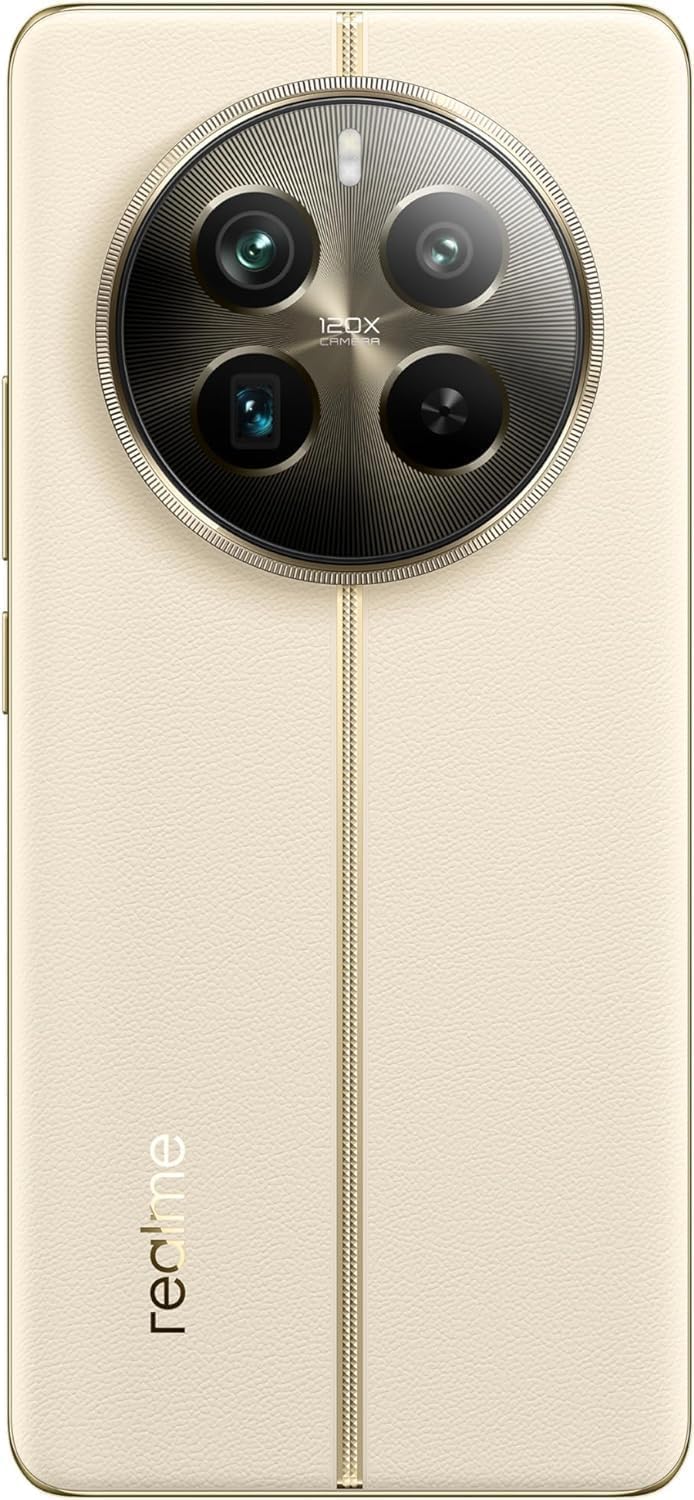
Immaġni: Wara view of the Realme 12 Pro Plus 5G, highlighting its advanced camera module.
5. Konnettività
- Wi-Fi: Mur f'Settings > Wi-Fi biex tikkonnettja man-netwerks mingħajr fili disponibbli.
- Bluetooth: Mur f'Settings > Bluetooth biex tqabbad ma' apparati Bluetooth bħal headphones jew speakers.
- 5G: The device supports 5G cellular technology. Ensure your plan and location support 5G for optimal network speeds.
Manutenzjoni
1. Tindif tal-Apparat Tiegħek
Use a soft, lint-free cloth to gently wipe the screen and body of your phone. Avoid using harsh chemicals or abrasive materials, which can damage the device's finish. Do not expose the device to excessive moisture.
2. Aġġornamenti tas-Software
Regularly check for and install software updates to ensure your device has the latest features, security patches, and performance improvements. Go to Settings > About device > Up to date to check for updates.
3. Kura tal-batterija
To prolong battery life, avoid extreme temperatures. Use the original charger and cable provided with your device. Avoid fully discharging the battery frequently. The device features a 5000 mAh Lithium-Polymer battery.
4. Ġestjoni tal-Ħażna
Perjodikament mill-ġdidview u ħassar bla bżonn files, apps, and media to free up storage space. Your device comes with 512 GB of internal storage. You can also utilize cloud storage services.
Issolvi l-problemi
1. Apparat Mhux Tixgħel
- Kun żgur li l-batterija hija ċċarġjata. Qabbad l-apparat mal-ċarġer tiegħu għal mill-inqas 15 minuta.
- Agħfas u żomm il-buttuna tal-Power għal 10-15-il sekonda biex terġa' tibda.
2. Kwistjonijiet ta' Konnettività tan-Netwerk
- Iċċekkja jekk il-Modalità Ajruplan hijiex mitfija.
- Ibda mill-ġdid l-apparat.
- Ivverifika li s-SIM card tiegħek hija mdaħħla sew u attiva.
- Reset network settings: Go to Settings > System > Reset options > Reset Wi-Fi, mobile & Bluetooth.
3. L-Applikazzjonijiet Jiġġarraf jew Jiffriża
- Agħlaq u erġa' iftaħ l-applikazzjoni.
- Clear the app's cache and data: Go to Settings > Apps > [App Name] > Storage > Clear cache/Clear data.
- Update the application from the Google Play Store.
4. Irrisettjar tal-Fabbrika (L-Aħħar Soluzzjoni)
Jekk il-problemi jippersistu, reset tal-fabbrika jista' jsolvihom. Twissija: Dan se jħassar id-dejta kollha fuq l-apparat tiegħek. Agħmel backup tad-dejta importanti qabel ma tipproċedi. Mur f'Settings > Sistema > Għażliet ta' reset > Ħassar id-dejta kollha (reset tal-fabbrika).
Speċifikazzjonijiet
| Brand | realme |
| Mudell | RMX3840 |
| Isem tal-Mudell | 12 Pro Plus |
| Sistema Operattiva | Android 14, Realme UI 5.0 |
| Proċessur | Qualcomm Snapdragon |
| RAM | 12 GB |
| Ħażna Interna | 512 GB |
| Daqs tal-Wiri | 6.7 Pulzier |
| Tip ta 'Wiri | AMOLED |
| Riżoluzzjoni | 1080 x 2412 |
| Riffriskar Rata | 120 Hz |
| Kapaċità tal-batterija | 5000 Milliamp Hours (Lithium-Polymer) |
| Teknoloġija Ċellulari | 5G |
| Konnettività | Bluetooth, USB, Wi-Fi |
| Riżoluzzjoni tal-Qbid tal-Vidjo | 3840 x 2160 |
Garanzija u Appoġġ
Your Realme 12 Pro Plus 5G RMX3840 smartphone is covered by a limited manufacturer's warranty. Please refer to the warranty card included in your product packaging for specific terms and conditions, including warranty period and coverage details. For technical support, service, or further assistance, please visit the official Realme support webis-sit jew ikkuntattja s-servizz tal-konsumatur tagħhom. Żomm il-prova tax-xiri tiegħek għal talbiet ta’ garanzija.


