1. Introduzzjoni
This manual provides detailed instructions for the safe and efficient operation of your GoveeLife Smart Air Purifier H7129. Please read this manual thoroughly before use and retain it for future reference.
Karatteristiċi ewlenin:
- High-Efficiency 3-Stage Filtrazzjoni: Includes a pre-filter, H13 True HEPA filter, and activated carbon filter to capture particles and odors.
- Kopertura tal-Kamra Kbira: Effectively purifies up to 1162 sq ft.
- Kontroll intelliġenti: App and voice control via Alexa and Google Assistant.
- PM2.5 Sensor & Auto Mode: Automatically adjusts fan speed based on real-time air quality.
- Operazzjoni kwieta: Sleep Mode operates at a low 24dB.
- Dawl bil-lejl: Customizable ambient LED light.
- Disinn portabbli: Features a built-in handle for easy relocation.

This image displays the GoveeLife Smart Air Purifier H7129, a cylindrical device with a silver top and white perforated base, alongside a smartphone showing its control app. The app interface indicates various fan speeds, auto mode, and night light settings, highlighting the smart capabilities of the air purifier.

This diagram visually breaks down the air purifier's internal components, showing the Pre-Filter for hair, lint, and fibers; the Personal HEPA Filter for PM2.5 and other fine particles; and the Active Carbon Filter for odors, smoke, VOCs, and harmful gases.

This image shows a man holding the GoveeLife Air Purifier H7129 by its built-in handle, demonstrating its portability and ease of moving between rooms to provide fresh air anywhere.
2. Setup
2.1 Tneħħija tal-kaxxa u Installazzjoni tal-Filtru
- Neħħi l-purifikatur tal-arja mill-imballaġġ tiegħu bir-reqqa.
- Turn the air purifier upside down. Twist the base counter-clockwise to unlock and remove it.
- Remove the sealed filter from inside the unit. The filter is typically wrapped in plastic for freshness.
- Neħħi l-ippakkjar tal-plastik kollu mill-filtru.
- Insert the unwrapped filter back into the air purifier.
- Replace the base by twisting it clockwise until it locks securely.

This image illustrates the process of unboxing the air purifier and preparing it for first use. It shows a person removing the base, extracting the filter from its protective plastic, and reinserting it into the unit.
2.2 Konnessjoni tal-Enerġija
- Connect the power adapter to the power port located at the back of the air purifier.
- Ipplaggja l-adapter tal-enerġija fi żbokk elettriku standard.
2.3 App Pairing (Govee Home App)
- Niżżel il- Govee Dar app mill-App Store (iOS) jew mill-Google Play Store (Android).
- Irreġistra jew idħol fil-kont Govee Home tiegħek.
- Tektek l-ikona "+" fir-rokna ta' fuq tal-lemin tal-app biex iżżid apparat ġdid.
- Select "Air Purifier" and follow the on-screen instructions to pair your H7129 model. Ensure your phone's Bluetooth is enabled and the air purifier is powered on.
- Note: 5GHz Wi-Fi networks are not supported. Ensure your device is connected to a 2.4GHz Wi-Fi network during setup.

This image shows multiple screenshots of the Govee Home app, illustrating how users can monitor filter life, adjust night light settings, view air quality data, and control various functions of the air purifier remotely.
3. Istruzzjonijiet Operattivi
3.1 Control Panel Overview
The top of the air purifier features a touch control panel for direct operation.
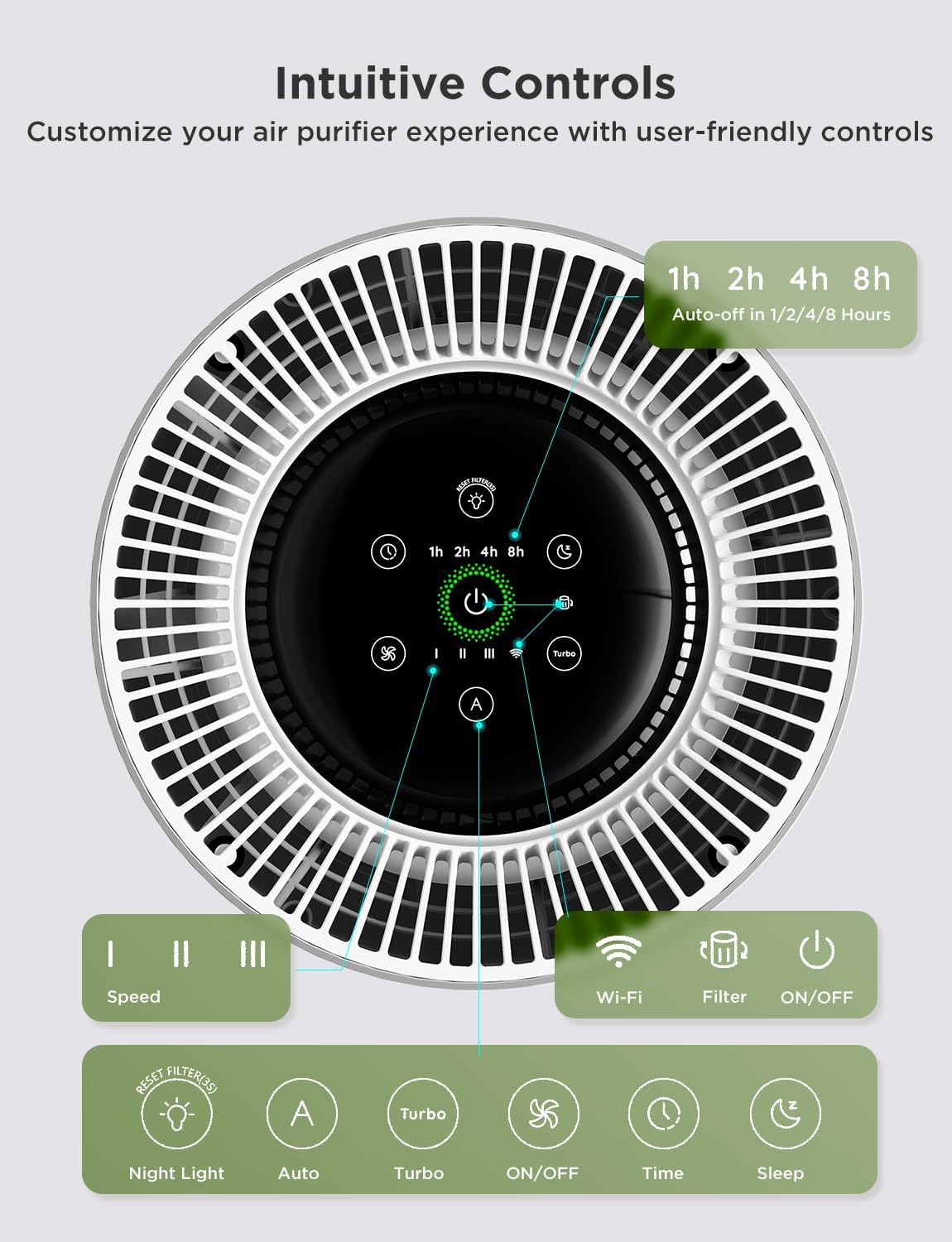
This image provides a close-up of the air purifier's top panel, showing touch-sensitive buttons for power, fan speed (I, II, III), Wi-Fi, filter reset, night light, auto mode, turbo mode, timer (1h, 2h, 4h, 8h), and sleep mode.
3.2 Aġġustament tal-Veloċità tal-Fann
- Low (I), Medium (II), High (III): Press the fan speed button on the control panel or select the desired speed in the Govee Home app.
- Modalità Turbo: Activates the highest fan speed for rapid air purification. This mode may produce increased noise.
- Modalità Sleep: Operates at the lowest fan speed with minimal noise (24dB), ideal for nighttime use.
3.3 Auto Mode and PM2.5 Sensor
- When Auto Mode is activated, the built-in PM2.5 sensor continuously monitors the surrounding air quality.
- The air purifier automatically adjusts its fan speed based on the detected PM2.5 levels to maintain optimal air quality.
- Air quality is indicated by a color-changing LED light on the unit:
- Aħdar: Excellent (0-35 µg/m³)
- Blu: Good (36-75 µg/m³)
- Isfar: Moderate (76-115 µg/m³)
- Aħmar: Poor (>115 µg/m³)

This image illustrates the GoveeLife Air Purifier H7129 in a room with a cat, showing how the device's LED light changes color to reflect real-time air quality, ranging from Excellent (green) to Poor (red) based on PM2.5 levels.
3.4 Funzjoni tad-Dawl bil-Lejl
- Press the Night Light button on the control panel or use the Govee Home app to turn the ambient LED light on/off.
- In the app, you can customize the color, brightness, and scene effects of the night light.
3.5 Funzjoni Timer
- Set a timer for 1, 2, 4, or 8 hours using the control panel or the Govee Home app. The air purifier will automatically turn off once the timer expires.
3.6 Kontroll tal-Vuċi
- Once paired with the Govee Home app, you can link your air purifier to Amazon Alexa or Google Assistant for hands-free voice control.
- Use commands such as "Alexa, set the air purifier to high" or "Hey Google, turn on the air purifier."

This image depicts a family in a kitchen setting, with one person giving a voice command "Alexa, set the air purifier to high" and another responding "Okay," illustrating the convenience of hands-free control for the GoveeLife Air Purifier H7129.
4. Manutenzjoni
4.1 Sostituzzjoni tal-Filtru
- The filter life is displayed in the Govee Home app. Replace the filter when the app indicates it's due or when the filter change indicator on the control panel lights up.
- To replace, follow the filter installation steps in Section 2.1.
- After replacing the filter, press and hold the "Filter Reset" button on the control panel for 3 seconds, or reset it via the app, to clear the indicator.

This image shows the cylindrical 3-stage replacement filter, highlighting its pleated design for efficient air purification.
4.2 Tindif ta' Qabel il-Filtru
- The detachable pre-filter can be cleaned regularly to extend the overall lifespan of the main filter.
- Carefully remove the pre-filter (outer mesh layer) and gently brush or vacuum away accumulated dust and debris.
- Ensure the pre-filter is completely dry before reattaching it.
5 Issolvi l-problemi
- Apparat mhux qed jixgħel: Ensure the power adapter is securely plugged into both the air purifier and a working electrical outlet. Check if the filter is correctly installed and its plastic packaging removed.
- Purifikazzjoni ħażina tal-arja: Check if the filter needs replacement. Ensure the air intake and outlet are not blocked. Clean the pre-filter.
- Problemi bil-konnessjoni tal-app: Ensure your Wi-Fi network is 2.4GHz. Restart your router, phone, and air purifier. Re-attempt the pairing process.
- Auto Mode not responding: Ensure the PM2.5 sensor is clean and not obstructed. The sensor is located on the side of the unit.
6. Speċifikazzjonijiet
| Numru tal-Mudell | H7129 |
| Dimensjonijiet tal-Prodott | 8.66"D x 8.66"W x 15.55"H |
| Piż tal-oġġett | 6.61 Liri |
| Sors tal-Enerġija | Corded Elettriku |
| CADR | Sa 150 CFM |
| Żona ta' Kopertura | Up to 1162 sq ft (purifies 5 times per hour for 232 sq ft) |
| Livell tal-Istorbju (Modalità Rqad) | 24dB |
| Ċertifikazzjonijiet | Energy Star, ETL, FCC, CA65 |
7. Garanzija u Appoġġ
Għal informazzjoni dwar il-garanzija, appoġġ tekniku, jew mistoqsijiet dwar is-servizz tal-konsumatur, jekk jogħġbok irreferi għall-websajt uffiċjali ta' GoveeLife. website or contact their customer support directly. Statements regarding dietary supplements have not been evaluated by the FDA and are not intended to diagnose, treat, cure, or prevent any disease or health condition.


