1. Introduzzjoni
This manual provides instructions for the ALLIMITY AH59-02146M and AH59-02146L replacement remote controls. These remotes are designed to be compatible with various Samsung Micro Component Multimedia Systems, offering a direct replacement without the need for complex setup or programming.
2. Informazzjoni dwar is-Sigurtà
- Żomm il-batteriji fejn ma jintlaħaqx mit-tfal.
- Tħallatx batteriji qodma u ġodda, jew tipi differenti ta 'batteriji.
- Neħħi l-batteriji jekk il-kontroll remot ma jkunx se jintuża għal perjodu twil ta’ żmien.
- Avoid exposing the remote to extreme temperatures or direct sunlight.
3. Kontenut tal-Pakkett
Il-pakkett tiegħek għandu jkun fih l-oġġett li ġej:
- 1 x ALLIMITY Replacement Remote Control (Model AH59-02146M or AH59-02146L)
Nota: Il-batteriji AAA mhumiex inklużi u jridu jinxtraw separatament.
4. Setup
4.1 Installazzjoni tal-batterija
- Sib il-kompartiment tal-batterija fuq wara tal-kontroll remot.
- Slide the battery compartment cover downwards and remove it.
- Daħħal żewġ (2) batteriji AAA, waqt li tiżgura li t-terminali pożittivi (+) u negattivi (-) ikunu allinjati sew mal-marki ġewwa l-kompartiment.
- Erġa’ poġġi l-għatu tal-kompartiment tal-batterija billi tiżżerżaqha lura f’postu sakemm tikklikkja sew.

Immaġni: Wara view of the remote control with the battery cover removed, illustrating the battery insertion points for two AAA batteries.

Immaġni: Wara view of the remote control with the battery cover securely closed.
The remote control is now ready for use. No programming or pairing is required.
5. Operazzjoni
5.1 Funzjonalità Bażika
This replacement remote control functions identically to the original Samsung remote for compatible multimedia systems. Simply point the remote at your Samsung Micro Component Multimedia System and press the desired button.

Immaġni: Quddiem view of the ALLIMITY replacement remote control, displaying its full button layout.
5.2 Compatible Samsung Systems
The ALLIMITY AH59-02146M / AH59-02146L remote control is compatible with the following Samsung Micro Component Multimedia System models:
- MM-C530D
- MM-D530D
- MM-DG35-EUR
- MMC550D
- MMC430D
- MMC530D
- MM-D430D
- MM-DG351
- MM-DG35IRS
- MM-DG36
- MM-C330D
- MM-DG25
- MMC330D
- MMDG25
- MM-C550D
- MM-C430D
- MM-DG35
- MM-DG36l
- REMOCON-ASSY
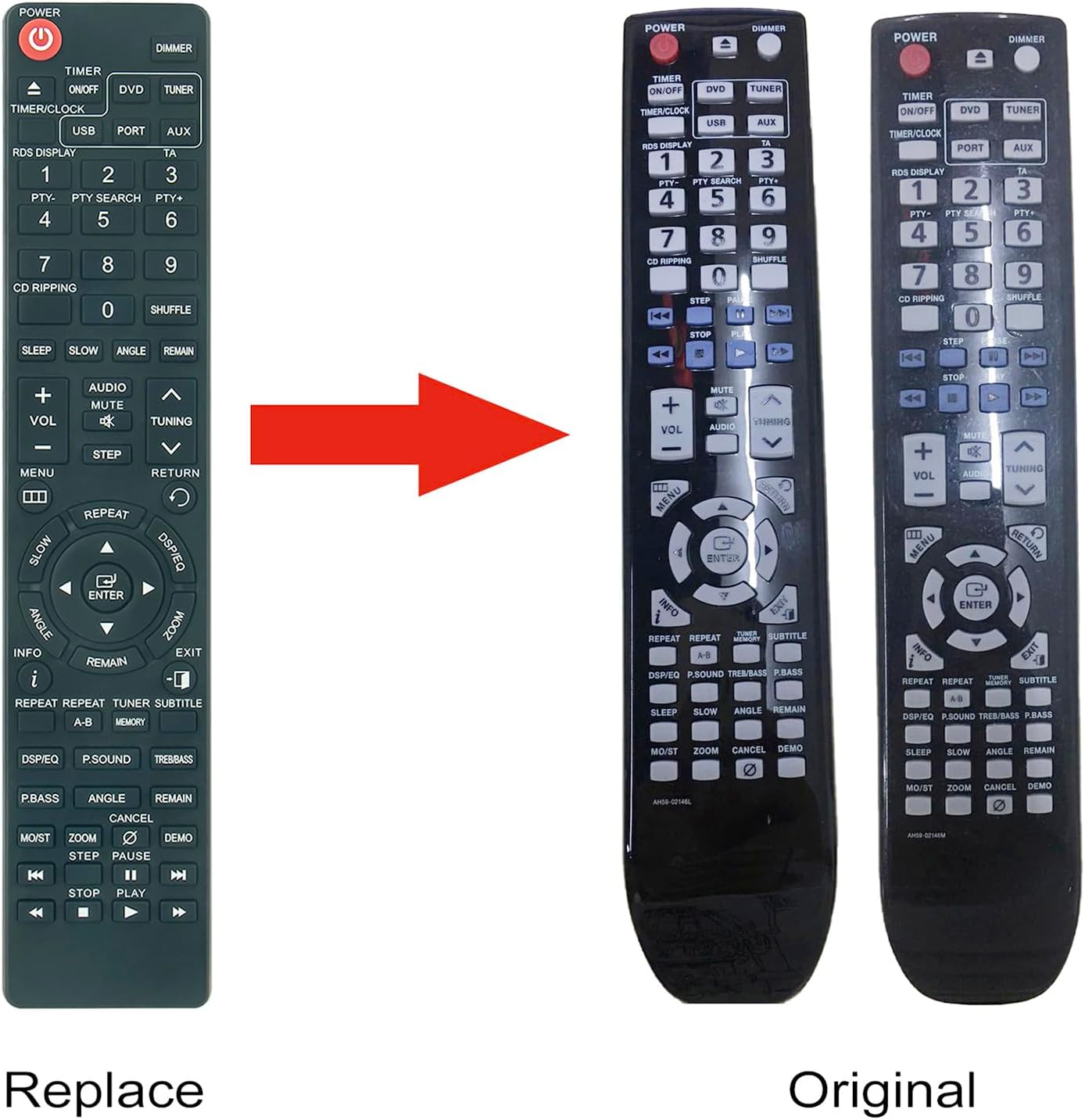
Image: A visual comparison between the ALLIMITY replacement remote and an original Samsung remote, demonstrating their similar design and button layout.
6. Manutenzjoni
6.1 Tindif
To clean the remote control, gently wipe it with a soft, dry cloth. Do not use liquid cleaners or abrasive materials, as these may damage the surface or internal components.
6.2 Sostituzzjoni tal-batterija
If the remote control's performance degrades or it stops responding, replace the batteries. Follow the battery installation steps outlined in Section 4.1. Always replace both batteries at the same time with new AAA alkaline batteries.
7 Issolvi l-problemi
| Problema | Kawża Possibbli | Soluzzjoni |
|---|---|---|
| Remote ma jirrispondix | Batteriji mejta jew imdaħħla ħażin. | Ibdel il-batteriji b'batteriji AAA ġodda, filwaqt li tiżgura l-polarità korretta. |
| Il-bogħod għandu firxa limitata | Weak batteries or obstruction between remote and system. | Replace batteries. Ensure a clear line of sight to the multimedia system's IR receiver. |
| Buttuni speċifiċi mhux qed jaħdmu | Button malfunction or system incompatibility. | Verify your Samsung system model is listed in the compatible models. If issues persist, contact customer support. |
8. Speċifikazzjonijiet
- Numri tal-Mudell: AH59-02146M, AH59-02146L
- Ditta: ALLIMITÀ
- Sors tal-Enerġija: 2 x Batteriji AAA (mhux inklużi)
- Dimensjonijiet: Madwar 6 x 2 x 0.6 pulzieri (15.24 x 5.08 x 1.52 cm)
- Piż tal-oġġett: Madwar 2-il uqija (56.7 gramma)
- Kulur: Iswed
- Karatteristika Speċjali: Ebda Programmazzjoni Meħtieġa
- Apparati Kompatibbli: Samsung Micro Component Multimedia Systems (refer to Section 5.2 for specific models)
9. Garanzija u Appoġġ
For warranty information or technical support, please refer to the seller's policy or contact the retailer from whom the product was purchased. Keep your purchase receipt as proof of purchase.


