Introduzzjoni
Thank you for choosing Enbrighten VIBE Eternity Permanent Outdoor Lights. This system is designed to provide versatile and durable outdoor lighting for your home, featuring RGBWIC LEDs for a full spectrum of colors and dedicated white light. With smart control capabilities via the Enbrighten app and compatibility with voice assistants like Alexa and Google Home, these lights offer customizable illumination for any occasion, from everyday accent lighting to holiday displays. This manual provides essential information for proper installation, operation, and maintenance to ensure optimal performance and longevity of your lighting system.

Image: The Enbrighten VIBE Eternity Permanent Outdoor Lights packaging, showing the 50ft length and 36 lights. The image also displays the lights installed on a house, showcasing various color options and smart home compatibility logos.
X'hemm fil-Kaxxa
Qabel tibda l-installazzjoni, jekk jogħġbok ivverifika li l-komponenti kollha huma preżenti fil-pakkett tiegħek:
- (3) 16.5ft Light Strands (totaling 50ft)
- (1) 10ft Extension Cable
- Provvista tal-Enerġija
- Brazzi tal-Immuntar
- 3M VHB Tape (pre-applied to brackets)
- Clips tal-kurdun
- Viti
- Tappijiet tat-Tmiem tal-plastik
- Kap tat-Tmiem tas-silikonju

Image: A detailed layout of all components included in the Enbrighten VIBE Eternity Lights package, including light strands, power supply, extension cable, mounting hardware, and end caps.
Setup u Installazzjoni
Proper installation is crucial for the performance and longevity of your Enbrighten VIBE Eternity Lights. Follow these steps carefully:
- Ippjana l-Layout Tiegħek: Determine the desired path for your lights. Ensure the power supply can reach a suitable outdoor outlet. The system is designed for permanent installation on eaves, pergolas, or other outdoor structures.
- Ipprepara l-Wiċċ tal-Immuntar: Clean the installation surface thoroughly to ensure optimal adhesion for the 3M VHB tape on the mounting brackets.
- Waħħal il-parentesi tal-immuntar: Remove the protective cover from the adhesive backing of each mounting bracket. Press the bracket firmly onto the desired surface. For enhanced security and permanent installation, use the provided screws to fasten the brackets.
- Install Light Strands: Gently snap the LED pucks of the light strands into the installed mounting brackets. Ensure the lights are oriented correctly.
- Connect Strands and Extensions: Connect multiple light strands or extension cables (up to a maximum total length of 200ft for full output) by aligning the connectors and twisting to secure. Ensure all connections are tight and sealed.
- Cutting Strands (Optional): If your installation requires a shorter length, the light strands can be cut. Use wire cutters to cut the strand at the designated cut marks, ensuring at least 1 inch of wire remains beyond the last light. After cutting, apply the provided silicone end cap to the cut end to maintain weather resistance. Attenzjoni: Improper cutting or failure to seal the cut end can damage the lights and void the warranty.
- Qabbad il-Provvista tal-Enerġija: Connect the power supply to the first light strand and then plug the power supply into a GFCI-protected outdoor electrical outlet.

Image: A visual guide demonstrating the three key steps for permanent installation: removing the cover from the adhesive backing, screwing in the mounting bracket, and attaching the light strand to the bracket.

Image: This image illustrates how to extend the Enbrighten VIBE Eternity Lights using an extension cable and additional light strands, allowing for lengths up to 200ft.
Operating Your Lights
Your Enbrighten VIBE Eternity Lights offer advanced control options for a personalized lighting experience.
Enbrighten App Control
Download the free Enbrighten app from the Apple App Store or Google Play. Follow the in-app instructions to pair your lights to your 2.4GHz Wi-Fi network. The app provides comprehensive control over your lighting system:
- Personalizzazzjoni tal-Kulur: Agħżel minn miljuni ta' kombinazzjonijiet ta' kuluri billi tuża l-LEDs RGBWIC.
- Dawl Abjad Aġġustabbli: Adjust white light from warm (2200K) to cool (6000K) to match your home's exterior or desired ambiance.
- Modi u Effetti Dinamiċi: Select from a variety of preset modes and effects for holidays, events, or everyday accent lighting.
- Schedules & Automations: Set custom schedules for your lights to turn on/off or change modes automatically.
- Kontroll LED individwali: Fine-tune your lighting by controlling individual LED pucks for unique patterns and designs.

Image: A family enjoying outdoor lights, with a smartphone displaying the Enbrighten app interface, showing various color and effect options for the lights.

Image: A house illuminated with Enbrighten VIBE Eternity Lights, demonstrating tunable white light, solid colors, custom colors, and preset effects, highlighting the unlimited color combinations available.

Image: A visual comparison of the Enbrighten VIBE Eternity Lights displaying warm white (2200K), soft warm white (4000K), and cool white (6000K) light temperatures on a house exterior.
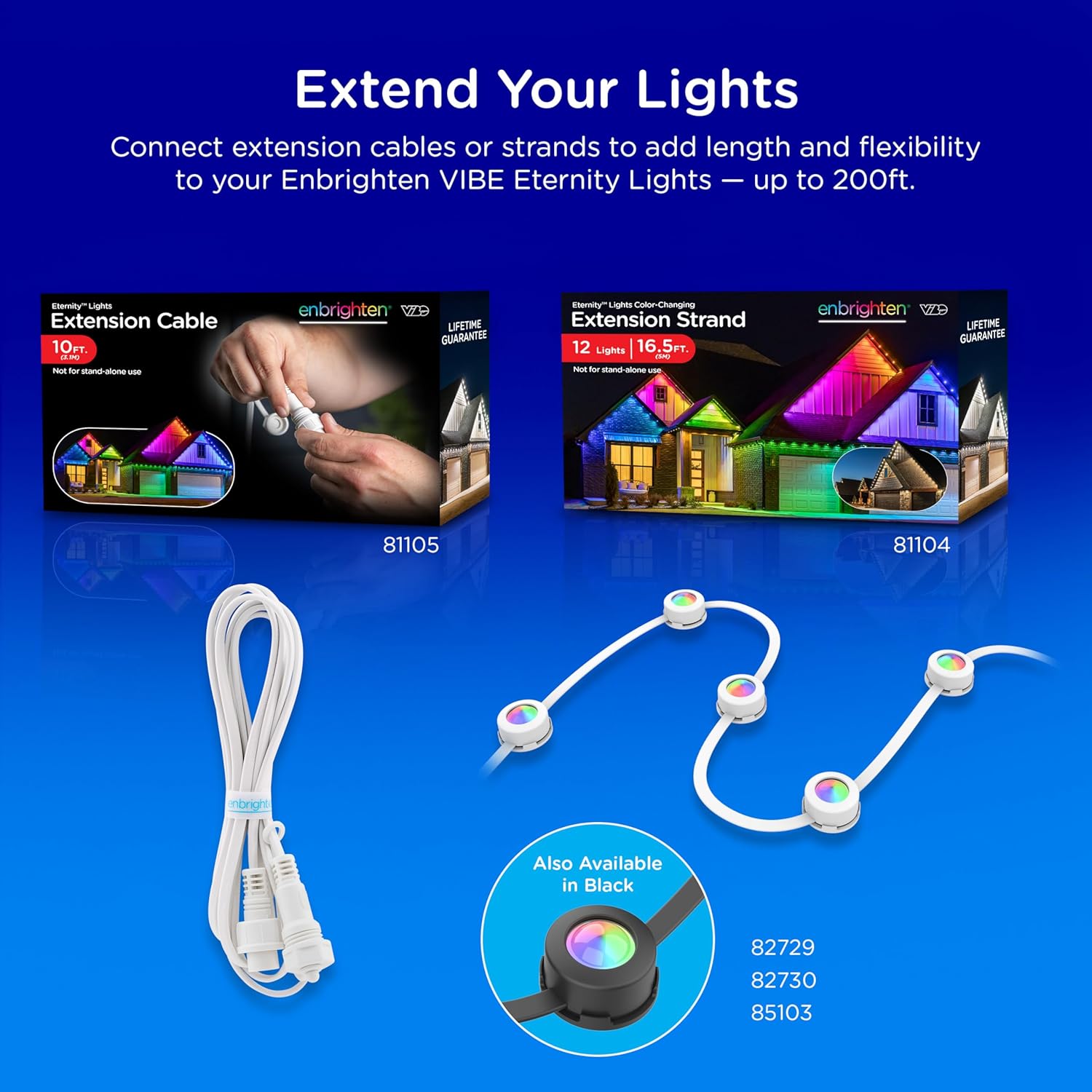
Image: A smartphone screen showing the Enbrighten app's light customization interface, allowing users to select colors and control individual lights for accent lighting, with an example of a house illuminated with varied colors.
Kontroll tal-Vuċi
The Enbrighten VIBE Eternity Lights are compatible with Amazon Alexa and Google Home. Once connected to your Enbrighten app and linked to your smart home platform, you can use voice commands to control your lights, such as turning them on/off, changing colors, or activating scenes.

Image: A house illuminated with Enbrighten VIBE Eternity Lights, showcasing the Enbrighten app interface and logos for Alexa and Google Home compatibility, indicating both app and voice control options.

Image: A close-up of the Enbrighten app interface demonstrating controls for color changing, white light selection, and dimming, highlighting the diverse customization options available.
Manutenzjoni
The Enbrighten VIBE Eternity Lights are designed for durability and minimal maintenance. They are IP67 waterproof rated, ensuring protection against dust and water immersion, and are suitable for all-weather outdoor use with an operating temperature range of -4°F to 131°F (-20°C to 55°C).
- Tindif: Periodically wipe the light pucks and cables with a soft, damp drapp biex tneħħi l-ħmieġ jew id-debris. Evita li tuża kimiċi ħarxa jew tindif li joborxu.
- Spezzjoni tal-Konnessjonijiet: Annually inspect all connections and seals to ensure they remain secure and watertight, especially after severe weather conditions.
- Provvista tal-Enerġija: Ensure the power supply is protected from direct standing water and is plugged into a GFCI-protected outlet.

Image: A house illuminated with Enbrighten VIBE Eternity Lights during a rain shower, emphasizing their all-weather rating and IP67 waterproof certification for the string lights and IP65 for the power supply.
Issolvi l-problemi
If you encounter issues with your Enbrighten VIBE Eternity Lights, refer to the following common problems and solutions:
- Id-dwal ma jinxtegħlux:
- Ensure the power supply is securely plugged into a working GFCI-protected outlet.
- Verify all light strand connections are tight and properly sealed.
- Iċċekkja jekk il-provvista tal-enerġija tkunx qed taħdem sew.
- Kwistjonijiet ta' Konnettività tal-App:
- Confirm your Wi-Fi network is 2.4GHz. The lights are not compatible with 5GHz networks.
- Ensure your smartphone is connected to the same 2.4GHz Wi-Fi network during the pairing process.
- Restart your Wi-Fi router and the Enbrighten app.
- If issues persist, try resetting the lights (refer to app instructions for specific reset procedures).
- Individual Lights or Section Not Working After Cutting:
- Ensure the cut was made precisely at the designated cut mark.
- Verify that the silicone end cap was properly applied and sealed to the cut end to prevent moisture ingress. Moisture can cause damage to the internal circuitry.
- If a section of lights is not working, it may indicate damage from an improper cut or insufficient sealing. Contact customer support if this issue occurs after following all cutting instructions.
- Lights Not Responding to Voice Commands:
- Ensure your Enbrighten account is correctly linked to your Amazon Alexa or Google Home account.
- Verify your smart speaker or device is connected to the internet.
- Check the device names in your smart home app to ensure they match your voice commands.
Speċifikazzjonijiet
| Karatteristika | Dettall |
|---|---|
| Numru tal-Mudell | 81102 |
| Brand | Idawlu |
| Kulur | Abjad |
| Użu fuq ġewwa/barra | Ġewwa, Barra |
| Karatteristiċi Speċjali | Cuttable, Easy Installation, Linkable, Outdoor Rated, Wi-Fi Enabled |
| Tip ta' Sors tad-Dawl | LED (RGBWIC) |
| Sors tal-Enerġija | Corded Elettriku |
| Kulur Dawl | Multicolor, White (Tunable 2200-6000K) |
| Tip ta' Kontrollur | Amazon Alexa, App Control, Google Home, Voice Control |
| Numru ta' Sorsi tad-Dawl | 36 |
| Voltage | 120 Volts |
| Wattage | 62 watt |
| Livell ta 'Reżistenza għall-Ilma | IP67 (Dwal tal-korda), IP65 (Provvista tal-Enerġija) |
| Temperatura operattiva | -4°F sa 131°F (-20°C sa 55°C) |
| Maximum Linkable Length | 200ft (for full output) |
| Materjal | Plastik |
Garanzija u Appoġġ
Enbrighten VIBE Eternity Lights are backed by a Lifetime Guarantee, reflecting the manufacturer's commitment to quality and durability. For detailed warranty information, product support, or to contact customer service, please visit the official Enbrighten webis-sit jew irreferi għall-informazzjoni ta' kuntatt ipprovduta fuq l-imballaġġ tal-prodott tiegħek.


