1. Introduzzjoni
The Mastech MS8233A is a compact, battery-powered digital multimeter designed for measuring AC/DC voltage, DC current, resistance, diode, continuity, and temperature. It features a 2000-count display, data hold function, and a low battery indicator, making it suitable for various electrical testing applications.
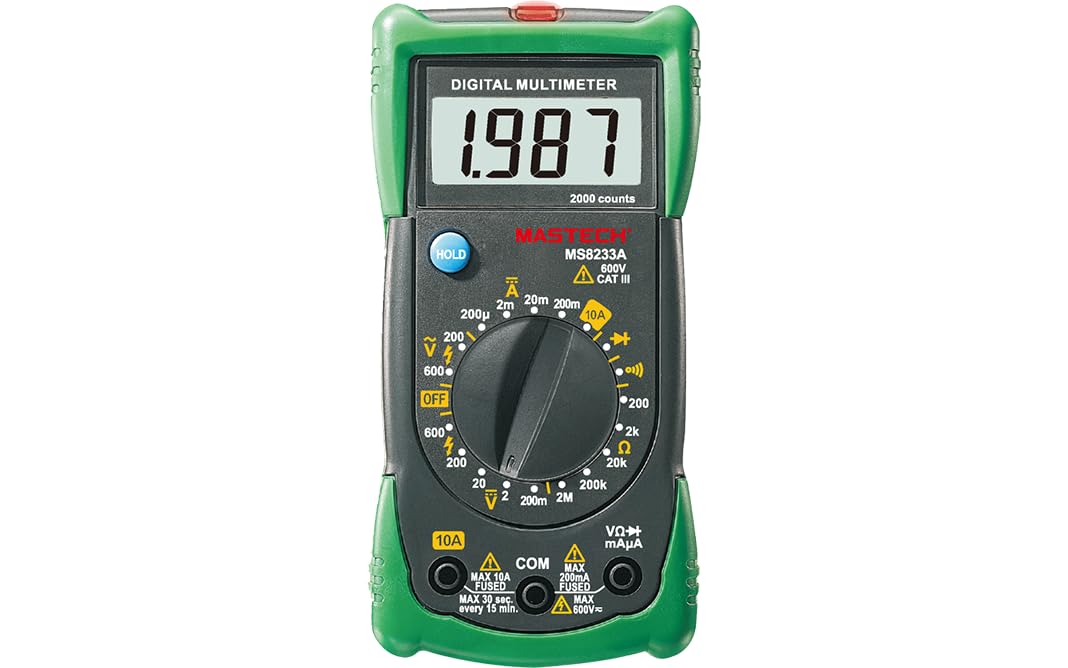
Figura 1: Quddiem view of the Mastech MS8233A Digital Multimeter, showing the display, rotary switch, and input jacks.
2. Informazzjoni dwar is-Sigurtà
To ensure safe operation and service of the meter, follow these instructions:
- Always ensure the meter is in good working condition before use.
- Applikax voltage or current that exceeds the maximum specified limits for the meter.
- Oqgħod attent meta taħdem bil-voltages 'il fuq minn 60V DC jew 30V AC RMS, għax dawn joħolqu periklu ta' xokk elettriku.
- Dejjem skonnettja l-wajers tat-test miċ-ċirkwit qabel ma tbiddel il-funzjonijiet.
- Ibdel il-batterija immedjatament meta jidher l-indikatur ta' batterija baxxa biex tiżgura qari preċiż.
- Do not operate the meter if the case is open or if it appears damaged.
- Aderixxi mal-kodiċijiet tas-sigurtà lokali u nazzjonali.
3. Karatteristiċi tal-prodott
- Wiri: 2000 għadd
- Diode Open Voltage: 3.0V
- Continuity Buzzer: Sounds at less than 60Ω
- Funzjoni ta' Żomm tad-Data
- Low Battery Display indicator
- Miżuri AC/DC voltage, DC current, resistance, diode check, continuity test, and temperature.
4. Kontenut tal-Pakkett
Ivverifika li l-oġġetti kollha huma preżenti fil-pakkett:
- Mastech MS8233A Digital Multimeter
- Test Leads
- 1x 9V 6F22 Battery (pre-installed or included separately)
- Ċertifikat ta 'Kalibrazzjoni
- Gwida Quick Start

Figure 2: Illustration of package contents and main applications for the MS8233A multimeter.
5. Setup
5.1 Installazzjoni tal-batterija
The MS8233A requires one 9V 6F22 battery. If the battery is not pre-installed or needs replacement:
- Kun żgur li l-multimetru jkun MITFI u skonnettja l-wajers tat-test kollha.
- Sib l-għatu tal-kompartiment tal-batterija fuq wara tal-unità.
- Unscrew the retaining screw(s) and carefully remove the cover.
- Qabbad il-batterija ta' 9V mal-klipp tal-batterija, waqt li tosserva l-polarità korretta.
- Poġġi l-batterija fil-kompartiment u erġa’ poġġi l-għatu, billi twaħħlu bil-vit(i).
5.2 Konnessjoni tal-wajers tat-test
Insert the test leads into the appropriate input jacks:
- Insert the black test lead into the “COM” (common) jack.
- Għal ħafna kejl (voltage, resistance, diode, continuity, temperature), insert the red test lead into the “VΩmA” jack.
- For DC current measurements up to 10A, insert the red test lead into the “10A” jack.
6. Istruzzjonijiet Operattivi
To operate the multimeter, turn the rotary switch to the desired function. The display will show the measurement value.
6.1 DC VoltagKejl tal-e (V–)
- Issettja s-swiċċ rotatorju għall-Volum DC mixtieqtagfirxa e (eż., 200mV, 2V, 20V, 200V, 600V).
- Qabbad il-wajer tat-test aħmar man-naħa pożittiva (+) taċ-ċirkwit u l-wajer tat-test iswed man-naħa negattiva (-).
- Aqra l-voltagIl-valur fuq il-wiri.
6.2 AC VoltagKejl tal-e (V∼)
- Issettja s-swiċċ rotatorju għall-Volum AC mixtieqtagfirxa e (eż., 200V, 600V).
- Connect the test leads across the AC voltagsors e.
- Aqra l-voltagIl-valur fuq il-wiri.
6.3 Kejl tal-Kurrent DC (A–)
- Set the rotary switch to the desired DC Current range (e.g., 200µA, 2mA, 20mA, 200mA, 10A).
- Importanti: For 10A measurements, move the red test lead to the “10A” jack. For other current ranges, use the “VΩmA” jack.
- Open the circuit where current is to be measured and connect the meter in series.
- Aqra l-valur attwali fuq id-displej.
6.4 Resistance Measurement (Ω)
- Set the rotary switch to the desired Resistance range (e.g., 200Ω, 2kΩ, 20kΩ, 200kΩ, 2MΩ).
- Kun żgur li ċ-ċirkwit jew il-komponent ma jkollux l-enerġija qabel ma tkejjel ir-reżistenza.
- Qabbad il-wajers tat-test mal-komponent li għandu jitkejjel.
- Aqra l-valur tar-reżistenza fuq il-wiri.
6.5 Diode Test (→|–)
- Set the rotary switch to the Diode Test function.
- Qabbad il-wajer tat-test aħmar mal-anodu u l-wajer tat-test iswed mal-katodu tad-dijodu.
- Id-displej se juri l-volum 'il quddiemtage drop. Reverse the leads to check for open circuit (OL) indication.
6.6 Test tal-Kontinwità (♫)
- Set the rotary switch to the Continuity Test function.
- Qabbad il-wajers tat-test madwar iċ-ċirkwit jew il-komponent.
- Jekk ir-reżistenza tkun taħt madwar 60Ω, il-buzzer se jdoqq, u jindika kontinwità.
6.7 Temperature Measurement (℃/℉)
The MS8233A can measure temperature using a K-type thermocouple (not always included, check package contents).
- Set the rotary switch to the Temperature function.
- Connect the K-type thermocouple to the input jacks, observing polarity.
- Poġġi s-sonda tat-termokoppja fil-punt fejn trid titkejjel it-temperatura.
- Aqra l-valur tat-temperatura fuq id-displej.
6.8 Funzjoni ta' Żamma tad-Data
Press the “HOLD” button to freeze the current reading on the display. Press it again to release the hold function and resume live readings.
7. Manutenzjoni
7.1 Sostituzzjoni tal-batterija
When the low battery indicator appears on the display, replace the 9V battery as described in Section 5.1.
7.2 Tindif
Imsaħ il-każ bl-adamp drapp u deterġent ħafif. Tużax abrażivi jew solventi. Kun żgur li l-miter ikun niexef għalkollox qabel l-użu.
7.3 Sostituzzjoni tal-Fjus
The current input jacks are typically protected by fuses. If the meter fails to measure current, the fuse may need replacement. Refer to the specific fuse ratings printed on the meter or in the detailed specifications. Fuse replacement should only be performed by qualified personnel.
8 Issolvi l-problemi
If the multimeter does not function correctly, consider the following:
- L-ebda wiri jew wiri dgħajjef: Check battery charge and ensure it is correctly installed. Replace if necessary.
- Qari mhux korrett: Verify the correct function and range are selected. Ensure test leads are properly connected and making good contact. Check battery level.
- Cannot measure current: Check the fuse for the current input. Ensure the red test lead is in the correct current jack (e.g., 10A).
- “OL” (Overload) displayed: The measured value exceeds the selected range. Switch to a higher range or verify the circuit is not open.
Jekk il-problemi jippersistu, ikkuntattja l-appoġġ tal-klijent.
9. Speċifikazzjonijiet
9.1 Speċifikazzjonijiet Ġenerali
- Power Source: 2 LR44 batteries required (included) - Note: Product description states 1x 9V 6F22 battery. Please verify with actual product.
- Dimensjonijiet tal-Prodott: 16 x 9 x 5 ċm
- Piż tal-Oġġett: 0.5 Kilogrammi
- Manufacturer: MASTECH/MGL
- Safety Rating: CAT III 600V
- Ċertifikazzjonijiet: CE, RoHS
- Upper Temperature Rating: 50 Degrees Celsius
9.2 Speċifikazzjonijiet elettriċi
| Speċifikazzjonijiet | Firxa | Riżoluzzjoni | Eżattezza |
|---|---|---|---|
| DC Voltage | 200mV/2V/20V/200V 600V | 0.1mV/1mV/10mV/100mV 1V | ±(0.5%+3) ±(0.5%+3) |
| AC Voltage | 200V 600V | 100mV 1V | ±(1.2%+10) ±(1.2%+10) |
| Kurrent DC | 200µA/2mA/20mA/200mA 10A | 0.1µA/1µA/10µA/0.1mA 0.01A | ±(1.0%+3) ±(3.0%+5) |
| Reżistenza | 200Ω/2kΩ/20kΩ/200kΩ 2MΩ | 0.1Ω/1Ω/10Ω/100Ω 1kΩ | ±(0.8%+4) ±(0.8%+4) |
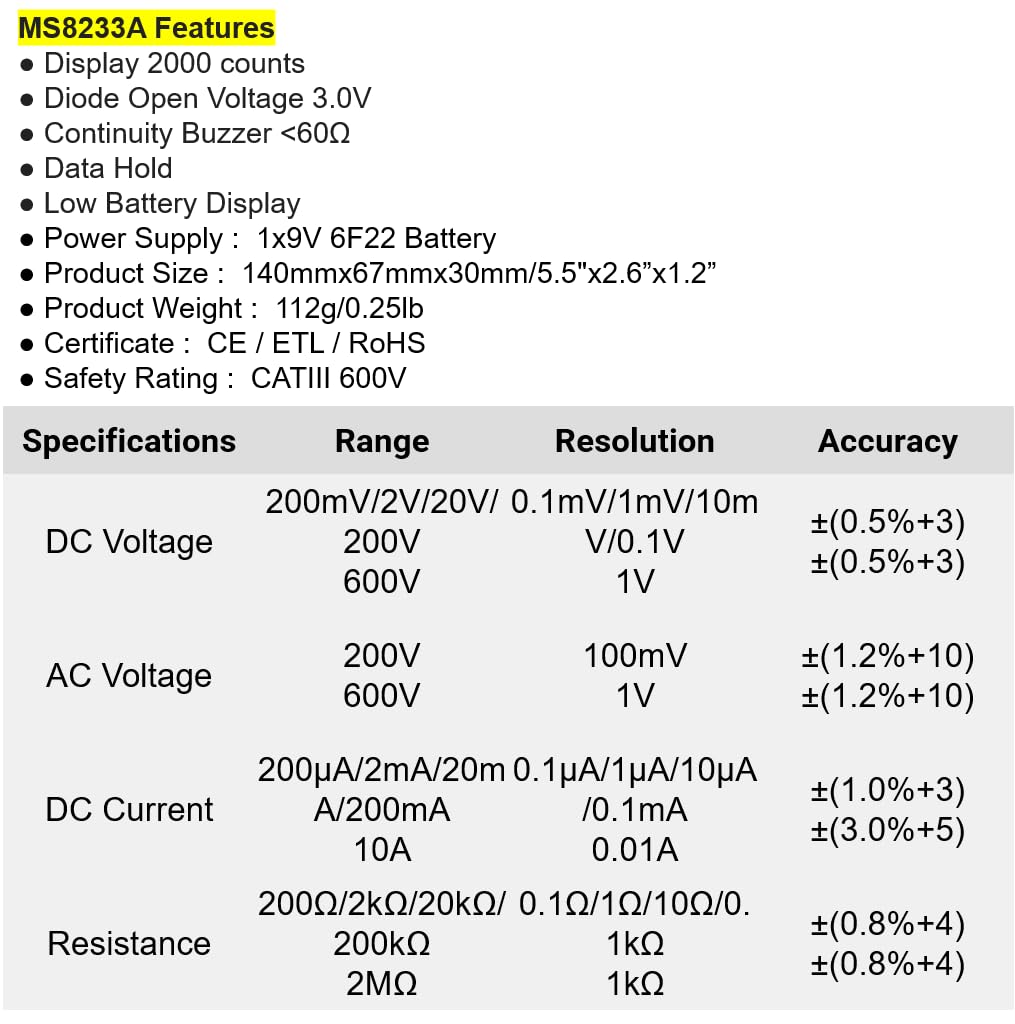
Figure 3: Detailed electrical specifications for the Mastech MS8233A.
9.3 Related Models Comparison

Figure 4: Comparison table of various Mastech manual ranging digital multimeters, including the MS8233A.
10. Garanzija u Appoġġ
Mastech products are designed for reliability and performance. For warranty information or technical support, please refer to the warranty card included with your product or contact Mastech customer service through their official websit. Żomm l-irċevuta tax-xiri tiegħek bħala prova tax-xiri għal talbiet ta' garanzija.


